
How to write good documentation
Headings
Use headings in order (#, ##, ###, and so on). Main level headings must be single tag headers.
Examples
Not like this## Main header Lorem ipsum... ### Header 2 Lorem ipsum...
Not like this# Main header Lorem ipsum... ### Sub header Lorem ipsum...
Like this# Main header Lorem ipsum... ## Sub header Lorem ipsum...
Embedding Draw.io images
You can embed images from draw.io. Embedding images may require some fiddling, but it will pay off. Embedded images will update automatically when graph gets updated in draw.io editor. But how to embed?
- Draw or select draw.io image and save it to ABB's Google Drive folder.
- Make sure graph is public.
- Click "File" > "Share...", and locate "Get shareable link"
- Click "Get shareable link", and select "Anyone with the link can view"
- Click "File" > "Embed" > "iFrame" and select options as image below shows. Disable layers and editing functionalities.
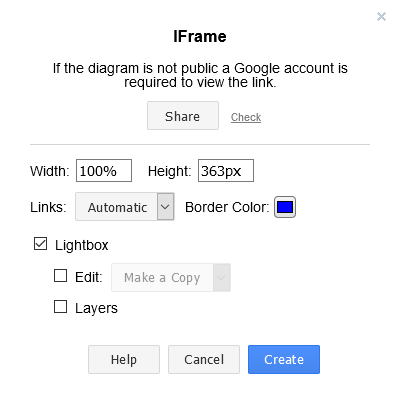
Disable the edit functionality and layers.
- Click "Create" and copy code snippet. E.g.:
<iframe frameborder="0" style="width:100%;height:363px;" src="https://www.draw.io/?lightbox=1&highlight=0000ff&nav=1&title=water_pump.drawio#Uhttps%3A%2F%2Fdrive.google.com%2Fuc%3Fid%3D1I0FBZfLzY_E01U_RP3U2PI6XyGT9c7Qr%26export%3Ddownload"></iframe>- On readme.com, add HTML block to your article and paste your iframe there.
- We want to disable editing. Add following URL parameters to your iframe's URL.
toolbar=0&border=0.
<iframe
        frameborder="0"
        style="width:100%;height:363px;"
        src="https://www.draw.io/?toolbar=0&border=0&lightbox=1&highlight=0000ff&nav=1&title=water_pump.drawio#Uhttps%3A%2F%2Fdrive.google.com%2Fuc%3Fid%3D1I0FBZfLzY_E01U_RP3U2PI6XyGT9c7Qr%26export%3Ddownload"
        >
</iframe>
<iframe
frameborder="0"
style="width:100%;height:363px;"
src="https://www.draw.io/?lightbox=1&highlight=0000ff&nav=1&title=water_pump.drawio#Uhttps%3A%2F%2Fdrive.google.com%2Fuc%3Fid%3D1I0FBZfLzY_E01U_RP3U2PI6XyGT9c7Qr%26export%3Ddownload"
>
</iframe>
You can find all the supported URL parameters from here
- Add class
draw-io-embedfor the iframe to apply those fancy styles.
<iframe
        class="draw-io-embed"
        frameborder="0"
        style="width:100%;height:363px;"
        src="https://www.draw.io/?toolbar=0&border=0&lightbox=1&highlight=0000ff&nav=1&title=water_pump.drawio#Uhttps%3A%2F%2Fdrive.google.com%2Fuc%3Fid%3D1I0FBZfLzY_E01U_RP3U2PI6XyGT9c7Qr%26export%3Ddownload"
        >
</iframe>