
OData: CRUD
Introduction
Before going to this tutorial, ensure you understand the basics of OData from OData getting started page. This article will focus on using Chrome's Console to Create, Read, Update, and Delete instances from RTDB, also known as CRUD operations. Similar requests can be made in Postman, Excel, PowerBI, etc.
In the following tutorials we will demonstrate how the fetch function is issued. We will use the JavaScript fetch-function to issue the CRUD operations.
Requirements
For OData to fully function in RTDB environment it requires RTDB, Vtrin-NetServer, and RTDB_CVMC. Once installed, then enable OData in the Vtrin-NetServer's configuration file. If OData is not enabled yet, please find installation instructions under getting started note..
When the services are running, we can use Chrome's Developer Tool to make OData requests (or HTTP requests). Other browsers with Chrome's JavaScript Engine should also work, e.g. Edge.
Developer tools can be accessed by More tools -> Developer tools.
Test your system
First we start by testing our system. You may test your OData by requesting <serviceroot>/odata/$metadata in the browser's address bar. The result should look like the following:
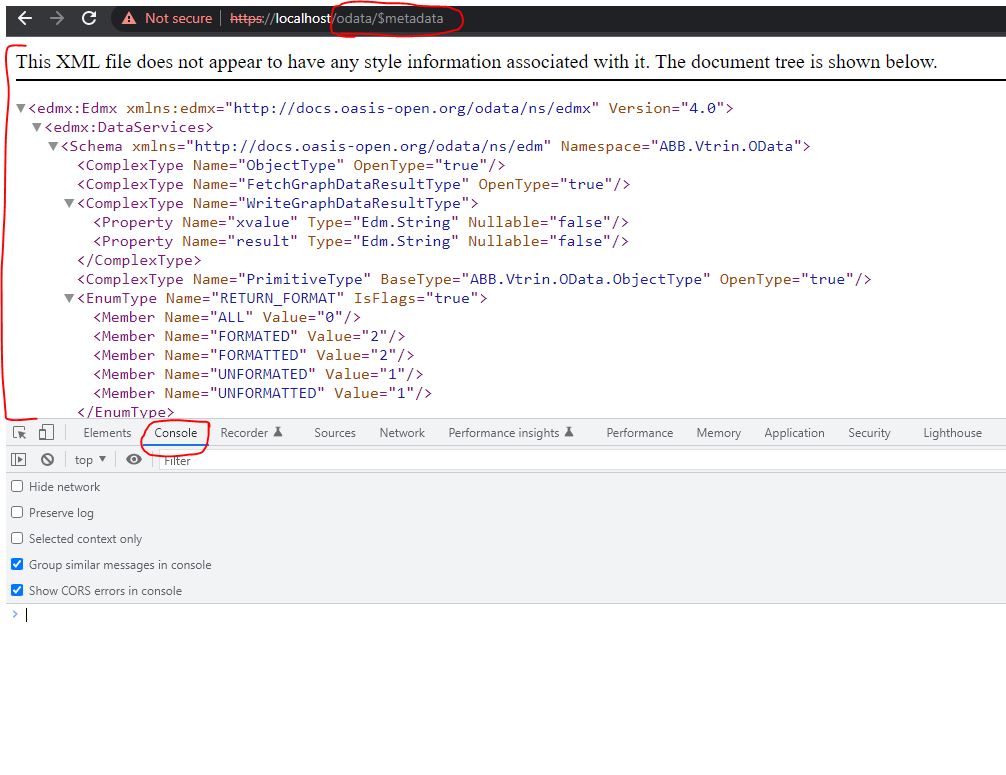
Response of metadata in the Chrome's Developer tools console
Please be advised that the address bar can be used for only GET requests, and others requests are given in the browser's console. The fetch function consists of URL, method, headers, and body. Notifiable is the header value remains the same throughout this tutorial.
Once tested that OData's metadata works, then log into https://<host>/view or https://<host>/history to keep session alive. Now all CRUD-commands below may be tested in the same tab you logged into ~/view or ~/history.
Create
All create requests can be issued by using the POST method. The following examples show how to create variables, equipment, equipment's properties, and equipment's instances.
fetch("https://localhost/odata/Variable",{
    method: 'POST',
    headers:{'Content-type': 'application/json; charset=UTF-8' },
    body:JSON.stringify({
        "Name":"MyODataVariable",
        "Description":"New Variable Description",
        "Type":7
    })
})

/** Response Sample:
Promise {<pending>}
	[[Prototype]]: Promise
  [[PromiseState]]: "fulfilled"
  [[PromiseResult]]: Response
*/
fetch("https://localhost/odata/Equipment",{
method: 'POST',
headers:{'Content-type': 'application/json; charset=UTF-8' },
body:JSON.stringify({
"Name":"MyODataEquipment"
})
})
/** Response Sample:
Promise {<pending>}
[[Prototype]]: Promise
[[PromiseState]]: "fulfilled"
[[PromiseResult]]: Response
*/fetch("https://localhost/odata/EquipmentPropertyInfo",{
method: 'POST',
headers:{'Content-type': 'application/json; charset=UTF-8' },
body:JSON.stringify({
"DisplayName":"MyODataProperty1",
"Equipment": "<Equipment GUID>",
"Type":211,
"TargetHistory":195,
"Approved":true,
"Historized":true
})
})
/** Response Sample:
Promise {<pending>}
[[Prototype]]: Promise
[[PromiseState]]: "fulfilled"
[[PromiseResult]]: Response
*/fetch("https://localhost/odata/Path",{
method: 'POST',
headers:{'Content-type': 'application/json; charset=UTF-8' },
body:JSON.stringify({
"Name":"MyODataEquipment.MyInstance1",
"Equipment": "<Equipment GUID>"
})
})
//To create a new equipment's instance, the URL ends with Path and the body contains Name, and Equipment's GUID.
//After calling this, the server might throw "500 (InternalServerError)", but instance will be created anyway.//Assuming SyncHalt is command class.
fetch("https://localhost/odata/SyncHalt",{
method: 'POST',
headers:{'Content-type': 'application/json; charset=UTF-8' },
body:JSON.stringify({
"TableName":"my table name."
})
})Read
To read RTDB instances, post a request URL to the browser's address bar. After posting the URL, the browser use GET method automatically:
| Request | Description |
|---|---|
| <https://localhost/odata/Variable/> | Get all variables from RTDB |
| <https://localhost/odata/Variable('MyODataVariable'>) | Get variable instance by name |
| <https://localhost/odata/Variable?$filter=Events> eq false | Get all variables that Events is false |
| <https://localhost/odata/Variable?$filter=CompressionMethod> eq 'Quantization_Lane_compression' | Get variables that have CompressionMethod of value 'Quantization_Lane_compression' |
| <https://localhost/odata/Variable?$filter=CompressionMethod> eq '2' | Same as previous request, but using numerical value for Quantization_Lane_compression |
| <https://localhost/odata/Equipment> | Fetch all equipments. |
| <https://localhost/odata/Equipment('MyODataEquipment'>) | Fetch single equipment with known name. |
| <https://localhost/odata/Path> | Fetch all equipment instances. |
| <https://localhost/odata/Path_MyODataEquipment> | Fetch all MyODataEquipment's instances |
| <https://localhost/odata/Path?$filter=Nominal_power> eq 150 | Fetch equipment instances whose nominal power is 150. |
| <https://localhost/odata/CurrentValue(IDN)> | Get current value of a variable |
To prevent data loss in JSON, make sure values of type UINT64 and INT64 are printed as strings. You can include the 'IEEE754Compatible=true' property in the Accept Header of the GET request. This will ensure that UINT64 and INT64 values are displayed as strings in the Console tab.
fetch("https://localhost/odata/Variable('<VariableName>')",{
    method: 'GET',
    headers:{'Accept': 'application/json;odata.metadata=minimal;IEEE754Compatible=true'},
}).then(response => response.json())
  .then(data => console.log(data))
Update
All updates are issued using the PATCH method. Below are examples of updating Variable, Equipment, Equipment property, and Equipment instance. The changing parts are the URL and body.
fetch("https://localhost/odata/Variable",{
    method: 'PATCH',
    headers:{'Content-type': 'application/json; charset=UTF-8' },
    body:JSON.stringify({
      "Id":<Variable ID>,
      "Description":"Updated Description",
      "Type":13
    })
})
Updating Variable
Updating a variable, its ID must be provided. After that variable's properties can be changed, e.g. Description, and Type.
fetch("https://localhost/odata/Equipment('MyODataEquipment')",{
    method: 'PATCH',
    headers:{'Content-type': 'application/json; charset=UTF-8' },
    body:JSON.stringify({
      "Abstract":false
    })
})
//Example of patching a value on CurrentValue table.
fetch("https://localhost/odata/CurrentValue(<CurrentValue IDN>)",{
method: 'PATCH',
headers:{'Content-type': 'application/json; charset=UTF-8' },
body:JSON.stringify({
"Time":"2025-09-08T20:00:00Z",
"Value":20
})
})Updating Equipment
For updating specific equipment, the equipment name must be provided in the URL, then the equipment property can be updated in the body.
fetch("https://localhost/odata/EquipmentPropertyInfo(<Property GUID>)",{
    method: 'PATCH',
    headers:{'Content-type': 'application/json; charset=UTF-8' },
    body:JSON.stringify({
      "Type":11,
      "TargetHistory":195,
      "Approved":true,
      "Historized":true
    })
})
Updating Equipment property
Updating a specific equipment's property, then the property identifier must provide inside the URL as GUID (without any quote) and the body contains new information.
fetch("https://localhost/odata/Path_MyODataEquipment('MyODataEquipment.MyInstance1')",{
    method: 'PATCH',
    headers:{'Content-type': 'application/json; charset=UTF-8' },
    body:JSON.stringify({
      "DisplayName":"UpdatedDisplayName"
    })
})
Updating Equipment Instance
Similarly, to update instance, the equipment and its unique instance must be provided in the URL. The body contains new information.
Variable's CurrentValue is available. CurrentValue is accessible, but <VariableName> must be provided as following:
fetch("https://localhost/odata/Variable('<VariableName>')",{
    method: 'PATCH',
    headers:{'Content-type': 'application/json; charset=UTF-8' },
    body:JSON.stringify({
      "CurrentValue":0.8
    })
})
Accessing CurrentValue of Equipment's instances is different. CurrentValue can be accessed by referring to its property:
fetch("https://localhost/odata/Path_<EquipmentName>('<InstancePath>')",{
    method: 'PATCH',
    headers:{'Content-type': 'application/json; charset=UTF-8' },
    body:JSON.stringify({
      "<property name>":<value>
    })
})
Delete
All deletions must be issued using DELETE method. All deletion requires changes in URL.
fetch("https://localhost/odata/Variable('MyODataVariable')",{
    method: 'DELETE',
    headers:{'Content-type': 'application/json; charset=UTF-8' }
})

/** Response Sample:
Promise {<pending>}
	[[Prototype]]: Promise
  [[PromiseState]]: "fulfilled"
  [[PromiseResult]]: Response
*/
Deleting Variable
When deleting a variable, the URL contains the Variable class and variable name.
fetch("https://localhost/odata/Path_MyODataEquipment('MyODataEquipment.MyInstance1')",{
    method: 'DELETE',
    headers:{'Content-type': 'application/json; charset=UTF-8' }
})

/** Response Sample:
Promise {<pending>}
	[[Prototype]]: Promise
  [[PromiseState]]: "fulfilled"
  [[PromiseResult]]: Response
*/
Deleting Equipment Instance
Deleting an equipment instance, specify equipment type and its instance's name in the URL.
fetch("https://localhost/odata/EquipmentPropertyInfo(fbc070ae-55ee-4734-8af6-29cef59e8be0)",{
    method: 'DELETE',
    headers:{'Content-type': 'application/json; charset=UTF-8' }
})

/** Response Sample:
Promise {<pending>}
	[[Prototype]]: Promise
  [[PromiseState]]: "fulfilled"
  [[PromiseResult]]: Response
*/
Deleting an Equipment Property
Deleting an equipment property, require EquipmentPropertyInfo and its property's GUID in the URL.
fetch("https://localhost/odata/Equipment('MyODataEquipment')",{
    method: 'DELETE',
    headers:{'Content-type': 'application/json; charset=UTF-8' }
})

/** Response Sample:
Promise {<pending>}
	[[Prototype]]: Promise
  [[PromiseState]]: "fulfilled"
  [[PromiseResult]]: Response
*/
Deleting equipment, requires Equipment name inside Equipment class.
History
2023.07.17 CurrentValue supported in Variable and Equipment instance since RTDB 5.3.XXX (TODO)
Updated 6 months ago