
Allow Deny rule set to access View application
Steps to Configure Allow/Deny Rules in View Application
Same steps can be considered if you wanted to Allow/Deny access to History and custom applications too.
Steps to Configure:
-
Navigate to C:\inetpub\wwwroot\View > Mia.Config file
-
Check for ‘<Location?’ node in Mia.Config file where path = ‘index.html’ as shown in the below screenshot
-
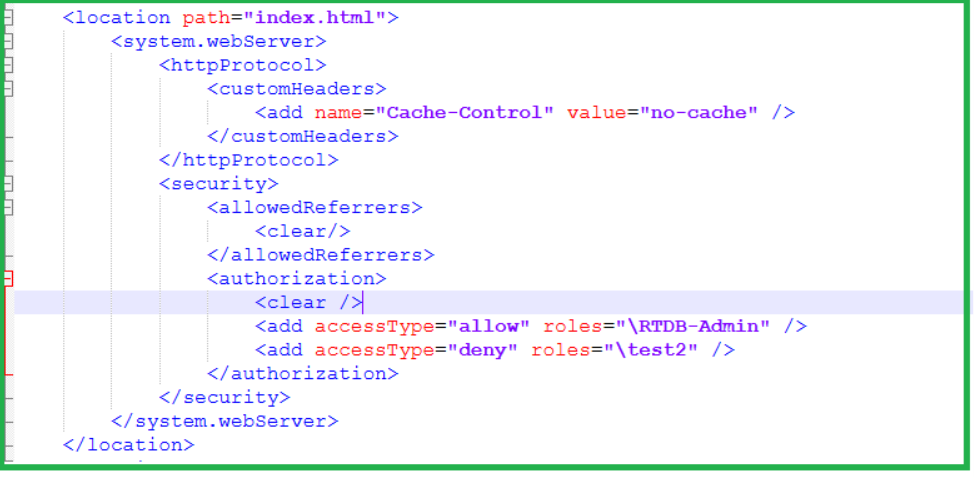
In this section add ‘Authorization’ node under ‘Security’ section
-
And add the Allow/Deny rules for the required users and user groups.
Allow: Will whitelist a specific user account or user group to access the directory/file.
Deny: Will Blacklisting a specific user account or user group from accessing the directory/file. -
Please find the below example for Denying access ‘test2‘ user for View application and allowing only for RTDB-Admin group
-
<authorization> <clear /> <add accessType="allow" roles="\RTDB-Admin" /> <add accessType="deny" roles="\test2" /> </authorization> -
With this above setting anyone with RTDB-Admin role will be able to access View application
-
However, when user ‘test2’ tries to access will be denied access.
Notes to consider
- Deny rules are stronger than Allow rules.
- We recommend configuring an "allow" rules instead of a "deny" rules. Allow rules grant access only to users in the specified role, while deny rules can sometimes lead to unintended access issues in certain scenarios.
- Specifies the user group(s) or individual username(s) for the authorization rule. Multiple user groups can be added, in a comma-separated list.
- The value is not case-sensitive.
- If the user group has no associated domain just provide the user group
- On windows, usernames require a prefix indicating either computer name or domain name. On Linux, usernames do not require any prefix and can be provided directly
- It is generally preferable to avoid using deny rules. However, if a deny rule must be enforced, it is recommended considering the use of individual usernames rather than entire user groups to maintain granular access control
Updated 9 months ago