
OPC UA Client 2 - Obsolete
OPC UA client dedicated for Linux OS, but currently recommended to replace by OPC UA Client
Introduction
OPC UA Client is a backend application, whose role is to fetch data from OPC UA Server and write the data to RTDB. OPC UA Client application can run on both Windows and Linux platforms.
OPC UA
OPC UA Client application is developed on with OPC Unified Automation Client C++ SDK and uses it to communicate and exchange data with OPC UA Servers. OPC UA is short for OPC Unified Architecture which is provided by Unified Automation.
OPC Unfied Automation Client C++ SDK's version is 1.7.5 on Windows, and it is 1.7.5 on Linux.
Architecture
Dependencies
- RTDB
- CVMC
- OPC UA Server
Features
OPC UA Client supports:
- Collecting numerical process history from 3rd party UA servers.
- Collecting process events and alarms from 3rd party UA servers. All attributes coming from standardized event types are supported.
- Tag and Equipment model-based configuration to cross-connect signals.
- Writing back to 3rd party UA server based on current value events in database when Tags-based configuration is used.
- Storing received valued both to Current History and Stream History
- Supports all datatypes available in Current and Stream histories, including string and arrays of basic datatypes.
- Supports application instance certificates and secure communication protocols. User authentication types: anonymous, password, user certificate.
It is not supporting:
- Redundant setup and master token.
- Browsing of the 3rd party server's address space.
- ec_crossref based cross-connecting of signals.
Installation
OpcUAClient is a component of CPMPlus History.
Linux:
First install cpmplushistory environment with the instruction in wiki: Installation on Linux
Then, installing OpcUAClient is just one command: apt-get install cpmplushistoryopcuaclient.
** Setting up as RTDB service**
OpcUa client can set itself up as RTDB service with the -install flag.
RTDB_OpcUAClient -install <path to database>Windows:
The RTDB_OpcUAClient service is installed and defined with the following commands that RTDB system uses as the standard application template:
CSCommon_cmd -setini "%APP_ROOT%\Config\FeatureInstall\APP_FeatureInstall_Selections_Custom.ini" SelectedFeatures RTDB_OpcUAClient 1"%APP_ROOT%\Config\FeatureInstall\App_Featureinstaller" /installConfiguration
Configuration tables
SimpleConfig table
OpcUAClient has some default variables. People can customize them by using the SimpleConfig table. Here is the list of the options and their default values:
| Key | Default Value | Optional Values | Description |
|---|---|---|---|
LogLevel |
WARN |
DEBUG, INFO, WARN, ERROR |
Indicate diagnose message log to be printed |
ReConnectInterval |
5000 |
positive number |
Millisecond is the precision. So the default 5000 equals 5 seconds. It defines the time interval that OpcUaClient tries to connect to an UA server. |
DataChangeTrigger |
2 |
0,1,2 or -1 |
The DataChangeTrigger setting to be used in monitored items. The default value is 2 which means that UA server is requested to return data change event if status, value or timestamp of the item changes. 1 means that only if status or value changes (this is the UA default which means that the UA client does not define the Filter definition at all for the item). 0 Means that if only status changes (rarely needed). |
Delay |
5000 |
positive number |
Millisecond is the precision. It indicates the time delayed to process the changes in every Configuration Tables. The delay time span is used for OpcUAClient to collect all the changes. |
BFNodeValues |
1000 |
positive number |
It is used in feature BackFill. it indicates the number of values per node to read. |
BFFilterSwitch |
1 |
0,1 |
1 is Reverse Order, 0 is Chronological Order. It indicates the order of BackFill. By default it's reverrse order. |
TagUaARQueueSize |
10 |
positive number |
It is used in constructing the requests of all monitored items except Event. It defines the queue size. |
EventUaARQueueSize |
500 |
positive number |
It is used only in constructing the requests of Event monitored items. It defines the queue size. |
UaDiscardOldest |
0 |
0,1 |
0 is False, 1 is True. It is used in constructing the requests of every monitored items. |
MinWriteBackCycle |
50 |
positive number |
Millisecons is the precision. It is used in feature Write to UA Server. Customized time interval can not be smalled than the default value 50 ms. That is for saving CPU resource. |
PKIStorePathWin |
A Windows Path |
Define the path of PKI store on Windows |
|
PKIStorePathLinux |
A Linux Path |
Define the path of PKI store on Linux. |
|
UaTraceLevel |
0 |
0..7 |
The UA SDK Tracing level. Value 1..7 causes that tracing is printed to Diag directory of the database, with name UaTrace-RTDB-UaClient_.txt (or if an instances with different appname is installed, then UaTrace-appname_.txt) 1 = Errors 2 = Warning 3 = Info 4 = InterfaceCall 5 = CtorDtor 6 = ProgramFlow 7 = Data (version info: RTDB 5.3/2020-03-27) |
UaTraceMaxEntries |
10000 |
positive number |
How many trace entries the trace will will contain before it is renamed as a backup file. (See UaTraceLevel) |
UaTraceNumBackupFiles |
5 |
positive number |
How many tracing backup files are maintained. (See UaTraceLevel) |
UaServer:<SERVERNAME>:<PORT> |
none |
UserIdentityType=anonymous |
It's possible to define multiple configurations for each UA server. With User private key for authentication: <PKIStorePath>/own/private/certs/<CERT>.pem |
The figure below shows an example on how to configure the options with the SimpleConfig table.
| Section | Key | Value |
|---|---|---|
| RTDB-OpcUaClient | AppTrace | -1 |
| RTDB-OpcUaClient | BFFilterSwitch | 1 |
| RTDB-OpcUaClient | BFNodeValues | 100 |
| RTDB-OpcUaClient | CmdOutFilterLimit | 0 |
| RTDB-OpcUaClient | DataSources | - |
| RTDB-OpcUaClient | Delay | 5000 |
| RTDB-OpcUaClient | LogLevel | WARN |
| RTDB-OpcUaClient | MaxCmdAgeS | 50 |
| RTDB-OpcUaClient | PKIStorePathLinux | /home/abb/certificates |
| RTDB-OpcUaClient | PKIStorePathWin | D:\certificates |
| RTDB-OpcUaClient | TAGSCHECKINTERVAL | 3 |
| RTDB-OpcUaClient | TaskTrace | -1 |
| RTDB-OpcUaClient | UaDiscardOldest | 0 |
| RTDB-OpcUaClient | UaServer:PikkuPelle:4840 | UserIdentityType=certificate;UserCertificateName=MYCERT |
DataAccessSources table
OPC UA Client ONLY loads the records, whose attribute 'Owner Component' value is selected to 'OPC UA Linux'.
The value of attribute 'Access Type' should be selected to 'Realtime'.
The value of attribute 'Access Path' should match the pattern: opc.tcp://ip:port///value;UaIdType=_;UaNamespace=_url* . For an example, please see the figure below.
| Id | Target Reference | Target | Owner Component | Access Type | Access Path |
|---|---|---|---|---|---|
{OPC UA Linux, /Path_Car[MotorSpeed]} | /Path_Car[MotorSpeed] | MotorSpeed | OPC UA Linux | RealTime | opc.tcp://127.0.0.1:48010///Demo.Dynamic.Scalar.Double;UaIdType=s;UaNamespace=<http://www.unifiedautomation.com/DemoServer/> |
Updates in this table will NOT be effect immediately after the user clicking the confirm button. They will come into effect in a fixed amount of time which is configured with the option 'Delay' in the SimpleConfig table.
Also the base class "Path" can be used instead of the actual Equipment class such as "Path_ACS600" in the DataAccessSources entries (version info: needs 5.3/2020-05-15).
DataAccessSource attribute
Equipment properties can be configured to show and propagate their corresponding data access source. This can happen by adding "DataSource" attribute to the equipment properties. DataSource attribute will reflect any changes happening to data access source.
DataAccessRealTime table
Similar to the DataAccessSources table, the value of attribute 'Owner Component' should be selected as 'OPC UA Linux'. For an example, please see the figure below.
| Id | Name | Target Reference | Target | Sampling Interval | Publishing Interval | Owner Component |
|---|---|---|---|---|---|---|
{OPC UA Linux, /Path_Car[RpmActual]/|Drives.Siemesn Drive} | Drivers.Siemens Drive | /Path_Car[RpmActual]/|Drives.Siemens Drive | RpmActual | 00:00:01 | 00:00:01 | OPC UA Linux |
{OPC UA Linux, /Path_Car[RpmActual]} | All property RpmActual | /Path_Car[RpmActual] | RpmActual | 00:00:02 | 00:00:02 | OPC UA Linux |
After the user clicks the confirm button, two operations will be executed in the backend to make the changes into effect.
- The program will immediately reload the DataAccessSources table and find out the changes.2
- The program will wait for a fix amount of time which is configured by option 'Delay' in the SimpleConfig table, then process the changes.
Also the base class "Path" can be used instead of the actual Equipment class such as "Path_ACS600" in the DataAccessRealtime entries (version info: needs 5.3/2020-05-15).
Tags table
OPC UA Client can subscribe the items configured in the Tags table. However, ONLY the ones whose attribute 'Da Type' is 'OPC UA Linux', and 'Activity' is 'Active', can be subscribed.
For more information about Tags, please see Configuring database to collect process history.
Tags Configurations
OPC UA Client uses 5 attributes in the Tags table. Here is a table to show the attributes and their meanings used in the program.
| Tags | OPC UA Client |
|---|---|
Id |
UUID, used as the primary key to acquire full information of a record |
NumericalId |
DataPoint IDN |
Da Type |
OPC UA Client |
Activity |
Decide if the record will be monitored in the program |
DaPath |
Contain UA Server URL, NodeId, UaIdType, Namespace and UaArrayElement |
DataFlowDirection |
Option [in] means OPC UA Client reads data from OPC UA Server, then write them to RTDB; |
DaFrequency |
Used as both sampling interval and publishing interval if 'DataFlowDirection' is [in]; |
The figure below shows an example of Tags configuration: TODO: Check text integrities
| Display Name | Proposal Name | DaType | DaPath | DaFrequency | Activity | Type | Id | NumericalId | DataFlowDirection |
|---|---|---|---|---|---|---|---|---|---|
| W1 | W1 | OPC UA Linux | opc.tcp://PikkuPelle///Demo.Static.Scalar.Double;UaNamespace=<http://www.unifiedautomation.com/DemoServer/> | 1,000 | Active | Float | 41afba9c-dfb2-488d-b2a0-2a4a | 11,425 | [out] |
| U2 | U2 | OPC UA Linux | opc.tcp://PikkuPelle///Demo.Dynamic.Scalar.Double;UaNamespace=<http://www.unifiedautomation.com/DemoServer/> | 1,000 | Active | Float | fa91cf1f-1db1-45ae-a144-db1abc | 11,329 | [in] |
Program Flow
- OPC UA Client scans the entire Tags table, and monitors every active item.
- OPC UA Client starts to monitor the changes of the Tags table.
- Once there are changes(insert, modify, delete) in the Tags table, OPC UA Client will collect them and process them in batch after a fix amount of time.
- The default value of the time is 5000ms. But it can be customized with option 'Delay' in the SimpleConfig table.
Mapping complex object sub elements
DaPath in tag configuration has an optional property "UaArrayElement" that could be used to map multidimensional arrays of ExtensionObject, normal scalar arrays, variant arrays inside datavalue arrays. In case of scalar arrays syntax should look as following: UaArrayElement=[n]; where n is a desired element number in array, the corresponding variable data type has to match. Currently available datatypes for array mapping are: OpcUaType_ExtensionObject OpcUaType_DataValue OpcUaType_Variant OpcUaType_Boolean OpcUaType_Float OpcUaType_Double OpcUaType_Byte OpcUaType_SByte OpcUaType_Int16 OpcUaType_UInt16 OpcUaType_Int32 OpcUaType_UInt32 OpcUaType_Int64 OpcUaType_UInt64 OpcUaType_Guid
Mapping matrix elements
"UaArrayElement" feature could be used to map elements of Matrix in case of one-dimensional Matrix (matrix that has similar structure to normal Array), multi-dimensional Matrix is not supported, available datatypes are identical to mentioned above for array.
Variant array inside datavalue array
For the case of variant array in datavalue array : UaArrayElement=[i]:[j]; where i,j are element numbers of array. Following example:UaArrayElement=[i]:[j]:[k]; is for variant array inside variant array inside datavalue array. More dimensions of variant arrays where initial array is datavalue array should work as well.
If the final element is complex structure and has subfields (currently supported for LocalizedText) it's possible to map it with following syntax: UaArrayElement=[i]:[j]:Text; or UaArrayElement=[i]:[j]:Locale; (case for datavalue array->variant array with j element as LocalizedText). Currently available variant endpoint datatypes for mapping: OpcUaType_Float OpcUaType_Double OpcUaType_Boolean OpcUaType_SByte OpcUaType_Int16 OpcUaType_Int32 OpcUaType_Int64 OpcUaType_Byte OpcUaType_UInt16 OpcUaType_UInt32 OpcUaType_UInt64 OpcUaType_Guid OpcUaType_String OpcUaType_LocalizedText
ExtensionObject array
In case of multidimensional array of ExtensionObject syntax should be similar to following example: UaArrayElement=[i]:StatusComments[j]:Actor; ( example from demo server Demo.Static.Arrays.WorkOrder) first element number doesn't need to have a field name (it's always "Value"), but following have to explicitly state subfield names (similar to "StatusComments" and "Actor" in Demo.Static.Arrays.WorkOrder example). Currently available variant endpoint datatypes for mapping: OpcUaType_Float OpcUaType_Double OpcUaType_Boolean OpcUaType_SByte OpcUaType_Int16 OpcUaType_Int32 OpcUaType_Int64 OpcUaType_Byte OpcUaType_UInt16 OpcUaType_UInt32 OpcUaType_UInt64 OpcUaType_Guid OpcUaType_String
DataAccessEvents table
It is used to configure the events to subscribe in Opc Ua Client. Opc Ua Client ONLY loads the records whose attribute 'Owner Component' is selected to 'OPC UA Linux'. In case if event field contains ExtensionObject array, that particular field is serialized as json and stored as event attribute to target event log table.
Event Configurations
Opc Ua Client takes 5 attributes in use.
| Attribute | Requirements |
|---|---|
Id |
UUID type. Used as the primary key to acquire full information of a record |
Owner Component |
must be 'OPC UA Linux' |
Target |
A comma separated list of target database tables (supported values: OpcEventLog,EquipmentEventLog) to where to store the events |
AccessPath |
Contain UA Server URL, NodeId, Queue Size, UaIdType and Namespace |
Filter |
Defines the UA fields to be excluded. Use keywork ExcludedUaFields. The format is ExcludedUaFields=uafield1,uafield2,uafield3 |
Options |
Optional definitions for the event collection and storing in format Keyword=Value;Keyword=Value. The following keywords can be used: Fields = defines the source and target fields (see the corresponding "UaFields" EcCrossRefs definition of the item). The default value contains all possible standard event attribute collections currently supported by the OPC client. (See the list of them in the UaFields documentation linked above) NOTICE: Currently, OpcUaClient support UaFields which are of reference type Id of OpcUaId_HasProperty and OpcUaId_HasComponent |
The figure below show an example of DataAccessEvent configuration:
| Name | OwnerComponent | Target | AccessPath | Filter | Options |
|---|---|---|---|---|---|
| SampleEvent | OPC UA Linux | OpcEventLog.EquipmentEventLog | opc.tcp://PikkuPelle///5068;UaQueueSize=100;UaIdType=i;UaNameSpace=<http://www.unifiedautomation>..... | ExcludedUaFields=EventType.... | buftime=1000;Fields=All |
| BaseServer | OPC UA Linux | OpcEventLog | opc.tcp://PikkuPelle///2253;UaQueueSize=100;UaIdType=i;UaNameSpace=<http://www.unifiedautomation>..... | ExcludedUaFields=Retain | buftim=3000;Fields=All |
| AirConditioner_1 | OPC UA Linux | OpcEventLog.EquipmentEventLog | opc.tcp://PikkuPelle///2253;UaQueueSize=100;UaIdType=i;UaNameSpace=<http://www.unifiedautomation>..... | ExcludedUaFields=Retain | buftim=1000;Fields=EventId=Id, Time=EventTime |
Json serialization of ExtensionObject Array Event field
Fields that represent Extension Object Array are stored in json format as an event attribute. Json is serialized as an array of objects where the simplest types described below
| Type | Json Type | String representation | Size in Json | Note |
|---|---|---|---|---|
| OpcUaType_Null | Null | null | 4 to 5 | |
| OpcUaType_Boolean | Boolean | true or false | 4 to 5 | |
| OpcUaType_SByte(Int8) | Int | as Int8 number | 1 to 5 | |
| OpcUaType_Byte (UInt8) | Int | as UInt8 number | 1 to 4 | |
| OpcUaType_Int16 | Int | as Int16 number | 1 to 7 | |
| OpcUaType_UInt16 | Int | as UInt16 number | 1 to 6 | |
| OpcUaType_Int32 | Int | as Int32 number | 1 to 12 | |
| OpcUaType_UInt32 | Int | as UInt32 number | 1 to 11 | |
| OpcUaType_Int64 | String | as String | 3 to 23 | Serialized in JSON as a string |
| OpcUaType_UInt64 | String | as String | 3 to 22 | Serialized in JSON as a string |
| OpcUaType_Float | Double | as Double number | 1 to 19 | JSON may lose precision |
| OpcUaType_String | String | (2 to 3)+n | Chars in the Unicode range consume more than one byte | |
| OpcUaType_Double | Double | as Double number | 1 to 19 | JSON may lose precision |
| OpcUaType_DateTime | String | DateTime (ISO 8601) | ||
| OpcUaType_Guid | String | as GUID 38 to 39 | ||
| OpcUaType_ByteString | Int Array | as UInt8 Array | ||
| OpcUaType_XmlElement | Int Array | as UInt8 Array | ||
| OpcUaType_NodeId | Object | has 3 fields: NamespaceUri(String), IdentifierType(String), Identifier(UInt32|String|GUID|Int Array) | ||
| OpcUaType_ExpandedNodeId | Object | has 3 fields: NodeId(Object), ServerUri(String), ServerIndex(Int32) | ||
| OpcUaType_StatusCode | Int | as UInt32 | ||
| OpcUaType_QualifiedName | Object | has 2 fields: QualifiedName(String) and NamespaceIndex(OpcUaType_UInt16) | ||
| OpcUaType_LocalizedText | Object | has 2 fields: Text(OpcUaType_String) and Locale(OpcUaType_String) |
Security
Application instance certificate.
Not to confuse with User Certificate, which is used for user authentication. Application instance certificate, as the name suggests establish trust between the server and client application, by exchanging each other's keys.
Flow chart of building trust relationship between one UA server and Opc UA Client: (Client Certificate is the Client Application Certificate)
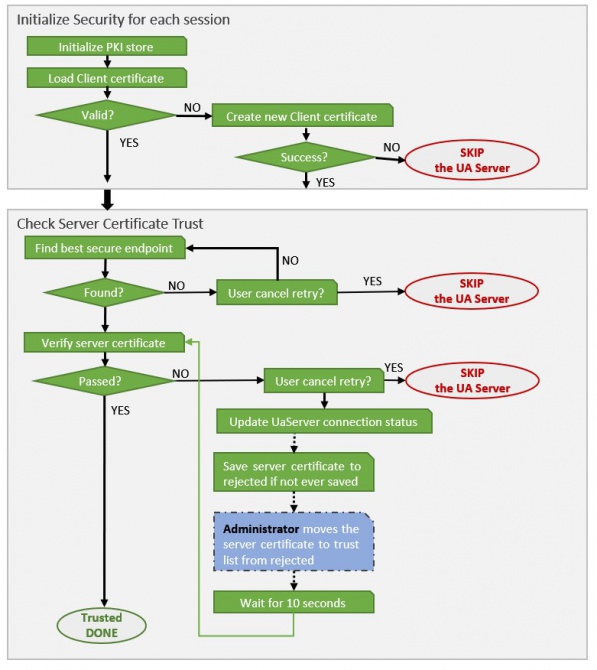
Process Flow of building trust relationship between UA Server and Opc UA Client
User Authentication
OPC UA Client currently supports three User Identity types, anonymous, password authentication and user certificate.
Anonymous
Anonymous is the default option. If server self-signed certificate mode is not enabled, it uses anonymous. Or user can manually give
Password authentication
Enabling password authentication needs one mandatory and one optional change in simpleconfig. Mandatory: UserIdentityType should have value password for the Uaserver it is connecting to. By setting this configuration, OPCUa client will look for username and password of the server it is connecting to. To set the credentials for the client to use, following command can be used:
CSCommon_Cmd -setcredential servername username passwordThe servername in setcredential command needs to be the same as UaServer in simple config (PikkuPelle:4840 in this example) The optional setting for password authentication is PKIStorePathWin (or PKIStorePathLinux for linux). This should be the path to the Uaserver certificate which is trusted by client. This enables encrypted communication of the password between client and server. If this path is provided in simpleconfig, server's certificate must be available in trusted certificate folder on the same path, so that client can use it for encryption of the credentials. Without providing this path, password will be sent to the server as plain text.
User Certificate
To enable User Certificate, two configures in SimpleConfig table must be defined.
First, key: UserIdentityType should have value certificate, then, followed by a semicolon ';', the UserCertificateName should specify the certificate&private key pair.
User certificate: <PKIStorePath>/own/private/certs/<CERT>.der User private key for authentication: <PKIStorePath>/own/private/certs/<CERT>.pem
Second, the path of PKI Store must be defined as well. PKI Store is the place for saving certificates of servers and client. On Windows OS, the PKI Store key is PKIStorePathWin, and on Linux OS, the PKI Store key is PKIStorePathLinux. An example is shown in the below table:
| Section | Key | Value |
|---|---|---|
| RTDB-OpcUaClient | PKIStorePathLinux | /home/abb/certificates |
| RTDB-OpcUaClient | PKIStorePathWin | D:\certificates |
| RTDB-OpcUaClient | TAGSCHECKINTERVAL | 3 |
| RTDB-OpcUaClient | TaskTrace | -1 |
| RTDB-OpcUaClient | UaDiscardOldest | 0 |
| RTDB-OpcUaClient | UaServer:PikkuPelle:4840 | UserIdentityType=certificate;UserCertificateName=<CERT>; |
** Server Configuration **
Extra explain, it's possible to define multiple configurations for each UA server. The configurations use one key whose syntax is UaServer:$hostname:$port. The value represents all the configurations for this server. Each configuration consists of a string pattern $key=$value pair, and the symbol ; is used to separate every configuration pair.
securitymode and securitypolicy could be manually overwritten with values (it's optional), for securitymode: None, Sign or SignAndEncrypt for securitypolicy: None, Basic128Rsa15, Basic256, Basic256Sha256, Aes128Sha256RsaOaep, Aes256Sha256RsaPss
Diagnose
OPC UA Client produces messages for diagnosing exceptions. There are two things that the users need to be aware of: the Log Level and the MessageLog table. Log Level is configured in SimpleConfig table.
- What kinds of log messages will show up?
The program has four log levels. From low to high priority, they are DEBUG, INFO, WARN and ERROR. The 'LogLevel' configuration in SimpleConfig marks the lowest accepted log level. This means that only the log messages, whose level is equal or higher than the LogLevel in SimpleConfig, can be produced to the MessageLog table and the console. For example, if the 'LogLevel' configuration in the SimpleConfig table is 'INFO', then the log messages with level 'DEBUG' will NOT show up anywhere. Other log messages will be shown in the MessageLog table and console. Each log message has a prefix string, [$LogLevel], such as [DEBUG], [WARN] and [ERROR]. Users can identify the messages' categories by the prefix.
- Where to find the log messages?
The log messages with enough priority will be stored into the MessageLog table and printed to Console. Users can view the log messages through Vtrin UI → MessageLog, or just check the Console of the program.
The messages related to subscriptions are prefixed with the identifier that looks like: S0G1000H1, where "S0" is the session number (identifies the UA server connection), and "G1000" indicates a subscription with publish interval 1000 ms, and "H1" indicates the client handle of the subscription. If there are connections to multiple servers, you need to find the message such as "[INFO] Successfully register server url: opc.tcp://fi-db-main-r2:4841 and assign session ID: 0" to find which connection the given session id means. If you cannot find it, you need to figure out the Id from some of the variable IDN numbers that are shown in the subscription diagnostic messages (find the Tag or Propoerty and see what UA server it uses). (Version info: RTDB 5.3/24.12).
See the description of the "UaTraceLevel" SimpleConfig setting above for instructions how to enable the SDK level trace messages.
Performance
On Windows platform, RTDB OPC UA Client is tested with 10000 tags for 24 hours. The CPU consumption is 1.7% and there is no missing values observed.
Updated 9 months ago