
OPC Classic DA and HDA servers
Introduction
The History OPC Server implements OPC Data Access (DA) 2.05a and OPC Historical Data Access (HDA) 1.20 specifications. The OPC (Open Process Connectivity) is a specification defined by the OPC foundation. For more information about OPC, take a look at the OPC Foundation website www.opcfoundation.org.
The History OPC DA server is used to browse, monitor and update current values in RTDB. The RTDB OPC HDA server is used to browse, monitor and maintain data in RTDB history tables. The purpose of this documentation is to give sufficient information regarding the installation and usage of RTDB OPC servers. The reader of the document should have overall knowledge of OPC DA and HDA specifications.
Architecture and deployment
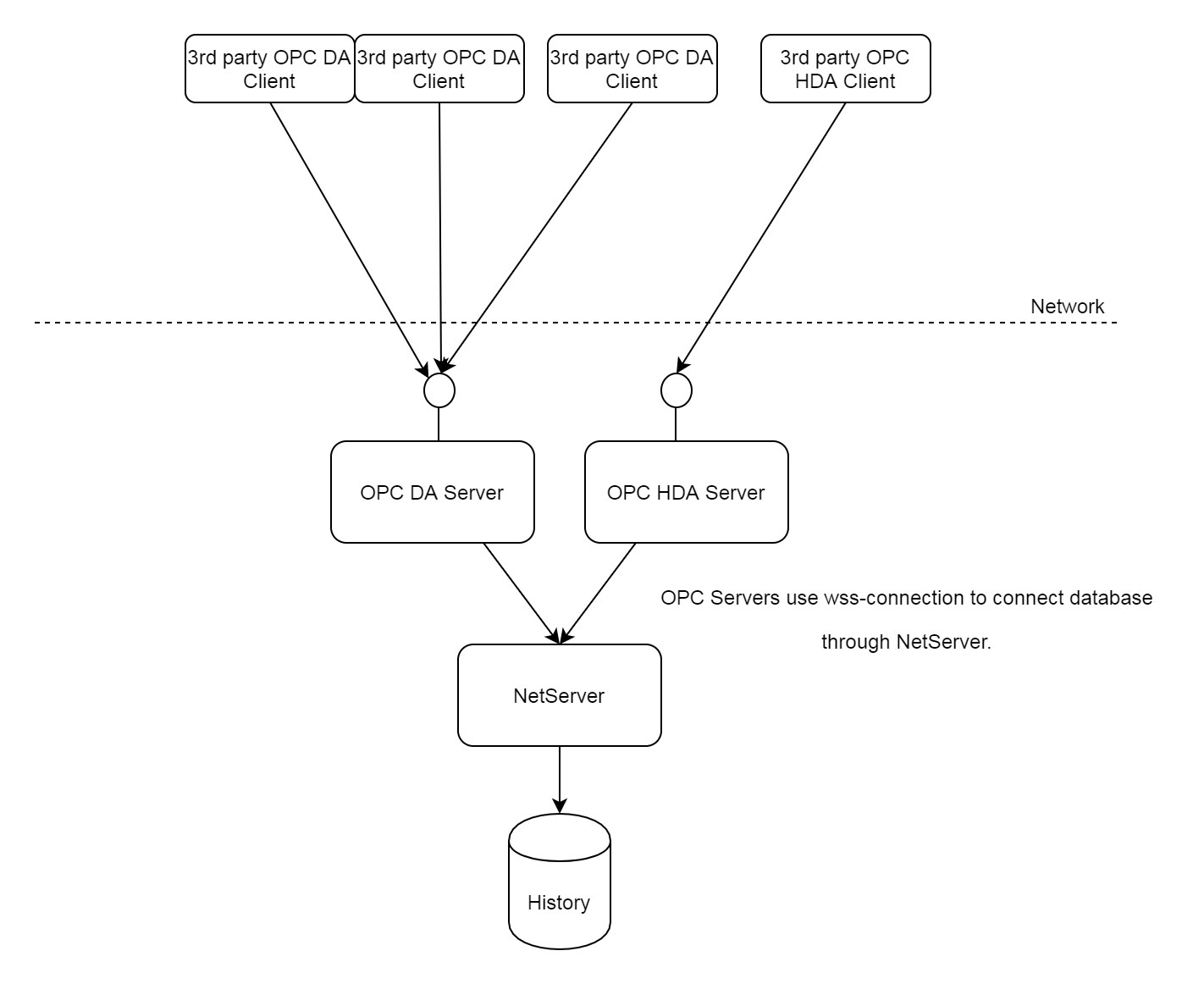
OPC servers are built on top of Vtrinlib data abstraction layer. By default OPC servers are connected to database through NetServer.
The following figure illustrates default setup. It is possible to locate server's to other computer as well to avoid using DCOM.
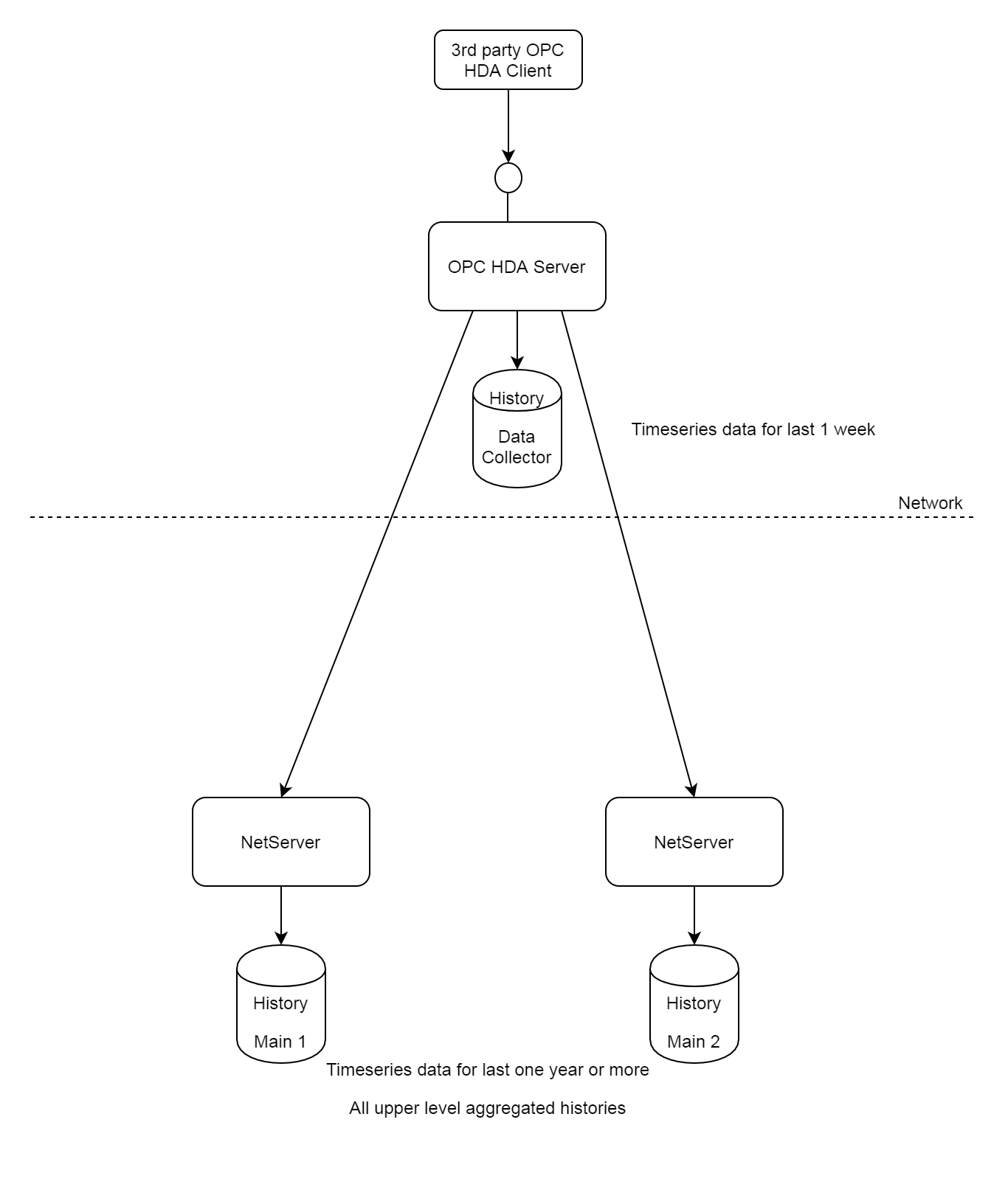
Other important deployment for HDA server is a special setup in hierarchical system. HDA server in data collector node having the prog id ABB.CpmPlusKmOpcHdaServer is set up to connect both localhost and Main node as well. In case Main node is redundant, HDA server connects both servers separately. Functionally server is always able to get last 8 days of data from locahost and for longer queris it goes to MAIN nodes in case network connection is good. This behaviour is called seamless HDA server.
Capabilities
DA and HDA Server common capabilities
History OPC DA and HDA servers, like all OPC servers as well, use and provide only UTC times. It is up to OPC clientto make any appropriate local time conversions. The HDA server also processes all timestamp values coming from client as UTC times.
User authentication and impersonation of connected client is supported both in OPC DA and OPC HDA server. Access rights are configured using Vtrinlib Access Control Lists and flags.
History is case-insensitive with respect to variable names. Both OPC DA and OPC HDA server are case-insensitive as well, when it comes to OPC DA and HDA item ids. E.g. the item Variable.RTDB_SECOND_OF_HOUR is the same item as variable.rtdb_second_of_hour. Browsing returns those item ids that are returned from the underlying RTDB, and does not convert item ids to either uppercase or lowercase (Case preserving). It is always valid to use those item ids that are returned from the browse interface.
OPC Access paths are not supported by either of the servers.
DA capabilities
OPC DA Server implements all major interfaces from the OPC Data Access (DA) 2.05 specification. All other interfaces but the (optional) interface IOPCPublicGroupStateMgt are implemented.
OPC DA server implements the OPCServer::IBrowse interface that can be used to browse and select variables that the user wants to either monitor or update.
OPC Item is mapped with a History variable name <variablename>. Each variable name is unique within one database.
The OPC write function implements production of current values of the Variable. If the target variable is an Tag with Input DataFlowDirection, the DA server refuses to write to it, and returns error OPC_E_BADRIGHTS (0xC0040006L) instead (the reason for this behavior is unclear, but there can be existing configurations that relay on this, so the behavior has been kept like this).
Today only variables and associated current value is available through OPC DA Server, not values of Historized Equipment properties. All nativly supported datatypes are supported (integers, unsigned integers, floating point values and string, and arrays of those.
Supported item properties and a description of how each item property is mapped to RTDB concepts are described in the table below.
| Item Property | Description |
| Type (id=1) | The native data type of variable in RTDB. If the user subscribes this variable without specifying the requested data type, the user gets values of this type. |
| Value (id=2) | The current value of variable at item the function call was executed. The type of the value can be fetched from the item property of ‘Type’. |
| Quality (id=3) | Current quality of current value. |
| Timestamp (id=4 | Timestamp of the current value in UTC time. |
| AccessRights (id=5) | Permissions of connected user. |
| ScanRate (id=6) | Defines how fast the specified item is updated. I.e. what is the internal polling rate of the OPC server and the underlying data source. OPC DA server specifies the same internal update rate resolution for all items. Items are updated using the event-based mechanism of Vtrinlib. ScanRate is the internal polling frequency of VtrinLib. This is specified in the initialization file using the parameter ‘InternalFrequency’. |
| EngineeringUnits (id=100) | Unit of the variable (string). Typically used only for representation purposes. |
| ItemDescription (id=101) | Description of item. |
| HighIR (id=104) | The highest possible value that the user should write to this item, or the user should expect from read and subscribe operations. |
| LowIR (id=105) | The lowest possible value that the user should write to this item, or the user should expect from read and subscribe operations. |
HDA Capabilities
OPC HDA server contains two different types of items: current history items and aggregates items. A current history item reflects the history before processing, and aggregated items contain data that is available after processing, which is defined in the RTDB Transformation mechanism. Current history item ids are formed formed from variable name, e.g. RTDB_SECOND_OF_DAY. Aggregated history itemid is formed by appending exclamation mark ! with the variable name, e.g.: RTDB_SECOND_OF_DAY!AVG1HOUR. All item ids are case-insensitive.
All native datatypes in History are supported. By default 64-bit integers are presented as 32-bit integers for the convenience of those OPC HDA clients that do not support 64-bit integers. Boolean values are represented as Integers. It is possible to show 64-bit integers as 64-bit integers by changing behavior from initialization file.
The supported item attributes and descriptions of how each attribute is mapped to History concepts are described in the table below. Note that the concept of item attributes is quite similar to the concept of OPC DA item properties. The major difference is that all history items support the same set of attributes. In OPC DA, each item might support a different set of item properties, and some of the item properties are required while some are optional. The OPC HDA specification defines that all item attributes are optional, but if a server supports one, then each and every history item must support that attribute.
| Data Type (id=1) | Native data type of history variable in RTDB. |
| Description (id=2) | Description of history table. |
| Eng Units (id=3) | Engineering units of history variable. |
The supported aggregates are described in the table below:
| Total (id=2) | Total = TimeAverage * interval length (in seconds). |
| Average (id=3) | Adds all good values and divides the sum by the number of good values. |
| TimeAverage (id=4) | The time-weighted average. |
| Count (id=5) | The count of all raw good values within the interval [starttime, endtime). |
| StdDev (id=6) | sqrt{{sigma(1…n){[X-Avg(X)]^2}}/n-1} |
| MinimumActualTime (id=7) | Minimum good raw value in the interval [starttime, endtime) with the timestamp at which the value occurs. |
| Minimum (id=8) | Same as MinimumActualTime, but the timestamp is the beginning of the interval. |
| MaximumActualTime (id=9) | Maximum good raw value in the interval [starttime, endtime) with the timestamp at which the value occurs. |
| Maximum (id=10) | Same as MaximumActualTime, but the timestamp is the beginning of the interval. |
| Start (id=11) | The first value within the interval [starttime, endtime) and corresponding timestamp. |
| End (id=12) | The last value within the interval [starttime, endtime) and corresponding timestamp. |
| Delta (id=13) | The difference between the earliest and latest good raw value in the interval. |
| Variance (id=17) | The square of the standard deviation. |
| Range (id=18) | The difference between the raw maximum and raw minimum value in the interval. |
| DurationGood (id=19 | Time in seconds for how long the corresponding value is good in the specified time interval. |
| DurationBad (id=20) | Time in seconds for how long the corresponding value is bad in the specified interval. Uncertain values are not considered as bad, so the aggregate value is not just IntervalTime-DurationGoodTime. |
| PercentGood (id=21) | PercentGood = DurationGood * IntervalLength |
| PercentBad (id=22) | PercentBad = DurationBad * IntervalLength |
| WorstQuality (id=23 | Returns the worst quality in the interval. The timestamp is the start of the interval, not the point where the worst quality exists. |
HDA Functions and how they are implemented in History
ReadRaw
ReadRaw is the most commonly used function in the OPC HDA interface. It returns raw values from database. Note that the actual storing method is still an implementation detail, and e.g. some packaging algorithm can be used to reflect values that are not packed in the OPC interface. Also note that logically the OPC HDA specification defines that there are data sources, which have current values and a history of current values. This history of current values form the history item, and ReadRaw can be used to get raw values of this history. History OPC HDA server maps both current history and calculated history levels to OPC HDA history items. Hence the ReadRaw operation can be assigned for both pre-calculated history levels and raw histories.
If the user status of the history data contains the coded OPC quality, the ReadRaw returns the detailed quality value such as OPC_QUALITY_LOCAL_OVERRIDE, OPC_QUALITY_EGU_EXCEEDED or OPC_QUALITY_NOT_CONNECTED. If the user status information is not available, the read function returns only the generic status codes OPC_QUALITY_GOOD, OPC_QUALITY_UNCERTAIN and OPC_QUALITY_BAD. This functionality requires that the Tag is an OPC DA Tag and that the RTDB_OpcHdaServer.ini setting ShowUserStatusAsStatus is 1 (by default it is). The HDA server treats variables as OPC DA Tags if their DaPath starts with "opcda://" or "opcua://" or if the UserStatusId (Application Status Text) of the variable is 1 or 2 ("Alcont OPC AI" or "Alcont OPC AO"). (Previously, only Tags whose DaPath started with "opcda://" or "opcua://" were treated as DA Tags). (Version info: UserStatusId check needs 5.3_23.10)
ReadProcessed
ReadProcessed returns aggregate values calculated from raw values in database. Aggregated values are calculated using VtrinLib filters. Behavior should be quite similar to what Vtrinlib might calculate for each aggregated value.
Values that have representativeness < 100% are not included in the aggregate calculations
ReadModified
ReadModified returns values which have HSHS bit set true. Note that HDA server operations (Insert, Replace and InsertReplace) do not modify the HSHS bit (Vtrin Substituted property). If the HDA client inserts values using insert, that does not mean that it should receive any values from the same time span using the ReadModified function.
ReadAttribute
Returns the attributes for the given OPC HDA item. The OPC HDA specification states that advanced servers might maintain a history of attributes for the given HDA item. This kind of behavior would mean that the client-given time span would affect the returned attribute values. However, OPC HDA item attributes are static and don't depend on the given time span.
Asynchronous Read Interface
Operations behave similarly to a synchronous interface, only the a-synchronic behavior is added. A-synchronic function calls are put into the queue that is processed using the first-in-first-out principle. Subscriptions are processed using a separate queue from other a-synchronic operations.
Insert, Replace and InsertReplace
The HDA server implements the synchronous and asynchronous update functions. They store the detailed OPC quality as a coded value to the user status of the history value similarly as the RTDB_EcOpcClient does (see description in ReadRaw above. (Version info: storing the coded OPC quality to user status requires 5.3_23.10).
OPC DA item values and qualities
The OPC DA specification defines the logical concept of an OPC item. The OPC item maps the data in the device level (History database) into the format known by the OPC specification. OPC DA item has a value of the specified data type. This data type is fixed and typically cannot change during the lifetime of the item. The DA item also has a quality and a timestamp. Value, quality and timestamp all together form the current value of the DA item. History OPC DA server maps current values of variable to OPC DA item value. The actual value of the DA item is the current value. The item timestamp is the timestamp of the current value in UTC format (the OPC specification states that timestamps are always transferred using UTC times between OPC clients and servers). The quality of the OPC item is less evident and needs more clarification. The OPC quality is a bit value that is divided into three different parts (bit fields):
- The Quality bit field represents the main quality of the item. It has three allowed values: ‘Good’, ‘Bad’ and ‘Uncertain’.
- The Sub status bit field clarifies the meaning of the quality field. Each main quality has its own set of allowed sub status codes.
- The Limit bit field further clarifies the overall quality value.
In addition to these, there is room for vendor-specific qualities. The OPC DA server currently supports always (main) Quality bit field. In case the producer of this ba´variable is History OPC DA client, server shows as well sub-statuses.
OPC DA read and subscribe operations return values, timestamps and qualities. OPC DA write operations, however, take only the value that should be written as an input argument. History OPC DA server prevents writing to items that have the quality bad. History OPC DA server never changes the quality of the OPC item manually in write operations. The timestamp of the item is changed when the OPC server commits the changes to database. OPC DA specification defines synchronic write and a-synchronic write operations. Writing current values is always done using the services of the CVMC server and is inherently a-synchronic. Although internally HIstory current value writes are done a-synchronically, History OPC DA server implements the synchronous write as well. Typically the user of the OPC client cannot see the impact of the underlying a-synchronic write, because OPC DA server updates the cache before returning from the synchronous write operation. It is, however, good to remember that there are no guarantees that the write operation has actually been done when the synchronous write returns.
Event-based data change, DA2-callbacks (also known as DA2 subscriptions, Connection points, Advise), is the most frequently used and recommended method to observe current values using the History OPC DA server. The OPC DA server uses an approach where the DA server samples current values using the frequency defined by an OPC client (OPC group frequency), and maintains a cache that reflects the latest values. Server-side data buffering is not supported in OPC DA specification (server-side data buffering is supported e.g. in OPC UA specification and History OPC UA Server). This leads to overall system behavior where changes that occur faster than the predefined sampling rate are lost (see the figure below). It is important to define the frequency of an OPC group as small enough, if lossless data observation is required.
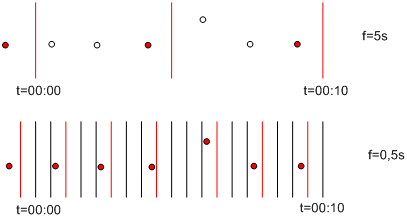
How small is a small enough frequency? it depends on the configuration of the data producers that feed the current values to History. If a data link provides values with a update rate of 1 second, the OPC group frequency should at least be less than that. Because of latencies and the a-synchronous nature of data change, a group frequency smaller than half of the frequency that the data link provides should be used for lossless data change. Note, however, that lossless data change is not always needed, and requiring that is instead often an overkill.
The following figure illustrates the data flow between different OPC DA server, data producers, and History components.
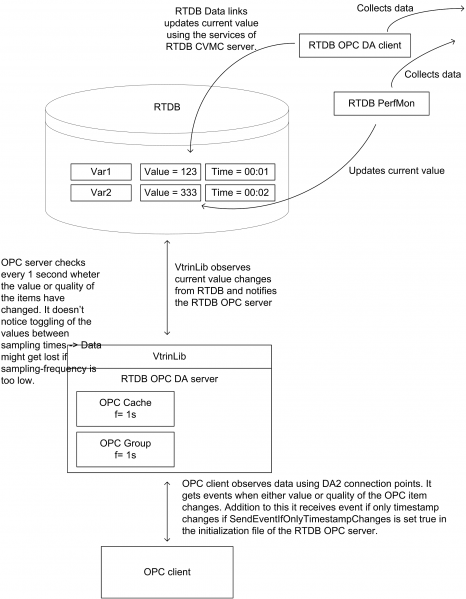
The cache of the OPC DA server should reflect the latest values of OPC items subject to the frequency of an OPC group. The timestamps of items should reflect the time when value was identified to be what it currently is. Typically this means that the timestamp changes in the cache, even though the value and the quality do not change. History OPC DA server, however, does not generate timestamps itself, if timestamps are not changing in database, it rather preserves original timestamp.
The cache of the OPC DA server reflects the values, qualities and timestamps similar what exists in database and events are not generated if only the timestamp of the item changes. This leads to overall behavior where many OPC clients, which are using DA2 connection points to monitor data changes, show a different timestamp that can be seen e.g. by using the Vtrin user interface. This feature of the OPC DA specification can be overridden by setting the initialization parameter SendEventIfOnlyTimestampChanges of the RTDB OPC DA server to 1 (true). This forces the OPC server to send events as well, if only the timestamp changes. This kind of behavior can enhance the overall system usability many times.
OPC HDA item values and qualities
OPC HDA specification defines the logical concept of a historical item. Historical item represents a time series of values of some real-time data source that may have current value associated with it. Each value in the time series has the associated timestamp (UTC) as well as the associated quality. The quality of a historical value is different to what is defined in the OPC DA specification. HDA specification defines the qualities OPCHDA_EXTRADATA, OPCHDA_INTERPOLATED, OPCHDA_RAW, OPCHDA_CALCULATED, OPCHDA_NOBOUND, OPCHDA_NODATA, OPCHDA_DATALOST, OPCHDA_CONVERSION and OPCHDA_PARTIAL. In addition to these HDA-specific qualities, OPC DA flags can be used as part of HDA qualities (see more details from the OPC HDA 1.20 specification, Chapter OPCHDA_QUALITY).
OPC Server status
History OPC servers run as services that can be located either in the same computer where History is running in, or in a different computer than where RTDB is running. In both cases, OPC servers use the VtrinLib data abstraction layer to establish a device connection to History. Two network connections can be between OPC client and History.
The first one is between the OPC client and the OPC server. OPC specifications use DCOM as a communication protocol, and due to the quite tight coupled interface and inherent restrictions of the DCOM protocol, network errors between OPC client and OPC server may be fatal in many cases. Running the OPC client and the OPC server in the same computer removes all the errors that are related to network conditions between the client and server. It also simplifies the DCOM security configuration.
Another network is between the History OPC server and History. This network connection is managed using functionality in VtrinLib data abstraction layer. Connection is by default to local host. VtrinLib connection is created when the first OPC client connects to the History OPC server. The connection is not created during the startup of the server. This allows starting the OPC servers to be fast as well as independent from starting the other History services, particularly Net Server. The OPC client is allowed to connect to the History OPC server always when the server is running. However, the status of the server can be either UP (RUNNING) or DOWN (FAILED). The status of the server can be queried using the GetStatus (DA) or GetHistorianStatus (HDA) functions. The status is UP as long as the first OPC client connects to the server. The History OPC server tries to establish the VtrinLib connection as the OPC client connects to the server. If the connection cannot be established, it tries to reconnect periodically until it succeeds or the OPC client closes the connection. The status of the OPC server is changed to DOWN (FAILED) for as long as the connection cannot be opened. When the reconnect succeeds, the status of the server is changed to UP (RUNNING). The VtrinLib connection is closed when the last OPC client closes the connection to the RTDB OPC server. Networking errors might occur after the VtrinLib connection has been opened. VtrinLib might notice the network errors and report them to the OPC servers as they occur. OPC servers monitor the VtrinLib-provided network status, and changes the status of the connection server respectively. A possible OPC client strategy to handle device connection failures could be to call GetStatus (GetHistorianStatus) periodically, and always after some function fails for some unknown reason. OPC specification defines that the OPC interface functions can return E_FAIL if the status of the server is DOWN (FAILED). History OPC server returns E_FAIL for those functions that use the services of VtrinLib. Remove operations typically can be used for a FAILED server as well, hence one possible OPC client strategy to cope with the server status DOWN (FAILED) is to remove all OPC objects and disconnect the server, and after that try to reconnect and call GetStatus as long as the status is UP (RUNNING) again.
Updated 9 months ago