
Internal Events
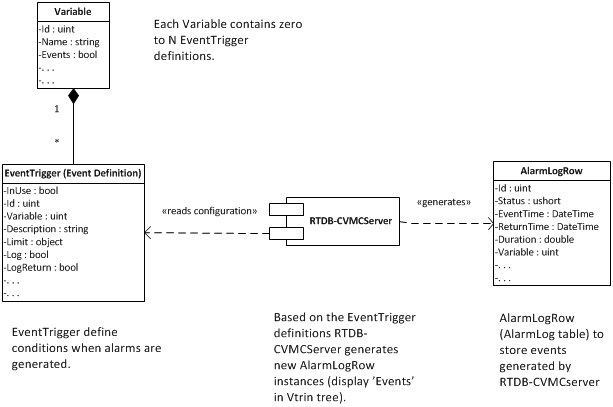
OPC Events and external events, as described in External events, provide means to store events collected from any third-party system that supports the OPC A&E server interface. Contrary to this, internal events are events that are generated based on numerical data collected to RTDB. Event generation is controlled by creating event triggers ("EventTrigger" Vtrin class, or "Event definition" in user interfaces). The following sections give detailed information on how to use and understand available events, as well as how to create new event triggers to spawn new internal events.
Event triggers are configured for database variables. The system uses event triggers to generate events with different severities (critical alarms, warnings, notices, and non-alarms) when the conditions that have been specified for the triggers are fulfilled. Typical triggers for analog variables are high limits and low limits. Typical triggers for binary variables are state changes.
For example, a high limit trigger would let the system generate an event of a certain severity when the value of the variable exceeds the high limit. Another event might be configured to be generated when the value returns below the high limit.
The following figure illustrates the logical relationships between related classes.
Event triggers are created using the "Event Configuration" list available from Vtrin in Maintenance\System\Events and Alarms. The "Event Configuration" list is a master-detail list where variables, which have event triggers associated, are presented in the upper part. The event trigger associated with a particular variable is shown in the lower part when the variable is selected in the upper part. After installation, there are no event triggers available, and the display is empty.
For example, a row could define that a warning event is triggered when the value of the variable specified on the row becomes higher than the limit specified on the row.
To be able to configure events, write access is needed to the database.
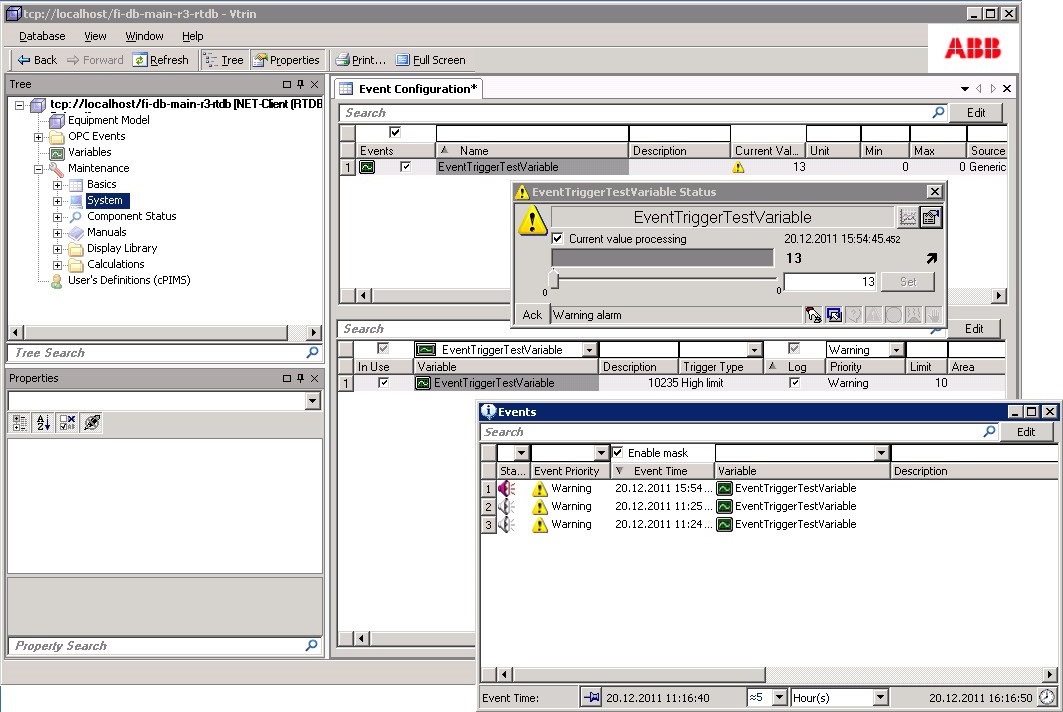
The easiest way to create event triggers is by using Vtrin. The "Event Configuration" list is found from the main tree in Maintenance\System\Events and Alarms. In the following example, a new variable, "EventTriggerTestVariable" is created. It is used to generate events whenever the current value of the variable becomes greater than 10.
- A new variable is created from the upper part of the "Event Configuration" display. If a variable is created from this display, the value of the "Events" property is automatically set to "true". If an existing variable is used, this should be set to true manually (this has to be done from the list view or from the generic properties, as the property is not available in the custom variable dialog).
- A new event trigger is created from the lower panel (from "Edit mode", click the "New" button). The property "InUse" should be set to "true". The limiting trigger value 10 is configured to the property "Limit" (by default, the "TriggerType" is already "High limit"). Finally, the value of the "Log" property is set to "true". This enables logging into the "Alarm log". In case the value of the "Log" property would be "false", the warning would only be visible from the variable instance's blinking current value with an appropriate warning icon. Changes are committed using the "Commit" button, and after that returning from "Edit mode" to "Normal mode" (Revert).
- Testing the configuration can be done by double-clicking the variable and feeding a value bigger than 10 for the current value.
The following figure illustrates the situation after the three steps above are executed.
EventEngineering Attributes (RTDB Core)
Attribute | Type | Description |
|---|---|---|
Variable (IDN) | uint32 | Reference to the variable instance where the event trigger is applied. |
PathId | GUID | Hierarchical path to the variable. |
PropertyId | GUID | Identifier of the property definition on the variable instance to which the event trigger is attached. |
ReferenceInstance | GUID | Identifier of the specific object instance that the trigger’s reference points to |
ReferenceProperty | GUID | Identifier of the property definition on the referenced instance whose value is used by the event trigger. |
EER | binary | Combines in binary format all the other attributes except IDN. |
Description | string[64] | Description of the variable where the event trigger is applied. |
InUse | bool | True if the trigger will be evaluated, false if not. |
EventTriggerId | GUID | ID of the event trigger |
Trigger | uint32 | Read the next chapter for more detailed value descriptions. |
TriggerCause | uint32 | Why the trigger actually fired |
Limit | object | Defines the limit that causes the state transition in event triggering. The type is derived from the variable instance"s type, and can be either 64bit integer or double. |
Format | uint32 | Output format for trigger |
ReturnFormat | uint32 | Output format for return |
Period | double | Time period in seconds, if the event or limit value represents some time-dependent value. |
Area | uint64 | Defines which alarm area the event trigger belongs to. The numeric value should not exceed 65535 because the value in AlarmLog is only 16 bits. If the setting is zero, the ProcessArea from the alarming Variable or Equipment property is used instead. (Version info: before 5.1/2017-04-25, the setting was ignored and worked as it was given as zero). |
DeadBand | object (float/int) | After some state change has been triggered, the return back to normal state happens once the limit has been exceeded with the specified dead band (absolute deadband used). |
External | uint32 | External event observation identification. If EventEngineering.External is greater than 0, the event observation, or limit handling, for the event is performed by the source of the value (e.g. an external data acquisition system). The event identification is provided in the latest value attribute CLEX (=EventEngineering.External), if the event is triggered (limit violated) and it has higher priority than the other external events. |
Reference | uint32 | In addition to using a static limit, there is the possibility to use another variable's value as a dynamic limit. "Reference" is set to contain a reference to the variable that contains the current value to be used as the dynamic limit. |
TriggerMethod(TriggerM) | uint32 | In case the "Trigger" is 13 ("Event trigger method"), the "TriggerMethod" defines the method that is used to evaluate the trigger condition. If the method returns true, the event state is valid. |
SuppressionMethod(SuppressionM) | uint32 | Alarm suppression method. If the conditions for the event are fulfilled, but the method execution specified by EventEngineering.SuppressionM returns a nonzero value, the specified alarm (EventEngineering.Priority) is suppressed. An indication for the suppressed alarm is set (CSAS). The event observation is continued. The special suppression method is AlarmSuppressed (11), which means that the alarm is suppressed without executing any other method. |
ActionMethod(ActionM) | uint32 | Action method to be executed when entering the event state. If EventEngineering.ActionMethod is zero, no method is executed. EventEngineering.ActionM is a user-written method. |
ReturnMethod(ReturnM) | uint32 | Action method to be executed when leaving the event state. If ReturnMethod is zero, no method is executed. ReturnMethod is a user-written method. |
Diary | bool | If true, event is stored into diary log if available. |
Log | bool | If true, event is stored into alarm log. |
OpcEvent | bool | If true, event is stored into Opc Event log. (From Version: 5.3/2022-12) |
DiaryReturn | bool | If true, event from returning back to normal state is stored into diary log. |
LogReturn | bool | If true, event from returning back to normal state is stored into alarm log. |
OpcEventReturn | bool | If true, event from returning back to normal state is stored into Opc Event log. (From Version: 5.3/2022-12) |
SetQuality (Set Validity) | uint2 | Status that the system sets for the variable when the triggering condition becomes true ("No change", "Set questionable", "Set bad"). |
Evaluation | uint8 | If the variable has several event triggers, the "Evaluation" defines the priority that the triggers are evaluated by. |
Priority | uint8 | Alarm priority used when condition is triggered. |
ReturnPriority | uint8 | Alarm priority used when returning back to normal state. |
Modified | DateTime | Row modification time shows the last time when the event trigger instance has been modified. |
RowModificationTime | DateTime | Last modification timestamp (local time) |
RowModificationTime_UTC | DateTime | Last modification timestamp (UTC) |
Speak | bool | If a sound-support package has been installed, the events generated are spoken. |
EvaluateAlways | bool | The system checks this trigger always even if an earlier trigger is active, so that multiple triggers can be active for the same variable. Notice that when multiple alarms are active, the "Alarm Priority" information of the current value only describes the priority of the first active alarm in the evaluation order. The other active alarms can be found from the ActiveAlarm class (ActiveAlarms database table), from entries where the "IsActive" property is true (version info: 5.3_25.06) |
EvaluateAlsoForInvalid | bool | Evaluate this trigger also if the current value was invalid. Without this, most triggers evaluate only for valid current values. (version info: 5.3_25.06) |
EvaluationConditionVariable | uint32 | If non-null, the value of this variable must be in the set of Condition Flags of property EvaluationConditionValue to enable evaluation of this trigger. This property together with the EvaluationConditionValue property can be used to implement "Plant Mode" specific triggers. The plant modes are integer values between 0 and 9. (Values up to 30 can be used but only the first 10 has been declared in UIStrings as Flags to be used in EvaluationConfitionValue). For example, if the EvaluationConditionValue is 48, it means that this trigger is evaluated if the plant mode is currently 4 or 5 (i.e. 2^4 + 2^5 = 16 + 32 = 48). Notice that in many cases a site has only one plant mode variable, but the configuration supports multiple of them because the setting is trigger definition specific. (version info: 5.3_25.06) |
EvaluationConditionValue | int32 | Set of Condition flags. Multiple settings can be entered separated with pipe character (|). See description of "EvaluationConditionVariable". (version info: 5.3_25.06) |
Type Enumeration of Event Trigger
Value | Description |
|---|---|
| Triggers when the value of the associated variable exceeds the value in the "Limit" property. |
| Triggers when the value of the associated variable goes below the value in the "Limit" property. |
| The maximum change per time period (the time period defined in "Period"), and the limit value is "Reference" or "Limit". Valid only for double type variables. |
| The maximum difference to the reference variable ("Reference"). Valid only for double type variables. |
| To detect binary value states. Triggers when all bits match. Valid only for int64 and binary type variables. |
| To detect binary value states. Triggers when any bit matches. Valid only for int64 and binary type variables. |
| If the value of the binary point changes more than once within the specified time period ("Period"), the event is generated. Valid only for int64 and binary type variables. |
| If the state change of a two or four signals digital input value has taken more than the specified time period ("Period"), the event is generated. Valid only for binary type variables. |
| Indicated by a separate binary variable specified in the "Reference" property. When the binary goes to 1, the event is triggered. "Reference" defines the limit indicator binary for the analog variable, and the corresponding analog variable for the binary indicator. |
| If the time since the last update (CLT) of the variable is longer than defined in the period ("Period"), an event is generated. |
| If the current value processing of the variable is disabled (EGE=false), an event is generated. |
| If the latest value has "bad measurement group" status (CLSBG), an event is generated. |
| If the status of the latest value is "bad" (CLSB), an event is generated. |
| User-written trigger method ("TriggerMethod") is used as a trigger condition. Note: the actual implementation is not documented yet in detail. |
| Time derivation aggregate is decreased, if a new pulse value has not been produced in the time interval defined in "Period". |
| Set the value of the "Reference" variable to zero, when the state changes to binary value on (1). This trigger is only valid for binary variables. The event does not stay valid and it does not cause the event actions, event logging, or alarm priority changes. |
| Reserved for RTDB_GradeServer use. |
| Triggers when the value changes more than the given absolute limit. Deadband is taken into account. |
| Triggers when the value changes more than the given signed limit (grows if positive or decreases if negative). Deadband is taken into account |
| Triggers when the value is outside of the measurement range |
| Triggers when the value is outside the measurement range and substitutes the value with the min or max value respectively. |
EventTrigger Attributes for Variables (VtrinLib)
| Column | Type | Description |
|---|---|---|
| Id | GUID | Unique event trigger identifier |
| Variable | uint32 | Variable ID this trigger applies to |
| Description | string | Variable description |
| InUse | bool | Trigger enabled |
| Period | double | Time period in seconds |
| Area | uint64 | Alarm area identifier |
| External | uint32 | External event handler ID |
| Reference | uint32 | Reference variable (dynamic limit) |
| ReferenceInstance | GUID | Referenced instance |
| ReferenceProperty | GUID | Referenced property |
| Trigger | uint32 | Trigger type (limit, state, method, etc.) |
| TriggerCause | uint32 | Cause code of trigger activation |
| Limit | double | Trigger limit value |
| DeadBand | double | Deadband for return to normal |
| TriggerMethod | uint32 | Trigger evaluation method |
| SuppressionMethod | uint32 | Alarm suppression method |
| ActionMethod | uint32 | Method executed on trigger |
| ReturnMethod | uint32 | Method executed on return |
| Priority | uint32 | Alarm priority |
| ReturnPriority | uint32 | Priority on return |
| Speak | bool | Text-to-speech enabled |
| Diary | bool | Log event to diary |
| Log | bool | Log event to alarm log |
| OpcEvent | bool | Generate OPC event |
| DiaryReturn | bool | Log return event to diary |
| LogReturn | bool | Log return to alarm log |
| OpcEventReturn | bool | OPC event on return |
| SetQuality | uint32 | Quality state to set |
| Evaluation | uint32 | Evaluation mode |
| EvaluateAlways | bool | Always evaluate trigger |
| EvaluateAlsoForInvalid | bool | Evaluate even if value invalid |
| EvaluationConditionVariable | uint32 | Conditional variable ID |
| EvaluationConditionValue | int64 | Conditional comparison value |
| Modified_UTC | datetime | Last modification timestamp |
| TriggerDescription | string | Human-readable trigger text |
Equipment Model Event Triggers
It is possible to trigger events when a specific property on an equipment instance changes. This is done using the EventTriggerEquipmentProperty class (the class name is "Event definition for Equipment Property" in user interfaces).
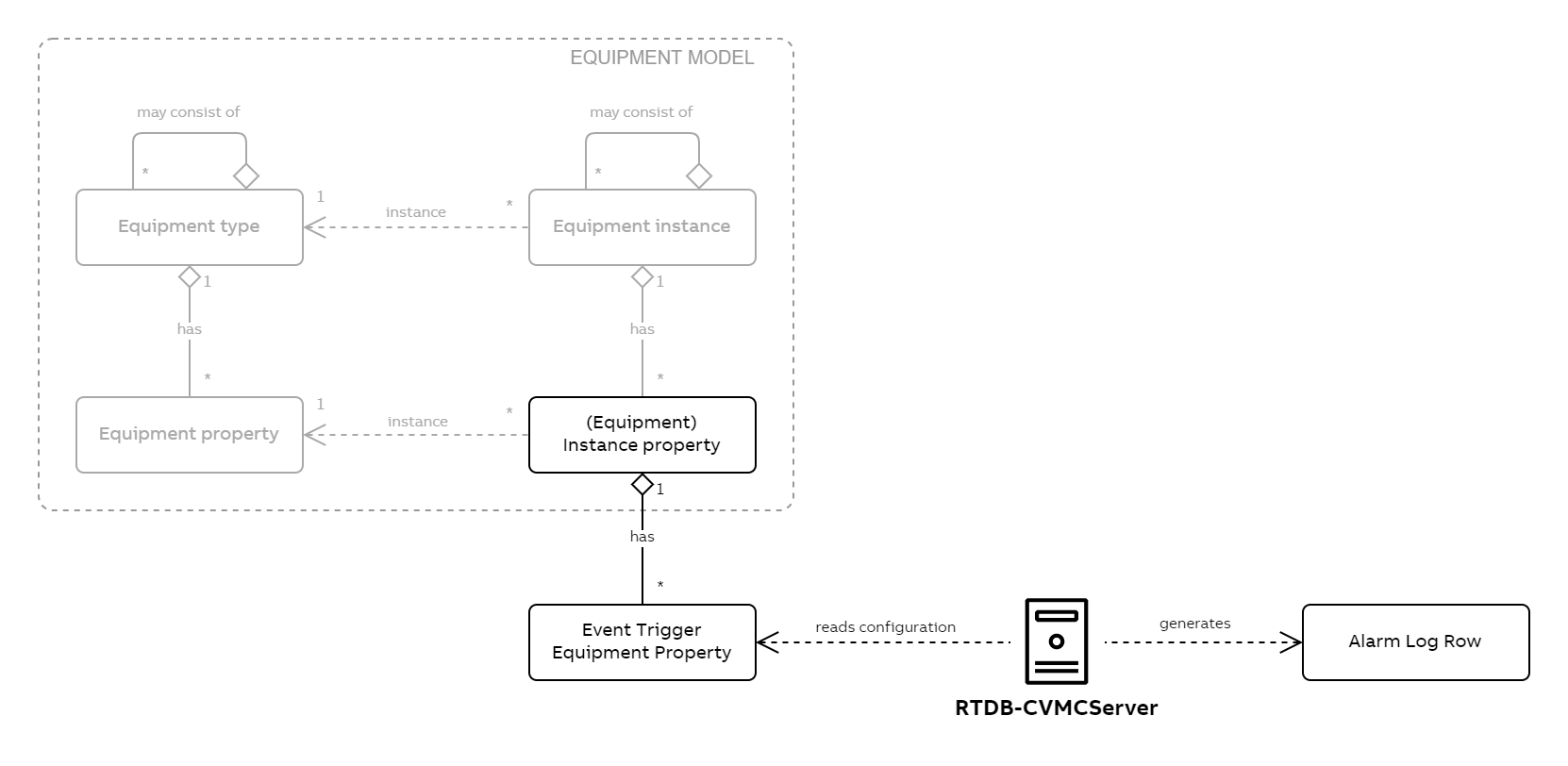
A conceptual model that shows how event triggers are related to the equipment model.
There are three ways of how property events can be set to trigger:
- When the property of a specific instance changes
- When the property of any instance of a specific equipment type changes
- When the property of any instance of a specific equipment type under a hierarchy subtree changes
From a configuration perspective, 1. and 2. are just special cases of 3. In 1., the subtree contains just the one instance and in 2., the subtree equals the whole hierarchy.
EventTriggerEquipmentProperty Attributes (VtrinLib)
| Column | Type | Description |
|---|---|---|
| Id | GUID | Unique identifier of the event trigger. |
| Instance | GUID | Equipment instance to which the trigger is applied. |
| Property | GUID | Property definition on the equipment instance being monitored. |
| Trigger | uint32 | Trigger type enum that defines how the event condition is evaluated. |
| InUse | bool | Enables or disables the trigger. |
| Limit | int64 | Limit value used by limit-based triggers. Data type must match the monitored property type. |
| DeadBand | int64 | Deadband used for return-to-normal evaluation. |
| Period | double | Time period in seconds for time-dependent triggers. |
| Priority | uint32 | Alarm priority when entering the event state. |
| ReturnPriority | uint32 | Alarm priority when returning to normal state. |
| Area | uint64 | Alarm area identifier. |
| External | uint32 | External event observation identifier. Zero means internal handling. |
| Reference | uint32 | Reference variable or identifier used for dynamic limits or comparisons. |
| ReferenceInstance | GUID | Target instance providing the referenced value for dynamic or reference-based triggering. |
| ReferenceProperty | GUID | Property on the referenced instance whose value is used by the trigger. |
| TriggerMethod | uint32 | Method used to evaluate the trigger when method-based triggering is configured. |
| SuppressionMethod | uint32 | Method used to suppress alarms when conditions are met. |
| ActionMethod | uint32 | Method executed when entering the event state. |
| ReturnMethod | uint32 | Method executed when leaving the event state. |
| Diary | bool | If true, the event is written to the diary log. |
| Log | bool | If true, the event is written to the alarm log. |
| OpcEvent | bool | If true, an OPC event is generated on trigger activation. |
| DiaryReturn | bool | If true, a diary entry is written on return to normal. |
| LogReturn | bool | If true, an alarm log entry is written on return. |
| OpcEventReturn | bool | If true, an OPC event is generated on return to normal. |
| SetQuality | uint32 | Quality value to set when the trigger activates. |
| Evaluation | uint32 | Evaluation mode controlling how trigger conditions are processed. |
| EvaluateAlways | bool | If true, the trigger is evaluated continuously. |
| EvaluateAlsoForInvalid | bool | If true, the trigger is evaluated even when the property value is invalid. |
| EvaluationConditionVariable | uint32 | Variable or identifier used as an additional evaluation condition. |
| EvaluationConditionValue | int64 | Comparison value for the evaluation condition. |
| Speak | bool | Enables speech output when the event is triggered. |
| TriggerDescription | string | Human-readable description of the trigger, mainly for UI and diagnostics. |
Updated 25 days ago