
Cyber security Development
Cyber security in the development and life-cycle processes of ABB Ability™ History
Security Development Life-cycle
ABB Ability™ History development team follows Security Development Lifecycle (SDL) from Microsoft and recommended by ABB Group Cyber Security Council, with ABB Software Development Improvement Program Security development life-cycle.
The Security Development Lifecycle (SDL) is a software development process that helps developers build more secure software and address security compliance requirements while reducing development cost Microsoft SDL
Security Management
Development Process
Cyber security development is integral part of the Continuous Release Production process.
Security Expertise - Training
Cyber security training is based on the concepts of Microsoft SDL.
- As part of onboarding process, new developer has to take the applicable mandatory cyber security trainings as defined by the ABB Group Cyber Security Council.
- Knowledge on SDL activities are shared periodically for the development staff by SDIP.
- Development team is monitoring and sharing information on ABB expectations, initiatives, offerings, etc. regarding cyber security delivered by the ABB Group Cyber Security Council in regular team meetings.
- Cyber security is frequently discussed and knowledge shared as part of the development team meetings.
File Integrity
ABB Ability™ History software is delivered to customers through ABB business line organizations as part of their products and solutions. The integrity and authenticity of the deliverables are ensured by digital signing all applicable executable and other files. More information can be found in Code Signing
Deliverables are signed with digital certificates based on ABB’s PKI (Public Key Infrastructure) as described in the ABB Cyber Security Guideline for Code Signing “ABB Cyber Security Guideline for Code Signing
Development Environment Security
Development environment is protected by ABB IS. Development is done by Microsoft DevOps tools and following Microsoft SDL
Documentation on Development Environment
Protection from Malware Propagation
As part of the release checklist tasks, deliverables are scanned with three different anti-virus scanners before made available. Anti-virus software is recommended to use as part of the solution installations, see Anti-virus software.
Controls for Digital Certificates and Private Keys
Digital certificates are used in software development and they are protected and handled according to Protection of Digital Certificates.
Related documentation on this is available in the following articles:
Vtrin Certificate Instructions
Setting Up Certificates for View
Creating a Self Signed Certificate
Infrastructure: Domain Certificate
Security Requirements for Externally Provided Components
In case of purchasing or using any new 3rd party software, the following guideline is followed: Minimum Cyber Security Requirements for Product Procurement.
Management of Third-party Software Included in the Product
Used 3rd party components and responsibilities on monitoring are defined in Included Open Source Components.
Responsible developer follows the channel used by 3rd party component provider to publish security updates. Target is to have 2 weeks time from original update or vulnerability announcement to have product patch including announced 3rd party patch.
Assessing and Addressing Security-related Issues
Issues originated from any phase of the software life-cycle, functional as well as non-functional, especially security related, are classified and software or a patch to it can't be released before all high and critical severity issues are resolved.
Security Assessment
Security assessment is performed before Gate 4 using the ABB Cyber Security Assessment Method and the results are reviewed by the respective BU cyber security responsible. Identified improvement items are entered as requirements in DevOps and scheduled to implementation as part of the development process. All “Not fulfilled” items identified during the assessment are fixed before releasing, i.e. passing Gate 5.
Specification of Security Requirements
Product Security Context
ABB Ability™ History is used to build various industrial applications and solutions that may have rather different security context. It is the responsibility of the product team using ABB Ability™ History to describe the security context as part of the security documentation of the product. This document describes one generic security context related to typical PIMS (Process Information Management System).
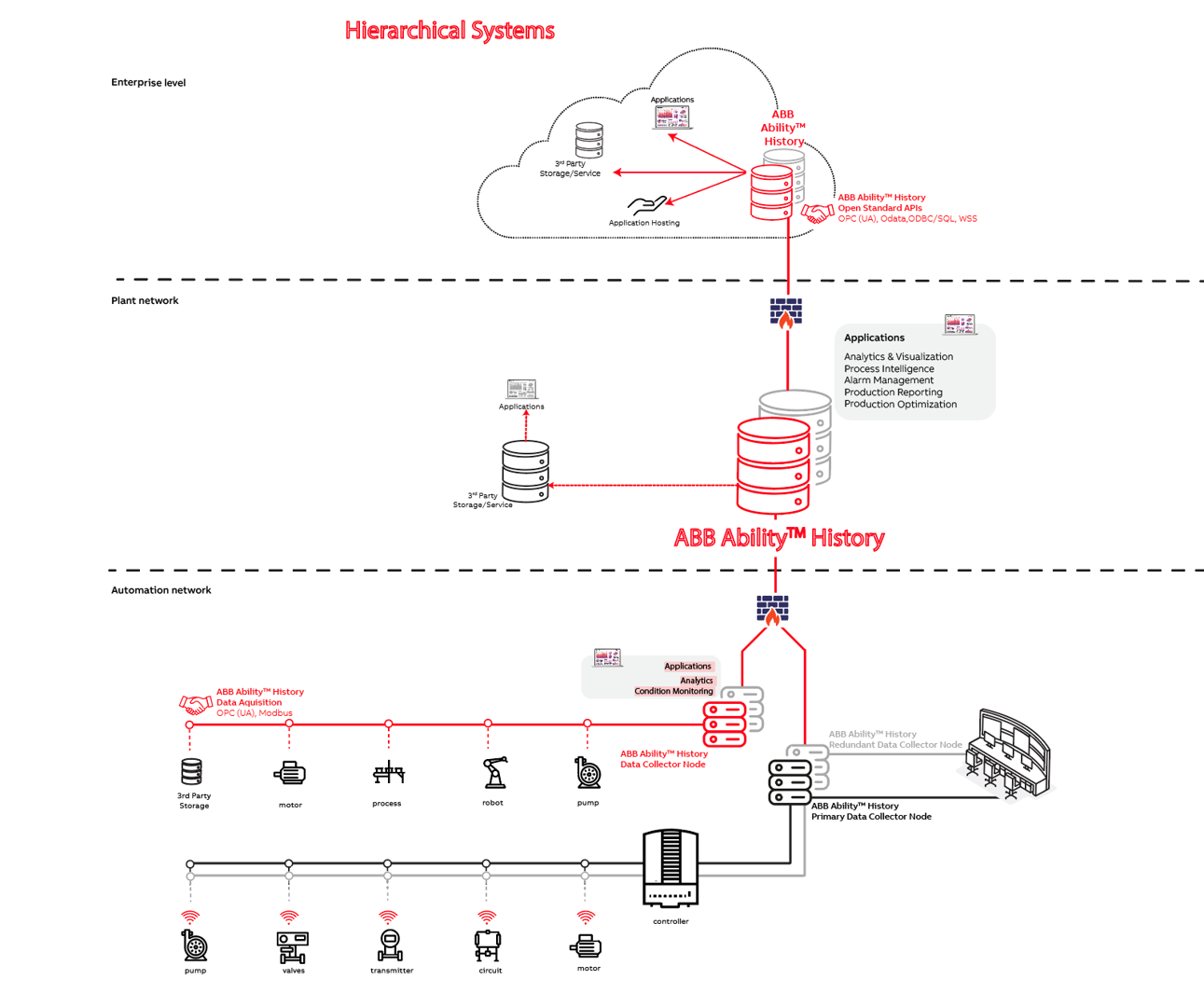
Typical PIMS system is constructed from 3 layers of systems; data collection nodes (DCNs), plant level system, and enterprise level system. All these levels are instances of the same ABB Ability™ History software with differences in the configuration parameters and services that are enabled. All systems are database centric where all the data as well as configuration is residing in database and controlled with uniform role based data access control.
DCN Level
DCNs (there can be multiple nodes) are run in automation network that is isolated from other networks with firewalls enabling only outbound port 443 for communication. DCN node is a physical computer or virtual machine with Windows or Linux operating system. Authentication of the users, typically just admin users, is handled locally in the node or from the domain controller of the automation network.
The primary purpose of a DCN is to connect devices, PLCs, and control systems to collect data with a master protocol such as OPC UA, OPC DA, or Modbus. OPC UA Client is enabled by default and it can connect to one or multiple OPC UA servers with digital certificates and subscribe data according to the configuration. Classic OPC DA Client and Modbus Master services can be enabled and configured to connect to one or more servers with the authentication methods available in the device or control systems. Master protocols can also write data back to device or control system if so configured.
DCN (Netsync service) connects to plant level PIMS system with secure websocket (wss) protocol using digital certificate for authentication. Netsync transfers data from DCN to plant level system and back according to configuration.
Plant Level PIMS
Plant level system collects data from DCNs, hosts applications, provides APIs, transfers data to enterprise level (Netsync), and serves the users with UIs. Plant level system is typically run in redundant configuration where both of the nodes are providing the same services concurrently and maximizing the system availability. System-to-system data transfer between DCN, plant level, and enterprise level supports automatic data backfill functionality to ensure consistency of the data.
Plant level node is a physical computer or virtual machine with Windows or Linux operating system. Plant level node is connected to customer AD or other authentication service to authenticate users. System to system connections are authenticated with digital certificates. Different APIs/protocols may have their own service to serve clients and systems, but all connections to database are handled by Vtrin Netserver that enforces authenticated connections, role based data authorization, and keeps audit logs.
Enterprise Level PIMS
Enterprise level system collects data from plant level system(s), hosts applications, provides APIs, and serves the users with UIs. Enterprise level system is typically run in redundant configuration in virtual machine or container environment in Cloud. Enterprise level node is connected to (federated) customer AD or other authentication service to authenticate users. System to system connections are authenticated with digital certificates.
Threat Model
Networking Protocols and Security Critical Components
Supported protocols for 3rd-party integration are:
- OPC UA (Unified Architecture) (client and server)
- Vtrinlib is the most flexible interface and available as .NET client API. Other interfaces are built on top of Vtrinlib. VtrinLib is available also as REST API.
- OData API is for doing calculations and analytics on top of History. It supports reading and writing timeseries and structural data.
- ODBC is a standard interface for databases, good alternative for maintenance and reporting.
- WSS server API connections can be done with any standard WebSocket library compliant with RFC 6455.
- OPC Classic (DA and HDA and) (client and server)
- Modbus (client i.e. master)
- File-input (e.g. files provided with FTP communication)
- CTS (Common Transport Service, a proprietary client-server communication protocol) (client and server).
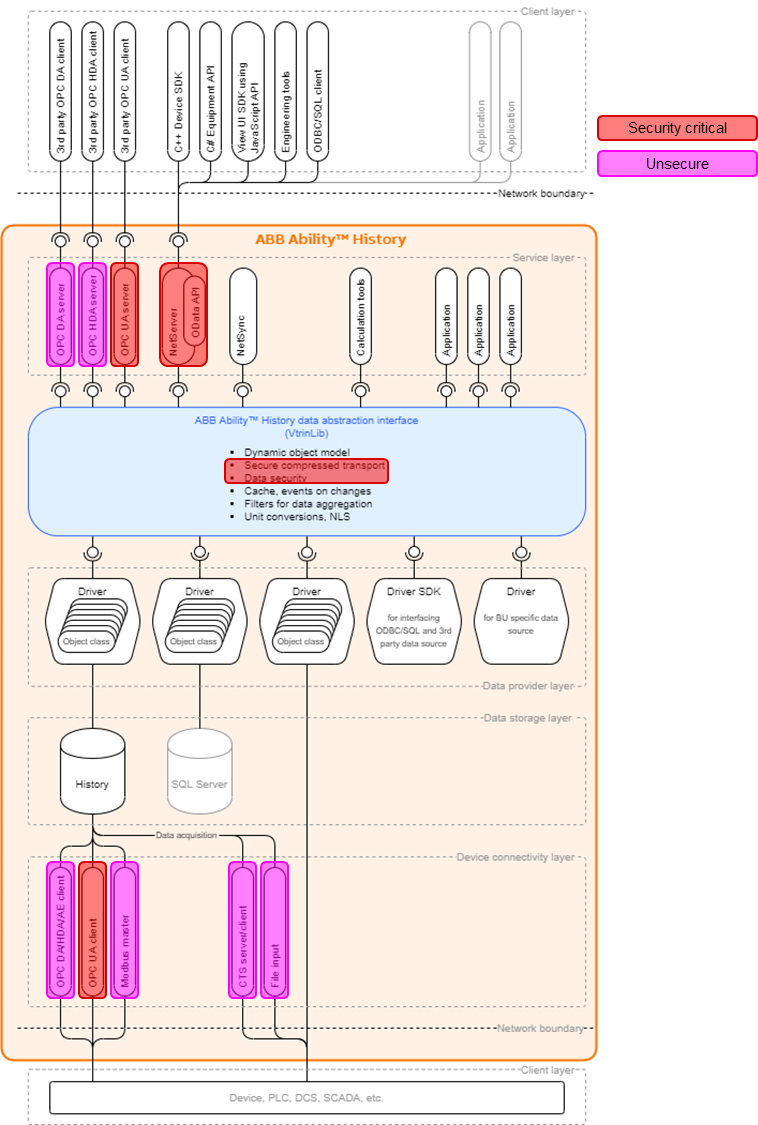
Picture below presents the architecture and how supported protocols fit into it. Picture as well communicates unsecure protocols clearly. Many time it is acceptable to use unsecure communication mechanisms as well when History and related clients are in same protected network. Decisions have to be done case by case.
Secure Protocols
By default only secure protocols are used in application-layer communication, though for the compatibility reasons also unsecure protocols are supported such as Modbus data collection. For more information see:
Server side secure components allowing network access are:
- OPC UA (Unified Architecture) server
- Vtrinlib .NET client/server API. VtrinLib is available also as REST API
- OData API
- ODBC client that is connecting to Vtrin-Netserver
- WSS server API connections can be done with any standard WebSocket library compliant with RFC 645
Client side secure component for data collection is
- OPC UA Client that can handle DA, HA, and event collection
Unsecure Protocols
Addition to secure protocols having industry best practise security, History supports server-side components which are providing networks access, but are not as secure than recommended ones. Server-side components where security can't be supported with industry best practises are:
- OPC Classis Data Access Server (DA) (older version of OPC for real-time data access)
- OPC Classic Historical Data Access Server (HDA) (older version of OPC for historical data access)
Client-side unsecure protocols (and components implementing this) handling data-aquisition in Device Connectivity layer are:
- OPC Classic Data Access Client (DA)
- OPC Classic Historical Data Access Client
- OPC Classic Alarms and Events Client
- Modbus Master
- CTS (cpmPlus History Common Transport Service, a proprietary client-server communication protocol on top of tcp.
- File-input (RTDB-EcPerfmon is reponsible from that). It is only reading files from defined folder, interpreting data from files and inserting it into database. It is not secure or unsecure inhenrently but any protocol such as FTP could be used to produce files to specified location. Usual way of working would be to use e.g. Windows Internet Information Server to setup FTPS server (FTP over SSL). IIS is not supporting SFTP (FTP over SSH). However as this component operates in local file system, stating it unsecure as such would not make sense.
Classic OPC servers and clients are based on Microsoft COM/DCOM technology, they are not considered to provide anymore "industry best practise" security available e.g. in OPC UA. However these components are so widely used for integration purposes that business-decision to use those in secure network could be justified. Same applies to Modbus and CTS. Recent specification versions of Modbus addresses security aspects as well, but current implementation is not supporting those, it is having NO security. When OPC Classic and DCOM is compared to what is called "industry best practice security" shortcomings can be found e.g. in areas:
- Difficult configuration of firewall due to dynamic port range used. Having difficulties in this area is a big security risk as solution many time is to relax firewall rules even too much.
- Algorithms available to encrypt the traffic in DCOM are not considered to be safe anymore.
- No PKI support available in DCOM. Certificate based authentication of users or software components is not available in DCOM. Certificates, when they are used to identify software components, can prevent man-in-a-middle attacks. For user authentication using certificates can replace using username-pw authentication. Username-pw authentication is not inherently unsecure, but when implemented badly it might be a security risk many people want to avoid.
- Generally configuring security is done in OS level with DCOM and Windows security. UA Security is built-in to specification and software stack implementing it, making easier to build and enforce secure integration solutions.
CTS is proprietary communication protocol on top of tcp-layer. It is completely unsecure, without encryption or client authentication. It should be used only in secure well isolated networks. Alternative secure communication mechanism here as well is OPC UA.
Addition to these one widely used 3rd party integration tool is SQL/ODBC. History provides ODBC connectivity either using Vtrinlib data-abstraction interface connectivity (recommended and secure way of communicating). In this case ODBC acts as client to Vtrin-Netserver. ODBC can as well be used in server machine and with a direct server connection where ODBC client maps database tables to the client process. In that case there is not network access involved and all communication is done in server computer. This scenario is not visible in architecture picture above. For compatibility reasons also some older versions of ODBC with network support are available and can be used in isolated environments, but they are not enabled by default due to lack of security and they are not recommended to use.
Flow of Categorized Information Throughout the System
Data can be divided in the following categories:
- System configuration, e.g. services and their parameters, enabled APIs, system hierarchies, history collection rules, authentication services, and certificates. System configuration is stored in RTDB and in separate files. System configuration is created with the engineering tooling by system engineers.
- Application configurations, e.g. information models, calculations, UIs, and dashboards. Application configurations are created with the engineering tooling by application engineers and stored in RTDB.
- Application data, e.g. instances of the information models and data collection and transfer rules. Application data is stored in RTDB.
- Process and asset data is collected from the devices, PLCs, and control or other systems with master protocols or produced by the data provides with the APIs to the information model instances and event logs. Data is stored in RTDB. Data transfer can be bidirectional.
Users are using the data from RTDB with UIs or external tools through APIs.
Trust Boundaries
It is zero trust. The only trust boundary is the server computer where the software is running. Redundant system is considered as one trust boundary where the connection between the two computers must be ensured with secure connection. There must not be allowed any interactive users to the server computers, except system administrators for configuring it.
Processes
System processes are described in Software Stack
Data Stores
RTDB is the database where all the data is stored.
Interacting External Entities
External entities can be the users of the system, application engineers, external applications, other systems, firewalls and other network components. They are all considered threats for the system.
Mitigations of the Threats
There are basically zero trust for any external entity and STRIDE methodology is used to analyze the possible threats and protect from them. STRIDE is for mnemonic for:
- Spoofing
- Tampering
- Repudiation
- Information disclosure
- Denial of Service
- Elevation of privilege
Product Security Requirements
Reference to Microsoft SDL documentation: https://www.microsoft.com/en-us/SDL/process/requirements.aspx
- Cyber security requirements as well as found security bugs/issues are handled according to the normal development workflow management. Development team uses Microsoft DevOps to track requirements and derived user stories, as well as bugs. Client initiated feature requests are handled in the ABB Ability™ History Ticketing Tool
- Security related bugs and user stories are not identified separately, because security is one of the fundamentals of the software production, not a separate attribute. DevOps is also considered to be rather public information and identifying security designs separately could be considered as separate threat.
- All security bugs/issues exceeding a previously defined and documented level are fixed, mitigated, or accepted with documented approval (DSAC meeting minutes) before product release.
Security Requirements Review
Security requirements and bug fixes are reviewed, updated as necessary, and approved to ensure clarity, validity, alignment with the threat model, and their ability to be verified. The review is part of the CCB (Change Control Board) process and includes the following personnel:
- Product Manager
- Support Manager
- Architects
- Test Lead (and testers if needed)
- Scrum Masters (and developers when needed)
Secure by Design
Secure Design Principles
When designing the software, the principle of lean architecture shall be followed to ensure that the architecture is the most simple that can provide the required functionality and ensures high quality including good cyber security. The authentication and authorization models must be simple to understand and engineer. All public APIs shall follow the same model and configuration as far as possible. The server size API services are implemented to handle the data in user context and let the final backend service to perform the data authorization. There is zero trust for the users of the APIs.
Defense in Depth Design
System architecture shall be designed to enable as much network segregation as needed to protect the different system parts from each other and multiple layers of security zones.
Security Design Review
Design reviews are conducted to identify, characterize, and track security related issues in design.
Secure Design Best Practices
Best practices shall be applied in the design process including e.g.
- least privilege
- using proven secure components
- simple design
- secure design patterns
- attack surface reduction
- documenting the trust boundaries
- disable all non mandatory functionality
No Backdoor Accounts and Hardcoded Credentials
ABB Ability™ History does not contain any accounts, passwords, secret or private keys, or certificates that cannot be changed or removed by authorized end-user.
Cryptographic Algorithms and Security Functionality
The following list contains links to documentation on cryptographic algorithms and other security functionality used or implemented by ABB Ability™ History:
Cryptographic algorithms used in cpmPlus
Asymmetric RSA Encrypted Key Exchange
Authentication and Access Control
Used Components and Resources
The following documents contain information on the resources used by ABB Ability™ History:
Included Open Source Components
Secure Implementation
Security Implementation Review
All implemented code are going through pull request review by senior developer or architect that the coding standards and security designs are followed.
Secure Coding Standards
Coding standards are maintained continuously and good security practices shared in the daily architecture patrol meetings.
Static Code Analysis
Static code analysis are performed on all new and changed code, and on risk based assessment for selected existing code, and specifically trying to address security vulnerabilities. Periodic static code analysis report is compared to what it was in previous report for old functionality and in case of differences required actions are taken. This action is executed by Architect.
Running static analysis on development workstations:
When coding with Visual Studio, static code analysis can be run by selecting ‘Analyse’ menu and command ‘Run Code Analysis’. It is possible to run the analysis for the whole solution or the currently open file this way.
If the project being developed is managed code (C#, Visual Basic), the compiler of Visual Studio makes static code analysis continuously as the code is typed.
Developers are responsible to run static code analysis for all new code. Architects shall decide when to run static code analysis for all or selected existing code.
Running static analysis on build servers:
When code is build on build servers, a parameter needs to be added to msbuild.exe command for the static code analysis to be run. The parameter is:
/p:RunCodeAnalysis=true
Also the ruleset to be used can be specified with this parameter, if needed.
Release Deliverables
ABB Ability™ History software is digitally signed for all released versions, including update packages. Official software deliverables are found by following documentation: Installation on Windows or Installation on Linux or Running in Docker.
Note on deliverable versionsThe "release version" (Release Type: Release to Manufacturing) should be used for production. The "programming version" is good for testing as it contains debugging symbols for all binaries. From release version debugging symbols have been removed for all C++ components. For C# libraries symbols (pdbs) are not removed as the binary executable contains source code information anyway and pdbs only bring line numbers visible. Addition to that global and local variable names are visible. However, having symbols removed only slows down reverse-engineering, and majority of the information needed is available in binary itself. Benefits of having symbols for C# is big as with that way developers are many times able to understand root causes of site-incidents only by seeing log file from one-time incident.
Following stackoverflow discussion discusses pros and cons to anyone judge:
However if C# symbols files is a problem they can be removed by running:
cd /d %RTDBRoot64%
del *.pdb
cd /d %RTDBRoot32%
del *.pdb
after installer has been executed. Deleting of the pdb should be done after install, not from CD Kit.
Security Verification and Validation Testing
DSAC Robustness Testing
DSAC testing is performed by ABB DSAC test team regularly (at least once per year) to ABB Ability™ History software and found issues fixed.
According to the current documentation DSAC testing includes at minimum:
- vulnerability testing
- penetration testing and
- independence of testers as defined in the DSAC test documentation.
Software Development Integrated Testing
Software developers are performing security testing and implementing automated unit tests as part of the development process whenever there is need to test security functionalities.
Test team is implementing automated tests and performing manual testing as part of the regular release testing including also cyber security testing. Also so called preDSAC testing is part of the tests performed by the product test team.
Management of Security-related Issues
Receiving Notifications of Security-related Issues
Security related issues are handled similarly as all other issues:
- Issues from security verification and validation testers are tracked in DevOps
- Suppliers of third-party components used in the product in DevOps
- Product developers and testers in DevOps
- Product users including clients and end customers in Jira.
Reviewing Security-related Issues
Security related issues are reviewed in weekly CCB meeting and assigned for further investigation or other actions as required.
Assessing Security-related Issues
Security related issues are assessed in weekly CCB meeting or separately by architects including
- Assessing impact with respect to
- the actual security context in which it has been discovered
- the product's security context
- the product's defense in depth strategy.
- Severity as defined by vulnerability scoring
- Identifying all other products and versions containing the issue
- Identifying the root cause of the issue
- Identifying related security issues.
Addressing Security-related Issues
Security related issues are addressed according to its priority and reported based on impact assessment. This may include
- Fixing the issue through one or more of the following:
- Design and/or implementation change
- Defense in depth strategy change
- Addition of one or more security requirements and/or capabilities
- Use of compensating mechanisms
- Disabling or removing the feature
- Creating a remediation plan to fix the problem
- Deferring the problem for future resolution and specifying the reason(s) and associated risk(s)
- Not fixing the problem if the residual risk is below the established acceptable level of residual risk.
In addition the following shall be done:
- Inform other processes of the issue
- Inform third parties if the problems are found in included third-party code.
When security related issues are resolved, recommendations to prevent similar errors from occurring in the future shall be evaluated.
Disclosing Security-related Issues
Product users shall be informed according to reporting templates about reportable security related issues in timely manner with content including
- Issue description, vulnerability score, and affected product versions
- Description of the resolution
The strategy for handling discovered third-party component vulnerability shall take into account the possibility of premature public disclosure by the third-party component supplier.
Vulnerability Handling
Vulnerabilities shall be handled according to ABB Software Vulnerability Handling Policy
Vulnerability handling process takes place in control of Product Manager with the following communication channels and responsibilities in each process phase:
- Primary communication channels for the Clients are Teams channel, Security Bulletin Board, and direct contacts by L4 service Manager.
- L4 service Manager is responsible for preparing the communication material and communication of the progress to Clients as well as to Group Cyber Security Council at each phase of the vulnerability handling process.
- Product Owner is responsible for the Initial Triage, Investigation, and Remediation phases.
Security Update Management
Security Update Qualification
Testing validates that
- Security updates created by the product developer address the intended security vulnerability
- Security updates do not introduce regressions and are not contradicting other operational, safety or legal constraints.
Dependent Component or Operating System Security Update Documentation
If compatibility issues are found with dependent component or operating system security update, users shall be informed and the issues fixed as other security issues.
Security Update Delivery
Security updates are delivered as other deliverables and made available for all supported products and versions with the possibility to verify the patch authenticity.
Timely Delivery of Security Patches
Security patches are delivered promptly and taking into account the following factors:
- The potential impact of the vulnerability
- Public knowledge of the vulnerability
- Whether published exploits exist for the vulnerability
- The volume of deployed products that are affected
- The availability of the effective mitigation in lieu of the patch.
Security Guidelines
Product Defense in Depth
Product documentation shall describe the security defense in depth strategy supported in installations, operations, and maintenance including:
- Security capabilities implemented by the product
- Threats addressed by the defense in depth strategy
- Mitigation strategies for known security risks.
Legal Disclaimer
Legal disclaimer regarding cyber security shall be included when creating end customer documentation. Guidance for disclaimer https://search.abb.com/library/Download.aspx?DocumentID=9ADB006607&LanguageCode=en&DocumentPartId=&Action=Launch .
Deployment Guidelines
ABB Ability™ History does not contain any end-user documentation, but there are documentationfor the ABB product teams that are using ABB Ability™ History in their products and solutions.
Hardening
Purpose of hardening is to minimize attack surface and ensure system is doing what it promises to do, but nothing else. Some of the common hardening examples are listed here:
https://en.wikipedia.org/wiki/Hardening_(computing)#Other_examples
Hardening can be done in different levels. One approach is to categorize those like below:
- Application hardening
- Operating System hardening
- Hardware and infrastructure hardening
Recommendation is to use standard Windows operating system installation without changes before installing the software (No OS-hardening). This ensures smooth installation experience and well working product. Other reason for such a recommendation is testing, which soon requires significantly more resources in case all OS services are not available. In other words: All operating system services coming with default Windows installation are required to be available.
From Application hardening perspective, it is recommended to follow “Secure-by-default” principle, which together with proper firewall setting provides good level of security. The following list covers some aspects from OS hardening and Application hardening. All responsibility of implementing and the consequences of hardening are with the organization using ABB Ability™ History software:
- Ensure computers, other infrastructure components, and Operating system are properly configured and maintained.
- Configuring firewall properly. Firewall rules are simple: starting from version 5.0 all communication related to getting data to user interfaces, or communication done in system topology, is done through tcp-port 443. In case older versions (4.5 or 4.6) are used in hierarchical topology instructions to configure firewall are found from installation kits document: \Project CPIMS\Project CPIMS RTDB Setup Instructions.txt (under "Firewall configuration instructions")
- Configure virus scanners properly, exclude database directory (%APP_DATAPATH%) and backup directory (%APP_BACKUP_ROOT%). Scanning those directories may have serious negative impact in database performance
- Ensure OS updates are installed (recommendation is to keep OS updated, all software testing is done with recent OS patches, including testing of service releases and hot fixes)
- Decide password policies
- In case using organization wants to accurately follow the paradigm where all unused software features are removed from OS it is up to using organization to ensure that product software continues working
- In case using organization wants to accurately follow the paradigm where all unused software features are removed from product software it is up to using organization to ensure that product software continues working as expected from remaining parts. Process of ensuring this includes testing and reading related product documentation.
Product Specific Security Documentation
It is recommended that products that are using ABB Ability™ History provide specific security documentation on the following topics:
- Defense in depth measures expected in the environment
- Security hardening guidelines
- Secure disposal guidelines
- Secure operation guidelines
- Account management guidelines
- Secure boot guidelines
Updated 9 months ago