
Time series concepts
This article guides you through the important time series structures and design choices. First the conceptual model is described and then supplemented with more details in the configuration model. Time series data is described in Time series .
Conceptual model
Conceptual model describes how time series concepts relate to each other inside ABB Ability™ History. The conceptual model is presented below with a simplified UML. The time series data are highlighted in blue color and the rest are metadata that is describing the time series data.
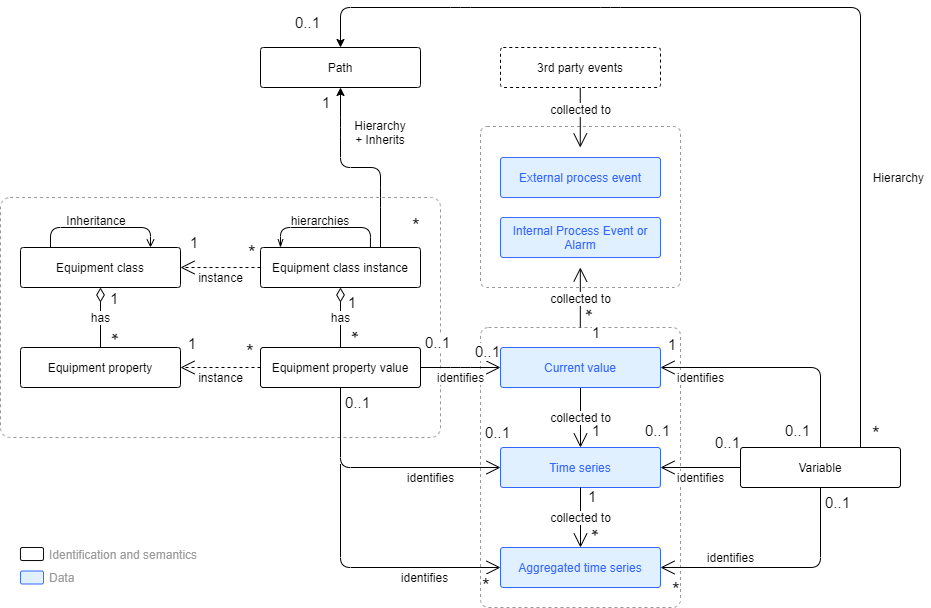
The conceptual model ties together the most important time series concepts.
The conceptual model can be divided into four separate concepts; time series, variable, equipment model, and events.
Time series and current value
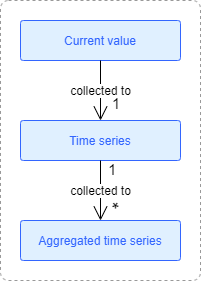
Current value is the value of a measured or calculated property at the current time. Current value can be of any primitive data type such as boolean, integer, floating point, or array of the primitive type, or enumeration, or text. Time series can also be of type blob, but there isn't a separate current value for it to avoid duplicating the data. Current value contains also the quality status and time stamp telling when it has been measured or produced.
Time series, also called raw history, is the history of the current value, though it can also represent the future in case of predicted value.
Aggregated time series is e.g. statistical aggregate of the time series such as one minute time average, one hour maximum, 15 minutes standard deviation, or one hour forecast. There can be any number of aggregated time series for each variable or equipment instance. Aggregated time series can be defined to be collected automatically by ABB Ability™ History or they can be calculated or produced by an external application. Aggregated time series can be accessed with all the APIs and used in calculations. In case there is not stored suitable aggregated time series, the APIs are also supporting online aggregation from the raw time series or aggregated time series e.g. "monthly maximums of 15 min standard deviations for the last year" or "histogram of the one hour minimums for last month".
History tables - Current History & Stream History
There are basically two types of history tables; CurrentHistory and StreamHistory.
- StreamHistory is optimized for recording of the raw history from sensors and other data sources with efficient (lossless) compression. Stream history is optimized for fast data recording, efficient storing, and fast reading of long time series. StreamHistory supports maintenance of the history values, but it is optimized for write once and read frequently type of use.
- CurrentHistory is optimized for frequently updated history values, i.e. why it is better for calculated values as well as aggregated values that typically need to be recalculated. It is important to select the right history table type for each signal.
A history database can contain any number of history tables of both types CurrentHistory as well as StreamHistory. History tables can be created e.g. to particular application use or storing some aggregated values such as daily averages or laboratory measurements. Each Variable or Equipment Property has an attribute that defines its' default history table, where the raw history is recorded. Calculations and applications as well as aggregation definitions can store the respective values to any other history table.
Applications can also use customized history tables that contain other types of data than just the history of the values. Customized history tables are created from CurrentHistory type by extending the row with additional attributes.
Variable
Variable is a basic object type that is used to engineer time series data. Variable represents measured or calculated value, and identifies a current value. Variable describes the data type, engineering unit, description, value limits and other attributes of the current value. Variable also defines how data is preprocessed and compressed before storing.
Equipment model
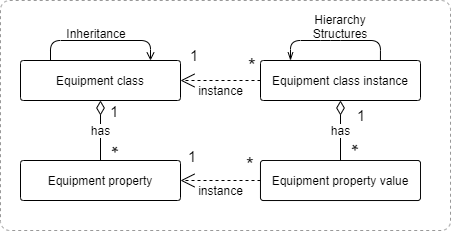
The equipment model is a semantic data representation model for defining data structures for various types of real world assets. Equipment Model supports inheritance to enable modeling of asset families and the various variants. Equipment model is constructed of properties, functions, interfaces, and tunnels. For simplicity the above picture only describes the properties.
Equipment instances can be organized to multiple hierarchies to describe real word factories, production lines and their subunits, and functional relations. Path is a non-typed equipment instance that is used to create structures together with the equipment instances. Each equipment instance, except the root, has a parent that can be a typed or non-typed instance. Variables can also have parent in the same hierarchy.
Equipment property value can be a maintainable static value of any basic data type, a reference to some other object, or historized property that contains a reference to current value.
Process events
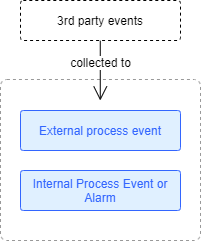
Internal process events and alarms are collected from the current value into time series data table that can be used to e,g, alarm management or monitoring the history of process events. Event and alarm statistics can be calculated online for analyses and stored as KPIs, and notifications can be initiated.
External process events are collected from devices and control systems with data acquisition protocols such as OPC (UA) AE or they can be stored with APIs. External process events can be used for statistical analyses, process and production monitoring, alarm management, and they can be further exposed in APIs such as OPC UA.
Time Series Configuration
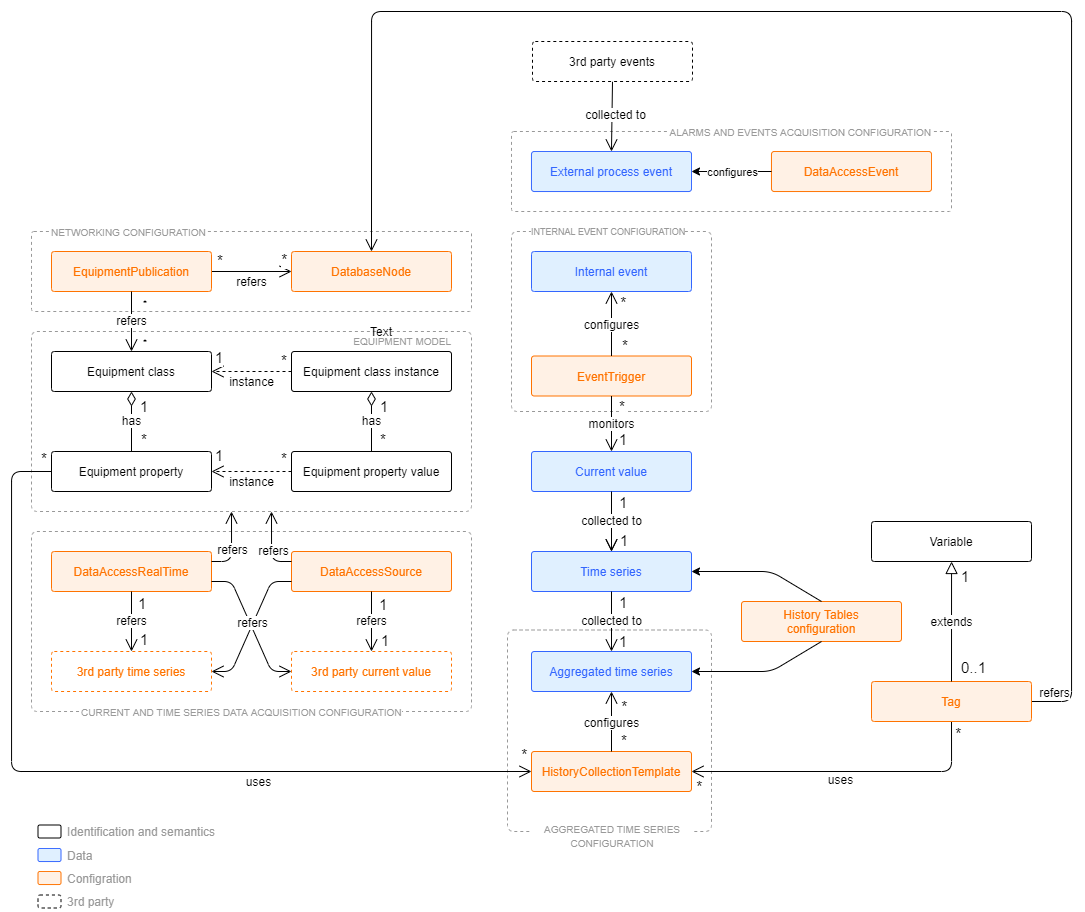
The picture above extends information modeling picture by addressing also configuration. Configuration related terms are highlighted with orange and time series data are highlighted with blue color.
The big picture is divided into five groups that represents five different configuration areas. Those groups are:
- Aggregated time series configuration
- Internal event configuration,
- Alarms and events acquisition configuration,
- Networking configuration
- Current and time series data acquisition configuration.
Next, the configuration model will be broke down by discussing those groups separately.
Aggregated time series configuration
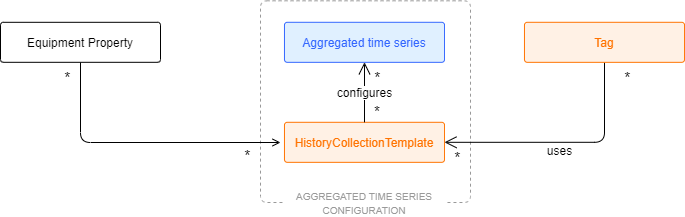
Aggregated time series configuration
The HistoryCollectionTemplate class defines which kinds of aggregated time series are collected for each current value. By default, there are history collection templates defined for "Average (AVG)", "Sum of Values (SUM)", "Minimum (MIN)", "Maximum (MAX)", "Deviation (DEV)", "First Value (FVA)", "Last Value (LVA)", "Operating Time (OPT)", "Startup Count (CNT)", and "Forecast Averages (FOR)". Tag and equipment model property have attribute called HistoryCollectionTemplates that is used to define which history collection templates are applied to the current value.
Each HistoryCollectionTemplate defines the chain of aggregated time series using its property "Template". The default templates consist of three periods: 1 minute, 1 hour and 1 day. The 1-minute aggregate is collected from raw time series, 1-hour aggregate is collected from 1-minute aggregate, and 1-day aggregate is collected from 1-hour aggregate. The time periods and collection chains can be freely configured and new ones added.
Time series are stored in history tables. There can be any number of actual tables with different retention policies. History tables are defined in HistoryTables configuration table and HistoryCollectionTemplate are referring to those table definitions when defining what an aggregate to be collected from one table to another one.
Aggregated history tables are typically periodical meaning that most of the values are representing some time period such as one hour, but they can also be non-periodical. Standard installation contains predefined aggregated history tables that can be modified and new tables added.
Alarms and events acquisition configuration
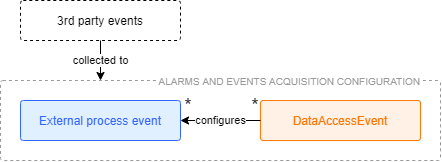
Alarms and events acquisition configuration
When using master protocols such as OPC UA Client to collect alarms and events, the collection definitions can be configured with DataAccessEvent. External events and alarms are stored into the tables OpcEventLog or EquipmentEventLog.
Internal process event configuration
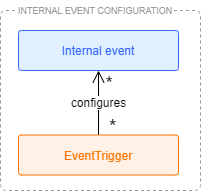
Internal event configuration
Contrary to external events, internal events and alarms are generated within the system based on triggers set to current values or created by calculations or other applications. Any number of event triggers can be set for each current value. Event trigger is monitoring the current value and creates an event or alarm, if the value meets the conditions. The basic trigger types are low value, high value, rate of change, difference to reference value, binary state change, and digital input indicated analog measurement limit. For each trigger type, the limit type can be either a fixed value or other measured or calculated current value. Events can also be created with calculations to implement other type of triggers.
Networking configuration
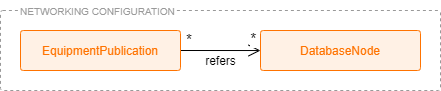
Networking configuration
Multiple ABB Ability™ History nodes can be connected to each others to form hierarchical or networked systems that exchange data between each others. The data exchange is primarily defined with equipment models in EquipmentPublication class. Data can also be exchanged with foreign systems if there is a common protocol available and if not there is SDK to add new protocols.
ABB Ability™ History nodes shall be defined in DatabaseNode class. It defines behavior and role of the database node such as whether the node is in high-availability configuration with another node, or if the node has any children in hierarchy. Data acquisition definitions may define in which node the data is collected.
Data acquisition configuration
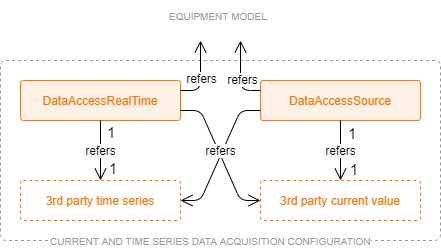
Data acquisition configuration
For collecting data to historized equipment property with a master protocol such as OPC UA client or Modbus master, the data acquisition can be configured using the DataAccessSource and DataAccessRealTime classes. Similar configuration for variable is available in (DaPath property) of Tag class.
Updated 9 months ago