
Networked systems - NetSync
This page gives an overview of the concepts related to Vtrin-NetSync (later just NetSync). It is an RTDB service that syncs equipment model instances and their data between ABB Ability™ History nodes. It is used to build networked systems from multiple History nodes. NetSync provides high-performance capabilities for syncing large amounts of time-series data between History nodes, and also from History to 3rd party systems.
For a quick start to get NetSync up and running see, NetSync - Getting started.
For reference and configuration instructions, see Networking systems using equipment publications.
Features
NetSync provides the following functionalities:
- Numerical time-series data
- Process events
- Online sync of process events (Equipment events and OPC events)
- Writeback
- Online writeback of live values (CurrentValue)
- Equipment model
- Sync new equipment types
- Incremental modification or deletion of equipment types is not supported
- Sync equipment instances
- Sync new equipment types
- Backward compatibility
- Sync time-series data from Variables into Equipment model
- Extensions
- Sync data to non-History datastores, such as Azure Data Lake.
Vtrin-NetSync Parameters
- --logfile <logfilelocation>
- Logfile to the specified location. If the logfile doesn't contain filename, then Vtrin-NetSync.log will be used. Example: If --logfile C:\myrtdb\diag\mylogfile.txt was given then Vtrin-NetSync may create the logfile in following format: C:\myrtdb\diag\mylogfile_2022-02-22.txt
- Use dot and directory separator to use current directory instead of simple logfilename.
Concept
The purpose of NetSync is to sync equipment model-related entities, such as time-series data and equipment instances, between two History nodes. These nodes are called the source node and the target node.
Typically, NetSync is run on the source node. This is because in a typical networked system, the source nodes are usually placed in a more secure network than the target node.
However, NetSync can also be run in the target node or any other machine. In some cases, such as when the source node has an older History version that is missing NetSync, running NetSync on the target node is the only possibility.
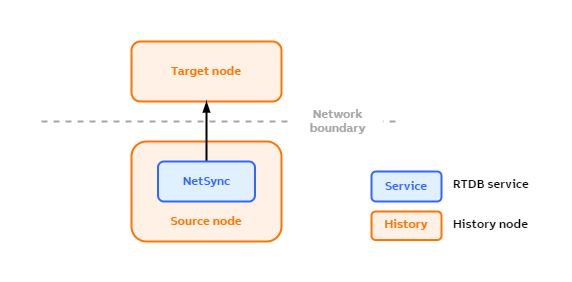
Running NetSync in the source node with a network boundary between the source and target nodes.
Data sync modes
Online sync
For most entities, NetSync supports online sync. This means that values for an equipment property and events are propagated to the target node when they are ingested in the source node. For this to work, the target node needs to be reachable when changes happen on the source node. If there's an issue, for example, the network goes down for a while, the entities will not be synced to the target node from this period at all.
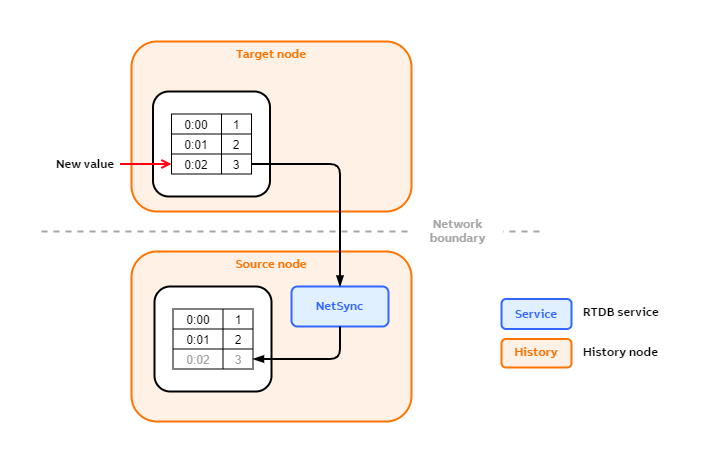
In the picture below, the current value of an equipment property is updated with value 3 and timestamp 0:02 on the source node. NetSync listens the events for changes and sends the new value to the target node, updating its current value to be in sync with the source node.
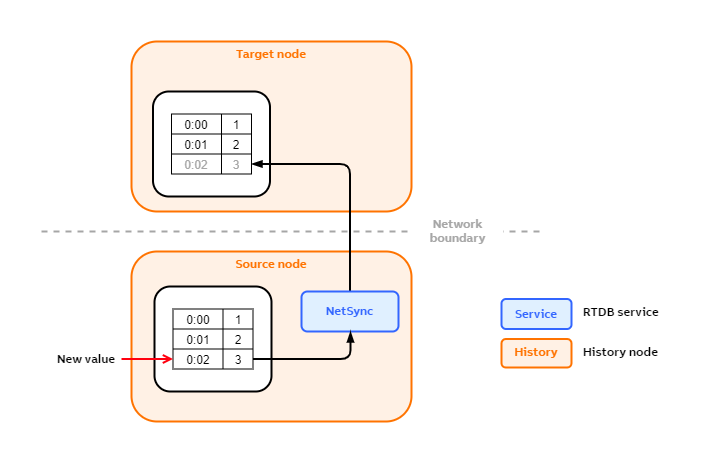
Online syncing of numerical time-series data.
Backfill
After a network failure or other connectivity issue, NetSync tries to feed the missing time series to keep the data in target node consistent. The functionality aims to fix single failure and doesn't ensure that the databases are consistent after multiple failures between the consistent states or in case there has happened data maintenance in the past. However, backfill can be triggered separately to fix this kind of situations.
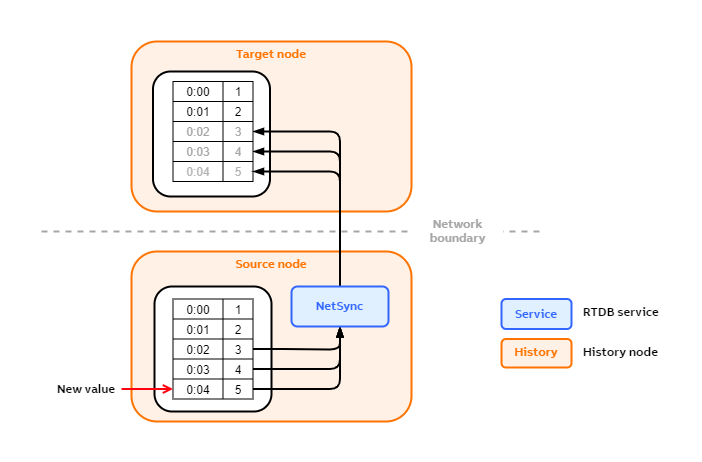
Backfill of numerical time-series data.
The picture above shows how historical data backfilling works. Initially, the connection between the source and target nodes is working. Both of the nodes have the time-series values 1 and 2.
Next, the connection between the source and target nodes goes down. The current value of the time-series in the source node is updated first to 3, then to 4. Since the connection is offline, these values won't be synced to the target node.
After the current value on the source node has been updated to 4, the connection comes back online. NetSync doesn't yet sync the values 3 and 4 to the target node.
Next, the current value is updated to 5 on the source node. At this point, NetSync starts to sync. When it tries to sync the latest change to the target node, it notices that the last value on the target node is 2. Therefore, NetSync can deduce that it needs to transfer the values 3, 4, and 5 to the target node for the nodes to be in sync. The signal based backfill is only supported between two History nodes. If the data feed is to 3rd party system, simple backfill is supported to cover connection breaks, but it doesn't ensure similar consistency as between two History nodes.
Process events
NetSync can sync equipment events from the source node to the target node. Only online syncing of events is supported, that is, events from the past that are missing are not synced.
In the picture below, a new event Event3 is created on the source node. NetSync notices this and sends the event to the target node.
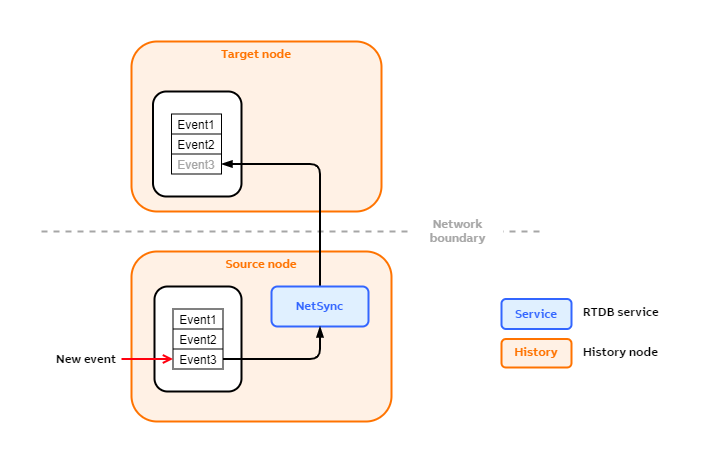
Online syncing of process events.
NetSync can sync:
- OPC events
OpcEventtable- Engineering UI: Process Events > OPC/800xa Events
- OPC events are stored in Equipment events in the target
- Equipment events
EquipmentEventtable- Engineering UI: Process Events > Equipment Events
NetSync can not sync:
- Alarms created by events triggers
AlarmLogRowtable- Engineering UI: Process Events > Active Alarms
Writeback
NetSync can sync values written into the input properties from the target node to the source node. This data flows in a reverse direction compared to the normal numerical time-series data flow. This is called writeback. Essentially, this is numerical time-series data writing done in the opposite direction.
Writeback supports only current values, that is, backfilling and history maintained values are not supported.
Syncing of writeback values from the target node into the source node.
Equipment model
NetSync can sync equipment types and equipment instances, including the equipment hierarchy. The modification and deletion of equipment types is not supported.
Equipment types
NetSync syncs equipment types and their properties from the source node into the target node. However, Netsync doesn't sync modifications or deletions of these types and properties. It is advised to maintain the equipment types without NetSync.
In the picture below, a new equipment type, Pipe, is created on the source node. NetSync notices this and copies the definition of Pipe to the target node.
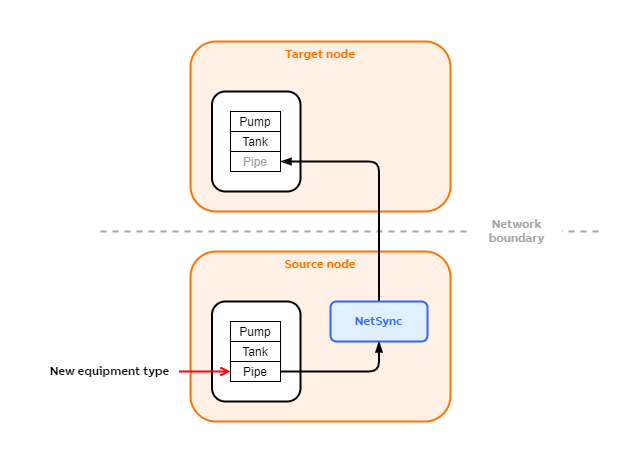
Syncing of equipment types.
Equipment instances
NetSync syncs equipment instances and their hierarchies from the source node into the target node.
In the picture below, a new equipment instance, Device 2, is created in the source node under the parent path Example site.Area 1. NetSync notices this and copies Device 2 to the target node. NetSync inserts it into the same position in the equipment hierarchy as it's located in the source node.
Equipment instance approval process affects this flow and it is explained in the next section.
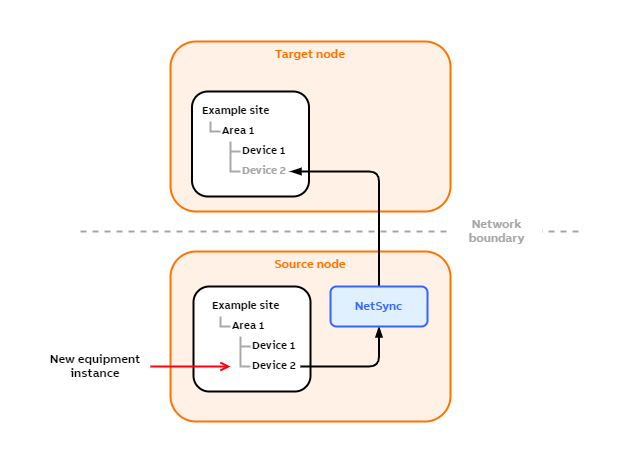
Syncing of equipment instances within the equipment hierarchy.
Approval
When NetSync creates new instances into the target node, they are by default created as unapproved. This means that the data will not be synced from the source node into these instances until they are approved.
Approving instances
NetSync creates new instance hierarchies under the [New equipment] path on the root level. Moving the new hierarchy outside of this path approves all instances under this hierarchy. Once the hierarchy has been approved, new instances created under the hierarchy won't need approval.
Disabling approval
Approval can be disabled by setting Equipment needs approval to false. Then NetSync creates all equipment instances directly into the hierarchy without placing them under the [New equipment] path.
Backward compatibility
NetSync can sync time-series data from variables on the source node into equipment properties on the target node. You can achieve this as follows:
- Create equipment types and property definitions on the source node. The properties that get their data from variables need to have their
ReferenceTargetset toClass:Variable,Historizedset tofalseandTypeset toUInt32. - Create the equipment instances and link the variables into the corresponding equipment properties.
- Create an equipment publication to sync your equipment model from the source node into the target node. On the target node, the equipment properties are created as "normal" historized properties, that is, they contain their own time-series data. This is in contrast to the source node where the equipment properties only contain links to the variables' time-series data.
Example setup
The following picture illustrates an example setup where NetSync syncs time-series data from variables on the source node into equipment properties on the target node.
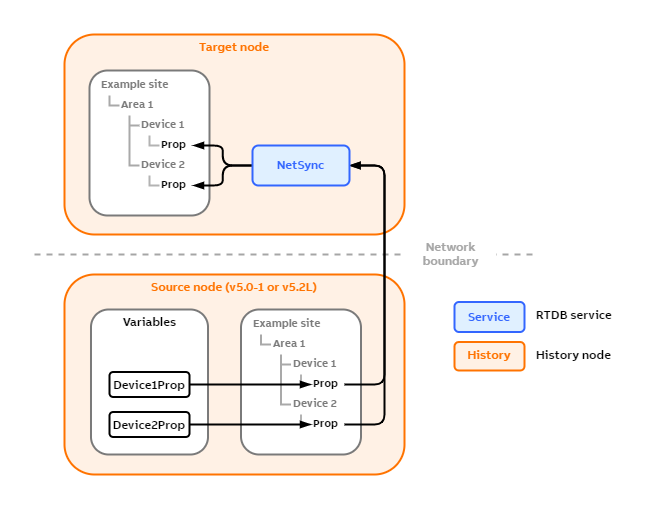
NetSync can provide backward compatibility by syncing time-series data from variables into equipment properties.
The source node on this example setup contains:
- Two variables,
Device1PropandDevice2Prop - Equipment type
Device(not shown in the picture)- This type has a historized equipment property
Prop, which references a variable
- This type has a historized equipment property
- Two equipment instances of equipment type
Device, namedDevice 1andDevice 2 Device1PropandDevice2Propvariables are linked into thePropproperty of equipment instancesDevice 1andDevice 2, respectively
When NetSync starts syncing to an empty target node for the first time, it first creates the equipment types and instances on the target node. However, NetSync creates historized equipment properties in place of the equipment properties that reference variables on the source node. In other words, Prop properties on the source node are references to variables, whereas Prop properties on the target node are historized equipment properties.
After NetSync has created the equipment instances, it starts to sync the time-series data from the variables into the historized equipment properties on the target node.
Version support
Older versions of History do not include NetSync (the first versions to include NetSync are 5.0-1 and 5.2L). Therefore, if the source node is of an older version, NetSync needs to be run on the target node.
Extensions
NetSync can sync data to non-History 3rd party systems, e.g. Azure, using extensions. The extension must be placed in the same folder as NetSync-executeable. The extension actually have Vtrin-NetSyncPlugin-prefix, but in DataSourceName-column doesn't have that prefix. For example if the extension is Vtrin-NetSyncPluginMQTTTarget.dll, then in the DataSourceName-column is MQTTTarget.dll;<ExtensionClassNamespace>. See below subsection for more about MQTT-extension.
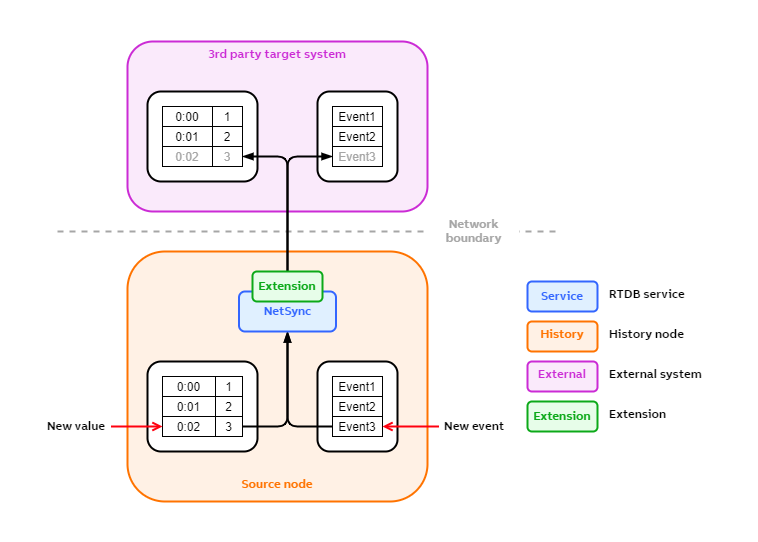
Syncing to an external 3rd party system using an extension.
MQTT
Vtrin-NetSyncPluginMQTTTarget.dll is an extension for NetSync for publishing messages to a MQTT broker. Make sure to know basic of MQTT architecture . Like in MQTT architecture explained, there are mainly three roles: broker, subscriber and publisher. This article mainly focus on publisher, Vtrin's MQTT, a plugin for Vtrin-NetSync.
Make sure Vtrin-NetSyncPluginMQTTTarget.dll file exists under the same folder as Vtrin-NetSync.exe. To publish OPC Events, Variables or Equipment Properties to a broker, a new row must be added to DatabaseNode-table and EquipmentPublication-table. Columns need to fill in DatabaseNode-table are: Name, Type, and Data Source Name;
- Name can be anything.
- Type is AbilityCloud. (Notice: AbilityCloud will be changed to External)
- Data Source Name is MQTTTarget.dll;VtrinNetSyncMQTTTarget.MQTTTarget . Explanation:
- MQTTTarget.dll is the Vtrin-NetSyncPluginMQTTTarget.dll , plugin, which locates in the same folder as Vtrin-NetSync.exe.
- The second part is namespace to the extension class of the Vtrin-NetSyncPluginMQTTTarget.dll.
Equipment Publication-table Configuration For OPC Event
To setup EquipmentPublication-table for OPC Events, following columns are required: Target, Source Class, and Publish Path.
- Target is from Database Node
- Source Class is Opc Event
- Publish Path is :equipmentevent
Whenever a new Opc Event is created, messages will be sent to a broker based on MQTT message format.
Equipment Publication-table Configuration For Variable
To setup EquipmentPublication-table for variables, following columns are required: Target, Source Class, Source Property Filter, Publish Equipment Type, Publish Property, and Publish Path.
- Target is from Database Node.
- Source Class is Variable
- Source Property Filter is CurrentValue
- Publish Equipment Type is Variable
- Publish Path is variable's name
- Publish Property is {Name}
- Instance Filter is NAME LIKE 'MyVariable0'*
Whenever a new value is modified, a message will be sent to a broker based on MQTT message format.
Equipment Publication-table Configuration For Equipment Instance
To setup EquipmentPublication-table for equipment instance, following columns are required: Target, Source Class, Root Instance, Source Property Filter, Publish Equipment Type, Publish Property, and Publish Path.
- Target is from Database Node.
- Source Class is Path
- Root Instance is for example /Path/|<equipment instance path>
- Source Property Filter is *
- Publish Equipment Type is {TypeName:5}
- Publish Property is {PropertyName}
- Publish Path is parent of equipment instance's path.
Whenever a new instance's value is changed, a message will be sent to a broker based on MQTT message format.
MQTT Extension Configuration Instance
If DatabaseNode and EquipmentPublication-table have configured to use Vtrin-MQTT extension, then starting Vtrin-NetSync creates an MQTT configuration instance (if not already exists) to Equipment and EquipmentProperties table.
The configuration instance should be located:
<RTDB> => Equipment Model => Builtin => NetSync => Configuration => '<source>' -->' <target>' => MQTT
The MQTT instance contains following properties which need to be configured once to be in effect:
| Group | Name | DefaultValue | OtherValue | Description |
|---|---|---|---|---|
| MQTT | Authentication | Anonymous | Password, Certificate, Certificate+Password | Authentication methods to login MQTT broker |
| MQTT | BrokerURL | tcp://localhost:1883 | URL of MQTT broker. | |
| MQTT | CleanSession | Yes | No | Start a session over or reuse old session |
| MQTT | ClientId | <machinename><GUID> | ClientId. Must be unique value in a broker. | |
| MQTT | QoS | At Most Once | At Lest Once, Exactly Once | Quality of Service when sending message to a broker. |
| MQTT | Topic | NetSyncMQTTTargetTest | Topic of a message. | |
| MQTT Client Option | MaximumSendPacketSize | 0 | Limit for publisher. If message byte size is exceeded, the message won't get send. Zero means unlimited. | |
| MQTT Client Option | MaxPendingMessageFlushInterval | 00:00:02 | Time limit for composing a message before flushing to MQTT broker. | |
| MQTT Client Option | MaxPendingMessages | 100 | Limit of pending messages in a queue to be send. | |
| MQTT Last Will Testament | LWTEnabled | No | Yes | Use last will testament |
| MQTT Last Will Testament | LWT Message | my lwt | Short last will testament message | |
| MQTT Last Will Testament | LWTTopic | mylastwill/topic | Topic of LWT message | |
| MQTT TLS | AllowUntrustedCertificate | No | Yes | |
| MQTT TLS | IgnoreCertificateRevocationErrors | No | Yes | |
| MQTT TLS | UseTLS | No | Yes | |
| Misc | ContentType | text | Message data type. | |
| Misc | MessageFormatter | Client's code (in C#) for composing MQTT messages |
The newly created configuration instance won't be applied right away, a small changes will be needed (e.g. spaces or anything) for the MQTT extension to apply it. If the configuration instance already exists during the starting of Vtrin-NetSync, then the configuration will be applied immediately. Whenever the configuration file is modified, it will applied immediately. Some modification requires reconnection, such as MQTTLastWillTestament, WindowsCredential or MQTTBrokerURL.
MessageFormatter-Property
MessageFormatter field is for compiling customer's message formatter code. If this field is empty, then default message formatter will be used. The default formatter and its definition (abstract class) was implemented in Vtrin-NetSyncPluginMQTTTarget.dll, so compiling own custom's message formatter depends on that DLL. If multiple files is required for the compilation, then they must be separated by semicolon. It is assumed that files are located under vtrin installation folder and having following prefixes "Vtrin-NetSyncPlugin". However, the prefix is not needed in MessageFormatter-property. There are three important methods have to overridden as shown below:
//Filename must start with "Vtrin-NetSyncPlugin", e.g. Vtrin-NetSyncPluginMyCustomFormatterWithInhouseSerializerPicky.cs
//Namespace can be anything.
namespace Vtrin_NetSyncTests.EmbeddedResource
{
	public class MQTTTestCustomFormatterWithInhouseSerializerPicky : VtrinNetSyncMQTTTarget.MessageFormatter
	{
		private const uint mMAX_MSG_SIZE=1024*1024; //1 Megabytes
		public override VtrinNetSyncMQTTTarget.MessageAppendResult MessageAppend(ABB.Vtrin.NetSync.ExternalSync.IPropertyValue v, uint maxmessagesize, object? message = null)
		{
			ABB.Vtrin.IO.Serialization.ISerializationContainer container;

			//Create a new serialization container.
			if(message==null)
			{
				var jsonserializer=new ABB.Vtrin.IO.Serialization.cPrettyJSONSerializer();
				jsonserializer.TimeFormat=ABB.Vtrin.IO.Serialization.cJSONSerializer.cTimeFormat.ISO;
				container=jsonserializer.CreateContainer();
				container.BeginArray();	//Add '['
			}
			//Reuse old serialization container
			else
				container=(ABB.Vtrin.IO.Serialization.ISerializationContainer)message;

			var state=container.SaveState();	//Backup in case serializing the new value exceed maximum message size.

			container.BeginArrayItem();	//For handling comma in an array. e.g. [x , y, z]
			container.BeginObject();	// Add '{' .
			container.CreateObjectEntry(nameof(v.Name), v.Name);
			container.CreateObjectEntry(nameof(v.Class), v.Class);
			container.CreateObjectEntry(nameof(v.Value), v.Value);
			container.CreateObjectEntry(nameof(v.Time), v.Time);
			container.EndObject();	// Add '}'

			//Should have limit although zero means unlimited, RAM shouldn't be consumed too much.
			if(maxmessagesize==0)
				maxmessagesize=mMAX_MSG_SIZE;

			//ASCII characters only, so using Length is okay to get byte size. This won't work on unicode characters.
			//+1 is for closing bracket, ']' when call MessageClose-method.
			bool isbytesizeover=container.Length>maxmessagesize+1;
			bool isreadytosend=container.Length>=maxmessagesize+1;
			object? overflownmessage=null;
			if(isbytesizeover)
			{
				//Size exceeded, rollback and put exceeding part to overflownmessage/NextNewMessage
				container.RestoreState(state);
				var jsonserializer=new ABB.Vtrin.IO.Serialization.cPrettyJSONSerializer();
				jsonserializer.TimeFormat=ABB.Vtrin.IO.Serialization.cJSONSerializer.cTimeFormat.ISO;
				var overlappedcontainer=jsonserializer.CreateContainer();
				overlappedcontainer.Serialize(v);
				overflownmessage=overlappedcontainer;
			}
			return new VtrinNetSyncMQTTTarget.MessageAppendResult(container, isreadytosend, overflownmessage);
		}
		public override VtrinNetSyncMQTTTarget.MessageAppendResult MessageAppend(ABB.Vtrin.NetSync.ExternalSync.IEvent v, uint maxmessagesize, object? message = null)
		{
			ABB.Vtrin.IO.Serialization.ISerializationContainer container;

			//Create a new serialization container.
			if(message==null)
			{
				var jsonserializer=new ABB.Vtrin.IO.Serialization.cPrettyJSONSerializer();
				jsonserializer.TimeFormat=ABB.Vtrin.IO.Serialization.cJSONSerializer.cTimeFormat.ISO;
				container=jsonserializer.CreateContainer();
				container.BeginArray();	//Add '['
			}
			//Reuse old serialization container
			else
				container=(ABB.Vtrin.IO.Serialization.ISerializationContainer)message;

			var state=container.SaveState();	//Backup in case serializing the new value exceed maximum message size.

			container.BeginArrayItem();	//For handling comma in an array. e.g. [x , y, z]
			container.BeginObject();	// Add '{' .
			container.CreateObjectEntry(nameof(v.EventId), v.EventId);
			container.CreateObjectEntry(nameof(v.EventUTCTime), v.EventUTCTime);
			container.EndObject();	// Add '}'

			//Should have limit although zero means unlimited, RAM shouldn't be consumed too much.
			if(maxmessagesize==0)
				maxmessagesize=mMAX_MSG_SIZE;

			//ASCII characters only, so using Length is okay to get byte size. This won't work on unicode characters.
			//+1 is for closing bracket, ']' when call MessageClose-method.
			bool isbytesizeover=container.Length>maxmessagesize+1;
			bool isreadytosend=container.Length>=maxmessagesize+1;
			object? overflownmessage=null;
			if(isbytesizeover)
			{
				//Size exceeded, rollback and put exceeding part to overflownmessage/NextNewMessage
				container.RestoreState(state);
				var jsonserializer=new ABB.Vtrin.IO.Serialization.cPrettyJSONSerializer();
				jsonserializer.TimeFormat=ABB.Vtrin.IO.Serialization.cJSONSerializer.cTimeFormat.ISO;
				var overlappedcontainer=jsonserializer.CreateContainer();
				overlappedcontainer.Serialize(v);
				overflownmessage=overlappedcontainer;
			}
			return new VtrinNetSyncMQTTTarget.MessageAppendResult(container, isreadytosend, overflownmessage);
		}
		public override System.ArraySegment<byte> MessageClose(object message)
		{
			var container=(ABB.Vtrin.IO.Serialization.ISerializationContainer)message;

			container.EndArray(); //Add ']'

			string content=container.GetStringData();
			System.ArraySegment<byte> bytedata=new System.ArraySegment<byte>(System.Text.Encoding.UTF8.GetBytes(content));
			return bytedata;
		}
	}
}


/* Example output for variable data:
 [
	{
		"Name":           "MQTT1",
		"Class":          "Variable",
		"Value":          9,
		"Time":           "2025-02-27 12:31:06.7359202"
	},
	{
		"Name":           "MQTT1",
		"Class":          "Variable",
		"Value":          8,
		"Time":           "2025-02-27 12:31:07.6565458"
	},
	{
		"Name":           "MQTT1",
		"Class":          "Variable",
		"Value":          76,
		"Time":           "2025-02-27 12:31:08.3600706"
	}
]
*/
//Filename must start with "Vtrin-NetSyncPlugin", e.g. Vtrin-NetSyncPluginMyCustomFormatterWithStringBuilder.cs
//Namespace can be anything.
namespace Vtrin_NetSyncTests.EmbeddedResource
{
public class MQTTTestCustomFormatterWithStringBuilder : VtrinNetSyncMQTTTarget.MessageFormatter
{
private const uint mMAX_MSG_SIZE=1024*1024; //1 Megabytes
//Custom data structure.
private class cMyMessageStructure
{
public System.Text.StringBuilder MessageBuilder; //For composing message, then send to broker.
public int CurrentMessageSizeInBytes; //track message byte size.
}
public override VtrinNetSyncMQTTTarget.MessageAppendResult MessageAppend(ABB.Vtrin.NetSync.ExternalSync.IPropertyValue instance, uint maxmessagesize, object? message = null)
{
cMyMessageStructure msg; //custom structure.
if(message==null)
{
//Create an instance for a new message.
//This might be for the first message or previous message was sent/processed.
msg=new cMyMessageStructure();
msg.MessageBuilder=new System.Text.StringBuilder();
} else
{
//Reuse message from the previous call.
msg=(cMyMessageStructure)message;
}
//Should have limit although zero means unlimited, RAM shouldn't be consumed too much.
if(maxmessagesize==0)
maxmessagesize=mMAX_MSG_SIZE;
string newvalue=instance.Value.ToString()+"€€€€€\n"; //just pick a value
int newvaluebytesize=System.Text.Encoding.UTF8.GetByteCount(newvalue); //Correct way to get size, because each ASCII is one byte, but unicode character size varies.
bool isbytesizeover=(msg.CurrentMessageSizeInBytes + newvaluebytesize)>maxmessagesize;
bool isreadytosend=(msg.CurrentMessageSizeInBytes + newvaluebytesize)>=maxmessagesize;
cMyMessageStructure? overflowmessage=null;
if(isbytesizeover)
{
//New value doesn't fit to StringBuilder, add the new value as an overflown message.
overflowmessage=new cMyMessageStructure();
overflowmessage.MessageBuilder=new System.Text.StringBuilder(newvalue);
overflowmessage.CurrentMessageSizeInBytes=newvaluebytesize;
} else
{
//Append new value to current message.
msg.MessageBuilder.Append(newvalue);
msg.CurrentMessageSizeInBytes+=newvaluebytesize;
}
return new VtrinNetSyncMQTTTarget.MessageAppendResult(msg, isreadytosend, overflowmessage);
}
// Implementation for OPCEvent instances.
public override VtrinNetSyncMQTTTarget.MessageAppendResult MessageAppend(ABB.Vtrin.NetSync.ExternalSync.IEvent eventinstance, uint maxmessagesize, object? message = null)
{
//Similar logic as above, but the way to extract value is different.
cMyMessageStructure msg;
if(message==null)
{
msg=new cMyMessageStructure();
msg.MessageBuilder=new System.Text.StringBuilder();
} else
{
msg=(cMyMessageStructure)message;
}
//Should have limit although zero means unlimited, RAM shouldn't be consumed too much.
if(maxmessagesize==0)
maxmessagesize=mMAX_MSG_SIZE;
string newvalue=eventinstance.EventUTCTime.ToString()+"€€€€€\n"; //<= differ
int newvaluebytesize=System.Text.Encoding.UTF8.GetByteCount(newvalue); //could have used newvalue.Length, because there isn't unicode character.
bool isbytesizeover=(msg.CurrentMessageSizeInBytes + newvaluebytesize)>maxmessagesize;
bool isreadytosend=(msg.CurrentMessageSizeInBytes + newvaluebytesize)>=maxmessagesize;
cMyMessageStructure? overflowmessage=null;
if(isbytesizeover)
{
overflowmessage=new cMyMessageStructure();
overflowmessage.MessageBuilder=new System.Text.StringBuilder(newvalue);
overflowmessage.CurrentMessageSizeInBytes=newvaluebytesize;
} else
{
msg.MessageBuilder.Append(newvalue);
msg.CurrentMessageSizeInBytes+=newvaluebytesize;
}
return new VtrinNetSyncMQTTTarget.MessageAppendResult(msg, isreadytosend, overflowmessage);
}
public override System.ArraySegment<byte> MessageClose(object message)
{
var sb=((cMyMessageStructure)message).MessageBuilder;
byte[] utf8bytes=System.Text.Encoding.UTF8.GetBytes(sb.ToString());
System.ArraySegment<byte> bytedata=new System.ArraySegment<byte>(utf8bytes);
return bytedata;
}
}
}
/* Example output of a message:
1€€€€€
2€€€€€
3€€€€€
*///This base class is part of Vtrin-NetSyncPluginMQTTTarget.dll
public abstract class MessageFormatter
{
protected MessageFormatter() { }
/// <summary>
/// Implementation of appending a new value to message
/// </summary>
/// <param name="v">instance value of type IPropertyValue</param>
/// <param name="maxmessagesize"> Maximum message size for client. If message size is too big, then the message will be discarded by MQTT client.</param>
/// <param name="message">Current message so far. Usually message requires casting to client's type, then new value (v) may be added.</param>
/// <returns></returns>
public abstract MessageAppendResult MessageAppend(ABB.Vtrin.NetSync.ExternalSync.IPropertyValue v, uint maxmessagesize, object? message = null);
/// <summary>
/// Implementation of appending values to message
/// </summary>
/// <param name="v">an instance value of type IEvent. This value may be processed and appended to message</param>
/// <param name="maxmessagesize">Maximum message size for client. If message size is too big, then the message will be discarded by MQTT client.</param>
/// <param name="message">Current message so far. Usually message requires casting to client's type, then new value (v) may be added.</param>
/// <returns></returns>
public abstract MessageAppendResult MessageAppend(ABB.Vtrin.NetSync.ExternalSync.IEvent v, uint maxmessagesize, object? message = null);
/// <summary>
/// Implementation of closing message. (E.g. adding closing brackets)
/// </summary>
/// <param name="message"></param>
/// <returns></returns>
public abstract System.ArraySegment<byte> MessageClose(object message);
}/// <summary>
/// Message append result. Appending messages to be sent to MQTT server.
/// </summary>
public readonly struct MessageAppendResult
{
/// <summary>
/// Contain appended message. This message will be send when IsReadyToSend is true.
/// </summary>
public readonly object AppendedMessage;
/// <summary>
/// IsReadyToSend give signal to MQTT client to send AppendedMessage to MQTT broker.
/// </summary>
public readonly bool IsReadyToSend;
/// <summary>
/// Whenever AppendedMessage is full and ready to send, but new message couldn't be appended, then the new message can be set to NextMessage.
/// </summary>
public readonly object? NextNewMessage;
public MessageAppendResult(object appendedmessage, bool isreadytosend, object? nextmessage=null)
{
AppendedMessage=appendedmessage;
IsReadyToSend=isreadytosend;
NextNewMessage=nextmessage;
}
}Both appending messages are for appending specific instance: IPropertyValue and IEvent. Their structures are shown below:
public interface IPropertyValue
{
	string Name {get;set;}
	string Class {get;set;}
	System.DateTime Time {get;set;} //parameter here
	object Value {get;set;}
	string PropertyName {get;set;}
	bool Invalid {get;set;}
	string Id {get;set;}
}
public interface IEvent
{
	public System.Collections.Generic.Dictionary<string, object> Attributes {get; set;}
	public string EventId {get;set;}
	public System.DateTime EventUTCTime { get;set;}
}
MessageFormatter-property utilize following properties MaximumSendPacketSize, and MaxPendingMessageFlushInterval:
- MaximumSendPacketSize-property is for limiting packet size in bytes. If the message exceeded this limit, the message will be discarded at publisher. Information of MaximumSendPacketSize-property will be passed in MessageAppend-method as the second parameter, maxmessagesize
- MaxPendingMessageFlushInterval-property is an interval which enqueue current message to be send to MQTT broker. This property is useful when there is long delay in composing a message.
Authentication-Property
There are four authentication methods, which most of them utilize a common pattern: <targethostname, broker><portnumber><targetnodename in EquipmentPublication>. Concrete example: mybrokername.net_1883_targetmqtt
Currently, it is possible to login to a broker using following four methods:
- Anonymous: no username or password.
- Password: use username and password from credential vault (Generic Credentials) in following format:
Vtrin-NetSync/MQTT/Password/\<common pattern>.
Example name of an credential vault entry name:Vtrin-NetSync/MQTT/Password/localhost_1883_targetmqtt - Certificate: Following certificate, <common pattern>.pfx will be fetched automatically from
C:\ProgramData\cpmplus\vtrin-netsync\certificates\folder. Password for the PFX-certificate will be fetched automatically from credential vault (Generic Credentials), which entry name isVtrin-NetSync/MQTT/CertificatePassword/\<common pattern>. Username won't be used when fetching password for the certificate.- Password for certificate will be read automatically from credential vault, similarly to Password-method, Vtrin-NetSync/MQTT/CertificatePassword/<common pattern>
- TIP: C:\ProgramData is be hidden from user, so in view it:
File Explorer->View tab->Check "Hidden item" - Notice: User might need to create folder manually
C:\ProgramData\cpmplus\vtrin-netsync\certificates\for the time being:mkdir -p C:\ProgramData\cpmplus\vtrin-netsync\certificates - In linux the certificate should be located in
/usr/share/cpmplus/vtrin-netsync/certificates
- Certificate + Password method work as two previous methods combined.
Common Errors and Solutions
- Unable read username and password from vault is commonly due to vault's entries was created and (Vtrin-NetSync was) ran by different user. To fix this, transfer the vault entries to "Local System":
%app_root%\Config\FeatureInstall\APP_TransferVaultEntries.bat /name <vault entry name>
Tip: to see list of vault entries in Windows command prompt, usecmdkey /list - Restart MQTT: MQTT server may be restarted without restarting Vtrin-NetSync by modifying following properties: BrokerURL, CleanSession, ClientID, UseTLS, Authentication, IgnoreCertificateRevocationErrors, and any Last Will Testament's property. Adding extra spaces at the end of BrokerURL is the typical way to restart.
Features
- Request model manually: Send following json
{ "Command": "GetModel"}(case sensitive query) to <current_topic>/Control. Involved properties: "Topic". The result appears in <current_topic> or console. This feature is available since version 5.3_25.06
Updated 19 days ago