
Using URL parameters in Dashboard Context Handlers
Dashboard Context Handlers can be configured to read certain parameter values from the current URL, use those values to add class instances to the context, and then send the created context to one or more targets, that can be widgets or dashboards.
Configuring a Context Handler
Dashboards have a property called Handlers under the Context Mapper section. By opening that, you can find the relevant configuration options.
URL parameter value. This value should be configured to match the URL parameter name, that holds the value that will be used to identify the instance or instances that should be added to the context. In Figure 1, that value is set to be ProcessId. When a dashboard is loaded, View’s context handling logic will search the page URL for a parameter by that name. That URL parameter can hold an ID value or some other value to be used for identifying a class instance. In Figure 2, a matching ProcessId parameter can be found from the example URL with an ID value.
Class. In the URL section of the configuration there is a dropdown list that holds all the classes in the system. That selection determines the class of the instances to be added to the context.
Class Property. After the class has been selected, a new dropdown appears, where you can select the class property that will be used to identify the instances to be added to the context. In Figure 1 the property is set to be ID.
Based on these three configurations, a query is created, that should ideally return at least one result. In the example in Figure 1, the query would look for instances of class Path_Builtin.SysDiag.Process whose ID property matches the value read from the URL parame-ter named ProcessId. So, in that case that URL parameter should contain an existing ID value of an instance of that particular class. Since an ID value is used, there will be at most one result. Any other property could be used as well, and in that case, there might be more than one result.
Max number of items determines the maximum number of results the query will return. This can be useful if an ID or some other unique property is not being used. Of course, it should also be noted that many, if not most, widgets can only handle one context item at a time. So, even if there are multiple instances in the context, many widgets can only utilize one of them. In that case, it might be good to formulate the query so, that it results in only one item.
The last part is to configure the Targets that will receive the context. Here you simply select the target widget(s) or dashboard(s).
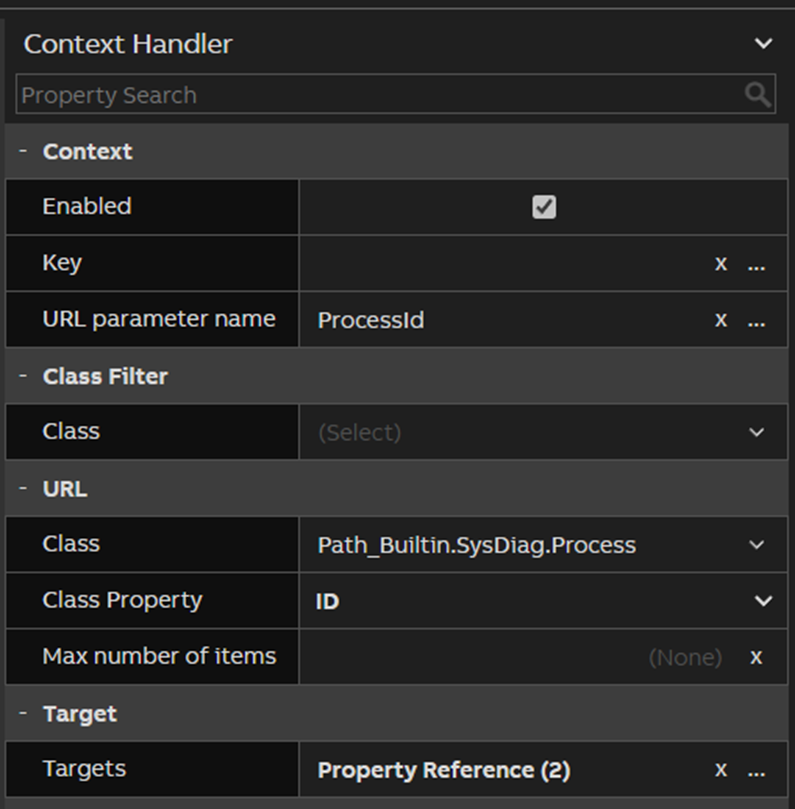
Figure 1 - Context Handler configuration

Figure 2 - An example URL with a parameter named ProcessId
Updated 6 months ago