
Calculation Tool classes
Overview
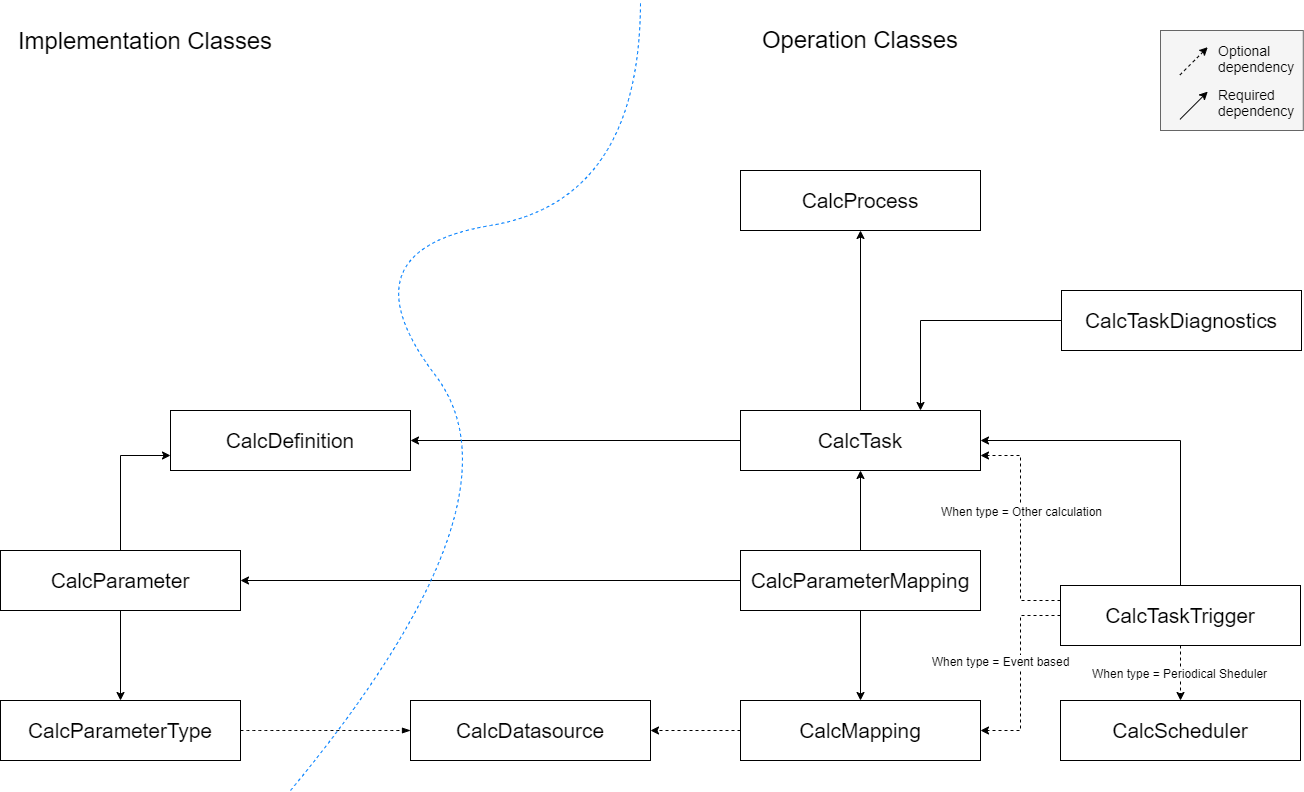
Calculation Tool service works by continuously reading the content of Calculation Tool classes. These classes contain the calculation code, various configuration of calculation tasks and all its other supporting elements. These classes are separated into two groups: implementation and operation.
- The implementation part contains classes that store the calculation code, along with its supporting elements such as parameters, parameter types, dependencies and external libraries.
- The operation part contains the calculation task along with its supporting elements such as parameter mapping, task triggers etc. We will explain each and every one of those classes below.
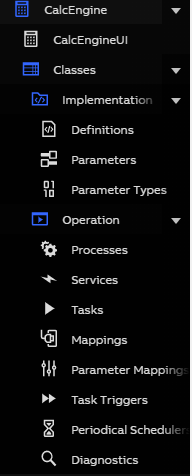
These classes are accessible via Engineering UI under Application > CalcEngine > Classes menu. As a more advanced alternative to CalcEngineUI dashboard, you can directly configure Calculation Tool by directly adding/deleting/modifying the instances in these classes.
Class relations
Below you can see the general schematic of Calculation Tool classes:
Implementation classes
CalcDefinition
This class contains the calculation code. This is where we define the calculation logic together with the associated CalcParameter.
Properties
- Name : string
The name for the calculation code. It must be unique. - Code : string
The code for the calculation. - CodeType : enum Calc Code Types
The type of code in the code property. System supports C#. - Disabled : bool
If set to true, calculations based on this Calc Definition will be suspended. - ErrorMessage : string(json)
Will contain any errors/warnings encountered during the compilation of this Calc Definition in JSON format. In case of a successful compilation, the errors array will be empty. - Group : string
The name of the group to which this calculation definition belongs to. For non admin user, they need to be part of the member of the group they are putting into this property. - Owner : string
The name of the owner to which this calculation definition belongs to.
CalcParameter
The instance on this class represents a parameter, which a CalcDefinition uses as either as an input or an output.
Properties
- Name : string
The name with which the parameter is used in the CalcDefinition code. - Definition : ref CalcDefinition
Reference to the CalcDefinition to which this parameter belongs. - Type : ref CalcParameter
Reference to the CalcParameterType that defines the compile-time type of this parameter. - ArrayDimensions : uint
The number of desired array dimensions in the parameter type. If the parameter is not supposed to be an array, set to 0. - IsOutput : bool
Whether this parameter is an output or not. If set to false, the parameter will be in a read-only mode.
CalcParameterType
This class contains all the types for the CalcParameters. The instances of this class is automatically generated by the Calculation Tool backend.
Properties
- Name : string
Descriptive name for the type. - EquipmentType : ref Equipment
If not null, represents the Equipment for which this type is a helper class. - EquipmentDatasource : ref CalcDatasource
If the equipment is from some other data source than where the Calc Engine is installed, represents the connection information. - TypeName : string
String passed toSystem.Type.GetType()to get the represented .NET type. Not used whenEquipmentType != null.
CalcExternalLibrary
The instance of this class represents a source of third-party code that can later be referenced in the calculation code and, consequently, added to the compilation.
Properties
- Name : string
The name for this external code link. It must be unique. - Type : enum Calc External Library Type
The type of the external code link. It defines what field will be read when registering this third-party code and can either be Code Snippet C# or DLL (File Path). - CodeSnippet : string
This field holds the third-party code if the type was selected as Code Snippet C#. - DLLPath: string
This field holds an absolute path, a relative path from the Vtrin installation directory, and an environment variable path to the compiled third-party code if the type was selected as DLL (File Path).
Caution is advised when incorporating third-party libraries into calculations; ensure that these libraries are free from any security vulnerabilities.
Operation classes
CalcTask
A Calc Task represents an executable calculation. It joins a Calc Definition and Calc Parameters with mappings to actual values, and can be executed by various triggers.
Properties
- Definition : ref CalcDefinition
The Calc Definition defining the task's calculation logic. - Process : ref CalcProcess
The process in which to run this task. - Description : string
Optional description for the task. - ConstructorParameters : string(json)
Optional constructor parameters for the definition code constructor. - MaxRunSecondsBeforeKilled : uint
The maximum time in seconds this task is allowed to execute for. 0 is unlimited. - BatchTarget : ref CalcMapping
The batch job variable mapping. - BatchProperty : string
Specifies a equipment property, if batch job variable is equipment instance. - BatchClassLevel : bool
If true, the batch job will track insertions of new instances to the target class. - CalcPeriod : uint
If set, defines the calculation period, otherwise calculation trigger's period is used. - CalcPeriodUnit : enum Time Units
Defines the time unit of calculation period. - PeriodOffset : uint
If set, delays the invocation of calculation code. - PeriodOffsetUnit : enum Time Units
Defines the time unit of offset. If not set, the total offset will be taken as task's calculation period multiplied by value of PeriodOffset.
For example, if the task's calculation period is 10 seconds, the period offset of -2 (PeriodOffset is -2 and PeriodOffsetUnit is None) will result in -20 seconds offset. - BaseTime : timestamp
Sets the alignment of calculation periods. - StartTime : timestamp(since March 2024)
The start time property defines the beginning of the valid period for the task, which does not apply before this time. - EndTime : timestamp(since March 2024)
The end time property marks the conclusion of the valid period for the task, which ceases to apply after this time. - Disabled : bool
If set to true, calculations for this task will be suspended. - ErrorMessage : string(json)
Will contain any errors encountered during the execution of the task or fetching the mapped values. In case of a successful execution, it will be empty {}. - Debug : bool
When set to true, a new CalcTaskSimulation instance containing additional debug information produced by Write and WriteLine commands will be created after each run. Currently at most 100 latest runs are retained for each task. - SkipMissed : bool(since March 2024)
Whether intervals missed for any reason should be skipped or calculated. - DiagUpdateIntervalSeconds : uint
Represents how often the CalcTaskDiagnostics row for this task should be updated. Setting this to a low value for many CalcTasks can have negative effects on system performance. - Group : string
The name of the group to which this calculation task belongs to. For non admin user, they need to be part of the member of the group they are putting into this property. - Owner : string
The name of the owner to which this calculation definition belongs to.
CalcProcess
A system process executing CalcTasks which are assigned to it.
Properties
- Name : string
- PriorityClass : enum Calc Process Priority
Sets the priorityclass for the process, available values:- Idle
- BelowNormal
- Normal
- AboveNormal
- High
- Realtime
It is probably not a good idea to use realtime.
- NumThreads : uint
Number of threads the process is allowed to use for calculations. 0 -> number of cores on the machine. - Disabled : bool
Prevent the process from running. - PID : uint
Id of the running process. - Restart : bool
Set to true if you want the process to be restarted. Used by Calc Engine when a process needs to be restarted for recompilation. - RunAs32Bit : bool
Set to true if you want the process to be run as 32-bit. You will want this if some of your dependencies are 32-bit dlls.
CalcMapping
A collection of VtrinLib class instances fetched through VtrinLib from some data source. Can be mapped to a parameter with a CalcParameterMapping.
Properties
- Description : string
Optional description for the collection (e.g. 'Pumps in Northern Europe'). - ClassName : string
Name of the VtrinLib class from which the instances should be fetched. - WhereString : string
Optional string to limit which instances are fetched. (e.g. "Name='MyVariable'"). - DataSource : ref CalcDatasource
If the instance is from a different data source than the Calc Engine installation, this reference must be set to the the defined data source.
CalcParameterMapping
Combines a CalcMapping and a CalcParameter for use by a CalcTask.
Properties
- Task : ref CalcTask
- Parameter : ref CalcParameter
- Mapping : ref CalcMapping
- SelectProperty : string
If only interested in a property of the mapped VtrinLib class instance and not the instance itself, represents the name of the property.
For example: If mapping an Equipment of type 'Pump' and wanting to get the 'Temperature' property, * SelectProperty would be 'Temperature'. - History : string
Optional name of the history table to get values from, if not using the default (Defined in the 'TargetHistory' property of the variable or equipment property). - PeriodLengthOverride : enum Time Units
- PeriodLengthUnitOverride : enum Time Units
- ImplicitForEach : bool
When having a CalcDefinition that operates on non-array parameters and wanting to perform that calculation for multiple parameter sets, set this to true.
If you have multiple 'ImplicitForEach' mappings for a single task, make sure the WhereStrings provide the arrays in the same order by appending an 'ORDER BY' clause.
CalcTaskTrigger
A trigger that can be attached to a CalcTask to cause it to run.
Properties
- Task : ref CalcTask
- Type : enum Calc Trigger Types
Available types are:- Periodical Scheduler
- Event Trigger
Calculation is triggered, whenever the instance(s) mapped to the CalcMapping changes.
A special case of the event-based trigger: You can configure a condition for a historical property (e.g. Variable or Equipment Property) by using the Process Events of RTDB (see this page to learn how to configure an event). Note that you have to configure the event trigger fields "InUse" and "Log" as true. Not also that you have to configure your Variable and/or Equipment Property field "Events" as true. - After Task Trigger (NOTE: Currently only supported when both calculations are run in the same process)
- Disabled : bool
Stop running the task through this trigger.
Properties, specific to Periodical Scheduler triggers
- Scheduler : ref CalcScheduler
Properties for Triggered by other calculation (NOTE: Currently only supported when both calculations are run in the same process).
Properties, specific to Event driven triggers
- Mapping : ref CalcMapping
Changes to the instances mapped will trigger calculation. - EventProperties : string
Optional ;-separated list of properties that should trigger the calculation, if not interested in all of them
mostly useful for Equipments.
With the following special []-syntax, it is also possible to listen changes in a specific CurrentValue property, such as Status or Values, in order to listen changes only in one of those: HistoricalProperty[] - ImplicitForEach : bool
Set to true, if you have a CalcParameterMapping that uses ImplicitForEach functionality in your task and you want to bind it with an event-based trigger so that a change in a specific instance will trigger calculation ONLY in that instance.
Note: if this is true, the CalcParameterMapping of the CalcTask must have the same CalcMapping reference than this CalcTaskTrigger is having! - ClassLevelListener
Set to true, if you want to listen inserts in the table/class of your Mapping.
In this case, the related CalcMapping instance is used to filter the upcoming database inserts: ClassName defines the class to listen and WhereString defines the filtering properties that needs to be satisfied. - PollingIntervalSecs : uint
Set the interval (seconds) to poll for new inserts in the specific table/class. The default and smallest permitted value is 5.0.
Note: If ClassLevelListener is set to true, but database-level events are not listened for the specific table/class, then polling is automatically used. For example, this is the case for the OpcEvent table. - Warnings : string
Gives warning messages as JSON. For example, it gives a warning if polling used.
Properties, specific to After task triggers
- TriggeredByTask : ref CalcTask
Defines by which task this trigger will activate, effectively chaining the execution of the tasks.
CalcScheduler
Defines how to run a CalcTask periodically.
Properties
- Name : string
- ExecutionInterval : uint
Interval on which to execute. - ExecutionIntervalUnit : enum Time Units
- BaseTime : timestamp
How to align the execution times.
For example, to run hourly at five seconds past, BaseTime should be 2000-01-01 00:00:05 and ExecutionInterval 1 hour. - Disabled : bool
Suspend the scheduler, not triggering any CalcTasks.
Relationship between BaseTime, StartTime and Endtime
Below picture illustrate how BaseTime in CalcScheduler and StartTime and EndTIme in CalcTask works.
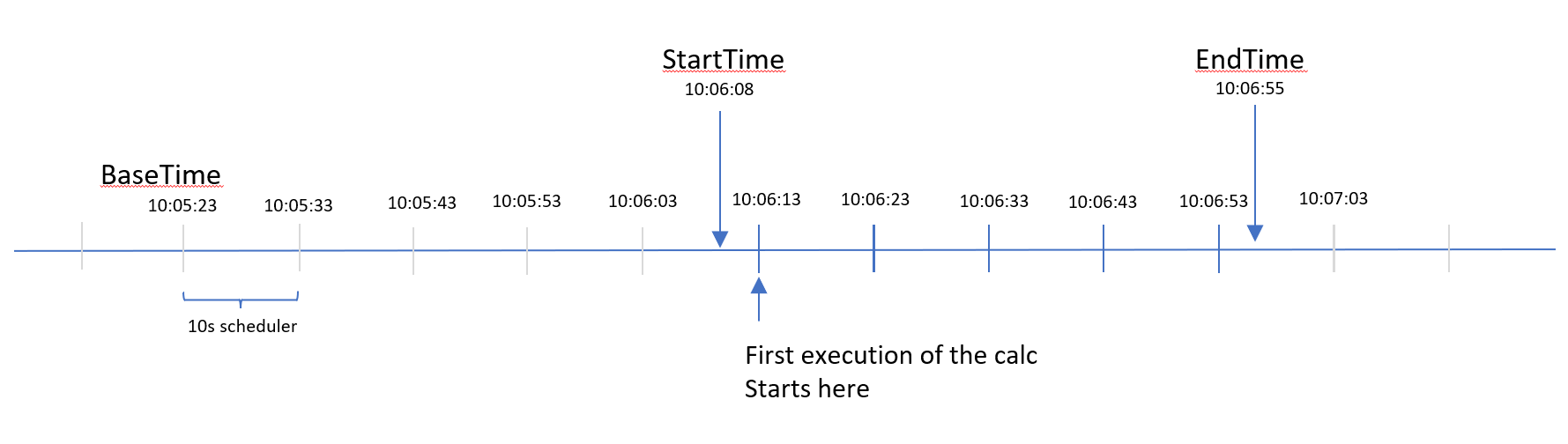
In the example shown in the picture, If the user set the scheduler BaseTime to be 10:05:23, and it uses scheduler that is being triggered every 10s, it means that the cadence of the scheduler should be aligned with what is being set on the BaseTime. In the example above, the next cadence is at 10:05:33, simply add 10 seconds into the BaseTime. But the calculation itself will not start at BaseTime, it will be started at the first BaseTime aligned cadence after StartTime. In the example above, even though we set the StartTime to be 10:06:08, the calculation will not immediately start at that time, but instead it will be started at 10:06:13, because that is the next closest BaseTime aligned cadence after the StartTime. Same thing applies to EndTime, the calculation will end at the last BaseTime aligned cadence right before the EndTime.
CalcTaskDiagnostics
Task containing runtime performance information collected from CalcTasks. Note that since massively updating the table very frequently can have negative effects on performance, the 'DiagUpdateIntervalSeconds' property in CalcTask has to be set before data is updated live.
Properties
- Task : ref CalcTask
- AvgExecutionMs : double
Average time in milliseconds spent in the Calculate-function of the task. - LastExecutionTime : timestamp
When the task was last executed. - LastScheduledPeriodEnd : timestamp
Calculation period for which the task was last executed. - NumExecutionsSinceUpdate : uint
The number of times the task was executed since the last update to the diagnostics table.
CalcRecalculations
Stores the information about recalculation jobs. Add a row here to request a new recalculation.
Properties
- Task : ref CalcTask
Reference of the task which is requested for recalculation. - PeriodStart : timestamp
The start time of the recalculation period. - PeriodEnd : timestamp
The end time of recalculation period. - Status : enum
The descriptive field which holds the status of the calculation. - Restart : bool
Ticking this flag will restart the recalculation job.
CalcDatasource
Define the datasource to be used by CalcMapping and CalcParameterType.
Properties
- Name : string
Name of the datasource. - Description : string
Description of the datasource. - DSN : string
DSN of the datasource. - CredentialVaultName : string
The credential vault name from the targeted DSN.
Calculation Whitelist
The Calc Engine is using the calculation whitelist for a security reason and it is not allowing user to run malicious code. Only database admin user can edit the Whitelist database.
If calculations are in progress, they must be restarted to obtain a new whitelisting's.
DisclaimerPlease be careful when you make changes to the calculation whitelist database values.
If you add there new values make sure that you're not introducing a security hole update and ABB takes no responsibility of those.
If the Calc Engine calculation is not working and a error message is showing(Failed to compile definition: Not allowed code found:)

then you have to add a new value in the Whitelist database table.
Go to: Part 4 - API Whitelisting
Updated 9 months ago