
Live data production
This page explains the concept of real-time value processing in ABB Ability™ History. It gives an overview of what happens before the value is stored; explaining every step of the data processing and storing in ABB Ability™ History. We start with the lifecycle description of time series data, from the data producer until the end when the data is deleted (cleaned up) from the database.
Overview
Live data production is the writing of a continuous stream of data values into the ABB Ability™ History database immediately after the values have been collected and processed (measured, calculated). Live data production aims to deliver the current data sample to storage and subscribers as fast and efficiently as possible.
Below is a picture of the steps in the data path:
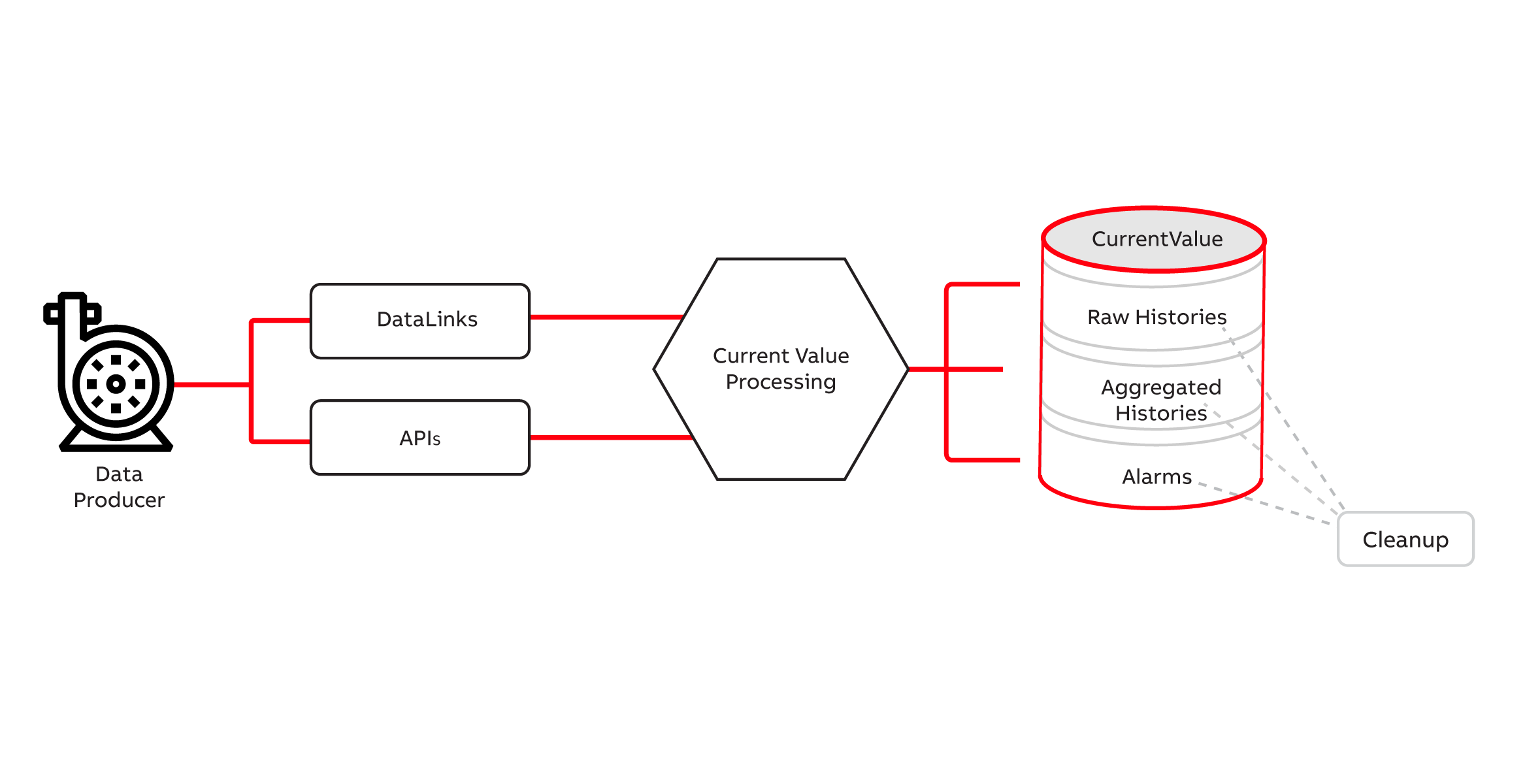
Overview of the History data lifecycle.
- Data Producer - In ABB Ability™ History, a producer can be a device, application, or system that is connected to a database to transfer value via data links (master protocols) or APIs. The data lifecycle begins when the value is received to be preprocessed at the Current Value Processing phase (refer to the image below).
- DataLinks fetch data from the data producer(s) to ABB Ability™ History using client-side protocols
- APIs - issued by the Data Producer to push the data and write the values to the ABB Ability™ History database. Further information on APIs under External Interfaces article.
- Current Value Processing - is a phase where the value goes through different stages starting with preprocessing. The value at this point called Latest Value will go through different stages before being stored in ABB Ability™ History in its representative table (see the image below for more). After passing this process the value then becomes Current Value. See below.
- Current Value - is the most recent value, i.e. Variable or Equipment property. Current Values, except the special types such as blobs, are typically the most frequently used data and that is why it is stored in a separate table in ABB Ability™ History to provide fast access.
- Raw Histories - Raw Histories is the time series history of the Current Value. Different types of raw histories are optimized for different use cases, and there can be multiple raw histories in one system.
- Aggregated Histories - Aggregated time series are calculated from the raw history values by the Aggregation and stored in history tables. There can be multiple history tables for storing aggregated values. Aggregated time series can also be produced by calculations and external applications.
- Alarms - Alarm triggers can be defined to create alarms from the current values during the Current Value Processing. Alarms are stored in the AlarmLog table. Notice that there can also be externally created alarms and events that are stored in different tables such as OPCEventLog.
- Cleanup - Each time series has a retention policy, i.e. age after which it will be deleted. This prevents past data from taking up too much disk space.
Data Links
Data acquisition is supported by the data links (also called master protocols) that are the active part of the communication. Data link services reside in the History node and are controlled by the configuration in the History database. History has the following data links and protocol support:
- RTDB-EcOpcClient, supports OPC DA and OPC UA
- RTDB-OpcUAClient, supports OPC UA
- RTDB-EcModbusMaster, supports Modbus
The data links can receive data in two ways: either by polling the producer or by registering a callback that the data producer calls when the data is updated. After the data link has received data from the producer, it feeds the data into current value processing.
The picture below shows the data flow from the producer to the current value processing. The data producers, e.g. devices, are usually on a different node connected with a network to the History system.
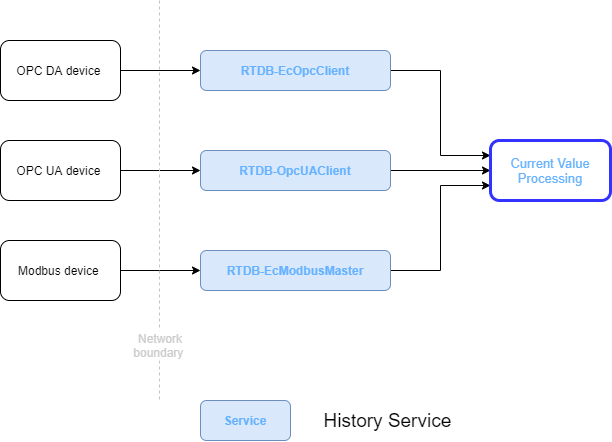
Arrows show the direction of data flow.
APIs
Current Value Processing
RTDB-CVMCServer is the service that performs the current value processing according to the parameters set in the properties of the Variable or Equipment property. Current value processing contains the following steps:
-
Value preprocessing Once a value, raw measured signal, is received the preprocessing starts with unit conversion to a proper engineering unit using one of the following methods:-
- A raw measured analogue value can be converted with a third-degree equation to proper engineering units. Noise filtering can be applied to show the essential changes in a noisy measurement.
- Digital inputs can be inverted and there is standard handling of bipolar binaries
- Pulse inputs are converted to engineering units, their increase against time calculated (e.g. to show instant power) and their integrated value in time is calculated (e.g. to show the amount of energy).
-
Event observation At this stage the value is going through a validation process against the set limits. Limit handling contains high, low, change speed, a difference to reference, binary state, binary oscillation, in-transit state surveillance, binary indicated analogue limit, expiration surveillance, and various status condition checks. When a limit is violated, an alarm indication is created and other indicators in the quality status can be set as well.
-
Alarm suppression logic In some special conditions the alarm can be suppressed and not processed to the AlarmLogIn, otherwise, will be inserted into AlarmLog.
-
Quality status processing contains several attributes that describe the quality of the value, and is recorded in the Raw Histories table with the actual value and time stamp.
-
Substitute value handling can replace a bad value with user set default value, manually entered value, or with redundant measurement.
-
As a result of the processing there is a new current value.
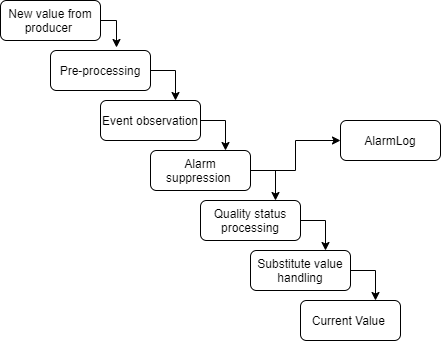
Current Value Processing
Current Value
The new current value is stored into the database:
- Current value table is a database table that contains the most recent value for each time series. The purpose of the current value mechanism is to enable optimized performance for the close-to-real-time operations such as delivering the value to its subscribers.
- Raw history table storing is optional, but typically used. There are two different types of raw history tables. CurrentHistory is better for values that may be maintained later on, or if the values are not coming in chronological order. StreamHistory is providing better performance and data compression. There can be multiple raw history tables of each type e.g. with different retention policies.
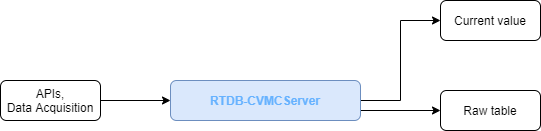
Arrows show the direction of data flow.
Aggregation
Aggregated time series can be defined to be collected from the current value or raw history as well as from other aggregated time series. Aggregate collection takes place online just after the current value processing, but it can also be activated separately for a defined time period. This recollection takes place e.g. after backfilling values, after performing history calculations that are wanted to be aggregated, or when a user has maintained the history values and wants to activate aggregate calculations.
Aggregated time series are typically periodical which means the aggregated value represents some time period such as 1 minute, 5 minutes, 1 hour, 1 week, or 1 month. The time periods are freely configurable as well as the start time and retention policy.
The supported aggregate types are:
- Time average
- Time integration
- Minimum value
- Maximum value
- First value
- Last value
- Local extremums
- Sum of values
- Deviation
- Operating time
- Startup count
- Arithmetic average
Aggregate collections are defined with a collection template that can be assigned to a Variable or Equipment property. The collection template is a chain of aggregates such as AVG1minute, AVG1hour, AVG1day, and AVG1month, where the lowest level is collected from the raw history and the rest from the previous aggregate. Collection template can be assigned to any number of Variables and a Variable can have multiple collections. For more details, see Aggregated histories.
The RTDB-CVMCServer service is responsible for collecting the aggregated time series. Recollection is handled by RTDB-Transformator.
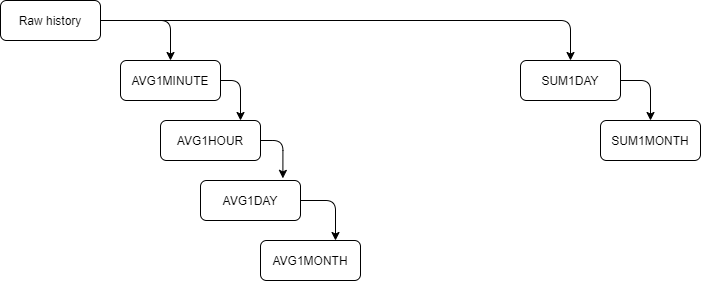
Two example aggregate collection chains.
Cleanup
History supports the automatic retention policy for time series data. The retention time is defined for each history table. RTDB-Transformator service is responsible for removing old time-series data when it reaches the configured age limit.
More info on Aggregated histories.
Updated 9 months ago
We have now discussed how live data is stored into History. Next, we build upon this and explain how history writing works.