
OPC UA Server
Introduction
The History OPC UA server implements partly the OPC Unified Architecture (UA) – a set specifications defined by the OPC Foundation. UA is the most recent version from the popular OPC industry-standard interoperability specifications. UA combines all the previous specifications under one coherent information model, and it does this by using the best cyber-security practices and cross-platform capabilities. More information about the specifications is available on the OPC Foundation’s website: http://www.opcfoundation.org.
The current version of the History OPC UA server implements the following parts from the specification version 1.03.
All the required facets in “Standard Server profile” are supported and additionally five historical read facets:
- Historical Raw Data Server Facet
- Base Historical Event Server Facet
- Historical Data Insert Server Facet
- Historical Data Update Server Facet
- Historical Data Replace Server Facet
From high level functional perspective it includes support for:
- Data Access (DA) functionality to read and write current values of any property available as a Vtrin class property.
- Historical Data Access (HDA) functionality to read the history of values from variables storing numerical process history.
- Historical Data Access (HDA) functionality to read the history of event from long term history of process events and alarms (OpcEvent class).
- Node management, which reflects the Vtrinlib object model. It allows browsing of the Vtrin classes, as well as the available Equipment types and instances. it allows creating new instances and deleting existing ones. It allows adding and removing references between existing instances.
Platform support
Only Windows platform is today supported.
Installation and configuration
The History main node installation includes the OPC UA server installed as a Windows service. It starts up with all other services. History OPC UA server is not installed to data collector nodes by default. History OPC UA Server is installed to the main node by default, no installation actions are needed normally.
Manual installation is, however, possible. It is done by running the following from RTDB bin. It is possible to install more instances to one node for better isolation or because need to share the load coming to one instance.
RTDB_OpcUaServer.exe -install <dbpath>where <dbpath> is the RTDB database directory given as a full path, e.g. D:\RTDBData.
Uninstalling the service is done by running:
RTDB_OpcUaServer.exe -remove <dbpath>Installation does not do any changes to RTDB.ini, but in case one wants service to be controlled by Service manager, one should add one line to enable starting and stopping the service automatically.
From a debugging perspective, it is sometimes good to have the possibility to run the UA server as a process from command line, instead of running it as a Windows service. To run the server from command line, the service can be disabled and stopped from services.msc. After that, it can be run from RTDB\bin folder by using the command:
RTDB_OpcUaServer.exe <dbpath>When the service starts up for the first time, it copies the initialization files to the folder:
%APP_ROOT%\Config\OpcIniFiles\There are two initialization files that the server reads at startup:
RtdbOpcUaDriverConfig.inidefines where the server connects to, and also some other basic configurations like the content that is shown in the address space.RtdbOpcUaServerConfig.xmlcontains UA-stack and UA SDK related parameters, including security configurations. It is not recommended to change the settings inRtdbOpcUaServerConfig.xml, as the behavior is not well defined and documented, in case the administrator is not very familiar with the OPC UA technology.
Note: Currently, installing two service instances into the same computer is not supported.
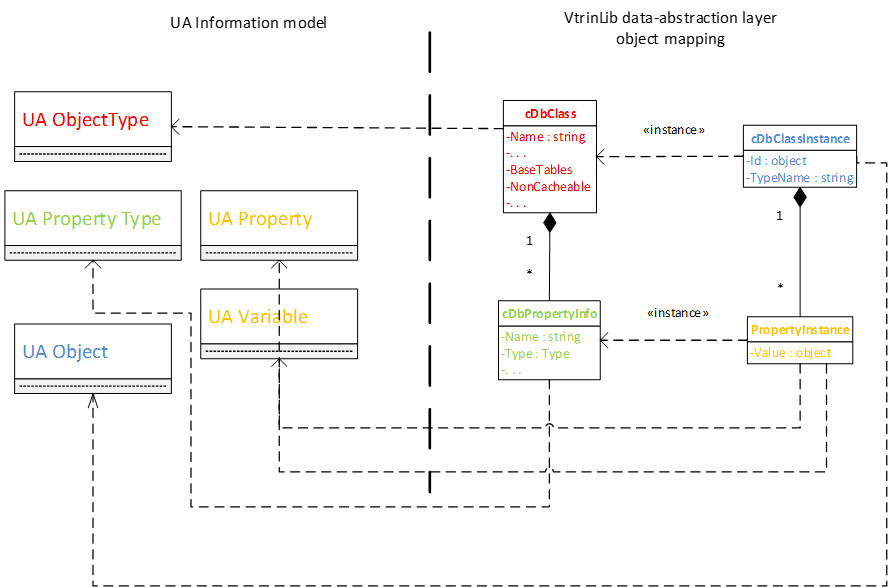
Information model mapping between Vtrinlib and OPC UA
History OPC UA server maps the OPC UA node types like in picture below.
Node Ids
All the History specific nodes are in namespace 2: http://fi.abb.com/Vtrin. The Vtrin object reference style string "/ClassName[PropertyName]/InstanceId|InstanceName" is used as node ids for Variable, Tag and Path classes. For other classes, the dot-delimited "ClassName.InstanceName.PropertyName" syntax is used. To refer to aggregate history values of variables or historized properties, the history table name can be added after the exclamation mark delimiter.
The UA special properties TrueState, FalseState, EURange, EngineeringUnits, EnumValues, ValueAsText are written at end after the period delimiter. (These are not supported together with history table syntax).
This means that the node id consists of parts delimited with dot or exclamation mark. The first (and often the only part) is the object reference. The second part can be the special UA property, or the history table. For other classes than Variable, Tag or Path, the first part is the class name, the second part is the instance name (or id), and the possible third part is the property name of the Vtrin class.
Any dots or exclamation marks in the parts of the node id must be quoted with a backslash, as well as the backslash itself. The C-style quotation of these control characters is also supported: \0 \a \b \f \n \t \r \v (however, these characters perhaps never exists in node ids). If backslash is used before other characters, the backslash is ignored (also if a single backslash is at the end of the string). The Vtrin object reference style escaping is used in the object reference string itself. For example, if the property name contains "]", the character must be duplicated.
The node ids follow the Vtrin object reference rule that either Id or Name can be present in the reference. If both are present, the Name is tried first, and if no match, the Id is tried.
Version info: The object reference style node id has been available since version 5.3_22.06 SR2. Before that, also Variable, Tag and Path classes used the "ClassName.InstanceName.PropertyName" syntax and this syntax is still also supported for backward compatibility. Notice that for the Tag class, the display name (i.e. the variable name) is used as the instance name. Accessing aggregate history for the equipment model historized properties needs version 5.3_24.01.
Connecting the server with Unified Automation UA Expert
History OPC UA server is connected like any other OPC UA server. Connecting with security policy ‘None’ is not allowed by default starting from version 4.5.
As an example, instructions to get connected are demonstrated here using a free OPC UA client, UA Expert, from Unified Automation. This is currently the most used free test OPC UA client. A freeware download is available from (Registration required):
http://www.unified-automation.com/opc-ua-clients/
After installing UA Expert (the installation is a simple Next → Next process), it is started from the Windows Start menu or from the desktop. Once the client is started for the first time, a certificate is required to be generated for the client. UA requires both client and server applications to be identified using certificates. To get connected, both the client and the server certificates can be self-signed.
The certificate details should be filled as asked. This is a one-time process only, as the certificate will be saved to the disk and used automatically later on. This is shown in the following two figures.
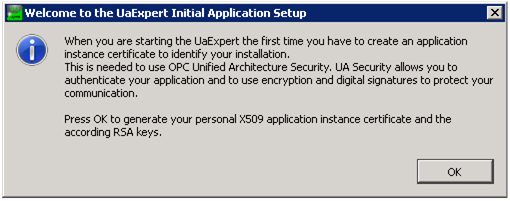
After starting the UA expert, the certificate for the client application should be generated.
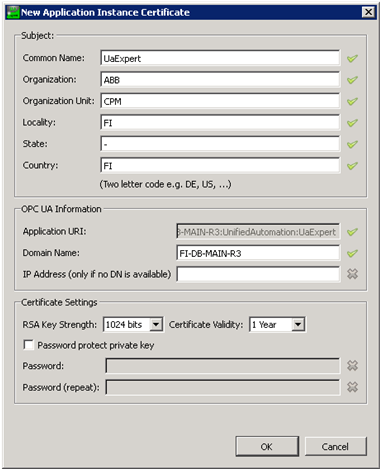
Certificate details for the client application certificate. An example.
You can enable downloading updates automatically, if an internet connection is available, as shown in the figure below.
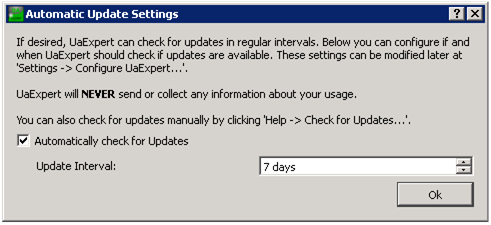
Enabling automatic updates.
After these steps, UA Expert is ready to use, as displayed in the next figure.
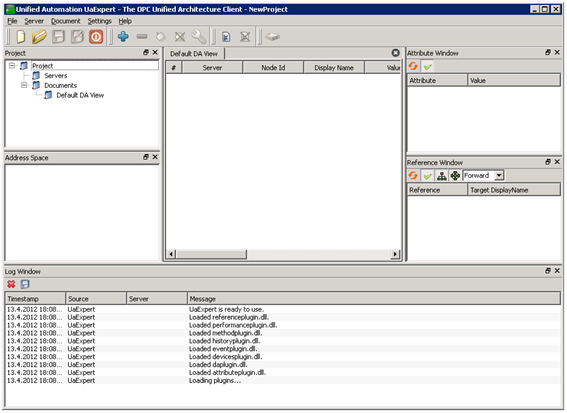
UA Expert is ready to use. The available components are ‘Project view’, where servers can be selected to connect to. ‘Address Space’ shows the content of the selected server. ‘Default DA View’ is used to monitor the value attributes of selected objects. ‘Attribute Window’ shows the attributes of the selected object (selection is done from the ‘Address Space’ view). ‘Reference Window’ shows the references of the selected object. ‘Log Window’ shows the status of the last interface calls and internal operations.
Connecting to the server starts by adding a new server from the context menu in Project view ‘Project\Servers → Add’. As there isn’t a discovery server running by default, the server is connected from the ‘Advanced’ tab, by giving the exact ‘Endpoint Url’ with security and authentication details. The Endpoint Url should be:
opc.tcp://localhost:4841The port 4841 is the default tcp-communication port in the UA specification. The Security Settings should be any of the listed setting with ‘Sign & Encrypt’ (recommended). ‘Configuration Name’ and ‘Session Name’ can be anything that characterizes the connection. See the following figure.
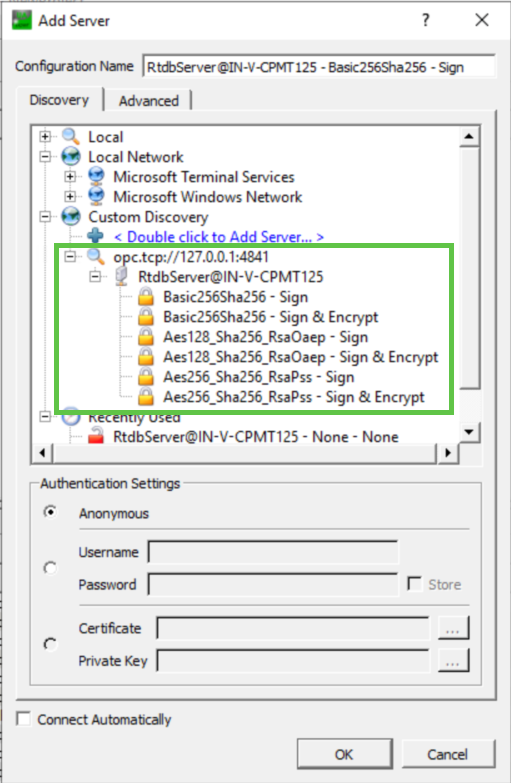
Preparing the UA server to be connected.
Once the server is configured, it can be connected from the context menu, by right-clicking ‘Connect’ (see the following figure).
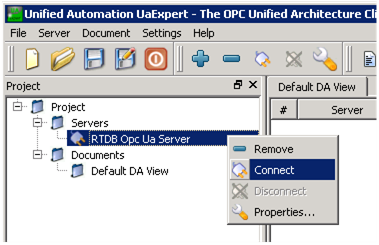
Connecting the UA server
The first connect attempt fails with the error “Connection failed with error ‘BadCertificateInvalid’, as the client application has not been accepted to connect to the server. This can be done next by going to the server computer and moving the client’s certificate from the directory
%VtrinBin%\Config\UaSecurity\pkiserver\rejectedto directory
%VtrinBin%\Config\UaSecurity\pkiserver\trusted\certsAfter that, retrying connect should succeed.
Once connected, the server returns its self-signed application instance certificate to the client, and UA Expert asks to accept that (see the next figure). The certificate can be accepted permanently or only for this session.
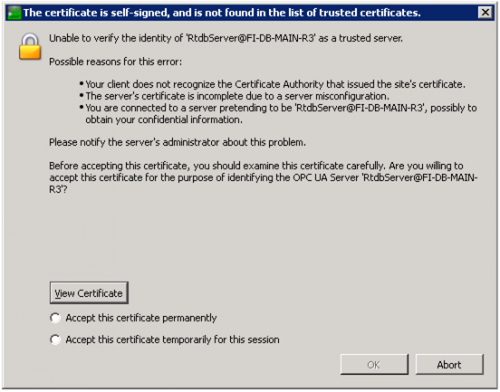
UA expert asks to accept the server's application instance certificate. The certificate details are found behind the ’View Certificate’ button.
In case the security policy ‘None’ is used, the server is not validating the client application instance certificate. The security policy settings can be changed from the file:
%APP_ROOT%\Config\OpcIniFiles\RtdbOpcUaServerConfig.xmlThe ‘None’ security policy could be added by uncommenting the following lines:
<SecuritySetting>
<SecurityPolicy>http://opcfoundation.org/UA/SecurityPolicy#None</SecurityPolicy>
<MessageSecurityMode>None</MessageSecurityMode>
</SecuritySetting>
If the connection is successful, it is reported in the ‘Log’ window, and the ‘Address Space’ window is populated to show the currently available types and objects. If the connection fails, it might be due to a connection timeout. In this case, the message ‘Connection failed with error bad timeout’ is displayed in the ‘Log’ Window. UA Expert uses relatively tight default timeouts to determine that the connection cannot be established. As History OPC UA server initializes the device connection when the first OPC UA client connects, it might be that it was not able to do that fast enough. The Client-side timeout settings can be changed from the menu ‘Settings\Configure UaExpert’. Alternatively, retry the connection.
If the connection was successful, the resulting view is similar to the following figure.
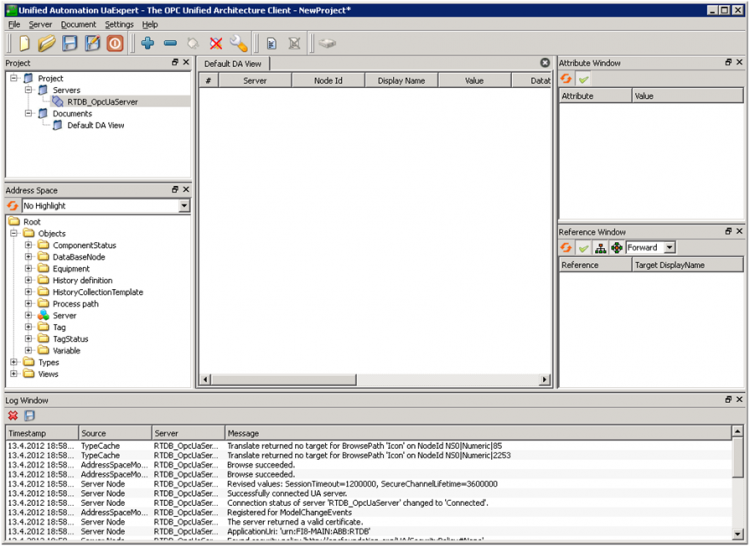
UA Expert is successfully connected with RTDB OPC UA Server.
Missing features and known bugs
- Certificate-based user-authentication not available. However, application-instance certificates are supported.
Compliance Testing
Starting from cpmPlus History version 5.2 OPC UA server is self-tested with OPC Foundation's compliance test tool. Tested UA Server is using latest long term support version from Unified Automation C++ SDK 1.5.6.
Current status is that 98,6% of relevant the test cases are passing. Non-relevant test case is such where server is not implementing an optional feature to be tested. 10 failing test cases are failing because:
- 'NaN' is not supported properly in UA server side. (NaN is 'Not a Number')
- UA Server is not able to write and persist status information coming from clients in a way it would preserve status. (In classic OPC writing status was not even possible).
- Problems with writing to rarely used datatypes arrayOfDateTime and arrayOfGuid. Recommendation is not to use those through OPC UA.
Addition to these three known problems there is one additional exception which is not reflected in failed tests:
- ABB Ability™ History is not supporting synchronic current value write, but all write operations are handled a-synchronically through internal ring buffer due to performance reasons. Many of the compliance tests are relying behaviour where compliance test client is writing to variables first and then reading back the value and verifying. To ensure read operation is able to see latest value, 1.5 seconds delay have been used before returning back the write operation. This delay is configurable and usually it should be set 0.
Configuration
OPC UA Server has two configuration files:
- Driver connection configuration file
Configures the integration between VtrinLib and OPC UA Server.
Located at%APP_ROOT%\Config\OpcIniFiles\RtdbOpcUaDriverConfig.ini - SDK Configuration file
Configures the SDK used to implement the OPC UA Server functionality.
Located at%APP_ROOT%\Config\OpcIniFiles\RtdbOpcUaServerConfig.xml
Default driver configuration file
[Main]
# Wrapper, either "vtrin" or "rtdb". So far only "vtrin" is supported.
driver=vtrin

## Vtdin Driver Specific settings ##
# %app_dsn% Environment variable refers to rtdb server.
# url=tcp://127.0.0.1:7614/CPIMS-INTERNAL/%APP_DSN%

url=FromServiceArguments

# Username and password for the driver
#
# If empty, authentication is based on kerberos and credentials are derived
# from current process. (Note, service must be ran as appropriate user)
#
# Default user authentication is used for two purposed.
# To read locales and for anonymous user.
username=
password=

# Classes to show, a regular expression pattern.
# Examples:
#   classes=.*                                                      Shows all classes
#   classes=(Tag)|(Variable)|(ComponentStatus)|(Class)|(Path)       Shows specific classes
#
classes=(Tag)|(ComponentStatus)|(Path)|(HistoryCollectionTemplate)|(OpcEvent)

# Classes for which we don't create folder under Objects folder. Main purpose of this is to prevent having
# multiple paths using 'hierarchical' references to object which would again cause troubles to UaDriver.
#
classes_to_drop_from_objects = (Variable)|(Tag)|(TagStatus)

# Of visible classes, the ones to show inverse references
classes_to_show_inverse_references=.*

# Each variable might have data in other history levels as well. This historical data can be set
# visible in browser as well by setting show_aggregates 1 instead of default 0.
#
show_aggregates = 0

# Integers and binaries in RTDB are presented using 64 bit integer.
# in practise it has been found that many OPC clients have trouble
# with handling 64 bit integers. Using this global setting one can map
# 64 bit integers to 32 bit values in OPC HDA interface
#
ConvertInt64ToInt32 = 0

# 1 if events are processed and send to clients that have subscribed those. 0 if not.
#
EnableEventProcessing = 1

# Device connection, i.e. Vtrin connection, can be closed immidiately when
# last UA client diconnects (0) or after some delay (positive integers), or never
# (negative integers).
#
DelayDeviceConnectionCloseInSeconds = -1

# If the producer of the Variable's CurrentValue has been RTDB-EcOpcClient
# it stores the original status of the OPC item received from 3rd party OPC
# server to UserStatus field. Addition to this it maps some of the information to
# RTDB specific status bits. By setting ShowUserStatusAsStatus to 1, RTDB-OpcUaServer
# show user status 'as is' to 3rd party OPC clients. Setting covers all OPC clients
# connected to this server. This setting is useful especially in so called 'data pump'
# use scenarios where RTDB is used as a proxy to automation system. If the 'ShowUserStatusAsStatus'
# is not available it is by default 1. Setting value 0 disables functionality and only main
# status bits are shown for OPC DA originated data as well.
#
ShowUserStatusAsStatus = 1


# Setting 'VariableBrowseNameIsVarialbeName' changes Variable's BrowseName to be
# VariableName as well in cases Variable is part of Equipment Type. This makes it impossible to use
# BrowseName to it's original purpose (Programming against type). Setting parameter 0 shows it to be
# same as defined in TypeDefinion.
#
VariableBrowseNameIsVariableName = 0

# If UA server has been configured to allow anonymous access, the question is what user credentials
# server uses to connect database. For anonymous login some candidates could be Guest user or then some
# user which Vtrinlib is able to authenticate, but having only read-only access. In versions 4.6,
# 5.0-1 and 5.1 all access control checks, after UA client's application instance certificate was approved,
# were neglegted.
#
AnonymousLoginUser = Guest

AdministratorGroup = RTDB-admin

# RTDB is not having synchronous current value write, instead it is always asynchronic. All current value writes are handled by
# RTDB-CVMCServer though shared-memory ring buffer. When current value commit returns, it is not yet know if RTDB-CVMCServer has
# handled this value. Purpose of the parameter is to get ComplianceTesting to pass and either give some time to write to be completed,
# before returning write operation, or then use change Vtrinlib current value cache to work in a way that as well write values are first
# inserted to cache, where read operations are handled. Allowed values are 0 (no delay added), -1 use cache for writes as well or
# positive integer N defining milliseconds to wait after each write.
#
DelayWriteReturnInMilliseconds = 0

# To make running CTT easier, some helpers would be nice which e.g. help creting test data
# to server's address space. By default these helpers are turned off (0). To turn on set value to 1.
#
CTTHelpers = 0
Default SDK configuration file
<?xml version="1.0" encoding="UTF-8"?>
<OpcServerConfig xmlns:xsi="http://www.w3.org/2001/XMLSchema-instance">
<UaServerConfig>
<!--Trace configuration
This part of the configuration defines the trace settings for OPC UA Stack and OPC UA Application.-->
<Trace>
<!--Enable UA stack trace true/false-->
<UaStackTraceEnabled>false</UaStackTraceEnabled>
<!--UA stack trace level. Possible values NONE, ERROR, WARNING, SYSTEM, INFO, DEBUG, CONTENT, ALL
NONE - No Trace
ERROR - Critical errors (unexpected and/or requiring external actions) which require attention
WARNING - Non-critical faults which should not go unnoticed but are handled internally
SYSTEM - Rare major events (good cases) like initializations, shut-down, etc.
INFO - Regular good case events like connects, renews
DEBUG - Used for debugging purposes
CONTENT - Used to add additional content (i.e. whole message bodies) to debug traces
ALL - All
-->
<UaStackTraceLevel>ALL</UaStackTraceLevel>
<!--Enable UA server application trace true/false-->
<UaAppTraceEnabled>false</UaAppTraceEnabled>
<!--UA server application trace level. Possible values NoTrace, Errors, Warning, Info, InterfaceCall, CtorDtor, ProgramFlow, Data
NoTrace - No Trace
Errors - Unexpected errors
Warning - Unexpected behaviour that is not an error
Info - Information about important activities like connection establishment
InterfaceCall - Calls to module interfaces
CtorDtor - Creation and destruction of objects
ProgramFlow - Internal program flow
Data - Data
-->
<UaAppTraceLevel>Data</UaAppTraceLevel>
<!--Maximum number of trace entries in one file-->
<UaAppTraceMaxEntries>100000</UaAppTraceMaxEntries>
<!--Maximum number of backup files-->
<UaAppTraceMaxBackup>5</UaAppTraceMaxBackup>
<!--Do not flush the file after each trace entry. The trace file gets flushed automatically from time to time anyway.
- For maximum trace performance you should set this option to true.
- If you have issues with missing trace entries in case of an application crash, you should set this option to false. -->
<UaAppTraceDisableFlush>true</UaAppTraceDisableFlush>
<!--Trace file-->
<UaAppTraceFile>[TracePath]\RtdbOpcUaServer.log</UaAppTraceFile>
<!--Trace event options. Possible values Disabled, History, HistoryAndEvents-->
<TraceEvents>History</TraceEvents>
</Trace>
<!--Trace configuration end-->
<!--Certificate store used for PKI certificate handling. Different Endpoints may have different trust lists.-->
<DefaultApplicationCertificateStore>
<!--The maximum size of the TrustList in bytes. 0 means no limit.-->
<MaxTrustListSize>0</MaxTrustListSize>
<!--For CA signed certificates this flag controls if server shall send the complete certificate chain instead of just sending the certificate.
This affects the GetEndpoints and CreateSession service.-->
<SendCertificateChain>true</SendCertificateChain>
<!--File based certificate store used with OpenSSL
[ConfigPath] can be used as placeholder for the configuration directory path.
[ApplicationPath] can be used as placeholder for the application path.-->
<OpenSSLStore>
<CertificateTrustListLocation>[ApplicationPath]/../Config/UaSecurity/pkiserver/trusted/certs/</CertificateTrustListLocation>
<!-- Must point to a folder. -->
<CertificateRevocationListLocation>[ApplicationPath]/../Config/UaSecurity/pkiserver/trusted/crl/</CertificateRevocationListLocation>
<IssuersCertificatesLocation>[ApplicationPath]/../Config/UaSecurity/pkiserver/issuers/certs/</IssuersCertificatesLocation>
<!-- must not point to same folder as 'CertificateRevocationListLocation' above, or server won't boot if there is a .crl file. (openssl)-->
<IssuersRevocationListLocation>[ApplicationPath]/../Config/UaSecurity/pkiserver/issuers/crl/</IssuersRevocationListLocation>
</OpenSSLStore>
<!--Windows based certificate store.
- <StoreLocation> location of the store. Valid values are LocalMachine and CurrentUser
- <StoreName> is the name of the certificate store in the local computer
- <IssuersStoreName> is the name of the store for CA certificates used to validate a trust chain. When setting an issuer store name make sure the location exists in the store.
<WindowsStore>
<StoreLocation>LocalMachine</StoreLocation>
<StoreName>UnifiedAutomationUaServerCPP</StoreName>
<IssuersStoreName>UnifiedAutomationUaServerCPP</IssuersStoreName>
</WindowsStore> -->
<!--Application instance certificate for the Server.-->
<ServerCertificate>
<!--File based certificate store used with OpenSSL
[ConfigPath] can be used as placeholder for the configuration directory path.
[ApplicationPath] can be used as placeholder for the application path.-->
<OpenSSLStore>
<ServerCertificate>[ApplicationPath]/../Config/UaSecurity/certs/uaservercpp.der</ServerCertificate>
<ServerPrivateKey>[ApplicationPath]/../Config/UaSecurity/private/uaservercpp.pem</ServerPrivateKey>
</OpenSSLStore>
<!--Windows based certificate store.
- <StoreLocation> location of the store. Valid values are LocalMachine and CurrentUser
- <StoreName> is the name of the certificate store in the local computer
- <ServerCertificateThumbprint> is the thumbprint of the server certificate used to load from store
<WindowsStore>
<StoreLocation>LocalMachine</StoreLocation>
<StoreName>UnifiedAutomationUaServerCPP</StoreName>
<ServerCertificateThumbprint></ServerCertificateThumbprint>
</WindowsStore> -->
<!--Enable server certificate creation if certificate is not available; true/false-->
<GenerateCertificate>true</GenerateCertificate>
<!--Settings for a certificate that is generated by the server-->
<CertificateSettings>
<!--Name of the application - [ServerName] is the default value to use the configured server name-->
<CommonName>[ServerName]</CommonName>
<!--DomainComponent - [NodeName] is the default value to use the hostname of the machine -->
<DomainComponent>[NodeName]</DomainComponent>
<!--Name of the organization using the OPC UA server-->
<Organization>Organization</Organization>
<!--Name of the organization unit using the OPC UA server-->
<OrganizationUnit>Unit</OrganizationUnit>
<!--Name of the location where the OPC UA server is running -->
<!-- Disabled due to CTT warning "Server Certificate Subject.Locality is used, but so is Subject.DomainComponent. Only one of these should be used." -->
<!--<Locality>LocationName</Locality>-->
<!--State where the OPC UA server is running -->
<State></State>
<!--Two letter code for country where the OPC UA server is running, e.g. DE or US-->
<Country>DE</Country>
<!--The number of years the certificate is valid for. The maximum accepted number is 20,
but it is strongly recommended to use a shorter time. -->
<YearsValidFor>5</YearsValidFor>
<!--Key length of the certificate to create. Valid values are 1024, 2048 for RsaMin and 2048, 3072 and 4096 for RsaSha256-->
<KeyLength>2048</KeyLength>
<!--Defines the algorithm used to sign the certificate. Valid values are RsaMin and RsaSha256.
Applications that support the Basic128Rsa15 and Basic256 profiles need a Certificate of type RsaMin.
Applications that support the Basic256Sha256 profile need a Certificate of type RsaSha256.
In this version of the SDK it is not possible to support multiple certificates for one Endpoint,
thus it is not possible to support the RsaMin and the RsaSha256 profile at the same time.-->
<CertificateType>RsaSha256</CertificateType>
</CertificateSettings>
</ServerCertificate>
</DefaultApplicationCertificateStore>
<!--Endpoint configuration
This part of the configuration defines the OPC UA communication endpoints
for the server and their security configurations-->
<!--Folder used to store rejected client certificates. Administrators can copy files from here to the trust list.-->
<RejectedCertificatesDirectory>[ApplicationPath]/../Config/UaSecurity/pkiserver/rejected</RejectedCertificatesDirectory>
<!--Maximum number of certificates stored in the rejected directory.-->
<RejectedCertificatesCount>100</RejectedCertificatesCount>
<!--List of configured Endpoints begin-->
<UaEndpoint>
<SerializerType>Binary</SerializerType>
<!-- URL of the Endpoint
This URL is used for Discovery and to open the Endpoints in the UA stack if no StackUrl is configured.
[NodeName] can be used as placeholder for the computer name. -->
<Url>opc.tcp://[NodeName]:4841</Url>
<!-- Optional URL that allows to define a specific address the stack should use to bind to.
Can be used to bind the endpoint to a specific network card or to localhost only.
<StackUrl>opc.tcp://192.168.0.15:48010</StackUrl>
-->
<!-- It is up to an administrator to configure the actual exposed SecurityPolicies.
This SecurityPolicy should be disabled for most use cases.
-->
<!-- 'None' disabled by default.
<SecuritySetting>
<SecurityPolicy>http://opcfoundation.org/UA/SecurityPolicy#None</SecurityPolicy>
<MessageSecurityMode>None</MessageSecurityMode>
</SecuritySetting>
-->
<!-- This SecurityPolicy is no longer recommended (#Basic128Rsa15)
It is up to an administrator to configure the actual exposed SecurityPolicies.
-->
<SecuritySetting>
<SecurityPolicy>http://opcfoundation.org/UA/SecurityPolicy#Basic128Rsa15</SecurityPolicy>
<MessageSecurityMode>Sign</MessageSecurityMode>
<MessageSecurityMode>SignAndEncrypt</MessageSecurityMode>
</SecuritySetting>
<SecuritySetting>
<SecurityPolicy>http://opcfoundation.org/UA/SecurityPolicy#Basic256</SecurityPolicy>
<MessageSecurityMode>Sign</MessageSecurityMode>
<MessageSecurityMode>SignAndEncrypt</MessageSecurityMode>
</SecuritySetting>
<!-- Need a certificate of type RsaSha256 to support this endpoint.-->
<SecuritySetting>
<SecurityPolicy>http://opcfoundation.org/UA/SecurityPolicy#Basic256Sha256</SecurityPolicy>
<MessageSecurityMode>Sign</MessageSecurityMode>
<MessageSecurityMode>SignAndEncrypt</MessageSecurityMode>
</SecuritySetting>
<!-- Flag indicating if the endpoint is provided in GetEndpoints and is therefore visible to a client. Default is true. -->
<IsVisible>true</IsVisible>
<!-- Flag indicating if the endpoint URL is provided as discovery URL. Default is true. -->
<IsDiscoveryUrl>true</IsDiscoveryUrl>
<!-- This option can be activated if certificates are used only for message security but not for application authentication.
If set to true, all client certificates will be accepted automatically and they are not stored.
It is strongly recommended to use this option only together with user authentication. -->
<AutomaticallyTrustAllClientCertificates>false</AutomaticallyTrustAllClientCertificates>
<!-- Some of the OPC UA security checks are optional in OPC UA or cause interoperability issues with older OPC UA clients
and can be disabled by an administrator of the OPC UA server through the following configuration options. -->
<SecurityCheckOverwrites>
<!-- Flag used to disable the client certificate validation error BadCertificateTimeInvalid. Default is false. -->
<DisableErrorCertificateTimeInvalid>false</DisableErrorCertificateTimeInvalid>
<!-- Flag used to disable the client certificate validation error BadCertificateIssuerTimeInvalid. Default is false. -->
<DisableErrorCertificateIssuerTimeInvalid>false</DisableErrorCertificateIssuerTimeInvalid>
<!-- Flag used to disable the client certificate validation error BadCertificateRevocationUnknown. Default is false. -->
<DisableErrorCertificateRevocationUnknown>false</DisableErrorCertificateRevocationUnknown>
<!-- Flag used to disable the client certificate validation error BadCertificateIssuerRevocationUnknown. Default is false. -->
<DisableErrorCertificateIssuerRevocationUnknown>false</DisableErrorCertificateIssuerRevocationUnknown>
<!-- Flag used to disable the ApplicationUri match check between client certificate and parameter in CreateSession.
The check is required for compliant OPC UA servers but older clients may provide a wrong ApplicationUri.
Default is false. -->
<DisableApplicationUriCheck>false</DisableApplicationUriCheck>
<!-- Flag used to disable the client nonce length check in CreateSession. The check is required for compliant OPC UA
servers but older clients may provide a client nonce that is shorter than the required 32 bytes. Default is false. -->
<DisableNonceLengthCheck>false</DisableNonceLengthCheck>
<!-- Flag used to disable the UserToken PolicyId check in ActivateSession.
The check is required for compliant OPC UA servers but older clients may not provide the UserToken PolicyId.
Default is false. -->
<DisableUserTokenPolicyIdCheck>false</DisableUserTokenPolicyIdCheck>
</SecurityCheckOverwrites>
</UaEndpoint>
<!--
Uncomment the next block (UaEndpoint) to enable the HTTPS based profiles.
This profile works but is not officially supported in this version of the SDK.
This is the HTTP based protocol that will be supported by embedded devices.
The HTTPS profile is not completely tested, so you can use it on your own risk.
-->
<!--<UaEndpoint>
<SerializerType>Binary</SerializerType>
<Url>https://[NodeName]:48011</Url>
<SecuritySetting>
<SecurityPolicy>http://opcfoundation.org/UA/SecurityPolicy#None</SecurityPolicy>
<MessageSecurityMode>None</MessageSecurityMode>
</SecuritySetting>
<IsVisible>true</IsVisible>
<IsDiscoveryUrl>true</IsDiscoveryUrl>
<AutomaticallyTrustAllClientCertificates>false</AutomaticallyTrustAllClientCertificates>
<CertificateStore>
<OpenSSLStore>
<CertificateTrustListLocation>[ApplicationPath]/../Config/pkiserver/trusted/certs/</CertificateTrustListLocation>
<CertificateRevocationListLocation>[ApplicationPath]/../Config/pkiserver/trusted/crl/</CertificateRevocationListLocation>
<ServerCertificate>[ApplicationPath]/../Config/pkiserver/own/certs/uaservercpp.der</ServerCertificate>
<ServerPrivateKey>[ApplicationPath]/../Config/pkiserver/own/private/uaservercpp.pem</ServerPrivateKey>
</OpenSSLStore>
<GenerateCertificate>false</GenerateCertificate>
</CertificateStore>
</UaEndpoint>-->
<!--Endpoint configuration end-->
<!--Maximum age of a request the server allows. Default value 0 is unlimited-->
<MaxRequestAge>0</MaxRequestAge>
<!--Maximum number of sessions the server allows to create. Default value 0 is unlimited-->
<MaxSessionCount>100</MaxSessionCount>
<!--Maximum number of sessions the server allows per Client, 0 is unlimited-->
<MaxSessionsPerClient>0</MaxSessionsPerClient>
<!--Minimum time-out in ms for a sessions the server allows to set. Default value 0 is unlimited-->
<MinSessionTimeout>3600000</MinSessionTimeout>
<!--Maximum time-out in ms for a sessions the server allows to set. Default value 0 is unlimited-->
<MaxSessionTimeout>3600000</MaxSessionTimeout>
<!--Maximum number of Browse Continuation Points managed by a session. Default value 0 is using internal default settings-->
<MaxBrowseContinuationPoints>0</MaxBrowseContinuationPoints>
<!--Maximum number of Browse results for one browse operation. Default value 0 is using internal default settings-->
<MaxBrowseResults>0</MaxBrowseResults>
<!--Maximum number of nodes to browse the server will accept. Default value 0 is unlimited-->
<MaxNodesToBrowse>0</MaxNodesToBrowse>
<!--Maximum number of nodes accepted by server for HistoryRead service for Raw, Modified, Processed and AtTime. Default value 0 is unlimited-->
<MaxNodesPerHistoryReadData>0</MaxNodesPerHistoryReadData>
<!--Maximum number of nodes accepted by server for HistoryRead service for Events. Default value 0 is unlimited-->
<MaxNodesPerHistoryReadEvents>0</MaxNodesPerHistoryReadEvents>
<!--Maximum number of nodes accepted by server for HistoryUpdate service for Data. Default value 0 is unlimited-->
<MaxNodesPerHistoryUpdateData>0</MaxNodesPerHistoryUpdateData>
<!--Maximum number of nodes accepted by server for HistoryUpdate service for Events. Default value 0 is unlimited-->
<MaxNodesPerHistoryUpdateEvents>0</MaxNodesPerHistoryUpdateEvents>
<!--Maximum number of History Continuation Points managed by a session. Default value 0 is using internal default settings-->
<MaxHistoryContinuationPoints>0</MaxHistoryContinuationPoints>
<!--Minimum publishing interval in milliseconds the server allows-->
<MinPublishingInterval>50</MinPublishingInterval>
<!--Maximum publishing interval in milliseconds the server allows. Default value 0 is no limitation-->
<MaxPublishingInterval>0</MaxPublishingInterval>
<!--Minimum KeepAlive interval in milliseconds the server allows-->
<MinKeepAliveInterval>5000</MinKeepAliveInterval>
<!--Minimum Subscription lifetime in milliseconds the server allows-->
<MinSubscriptionLifetime>10000</MinSubscriptionLifetime>
<!--Maximum Subscription lifetime in milliseconds the server allows. Default value 0 is no limitation-->
<MaxSubscriptionLifetime>0</MaxSubscriptionLifetime>
<!--Maximum number of messages in the republish queue the server allows per Subscription.-->
<MaxRetransmissionQueueSize>20</MaxRetransmissionQueueSize>
<!--Maximum number of notifications per Publish the server allows. Default value 0 is no limitation-->
<MaxNotificationsPerPublish>0</MaxNotificationsPerPublish>
<!--Maximum size of monitored item data queues.-->
<MaxDataQueueSize>100</MaxDataQueueSize>
<!--Maximum size of monitored item event queues.-->
<MaxEventQueueSize>10000</MaxEventQueueSize>
<!--Maximum number of subscriptions the server allows to create. Default value 0 is unlimited-->
<MaxSubscriptionCount>0</MaxSubscriptionCount>
<!--Maximum number of subscriptions the server allows to create per Session. Default value 0 is unlimited-->
<MaxSubscriptionsPerSession>10</MaxSubscriptionsPerSession>
<!--Maximum number of monitored items the server allows to create. Default value 0 is unlimited-->
<MaxMonitoredItemCount>0</MaxMonitoredItemCount>
<!--Maximum number of monitored items per subscriptions the server allows to create. Default value 0 is unlimited-->
<MaxMonitoredItemPerSubscriptionCount>0</MaxMonitoredItemPerSubscriptionCount>
<!--Maximum number of monitored items per session the server allows to create. Default value 0 is unlimited-->
<MaxMonitoredItemPerSessionCount>0</MaxMonitoredItemPerSessionCount>
<!--Minimum sample interval supported by the server-->
<MinSupportedSampleRate>0</MinSupportedSampleRate>
<!--Settings for the sampling engine.-->
<AvailableSamplingRates>
<SamplingRate>0</SamplingRate>
<SamplingRate>50</SamplingRate>
<SamplingRate>100</SamplingRate>
<SamplingRate>250</SamplingRate>
<SamplingRate>500</SamplingRate>
<SamplingRate>1000</SamplingRate>
<SamplingRate>2000</SamplingRate>
<SamplingRate>5000</SamplingRate>
<SamplingRate>10000</SamplingRate>
</AvailableSamplingRates>
<!--Settings for the available LocaleIds known to be supported by the server.-->
<AvailableLocaleIds>
<LocaleId>en</LocaleId>
<LocaleId>de</LocaleId>
<LocaleId>es</LocaleId>
<LocaleId>fr</LocaleId>
<LocaleId>ru</LocaleId>
<LocaleId>fi</LocaleId>
<LocaleId>sv</LocaleId>
<LocaleId>it</LocaleId>
</AvailableLocaleIds>
<!--Settings for the available UA profiles known to be supported by the server.-->
<AvailableServerProfiles>
<ServerProfileUri>http://opcfoundation.org/UAProfile/Server/StandardUA</ServerProfileUri>
<ServerProfileUri>http://opcfoundation.org/UAProfile/Server/DataAccess</ServerProfileUri>
<ServerProfileUri>http://opcfoundation.org/UAProfile/Server/Methods</ServerProfileUri>
<ServerProfileUri>http://opcfoundation.org/UAProfile/Server/NodeManagement</ServerProfileUri>
<ServerProfileUri>http://opcfoundation.org/UAProfile/Server/EventSubscription</ServerProfileUri>
</AvailableServerProfiles>
<!--Flag indicating if audit events are activated-->
<IsAuditActivated>false</IsAuditActivated>
<!--Settings for the thread pools used in the server application-->
<ThreadPoolSettings>
<MinSizeTransactionManager>1</MinSizeTransactionManager>
<MaxSizeTransactionManager>10</MaxSizeTransactionManager>
<MinSizeSubscriptionManager>1</MinSizeSubscriptionManager>
<MaxSizeSubscriptionManager>10</MaxSizeSubscriptionManager>
</ThreadPoolSettings>
<!--Build information for the server application software-->
<ProductUri>urn:ABB:RTDB</ProductUri>
<ManufacturerName>ABB</ManufacturerName>
<ProductName>RTDB OPC UA Server</ProductName>
<SoftwareVersion>5.1</SoftwareVersion>
<BuildNumber>1</BuildNumber>
<!--Build information end-->
<!--Server instance information defined for the server installation.
[NodeName] can be used as placeholder for the computer name. -->
<ServerUri>urn:[NodeName]:ABB:RTDB</ServerUri>
<ServerName>RtdbServer@[NodeName]</ServerName>
<!--Server instance information end-->
<!--Configuration for supported user identity tokens-->
<UserIdentityTokens>
<!--Enable anonymous login true/false-->
<EnableAnonymous>true</EnableAnonymous>
<!--Enable user/password Windows AD login "true"/"false"-->
<EnableUserPw>true</EnableUserPw>
<!-- Enable Md5Password file based user/password login. Used for test deployment.
Notation for the file is "username:[md5 of password]".
Example: password.txt
// Example user 'User1' 'Password1' 'group1,group2,...'
User1:7c6a180b36896a0a8c02787eeafb0e4c BUILTIN\Administrators,MyGroup
-->
<EnableMd5Passwd>[ApplicationPath]/../Config/pkiuser/password.txt</EnableMd5Passwd>
<!-- Enable LDAP Server for username/password authentication. These lines can be added multiple times. -->
<!-- <EnableLDAPServer>localhost</EnableLDAPServer> -->
<!--Enable certificate based user login true/false. Must be set if OpenSSL or Windows certificate store is used. -->
<EnableCertificate>true</EnableCertificate>
<!--The security policy to use when encrypting or signing the UserIdentityToken when it is passed to the server.
This security policy is only applied for None Endpoints. For other Endpoints we use the security policy of the Endpoint.-->
<SecurityPolicy>http://opcfoundation.org/UA/SecurityPolicy#Basic256</SecurityPolicy>
<!--Configuration for OpenSSL Trust store, a file based certificate store to handle user certificates.-->
<DefaultUserCertificateStore>
<CertificateTrustListLocation>[ApplicationPath]/../Config/UaSecurity/pkiuser/trusted/certs/</CertificateTrustListLocation>
<!-- opcua_p_openssl_pki.c OpcUa_P_OpenSSL_PKI_OpenCertificateStore() appends "\*.crl" to this value. Therefore CertificateRevocationListLocation must point to a folder. -->
<CertificateRevocationListLocation>[ApplicationPath]/../Config/UaSecurity/pkiuser/trusted/crl/</CertificateRevocationListLocation>
<!-- List of CA certs. Note, root of chain must be explicitely trusted in CertificateTrustListLocation location.-->
<!-- Warning! Any CA that is trusted here can issue certificate for ANY SubjectName -->
<IssuersCertificatesLocation>[ApplicationPath]/../Config/UaSecurity/pkiuser/issuers/certs/</IssuersCertificatesLocation>
<!-- must not point to same folder as 'CertificateRevocationListLocation' above, or server won't boot if there is a .crl file. (openssl)-->
<IssuersRevocationListLocation>[ApplicationPath]/../Config/UaSecurity/pkiuser/issuers/crl/</IssuersRevocationListLocation>
</DefaultUserCertificateStore>
<!--Folder used to store rejected user certificates.-->
<RejectedUserCertificatesDirectory>[ApplicationPath]/../Config/UaSecurity/pkiuser/rejected/</RejectedUserCertificatesDirectory>
<!--Maximum number of certificates stored in the rejected directory.-->
<RejectedUserCertificatesCount>100</RejectedUserCertificatesCount>
<!--Configuration for Windows Trust store-->
<WindowsStore>
<!-- List of windows certificate store locations where certificates have explicit trust. -->
<!-- The X.509 certificate store for personal certificates. -->
<!--
<CertificateTrustStore StoreLocation="CurrentUser">My</CertificateTrustStore>
<CertificateTrustStore StoreLocation="LocalMachine">My</CertificateTrustStore>-->
<!-- The X.509 certificate store for intermediate certificate authorities (CAs). -->
<!--<CertificateTrustStore StoreLocation="CurrentUser">CA</CertificateTrustStore>-->
<!-- The X.509 certificate store for other users. -->
<!-- <CertificateTrustStore StoreLocation="CurrentUser">AddressBook</CertificateTrustStore> -->
<!-- The X.509 certificate store for third-party certificate authorities (CAs). -->
<!-- <CertificateTrustStore StoreLocation="CurrentUser">AuthRoot</CertificateTrustStore> -->
<!-- The X.509 certificate store for revoked certificates. -->
<!-- <CertificateTrustStore StoreLocation="CurrentUser">Disallowed</CertificateTrustStore> -->
<!-- The X.509 certificate store for trusted root certificate authorities (CAs). -->
<!-- <CertificateTrustStore StoreLocation="CurrentUser">Root</CertificateTrustStore> -->
<!-- The X.509 certificate store for directly trusted people and resources. -->
<!-- <CertificateTrustStore StoreLocation="CurrentUser">TrustedPeople</CertificateTrustStore> -->
<!-- The X.509 certificate store for directly trusted publishers.-->
<!-- <CertificateTrustStore StoreLocation="CurrentUser">TrustedPublisher</CertificateTrustStore> -->
<!-- List of windows certificate store locations where issuers are approved. -->
<!-- Warning! Any CA that is trusted here can issue certificate for ANY SubjectName -->
<!-- The X.509 certificate store for intermediate certificate authorities (CAs). -->
<!--
<CertificateIssuersStore StoreLocation="CurrentUser">CA</CertificateIssuersStore>
<CertificateIssuersStore StoreLocation="LocalMachine">CA</CertificateIssuersStore>-->
<!-- The X.509 certificate store for trusted root certificate authorities (CAs). -->
<!--
<CertificateIssuersStore StoreLocation="CurrentUser">Root</CertificateIssuersStore>
<CertificateIssuersStore StoreLocation="LocalMachine">Root</CertificateIssuersStore>-->
<!-- The X.509 certificate store for third-party certificate authorities (CAs). -->
<!-- <CertificateIssuersStore StoreLocation="CurrentUser">AuthRoot</CertificateIssuersStore> -->
<!-- The X.509 certificate store for other users. -->
<!-- <CertificateIssuersStore StoreLocation="CurrentUser">AddressBook</CertificateIssuersStore> -->
<!-- The X.509 certificate store for revoked certificates. -->
<!-- <CertificateIssuersStore StoreLocation="CurrentUser">Disallowed</CertificateIssuersStore> -->
<!-- The X.509 certificate store for personal certificates. -->
<!-- <CertificateIssuersStore StoreLocation="CurrentUser">My</CertificateIssuersStore> -->
<!-- The X.509 certificate store for directly trusted people and resources. -->
<!-- <CertificateIssuersStore StoreLocation="CurrentUser">TrustedPeople</CertificateIssuersStore> -->
<!-- The X.509 certificate store for directly trusted publishers.-->
<!-- <CertificateIssuersStore StoreLocation="CurrentUser">TrustedPublisher</CertificateIssuersStore> -->
<!-- List of windows certificate store locations where certificates are explicitly rejected. -->
<!-- The X.509 certificate store for revoked certificates. -->
<!--
<RejectedCertificatesStore StoreLocation="CurrentUser">Disallowed</RejectedCertificatesStore>
<RejectedCertificatesStore StoreLocation="LocalMachine">Disallowed</RejectedCertificatesStore>-->
<!-- The X.509 certificate store for personal certificates. -->
<!--<RejectedCertificatesStore StoreLocation="CurrentUser">My</RejectedCertificatesStore>-->
<!-- The X.509 certificate store for intermediate certificate authorities (CAs). -->
<!--<RejectedCertificatesStore StoreLocation="CurrentUser">CA</RejectedCertificatesStore>-->
<!-- The X.509 certificate store for other users. -->
<!-- <RejectedCertificatesStore StoreLocation="CurrentUser">AddressBook</RejectedCertificatesStore> -->
<!-- The X.509 certificate store for third-party certificate authorities (CAs). -->
<!-- <RejectedCertificatesStore StoreLocation="CurrentUser">AuthRoot</RejectedCertificatesStore> -->
<!-- The X.509 certificate store for trusted root certificate authorities (CAs). -->
<!-- <RejectedCertificatesStore StoreLocation="CurrentUser">Root</RejectedCertificatesStore> -->
<!-- The X.509 certificate store for directly trusted people and resources. -->
<!-- <RejectedCertificatesStore StoreLocation="CurrentUser">TrustedPeople</RejectedCertificatesStore> -->
<!-- The X.509 certificate store for directly trusted publishers.-->
<!-- <RejectedCertificatesStore StoreLocation="CurrentUser">TrustedPublisher</RejectedCertificatesStore> -->
<!-- X.509 Verification flags -->
<!-- Ignore that the chain cannot be verified due to an unknown certificate authority (CA). -->
<!--<X509VerificationFlag>AllowUnknownCertificateAuthority</X509VerificationFlag>-->
<!-- Ignore that the certificate authority revocation is unknown when determining certificate verification. -->
<!--<X509VerificationFlag>IgnoreCertificateAuthorityRevocationUnknown</X509VerificationFlag>-->
<!-- Ignore that the end certificate (the user certificate) revocation is unknown when determining certificate verification. -->
<!--<X509VerificationFlag>IgnoreEndRevocationUnknown</X509VerificationFlag>-->
<!-- No flags pertaining to verification are included. -->
<!-- <X509VerificationFlag>NoFlag</X509VerificationFlag> -->
<!-- Ignore certificates in the chain that are not valid either because they have expired or they are not yet in effect when determining certificate validity. -->
<!-- <X509VerificationFlag>IgnoreNotTimeValid</X509VerificationFlag> -->
<!-- Ignore that the certificate trust list (CTL) is not valid, for reasons such as the CTL has expired, when determining certificate verification. -->
<!-- <X509VerificationFlag>IgnoreCtlNotTimeValid</X509VerificationFlag> -->
<!-- Ignore that the CA (certificate authority) certificate and the issued certificate have validity periods that are not nested when verifying the certificate. For example, the CA cert can be valid from January 1 to December 1 and the issued certificate from January 2 to December 2, which would mean the validity periods are not nested. -->
<!-- <X509VerificationFlag>IgnoreNotTimeNested</X509VerificationFlag> -->
<!-- Ignore that the basic constraints are not valid when determining certificate verification. -->
<!-- <X509VerificationFlag>IgnoreInvalidBasicConstraints</X509VerificationFlag> -->
<!-- Ignore that the certificate was not issued for the current use when determining certificate verification. -->
<!-- <X509VerificationFlag>IgnoreWrongUsage</X509VerificationFlag> -->
<!-- Ignore that the certificate has an invalid name when determining certificate verification. -->
<!-- <X509VerificationFlag>IgnoreInvalidName</X509VerificationFlag> -->
<!-- Ignore that the certificate has invalid policy when determining certificate verification. -->
<!-- <X509VerificationFlag>IgnoreInvalidPolicy</X509VerificationFlag> -->
<!-- Ignore that the certificate trust list (CTL) signer revocation is unknown when determining certificate verification. -->
<!-- <X509VerificationFlag>IgnoreCtlSignerRevocationUnknown</X509VerificationFlag> -->
<!-- Ignore that the root revocation is unknown when determining certificate verification. -->
<!-- <X509VerificationFlag>IgnoreRootRevocationUnknown</X509VerificationFlag> -->
<!-- All flags pertaining to verification are included. -->
<!-- <X509VerificationFlag>AllFlags</X509VerificationFlag> -->
<!-- Revocation modes -->
<!-- No revocation check is performed on the certificate. -->
<!-- <RevocationMode>NoCheck</RevocationMode> -->
<!-- A revocation check is made using an online certificate revocation list (CRL). -->
<!-- <RevocationMode>Online</RevocationMode> -->
<!-- A revocation check is made using a cached certificate revocation list (CRL). -->
<RevocationMode>Offline</RevocationMode>
<!-- URL timeout for Online revocation check mode (seconds) -->
<UrlRetrievalTimeout>60</UrlRetrievalTimeout>
<!-- Revocation Flags -->
<!-- Only the end certificate is checked for revocation. -->
<!--<RevocationFlag>EndCertificateOnly</RevocationFlag>-->
<!-- The entire chain of certificates is checked for revocation. -->
<RevocationFlag>EntireChain</RevocationFlag>
<!-- The entire chain, except the root certificate, is checked for revocation. -->
<!--<RevocationFlag>ExcludeRoot</RevocationFlag>-->
</WindowsStore>
</UserIdentityTokens>
<!--User identity token configuration end-->
<!--IDs for default roles defined in the SDK.
These IDs are used to control access to audit events, allow trace configuration or certificate configuration. -->
<UserAndGroupIdsForDefaultRoles>
<!--The root user has access to everything.-->
<RootUserId>0</RootUserId>
<!--Members of the SecurityAdminGroup can receive audit events and configure certificates. -->
<SecurityAdminGroupId>0</SecurityAdminGroupId>
<!--Members of the ConfigurationAdminGroup can configure the server trace. -->
<ConfigurationAdminGroupId>0</ConfigurationAdminGroupId>
</UserAndGroupIdsForDefaultRoles>
<!--Ids for default roles end-->
<!--Discovery configuration
Configuration for registration with discovery server(s)-->
<DiscoveryRegistration>
<!--Flag indicating if the certificates should be exchanged with the windows certificate store -->
<AutomaticCertificateExchange>false</AutomaticCertificateExchange>
<!--Path of the local discovery server trust list. This is where the server copies it's certificate to
if the file based store of the new LDS is used. -->
<DiscoveryServerTrustListLocation></DiscoveryServerTrustListLocation>
<!--Store name used for the local discovery server in the windows certificate store -->
<DiscoveryServerStoreName>UA Applications</DiscoveryServerStoreName>
<!--Certificate name of the local discovery server in the windows certificate store -->
<DiscoveryServerCertificateName>UA Local Discovery Server</DiscoveryServerCertificateName>
<!--Interval in milliseconds for registration with discovery server(s) -->
<RegistrationInterval>30000</RegistrationInterval>
<!--List of discovery servers to register with.
If the list is empty, no registration is executed.
Default is opc.tcp://localhost:4840 for the local discovery server.
Additional remote discovery servers can be added-->
<Url>opc.tcp://127.0.0.1:4840</Url>
</DiscoveryRegistration>
<!--Discovery configuration end-->
<!--Serializer configuration
This part of the configuration defines the OPC UA Stack serializer settings.
These are the Security constraints for the serializer. Set this values carefully.-->
<Serializer>
<!--The largest size for a memory block the serializer can do when deserializing a message-->
<MaxAlloc>167772160</MaxAlloc>
<!--The largest string accepted by the serializer-->
<MaxStringLength>167772160</MaxStringLength>
<!--The largest byte string accepted by the serializer-->
<MaxByteStringLength>167772160</MaxByteStringLength>
<!--Maximum number of elements in an array accepted by the serializer-->
<MaxArrayLength>655360</MaxArrayLength>
<!--The maximum number of bytes per message in total-->
<MaxMessageSize>167772160</MaxMessageSize>
</Serializer>
<!--Serializer configuration end-->
<!--Settings for the thread pools used in the OPC UA Stack-->
<StackThreadPoolSettings>
<!--Controls whether the secure listener uses a thread pool to dispatch received requests-->
<Enabled>true</Enabled>
<!--The minimum number of threads in the thread pool-->
<MinThreads>10</MinThreads>
<!--The maximum number of threads in the thread pool-->
<MaxThreads>32</MaxThreads>
<!--The length of the queue with jobs waiting for a free thread-->
<MaxJobs>1024</MaxJobs>
<!--If MaxJobs is reached the add operation can block or return an error-->
<BlockOnAdd>true</BlockOnAdd>
<!--If the add operation blocks on a full job queue, this value sets the maximum waiting time. 0 is infinite-->
<Timeout>0</Timeout>
</StackThreadPoolSettings>
<!--Provides the redundancy settings for the server-->
<RedundancySettings>
<!--Redundancy support options are None, Cold, Warm, Hot and Transparent. Transparent requires special module. -->
<RedundancySupport>None</RedundancySupport>
<!--List of server URIs for the servers in the NonTransparent redundant set.
<ServerUri>urn:MyServer:UnifiedAutomation:RedundancySample</ServerUri>
<ServerUri>urn:PC1:UnifiedAutomation:RedundancySample</ServerUri>
<ServerUri>urn:PC2:UnifiedAutomation:RedundancySample</ServerUri> -->
</RedundancySettings>
<!--Allows configuration of servers returned in FindServers by the server
This is required for the redundancy configuration to provide the discovery URLs for the configured ServerUris of
the redundant servers in a non transparent redundancy set. The own server mus be excluded from the list.
<AdditionalServerEntries><ApplicationDescription><ApplicationUri> must match <RedundancySettings><ServerUri>
This can also be used to configure other servers on the same system if this server is running on Port 4840.
Options for <ApplicationType> are Server or ClientAndServer
<AdditionalServerEntries>
<ApplicationDescription>
<ApplicationUri>urn:PC1:UnifiedAutomation:RedundancySample</ApplicationUri>
<ProductUri>urn:UnifiedAutomation:RedundancySample</ProductUri>
<ApplicationName>RedundancySample@PC1</ApplicationName>
<ApplicationType>Server</ApplicationType>
<DiscoveryUrl>opc.tcp://PC1:48010</DiscoveryUrl>
<DiscoveryUrl>https://PC1:48011</DiscoveryUrl>
</ApplicationDescription>
<ApplicationDescription>
<ApplicationUri>urn:PC2:UnifiedAutomation:RedundancySample</ApplicationUri>
<ProductUri>urn:UnifiedAutomation:RedundancySample</ProductUri>
<ApplicationName>RedundancySample@PC2</ApplicationName>
<ApplicationType>Server</ApplicationType>
<DiscoveryUrl>opc.tcp://PC2:48010</DiscoveryUrl>
<DiscoveryUrl>https://PC2:48011</DiscoveryUrl>
</ApplicationDescription>
</AdditionalServerEntries>-->
</UaServerConfig>
<General>
</General>
</OpcServerConfig>Reading timeseries data
OPC UA Client is able to read timeseries data from either Vtrin Variable, Vtrin Tag, or from Vtrin Historized Property.
In case OPC UA Client requires seeing the nodes to be read in browser, RTDB OPC UA Server can be configured to show currently collected upper level histories (aggregates). This is done from OPC UA Server's inifile in %APP_ROOT%\Config\OpcIniFiles\RtdbOpcUaServerConfig.ini
by changing show_aggregates from 0 to 1.
# Each variable might have data in other history levels as well. This historical data can be set
# visible in browser as well by setting show_aggregates 1 instead of default 0.
#
show_aggregates = 1
With show_aggegates =1 setting OPC UA server browser shows an object 'AggregatedHistories' under which there exists two folders 'All' and 'Precalculated'. 'All' is showing all history tables where TransformationType is not 'Current value history', 'Event log', 'Sequence of events' or 'Sequence of selected events''. 'UA Variables under Precalculated' shows only those where some aggregation process is going on. Usually this is defined using HistoryCollectionTemplate property in Tag class.
Reading and Writing numerical timeseries data not requiring Aggregates visible in browserOPC UA Clients can read and write historical data in selected history table (other than Current History or Stream History) eventhough show_aggregates would be 0 and aggregated histories would not be visible in browser. This would require knowing the node id of the aggregated item. It is having a format: Variable.
<variablename>!<historytablename>
Writing timeseries data
OPC UA Clients can write numerical timeseries data too either Vtrin Variable, Vtrin Tag or to Vtrin Historized Property. Writing directly to upper level history tables is as well supported.
OPC UA Server supports History update types INSERT_1, REPLACE_2 and UPDATE_2
OPC UA Client should use INSERT_1 when it knows that all there is no existing data in those timestamps it tries to insert. REPLACE_2 should be used when one is replacing existing values with exactly same timestamps. UPDATE_2 is similar to Classic OPC HDA InsertReplace, inserting or replacing based on data already available in database.

Writing to aggregated historiesWhen OPC UA Client writes to aggregated history it is responsible to give right timestamp (in UTC) to server. E.g. when write is done in one minute level, it usually means that timestamps are in even minutes (not having seconds at all)
However basetimes of History tables are fully configurable in HistoryTables. Before writing to aggregated table ensure how data should be alligned from HistoryTables in terms of timestamps.
Updated 9 months ago