
Database administration
After the database has been successfully configured, and input data is coming to the system, there are tools to monitor the behavior of the system. This article gives an overview of various kinds of diagnostics tools that can be used to monitor how the database is currently working. Diagnostics, as well as the services available, are covered in detail in separate articles.
After reading this chapter, the reader should know answers, for example, to the following questions:
- How to shut down and start up the system?
- How to populate the database?
- What is the scope of process history for both the current history and upper-level histories?
- How to make a backup of the database?
- How to restore the database from a backup?
The content of this article should answer those questions on a level that should be enough for most administrators.
Environment
RTDB needs a set of system-wide environment variables. These have been defined during the RTDB software installation phase. The following table lists the system-wide environment variables. Note that the administrator usually should not change the values of the environment variables. In many low-level administration tasks, it is valuable to know what each environment variable means, in order to be able to effectively work from the command line.
| Name | Value | Description |
|---|---|---|
| RTDBRoot | C:\Program Files (x86)\ABB Oy\RTDB | Root directory of the RTDB software. |
| CSCommonRoot | C:\Program Files (x86)\ABB Oy\CSCommon | Root directory of the CSCommon software (part of the RTDB (ABB Ability™ History) product). |
| CSCommon_TZ | e.g. Europe/Helsinki | Time zone definition. |
| CSCommon_TZDIR | C:\Program Files (x86)\ABB Oy\CSCommon\Data\ZoneInfo | Time zone database location. |
| Path | Includes the Bin directories of RTDB and CSCommon and <APP_ROOT>\bin | The system PATH must contain the directories that contain the EXEs and DLLs needed during the run-time. |
| APP_DATAPATH | D:\RTDBData | RTDB database directory. |
| APP_DSN | <COMPUTERNAME>-RTDB | The ODBC data source name of the RTDB database. |
| APP_ROOT | D:\Application | Root directory of the application-specific software. In addition, some configuration files for standard services are stored under this. |
| APP_BACKUP_ROOT | E: | Backups are stored here. |
Disk configuration
The RTDB database can reside in any single Windows folder. Still, in typical installations, the RTDB database is located on a separate data disk (hard disk drive), and the software is located on another disk (usually System disk C:). For performance reasons, it is most desirable, whenever possible, to have the disk containing the RTDB database to be formatted using 64 kB block size. This is something that is also pointed out in the setup phase, in System Installer.
A very typical disk configuration is the following:
| Disk | Description |
|---|---|
C: | Operating system and product software. |
D: | RTDB Database and project-specific Application files. The allocation unit size of this disk is 64 kB (kilo Bytes) for best database performance. |
E: | RTDB Backup (online backup, essential backup, and application backup). |
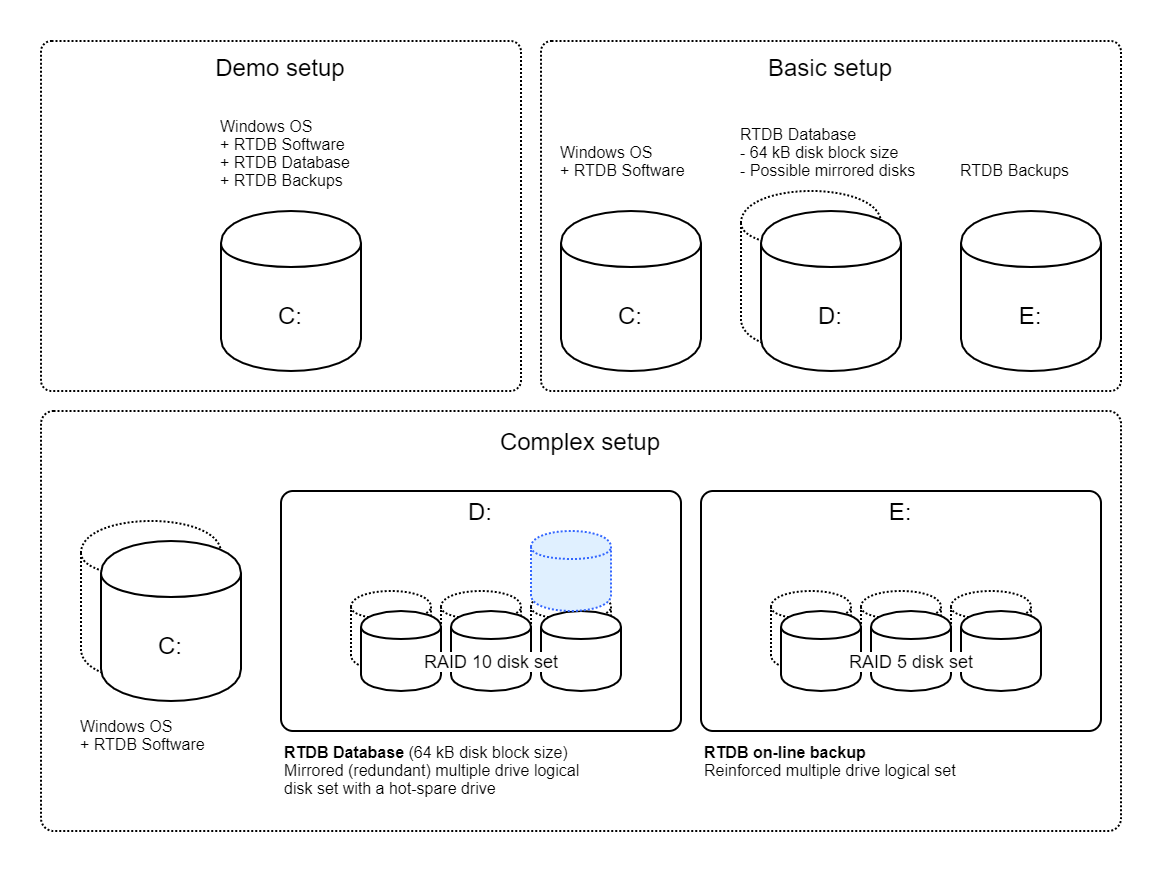
It is possible to make more complex and extremely sizeable disk configurations with high redundancy and high performance for RTDB. A typical larger configuration setup looks like the "Complex setup" in the picture above.
The guidelines to remember when planning for RTDB disk configurations are:
- The RTDB database must reside in a single Windows folder. If a sizeable database is required, then an adequately sized single logical disk must be provided.
- The size of the database online backup must be at least the same as that of the actual database.
The RTDB database directory location is available in the environment variable %APP_DATAPATH%, which refers to the database directory.
Database structure
In this article, the Vtrin user interface is used to manage the content of the database and to make configurations to implement PIMS functionality. Using Vtrin implies that operations towards the database are done through the VtrinLib data abstraction layer. It is good to understand the basics of the relationships between the VtrinLib data abstraction layer and the relational database tables at the core level.
RTDB is a relational database and data is stored into relational tables. The actual database tables and definitions are available in the directory %APP_DATAPATH%.
The easiest way to find a list of the available tables is by running the following from command line:
dir *.tabledefinitionThere are quite a bunch of tables available, mostly because there is a separate table for each different process history type (Aggregated histories discusses the details of process history tables).
Tables are defined in the files ending with .TableDefinition. The actual data is available in the .TableData files. The primary indexes are included in the .TableData files, and the .TableIndex files contain the secondary indexes. Sometimes it is necessary to understand the details of the table structure. For this purpose, there are a couple of good tools:
RTDB_CoreInfo.exeis able to show information from the selected table (column names, data types, and indexes).Praotstx.exeis an ODBC command line client that is able to execute SQL queries against the database.
The relational database side is really quite what any relational database would look like. On top of the relational database, there is the VtrinLib data abstraction layer. The following figure illustrates the basic mappings intuitively, although quite informally, by combining the UML class model from the VtrinLib data abstraction layer into the relational model and actual table data.
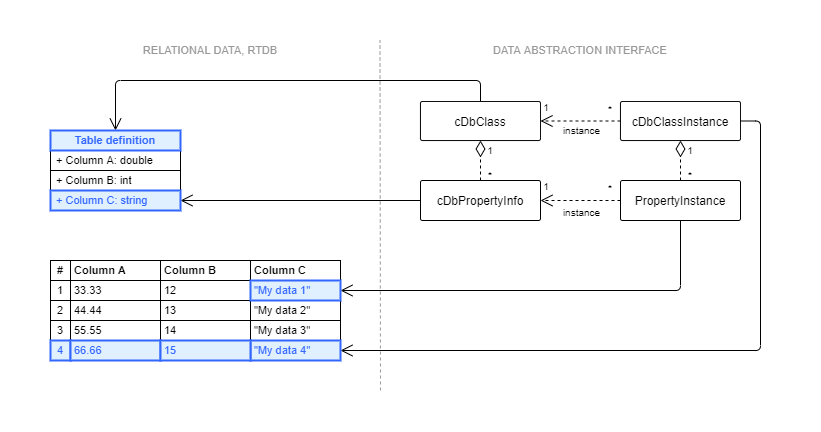
Relationships between RTDB relational database tables and classes in the VtrinLib data abstraction layer.
The building blocks of the VtrinLib object model are "class", "property info", "class instance", and "property instance". Together, class and property info form the type definition part, and class instance and property instance are the actual objects. In the simplest use case, the class is mapped to a single table definition, and property info is mapped to one database column definition. On the instance side, the class instance represents rows in the database table, and each property instance represents a single column on one row. The VtrinLib data abstraction layer is, however, able to present more advanced mappings as well. A good example of a virtualized class is the Tag class, which is presenting data from several tables, hiding the complexity of the configuration behind a multifunctional easy-to-use class.
The set of database tables and classes is not fixed, and application developers can create their own tables and related classes.
Updated 9 months ago