
Modbus client
Modbus is a serial communications protocol based on request-response architecture. On ABB Ability™ History, Modbus client is implemented as an RTDB core service. Modbus client can be used for data collection.
Introduction
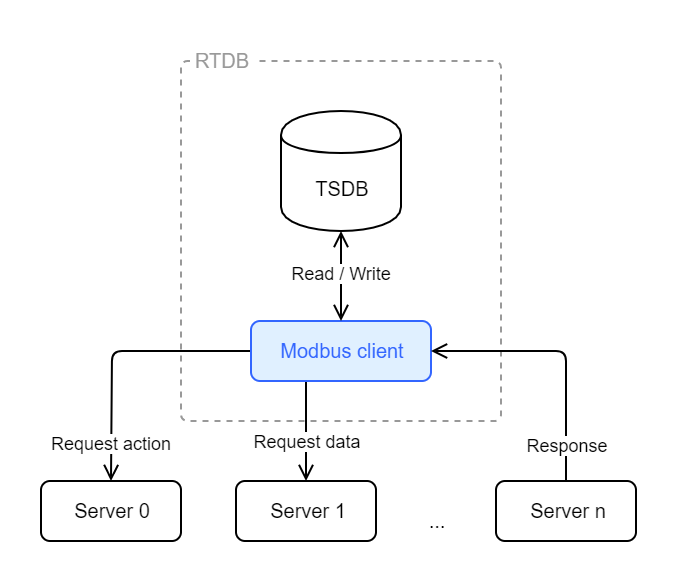
RTDB Modbus client (master) is communicating with one or many servers (slaves).
Modbus is a serial communications protocol based on request-response architecture. In request-response architecture, there is one client (master) and many servers (slaves). The request is issued by the client, then a server either responds or takes action. These request-response-cycles are possible by passing messages. There are several Modbus protocols, thus several different message headers (source):
Protocol | Headers |
|---|---|
Modbus RTU Message |
|
Modbus TCP/IP Message |
|
Thus, industrial electronic devices (servers) could be monitored and controlled by the client (master) of that network.
Modbus was developed with industrial applications in mind. It is easy to deploy and maintain, it moves raw data without placing many restrictions, and it is openly published and completely royalty-free. Modbus has become a de facto standard communication protocol and is now a commonly available means of connecting industrial electronics devices. More information about Modbus can be found from the Modbus' official website.
Modbus and RTDB
RTDB Modbus connection (RTDB_EcModbusMaster) implements a master-slave connection to Modbus slaves over TCP/IP. The functionality of the RTDB_EcModbusMaster process and variables parameters are defined in the "EcCrossrefs" or "Tags" and "DataAccessSources" and "SimpleConfig" tables.
The current implementation can read 16-bit Modbus holding and input registers and the 1-bit coils and discrete inputs. By default, the address of the register defines which read function is used to read the register by using the standard 5-digit traditional or 6-digit extended address notation, i.e.:
- 1 - 9999, or 000001 - 065536: function code 1 (Read Coils)
- 10001 - 19999, or 100001 - 165536: function code 2 (Read Discrete Inputs)
- 40001 - 49999, or 400001 - 465536: function code 3 (Read Holding Registers)
- 30001 - 39999, or 300001 - 365536, function code 4 (Read Input Registers)
Also, non-standard special support if the configurator is unable to use leading zeros in coil addresses:
- 200001 - 265536: : function code 1 (Read Coils)
NoteIn order to use the extended address format, exactly six digits must be preset.
The program supports also output Tags. The program will cyclically write the current value of the tag in the given frequency. Writing is not enabled by default but it needs to be enabled with a SimpleConfig setting. (version info: coil, discrete input and write support needs 5.0-1/2018-10-24 or 5.2/2018-10-24. Output coil write needs 5.2/2019-04-05 version. Other than 16-bit integer write support and multi-register write function needs version 5.3/2020-01-08).
If a single register is stored to an RTDB variable, it is treated as a 16-bit signed integer by default. It is possible to combine up to 4 register values to a single RTDB variable, and the combination can be interpreted as a signed or unsigned integer, or single or double-precision floating-point number. The link tries to read the multi-register values with the same read, if possible (usually the addresses of multi-register values are consecutive, so it is always possible to read them in one read function call because one read can return up to 125 consecutive addresses by default).
There are also other Modbus protocol versions that present longer data types differently but the link does not currently support them. For example, the Enron Modbus protocol defines that the registers 5001-5999 contain 32-bit integer values and the protocol does not differentiate between register numbers and protocol level addresses (in the original Modbus protocol, for example, the register 40001 maps to protocol level address 0 and function code 3). If you accidentally try to communicate with an Enron Modbus a protocol error will result because the returned answer format from the read function is incorrect and the link stores the current value as invalid.
The link supports only big-endian 16-bit register data values (i.e. the register values transferred in the line must come with the most significant byte first). The order of 16-bit words in multi-register values can be anything because the register addresses of each part are configured separately. The link supports also transport of characters strings that are stored as zero-terminated UTF-8 characters in register values two bytes per register. The storing order of the 8-bit bytes in the 16-bit register value can be specified in the configuration.
RTDB_EcModbusMaster cannot act as a Modbus slave.
RTDB_EcModbusMaster does not support the Modbus security application protocol (mbaps) protocol. If the connection to the remote slave uses a non-dedicated network (typically anything else than a direct Ethernet cable), an SSH tunnel should be used between the master and slave and in addition some firewall settings that would restrict the use of the tunnel port.
The RTDB_EcModbusMaster needs Windows 2008 R2 or later. It does not run in older versions (such as Windows 2008) because of a .NET Framework crash issue.
Column | Description |
|---|---|
ProcNumber | The number of the EC process. This is value 26, which means the EC MODBUS master program, unless there are several MODBUS processes. |
TimeClass | Must be zero. |
OrderBy | Not used. Should be zero. |
CommType | Must be the string “MBSLV”. This identifies that this row of ECCrossRefs defines one MODBUS slave for the RTDB MODBUS master. |
LocalId | Defines local settings about the MODBUS slave. This is a string of format | Keyword | Description | |
RemoteId | | Keyword | Description | |
Installing & Defining service processes
The RTDB_EcModbusMaster service is defined with the following command RTDB systems that use the standard application templates:
CSCommon_cmd -setini "%APP_ROOT%\Config\FeatureInstall\APP_FeatureInstall_Selections_Custom.ini" SelectedFeatures RTDB_EcModbusMaster 1After executing the above command, Run the below command to install RTDB_EcModbusMaster as a service
"%APP_ROOT%\Config\FeatureInstall\App_Featureinstaller" /installLicense
A license for a MODBUS master service must be defined with the following keywords:
- section name “ModBus Master”
| Parameter | Description |
|---|---|
| Connection Limit | Defines the maximum amount of MODBUS connections that the MODBUS masters can take. The limit is shared by all RTDB_EcModbusMaster processes of the computer. If the keyword is missing, the count is not limited. If the whole section is missing, the count is zero. |
- The program reads the license file only during startup. All instances of RTDB_EcModbusMaster need to be restarted to get the new license file into use.
General configuration
The configuration tasks consist of editing the RTDB database tables that contain the MODBUS master configuration data. The database tables are usually maintained with the Excel files derived from RTDB_Populate_Database.xls.
By default, all data retrieved from MODBUS slaves is stored in the CurrentValues and CurrentHistory tables, and all aggregates defined for the variables. However, if the variable history compression method is Cluster Compression (value 1), and the recording method is Clustered Storing (value 2), the values are stored to ClusterHistory. If CVRate is defined for the variable, the values are also stored to normal histories with that rate. Refer to the SimpleConfig and EcCrossRefs configuration.
The configuration settings do not take effect before restarting the RTDB MODBUS master.
The process can be restarted with Control Panel → Administrative tools → Services dialog.
The process can also be restarted with the CommandQueue command Restart. For example:
INSERT INTO CommandQueue(RcvId, CmdText) values(26, 'Restart')In addition to the traditional EcCrossRefs style configuration, the MODBUS master can also be configured with the Tags table and with the DataAccessSources and DataAccessRealTime tables.
SimpleConfig Settings
The general configuration settings for the MODBUS master reside in the database table SimpleConfig, where SectionName is “RTDB-EcModbusMaster”. If other MODBUS master processes are to be configured, the sectionname is the same as the name of the actual MODBUS master process.
When the Tags configuration is enabled (with the DataSources setting), most SimpleConfig settings are dynamically taken into use. They are marked with (D). Other settings require that the program is restarted to have effect. The KeyNames in the SimpleConfig are:
| KeyName | Description |
|---|---|
| AppTrace | The default value is -1 (as from the RTDB Service Framework) but the program treats this same as 2 to avoid excess diagnostics by default. This is an integer bitmask but the lowest 3 bits define the debug level 0-7 as follows:0 = No tracing1 = Show configuration log only2 = Also show error messages3 = Also show warning messages4 = Also show information messages5 = Also show trace messages6 = Also show additional debug messages (currently non of these)7 = The trace messages contain also additional dataThe bit 8 defines if the diagnostic messages are wanted also the the Diag log file. (version info: debug level and the bit 8 mask need version 5.2/2019-04-05. Lowest bit was used to select timing information logging in version 5.2/2018-11-21) |
| RealTime | The MODBUS master service is run with real-time Windows priority. This can lead to system delays in other functions of the PC.To force real-time priority, set the value to 1. The default is 0, meaning normal process priority.Use with caution. |
| DataSources | If defined, will direct the MODBUS server to get its configuration from the Tags table instead of EcCrossRefs.The default value of this field is an empty string, which means that the connection does not use the Tags configuration.The asterisk (‘*’) means all connections. A list of MODBUS slaves separated with ';' can also be defined. The slave notation is Node/port, for example “127.0.0.1/502”.The DataSources parameter is not a dynamic parameter. However, if the setting is non-empty, the updated value is always used when the new Tags configuration is read (but just changing the DataSources setting does not trigger reading of new Tags Configuration in the current implementation). |
| CVRate (D) | For data points stored to ClusterHistory, this entry defines the rate of production to CurrentHistory (and CurrentValues) in milliseconds. The default is 1000. Zero disables production of current values completely for ClusterHistory stored variables. |
| HRAddressOffset (D) | (deprecated: Defines the starting address of holding registers in the slave. The default value is 40001. The setting as well as the oter "Offset" settings are deprecated because if they are used, there is no support for reading coils and discrete inputs) |
| IRAddressOffset (D) | (deprecated: Defines the starting address of input registers in the slave. The default value is 30001.) |
| HR6DAddressOffset (D) | (deprecated: Defines the 6-digit starting address of holding registers in the slave. The default value is 400001.) |
| IR6DAddressOffset (D) | (deprecated: Defines the 6-digit starting address of input registers in the slave. The default value is 300001.) |
| Protocol | Optional. If the value is Modicon, RS-485 type protocol (Modicon) will be used. The default is none, which means use Modbus-TCP. |
| TagsCheckInterval (D) | Interval in seconds that defines the time after which the new Tag or DataAccessSources configuration is taken into use, after changes to the tables have stopped arriving. Only changes that may affect the Modbus configuration are taken into consideration. The default value is 10 seconds. |
| TagsCheckMaxDelay (D) | If changes to the Tags or DataAccessSources tables keep arriving, this is the maximum time when the new configuration is still taken into use. The default value is 900 seconds. |
| InvalidWhenBroken (D) | Can be set to 0 (zero) to disable invalidation of current values, when the connection to the Modbus slave gets broken. The default value is 1. |
| ComponentStatusUpdateInterval (D) | Interval in seconds for how often the link updates the main-level component status information. The default is 10 seconds. |
| SmallestAllowedTimerPeriod (D) | If very fast data rates are used, the Modbus link speeds up the Windows scheduler with the timeBeginPeriod API. This behavior can be harmful for other performance of the system, in which case this parameter can be used to limit how fast the Modbus link will set the scheduler. The default value is 1 millisecond. The value of 16 milliseconds disallows touching of the scheduler timer at all, but this can result in more spinlooping with Sleep(0). See also the TimeAccuracy parameter in the table MODBUS slave definitions in table ECCrossRefs. |
| ReceiveTimeout (D) | The default receive timeout in seconds as a floating point value. The default setting is 30.0 seconds. A different value can be configured for each server connection by using the RcvTmo setting in RemoteId settings of the server. A much shorter timeout may be necessary if the same TCP/IP connection contains multiple units and some units do not respond, in order to not delay the whole polling cycle.If timeouts occur for some units, the component status shows a warning severity for them in RTDB-EcModbusMaster/ServerConnections/serverid/SubServer_NN. If the timeout setting has been configured to too small value, the component status may also contain information about "Old Messages" being received. Notice that the unit (or SubServer) for which this is reported may not be the actual unit from which the message is, but the unit that received the message when its own message was expected. In this case, the old message was discarded and the next messages were read from the connection to get the correct response message (if any).(version info: 5.2/2018-04-10) |
Configuration by Using the Tags and DataAccessSources Tables
The Tags table is usually maintained with the Vtrin dialog. The DataAccessSources table is new to RTDB 5.0-1, but it can be installed to RTDB 5.0 version separately with 5.0 SR2 version.
Note: by default the Tags and DataAccessSources configuration is disabled, and the program uses EcCrossRefs instead. To enable them (and disable EcCrossRefs), define the following SimpleConfig setting:
INSERT INTO SimpleConfig(SectionName, KeyName, StrValue) VALUES('RTDB-EcModbusMaster', 'DataSources', '*')The DaType setting in Tags must be 3/Modbus, and the OwnerComponent setting in the DataAccessSources and DataAccessRealTime tables must be 2/Modbus. The DaFrequency or SamplingInterval defines the interval for how often the result items are written (the link currently truncates the value to a whole amount of milliseconds). The smallest value of all items defines the polling frequency. The syntax of the “Id” string in DataAccessSources uses the Vtrin ClassRef syntax (see the OPC client documentation for a description and example configuration). The PublishInterval in DataAccessRealTime is ignored (the Modbus Master uses only UpdateRate).
The DaPath and AccessPath syntax in the Tags and DataAccessSources table has the following format:
modbus://Node/Port/Unit_Id/A/A1/A2/A3/D/F/U;Options
modbus://Node/Port/Unit_Id/A[count]/D/F/U;Options
where:
| KeyName | Description |
|---|---|
| modbus:// | The heading of the tag indicating a MODBUS definition. |
| Node | TCP/IP address of the MODBUS slave. |
| Port | IP port to connect to. The default is 502. |
| Unit_Id | MODBUS Unit Id of the slave. The default is 0. |
| A | MODBUS register address of the data (the least significant 16 bits, bits 0...15 , of the value, in case of multi register data). |
| Count | Count of consecutive addresses starting from A. Negative value means a reversed order. For example 10001[4] means same as 10001/10002/10003/10004 and 10001[-4] means same as 10004/10003/10002/10001 (Version info: RTDB 5.2/2018-10-27) |
| A2 | Optional MODBUS register address that contains the bits 16...31 of the value to be combined with A. |
| A3 | Optional MODBUS register address that contains the bits 32...47 of the value to be combined with A and A2. |
| A4 | Optional MODBUS register address that contains the bits 32...63 of the value to be combined with A, A2 and A3. |
| F | Interpret combined register value as Intel single precision floating point number (32 bit). |
| D | Interpret combined register value as Intel double precision floating point number (64 bit). |
| U | Treat the (combined) register value as unsigned integer. 64-bit values are always treated as signed. |
| THL or TLH | Treat the combined register values as zero terminated UTF-8 character string where two bytes are transported in one register value.With "THL", the first character goes to the high-end part of the 16-bit register value, and with "TLH" it goes to the low part. For example the character string "A" is represented as 16-bit register value 16640 (0x4100) in the THL mode and as value 65 (0x0041) in the TLH mode . If the Modbus slave documentation does not specify the order, you need to try both of them see which one works. The "natural" order in Modbus would be "THL" because in that order the text appears in the correct format also in the line level messages. However, it is possible especially if the Modbus slave uses little endian hardware architecture (such as x86), the order may be TLH instead.The string may consist of multiple language texts separated by "|xxx" where xxx is the language id. By default the link uses the language 001 and stores that text only. See description of the LanguageTag SimpleConfig setting more detailed description.If the UTF-8 string contains invalid byte sequences, the Link tries to replace trailing bytes as "?" until a valid string is resulted (this behavior may change in a future version). If the trailing zero byte is missing, the link assumes that the string ends right after the last register value that stores the last two bytes.(Version info: RTDB 5.2/2018-10-27) |
| Options | The Options part may contain definitions Scale0=x;Scale1=y that define floating point values that define the scaling from the register values to engineering units to be stored to RTDB. If the register value is R, the value is scaled as R*scale1 + scale0. By default scale1 is 1 and scale0 is 0, which effectively means that no scaling is used. The default configuration also means that the link produces integer type input values with the integer current value production API. If scaling is used, it uses the double precision API to produce the current value. Also the output direction supports scaling (version info: needs 5.3/2020-01-08). The scaling setting in the output direction is semantically equal to the input direction, i.e. when writing output, the actually written value will be (currentvalue-Scale0) / Scale1 rounded to the nearest integer value if the integer Modbus data type is used. If the result does not fit to the Modbus integer data type, and overflow will be reported to component status and the value is not written at all.For output tags, the option can also contain setting ";KeepWithNext=1". This means that the slave requires that the register must always appear together with the next address in the "write multiple registers" function call. Multiple consecutive "KeepWithNext" definitions for a group of addresses. The group can contain at most 123 registers because that is the maximum number of registers that can appear in the "write multiple registers" message. If a current value of any item is invalid in the group the writing of the whole group is skipped. The same happens if an overflow occurs when preparing the register values to be written.The options string can also be specified in the "options" column of DataAccessRealTime table. Notice: Even that it is possible to define the property specific scaling to DataAccessRealTime table, this may cause confusion if instance level entries are wanted to be used for defining the sampling interval. This is because if a property specifix entry is there, the Modbus link always used that, and ignores the entry that has the instance level (only) entry. If there is an entry that contains both the instance and the property, that will be used as the highest priority. If both the DataAccessRealTime entry and DataAccessSources entry contains scaling settings, the DataAccessSources setting wins.(version info: RTDB 5.2-19.06/2019-06-08) |
The above entry with default values can be expressed as:
modbus://Node///AThe Modbus addresses can be specified either with a 5- or 6-digit notation. Input registers have the range 30001-39999 or 300001-365536, and holding registers have the range 40001-49999 or 400001-465536.
Examples:
Read the Input register 300010 as a 16-bit signed integer (having values -32768 .. 32767):
modbus://Node///300010It is recommended to use the 6-digit format, as in above, but the 5-digit style, the same would be written as:
modbus://Node///30010Read the Input register 300010 as a 16-bit unsigned integer (having values -0 .. 65535):
modbus://Node///300010/URead a discrete input bit value from address 100001:
modbus://127.0.0.1/10001/0/100001Read an output coil bit value from address 000001:
modbus://127.0.0.1/10001/0/000001Read holding registers 400010, 400011, 400012 and 400013 and interpret them as a double precision float (note: this assumes that the slave stores the value as a 64-bit IEEE double precision format to 4 consecutive 16-bit register values so that the most significant 16-bits are in the highest register address):
modbus://Node///400010/400011/400012/400013/DOr, if the Slave stores the most significant 16 bits in the lowest register address, the addresses must be reversed:
modbus://Node///400013/400012/400011/400010/DInput registers 300010, 300011 should be interpreted as a 32-bit unsigned integer:
modbus://Node///300010/300011/UAnd again, if the Slave stores the most significant 16 bits in the lowest register address, the addresses must be reversed:
modbus://Node///300011/300010/URead the Input registers 300001 - 300100 as zero terminated UTF-8 character string
modbus://Node///300001[100]/THLExample configuration that uses DataAccessSources (this script is for RTDB Core ODBC driver. Therefore the time intervals are present as 100 ns units):
-- Default update rate for Drive1
insert into DataAccessRealTime(id, name, SamplingInterval, PublishingInterval, OwnerComponent, Options) values('/Path_Drive/|Drive1', 'Drive1 default update rate', 25000000, 25000000, 2, NULL);
--
-- Update rate and scaling for MotorTorque property
insert into DataAccessRealTime(id, name, SamplingInterval, PublishingInterval, OwnerComponent, Options) values('/Path_Drive[MotorTorque]', 'Drive MotorTorque default update rate and scaling', 10000000, 10000000, 2, 'Scale1=0.1');
--
insert into DataAccessSources(id,OwnerComponent,AccessType,AccessPath) values('/Path_ACS600[MotorSpeed]/|Drive1',           2, 0, 'modbus://127.0.0.1/10001/0/300001/300002');
--
-- DataAccessSources scaling overrides the DataAccessRealTime setting. However, its SamplingInterval of 10000000 is still used
insert into DataAccessSources(id,OwnerComponent,AccessType,AccessPath) values('/Path_ACS600[MotorTorque]/|Drive1',          2, 0, 'modbus://127.0.0.1/10001/0/300003;Scale1=0.1;Scale0=1000');
--
-- For this entry, the scaling and SamplingInterval of the DataAccessRealTime 'Drive MotorTorque default update rate and scaling' is used
insert into DataAccessSources(id,OwnerComponent,AccessType,AccessPath) values('/Path_ACS600[MotorTorque]/|Drive3',          2, 0, 'modbus://127.0.0.1/10003/0/300063');
It is possible to define additional connection-specific settings, which can be provided in the DaPath setting by using SimpleConfig entries with key names SID_sid_Local and SID_sid_Remote, which contain the EcCrossRefs style settings of the MBSLV entry. The “sid” in the key name is the generated sid value from the DaPath that has the format node/port. For example:
insert into SimpleConfig(sectionname,keyname,strvalue) values('RTDB-EcModbusMaster', 'SID_127.0.0.1/10001_Remote', 'MaxPacket=40;MaxGapInReads=0;SilentMs=100')Configuration by Using the EcCrossRefs Table
The EcCrossRefs table is usually maintained with the Excel Populator application derived from RTDB_Populate_Database3.xls. This normally resides in the %APP_ROOT%\Config\Variables directory.
The RTDB MODBUS master communicates with one or more MODBUS slaves. The slaves must be introduced to the RTDB MODBUS master. The MODBUS slave definitions reside in the database table EcCrossRefs.
Here is an example of an SQL Insert statement that defines one MODBUS slave:
INSERT INTO eccrossrefs (ProcNumber, TimeClass, OrderBy, CommType, LocalId, RemoteId) VALUES(26, 0, 0, 'MBSLV', 'SID=MB1;ONIDT=EC_MB1_CONNECTION;COUNTERIDT=MB1_COUNT', 'NODE=10.20.30.40;PORT=500;CYCLE=10;UNITID=2;FLUSH=20')Note: if you have enabled Tags and DataAccessSources configuration (see above), the EcCrossRefs configuration is disabled. If you need to use both styles of configuration in the same database, you need to install a separate RTDB_EcModbusMaster instance. (It must be installed manually, a pre-defined feature for that is not available).
Each slave has a set of groups, which contain the actual variable definitions. Here is an example of an SQL Insert statement that defines one MODBUS slave group:
INSERT INTO eccrossrefs (ProcNumber, TimeClass, OrderBy, CommType, LocalId, RemoteId) VALUES(26, 10, 0, 'MBGRP', 'TimeMult=5', 'SID=MB1')The meaning of the columns of the ECCrossRefs table is the following:
| Column | Description |
|---|---|
| ProcNumber | The number of the EC process. This is value 26, which means the EC MODBUS master program, unless there are several MODBUS processes. |
| TimeClass | The group number to be used. This is a unique number for this group. Other MODBUS master services must not use this group number. |
| OrderBy | Not used. Should be zero. |
| CommType | Must be the string “MBGRP”. This identifies that this row of ECCrossRefs defines one MODBUS slave group for the RTDB MODBUS master. |
| LocalId | Defines local settings about the MODBUS slave group. This is a string of format keyword=value;keyword=value;...TimeMultDefines: the interval multiplier to be used for the base interval of the slave. All variables in this group use this multiplier giving the actual data reading cycle. The default value is 1. |
| RemoteId | Defines remote settings about the MODBUS slave group. This is a string of format keyword=value;keyword=value;...Sid: The identification of the MODBUS slave to connect this group to. |
Each group has a set of variable definitions. Here is an example of an SQL Insert statement that defines one MODBUS variable:
INSERT INTO eccrossrefs (ProcNumber, TimeClass, OrderBy, CommType, LocalId, RemoteId) VALUES(26, 10, 0, 'AI', 'IDT=MB1_DATA1', 'MBADDR=40010;U32HRA=40011;U48HRA=40012;U64HRA=40013;UNSIGNED;UNITID=4')Diagnostics
The Modbus link produces diagnostics to Messagelog, Diag Log files, Component status, and to user status of current values. The AppTrace setting in SimpleConfig the diagnostic level. The Component status contains information about configuration settings errors and information about server connections.
The user status of current values contain also diagnostics, as follows (currently the texts are not available as UIStrings user status translation texts):
| Value | Description |
|---|---|
| 10 | Value successfully read from slave |
| 11 | The Modbus Master service was stopped |
| 12 | No connection to slave |
| 13 | Protocol error |
| 14 | Timeout |
| 15 | Item removed from configuration |
| 101 | Exception 1 from slave: Illegal Function |
| 102 | Exception 2 from slave: Illegal Data Address |
| 103 | Exception 3 from slave: Illegal Data Value |
| 104 | Exception 4 from slave: Slave Device Failure |
| 105 | Exception 5 from slave: Acknowledge |
| 106 | Exception 6 from slave: Slave Device Busy |
| 107 | Exception 7 from slave: Negative Acknowledg |
| 108 | Exception 8 from slave: Memory Parity Error |
| 110 | Exception 10 from slave: Gateway Path Unavailable |
| 111 | Exception 11 from slave: Gateway Target Device Failed to Respond |
(Version info: user status values are produced with version 5.2/2019-04-06)
See the Modbus slave documentation for the possible reasons for the exception codes, or refer to the general Modbus information from specifications http://modbus.org/specs.php
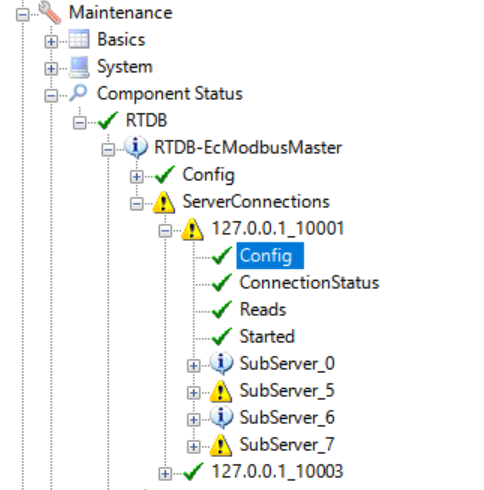
You can verify that different kind of settings were taken into use by checking the component status under RTDB-EcModbusMaster/ServerConnections/serverid/Config that contains an information string value such as: BaseInterval=1000 ms;RcvTmo=2.5;LanguageTag=|358;MaxPacket=125;MaxGapInReads=125;Protocol=TCP;
Server simulator
The Modbus link executable file has a simple server simulator program embedded to it. It can be run as a console program with the following command:
RTDB_EcModbusMaster -slavesimulator [port [-v] ["Modicon"]] [-config "configfile.ini"]For example:
RTDB_EcModbusMaster -slavesimulator 10001The -v qualifier enables verbose mode, where the program shows the Modbus functions executed. The "Modicon" switch (note that this is written without a leading "-") changes the simulator to use the Modicon version of the Modbus/TCP protocol instead.
The simulator returns growing 16-bit register values for each address.
The configfile.ini is an .ini file format file that can optionally be provided for testing different data types. However, values defined in the config file do not change. For example:
[RegisterValues]
; The addresses are in this order to present the data as big endian
; So the least significant 16-bits are in the first listed address and so on.
double[411004,411003,411002,411001]=12.234
float[412002,412001]=12.234
uint32[413002,413001]=4000000000
int32[414002,414001]=-1223456
int16[415002]=-12234
uint16[416002]=52234
int64[417004,417003,417002,417001]=9000000000000000000
utf8_LH[418101:100]=|001Here is some English text|358Tässä on vähän suomenkielistä tekstiä
utf8_HL[418301:100]=|999Auto generated text only. In HL order.
Remember that if you want to run the simulator program at the background always after RTDB startup (and stop it when RTDB is stopped), you and define it to RTDB.ini to be run as a subprocess by RTDB_ServiceManager, for example as:
; Add this to RTDB.ini
[MBSIM]
CmdEx=RTDB_EcModbusMaster -slavesimulator 10001 -config "%app_root%\config\mbsim.txt"
[SubProcesses]
MBSIM=ON
Updated 9 months ago