
Uninstalling History software
This article will guide you through how to uninstall ABB Ability™ History Server on a Windows environment
AlertThis procedure will remove the database completely so if you want the data for any future references then consider taking the backup before performing these steps.
- Log on with the user in which ABB Ability™ History was installed previously.
- Stop RTDB from RTDB control panel available on the Desktop.
- Open an elevated CMD prompt and navigate to the folder where the installation media is present e.g. D:\RTDB CD\Project CPIMS and run the batch file "Upgrade Project CPIMS.bat"
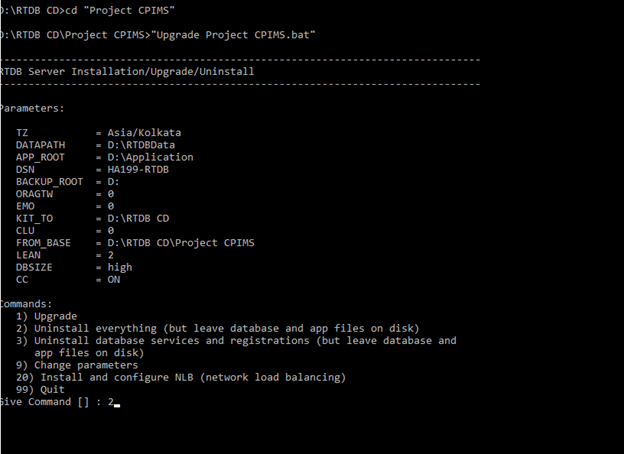
- Give option "2" to uninstall ABB Ability™ History from the system.
- After successful uninstallation delete the database folder manually (Example: D:\RTDBData and D:\Application)
Updated 4 months ago