
Using third-party code
External Library
CalcExternalLibrary is a new Calculation Tool class that provides support for using third-party code in the calculations. This class resides under the Implementation group in the navigation tree.
The CalcExternalLibrary can only be edited via direct connection. Please, contact the database admin user who has a direct connection to database.
Caution is advised when incorporating third-party libraries into calculations; ensure that these libraries are free from any security vulnerabilities.
CalcExternalLibrary
The instance of this class represents a source of third-party code that can later be referenced in the calculation code and, consequently, added to the compilation.
Properties
- Name : string
The name for this external code link. It must be unique. - Type : enum Calc External Library Type
The type of the external code link. It defines what field will be read when registering this third-party code and can either be Code Snippet C# or DLL (File Path). - CodeSnippet : string
This field holds the third-party code if the type was selected as Code Snippet C#. - DLLPath: string
This field holds an absolute path, a relative path from the Vtrin installation directory, and an environment variable path to the compiled third-party code if the type was selected as DLL (File Path).
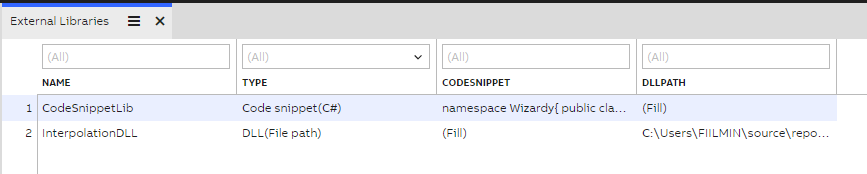
CalcExternalLibrary structure
Usage
After the third-party code has been added to the External Libraries table, it can be referenced in the calculation code. Reference must be formatted as follows:
// #include <External Library>In this example "External Library" is a name of the row in the External Libraries table that records this third-party code. Having this line commented ensures that the calculation code stays a valid C# code and that reference can be picked up by the calculation processor.
If multiple references are needed in the code, each one of them shall be written on a new line.
Placement of referencesReference lines shall be written before the namespace block of the calculation class, effectively before the "namespace ABB.Vtrin.CalcEngine" line.
Example
The following calculation code shows the inclusion of two external code sources - "Custom Math" (provides namespace MyMath) and "Random Generation" (provides namespace Generation), and their usage in the code.
// Automatically generated scaffolding for the calculation code
//
// Code name: no code name defined, put code name on the input box above this code editor
// List of variables that you can use based on parameters that you have added:
// CalcEquipment_Tank tank

// #include <Custom Math>
// #include <Random Generation>

using System.Linq;
using System;

namespace ABB.Vtrin.CalcEngine
{
	public class CalcClass_UntitledCode : CalcInstance
	{
		// put your constructor here

		public void Calculate(CalcEquipment_Tank tank)
		{
			// put your calculation code here
			tank.Level.Last = MyMath.Helper.CalculateLevel(tank.Level, Generation.Random.Next(0, 100));
		}
	}
}If the Calc Engine calculation is not working and a error message is showing( Failed to compile definition: Not allowed code found):
then you have to add a new value in the Whitelist database table.
Go to: Part 4 - API Whitelisting

Updated 8 months ago