
Release 4.6
cpmPlus History is a process historian and database for Collaborative Production Management (CPM) software that can be used to collect and visualize data, build software products and systems for utilities and manufacturing process industries, and integrate with other systems.
cpmPlus History contains integrated software modules that together provide a highly scalable software platform. The applications vary from standalone embedded data logger for a piece of equipment up to large process historian system, or extended CPM solution that integrate the real-time performance measures with the current business context to support fast operational decision-making on the plant or utility level.
About this document
This document describes the major new functionality of the cpmPlus History technology release 4.6.
Detailed technical release notes on individual new functionality as well as bug fixes are presented in a separate document that can be found in the distribution media
\RTDB\program files\ABB Oy\RTDB\Document\ReleaseNotes_cpmPlus_History.txtVersion 4.6 Release Content
The following chapters describe the major new or enhanced functionality in cpmPlus History in release 4.6. The items are grouped under the category titles to make it easier to find the interesting improvements.
Core RTDB
Varying length columns
In the previous versions the columns in a database table have been defined to have fixed size, e.g. a string with maximum length of 1024 chars. Each row in the table has consumed the space of the maximum length no matter whether there is any data stored or not.
In a typical process historian use case there are plenty of engineering tables with lots of potentially very long strings and especially tables such as event logs and diaries may have wasted 90% or more of disk space, because typically the actual data rows only contain data for couple of attributes and even those have data that is far smaller than the maximum length. On the other hand sometimes the length of a column is limited to save space and that may lead to usability issues once there is a need to enter longer data.
Now RTDB supports varying length columns in its indexes. The functionality can be selected index specifically with COMPRESSED parameter in the index definition. To take benefit of this new functionality in the actual data, the table must be primary indexed.
The benefit of this feature is significant savings in used disk space. Because the disk I/O is typically the performance bottleneck in process historians, this new feature improves system performance respectively. As a drawback the CPU consumption is increased somewhat, but currently that is not a bottleneck in typical process historians.
Notice that you should not use this option to such indexes that potentially do not have varying length columns and can’t benefit of it.
Variant data type
In some applications there is a need to store various data types without knowing the data type in advance and have indexing over them. Some examples of such are the vendor specific attributes in OPC events and dynamic attributes in equipment models.
To address this kind of requirements with fixed data types have led to complicated table structures that typically reduce the performance and may also introduce some usability issues in data retrieval.
Variant data type enables storing and indexing different types of data in the same column. Variant supports all the basic data types and arrays of them. Variant data type combined with the varying length columns provide a very powerful functionality for application development and enables things that used to be very difficult to implement.
Connectivity
OPC HDA Server supports seamless retrieval in DCN
In case the DCN node has had break in its operation or in the OPC data acquisition from the control system, and an OPC HDA client is retrieving data over the time period of the missing data in the local DCN History, the retrieval request is forwarded to the main History. The main History returns data that contains also the data for the time period when the DCN has been down if there is a redundant DCN in the configuration and it has produced the data to the main History.
History functionality
Scan profile history supports high availability configurations
Scan profile history is used to store QCS and lab profiles in P&P CPM systems. The scan profile table structures have been modified to support high availability History configurations where the tables and their contents are automatically replicated close to real-time between two History nodes. The scan profile id structures and the respective data acquisition interfaces have been modified, but otherwise this change should not affect the applications.
Feature change to the collection of the unfinished period in an aggregated history
Unfinished aggregate values such as consumption of raw materials this month until now are frequently used in reporting and on dashboards. Quite often such values are produced periodically with calculations, but sometimes they are left for the History to automatically cumulate from lower level values. There are rules for handling the quality status of the values and sometimes they are rather challenging to get proper results e.g. during the first day or week of the month as well as the last day of the month with the same rule.
The quality status handling and the logic how the unfinished period of precalculated aggregates are calculated has been changed to better reflect the actual source values. The unfinished value and status is now calculated up to “current time” instead of extrapolating up to the period end as it used to be in the previous versions. This modification addresses several issues related to the representativeness and quality of the unfinished values especially in case of calculated history values. It is also providing more close to real-time updating of the values.
Notice that this change may affect the actual values and their quality in your application reporting and dashboards. It is recommended to perform testing before upgrading customer installations.
OPCEventLog to support retrieval of vendor specific attributes
OPCEventLog implementation has been changed to take benefit of the variant data type and varying length columns to optimize storage space consumption and support indexing of the vendor specific attributes. The benefit of this improvement is significantly lower storage space consumption and enabling of data retrieval by vendor specific attributes with reasonable performance. Implementation provides automatic migration from the actively supported versions (since 4.2-5). The existing classes in VtrinLib interface are supported with compatibility implementation to provide compatibility with the existing applications.
Performance
Optimization to the data abstraction interface in-memory storage
Previously data in the data abstraction interface (VtrinLib) has been handled as .NET objects, which has several drawbacks such as the handling is not type safe, memory is wasted for storing type information for objects that are already known, and allocating individual memory slots for even boolean and integer values.
Now VtrinLib uses runtime code generation together with generics to achieve type safe handling of data with improved memory efficiency and faster operation. The level of observable performance improvement depends on the use case, but typically memory consumption is lowered 10-50% and access times are 10-400% faster.
High availability
File replication
File replication functionality has been introduced to the History high availability configuration. File replication keeps the content of the defined folders the same between the high availability servers. This functionality is applied by default to the files used in Vtrin user interface.
Environment
Main History Server
Windows Server 2008 R2 SP1 or 2012 (Windows 7 and 8 can be used for development or other controlled use cases)
MS .NET 4.5
MS Visual Studio 2012
MS Office Excel 2010 or 2013 is needed for bulk load tool in engineering client
Basic server configuration:
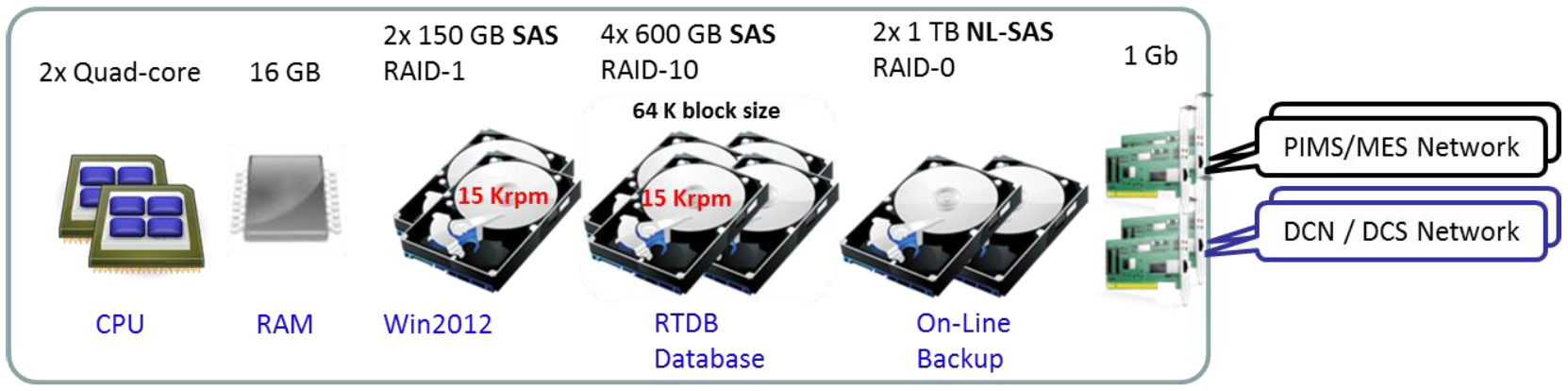
Alternative server configuration for high availability solutions:
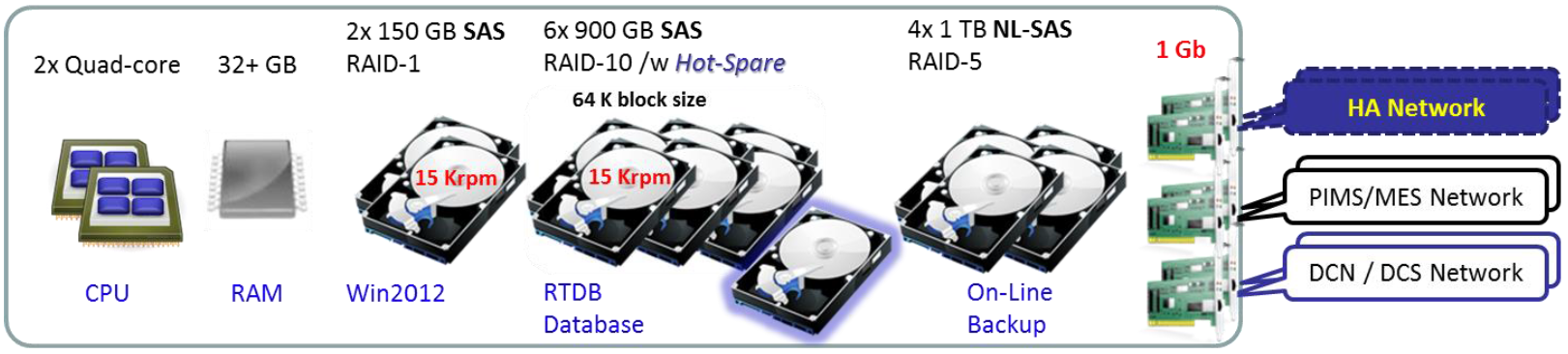
Higher performance hardware is recommended for large systems.
Required disk space for the database shall be separately calculated in each case.
Data Collector Node
Windows Server 2008 R2 SP1 or 2012
MS .NET 4.5
Recommended configuration:
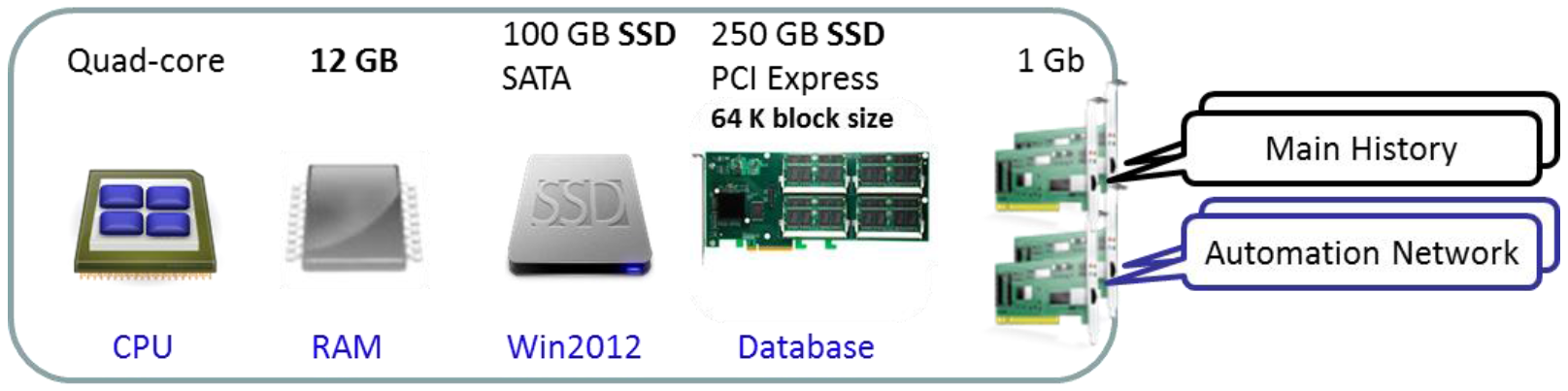
Data Collector Node for 32-bit environments
Windows 2008 SP2 other options: Windows Vista SP2, 7, Windows Embedded System
MS .NET 4.5
Recommended configuration:
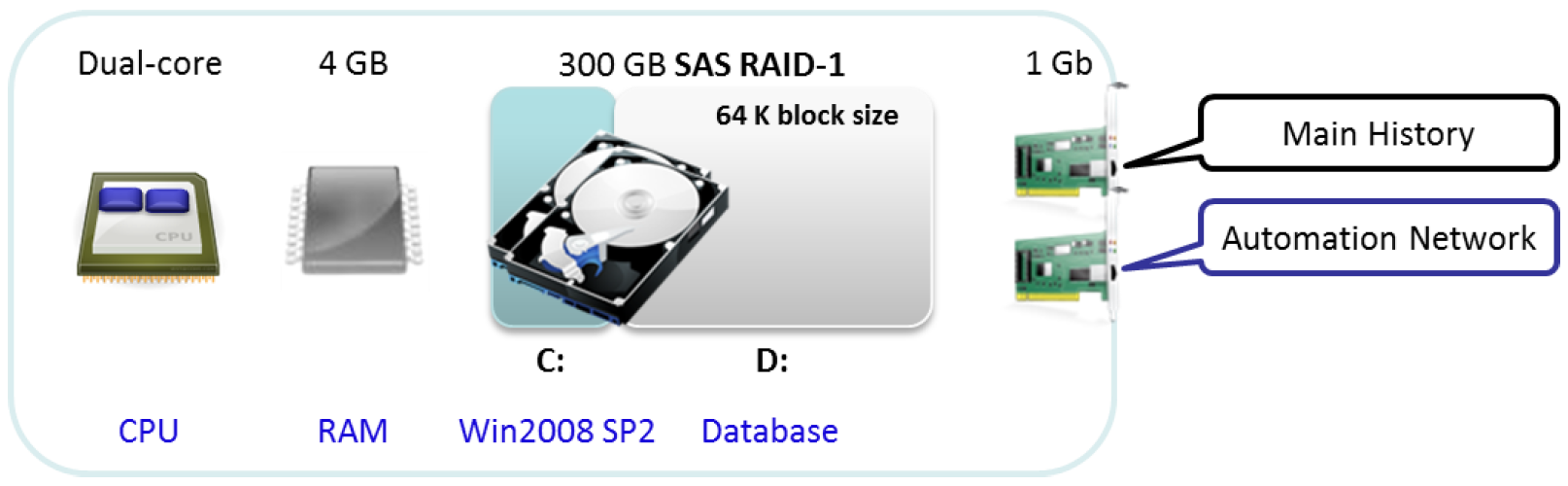
Compatibility
Applications and systems implemented with previous released versions can be upgraded to release 4.6.
cpmPlus History data collector nodes of version 4.2-5, and 4.5 are tested to be compatible with the cpmPlus History 4.6 main node.
Implementation changes in OPC DA server browsing functionalityOPC DA Server does not anymore by default show the item property related items in browser, but only the Variables.
Format of the item ids returned from the browser has been changed. Old item ids are supported as alias item ids for backward compatibility. For more information see the detailed release notes.
cpmPlus History 4.6 known issues with cpmPlus View 1.2 or later
cpmPlus View 1.2 has limited support for using cpmPlus History 4.6 as the datasource.
Here are listed some known issues with this configuration.
.NET Remoting in server connections
The View server can only connect to History 4.6 using the legacy .NET Remoting connections (tcp:// connection strings). This might require additional firewall configuration for allowing certain ports to communicate between the View server and Vtrin Server in the History 4.6. (See the History 4.6 documentation for more information.)
History Value Subscription
History Value Subscription (SubscribeHistoryValue in Server API / ABB.Mia.cHistoryValueAccessor value accessor) is known not to work with History 4.6 as the datasource. There are server side changes done in History 5.0/View 1.2 that fix issues in the backend that unfortunately also make SubscribeHistoryValue unable to work with History 4.6.
Workaround
When using History Value Accessor in a widget, the workaround for this is to change the accessor General.Type property to Fetch. The Fetch mode requires a Time Bar widget to be attached to the accessor (Time.TimeBar property). The attached Time Bar can then be configured to define the time window from where the history value is calculated from.
NoteGraph Data Filter. Filter should not contain any time period for this to work properly. E.g. AVG1MIN -> AVG
Updated 9 months ago