
Application Development
ABB Ability™ History provides an industrial Low Code Application Platform (iLCAP) that makes revolution to the productivity of the industrial application development.
Industrial companies are constantly seeking ways to improve operational excellence, production efficiency, quality, and asset utilization while ensuring environmental sustainability. All these processes need data-driven applications that utilize measured data from sensors, devices, and control systems and combine it with data from humans and other sources.
Just as in all areas where IT and OT converge, digital transformation occurs with the Internet of Things, artificial intelligence and machine learning being present across systems, the borders between applications are gradually blurring. As a result, industrial companies are investing in an open, standardized, and interoperable ecosystem approach that can rapidly integrate next-generation solutions. Harnessing AI and machine learning, the applications’ analytical capabilities can help manufacturers plan for future facility scenarios and the wider operating environment. Industrial companies seek to acquire software applications that do not have limitations and can support various business processes, and contract multiple vendors with the ability to pick-mix applications to avoid vendor lock-in. The primary outcome sought by companies today is alignment to create business value, reduce expenditure, and respond to market time. Because of the evolving business needs, subscribing applications as a service are preferred over capital investments.
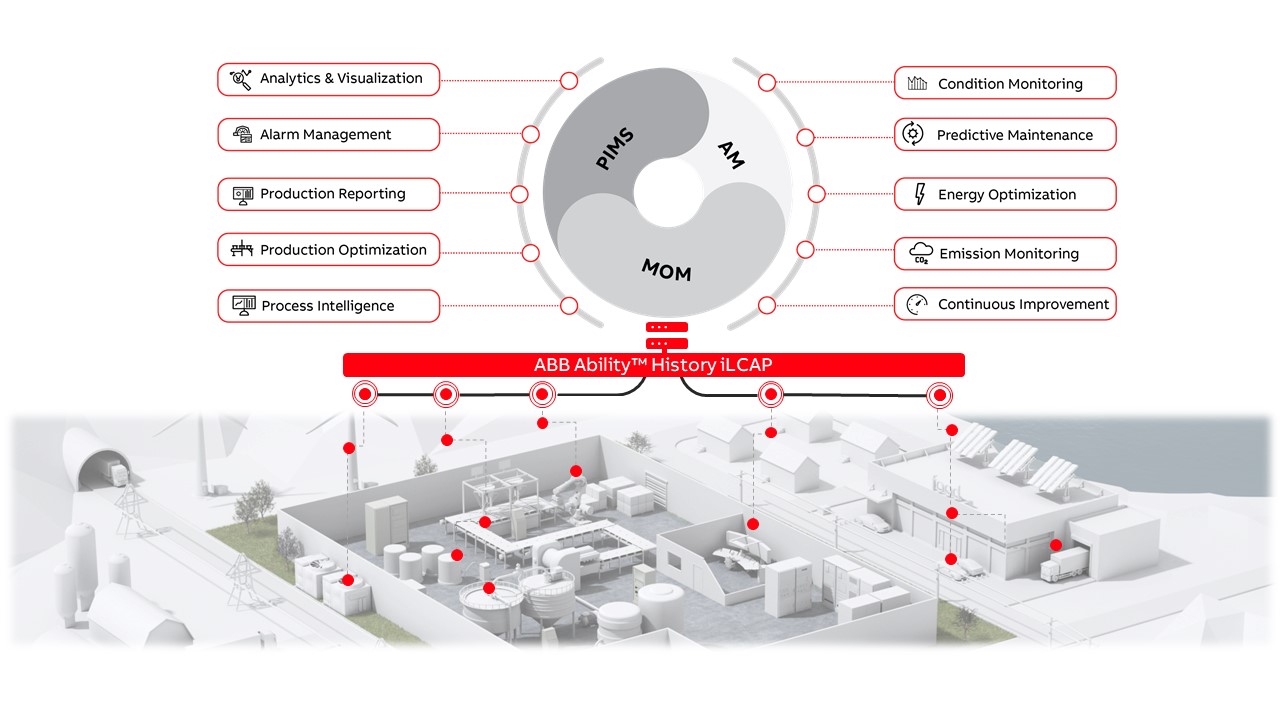
ABB Ability™ History collects, transfers, and aggregates the measured data and provides it to applications in an easy-to-use format. The applications are developed in web browsers with high agility to meet the customer requirements.
Industrial applications are agile and provide excellent user experience
The key success factor for any application is the good user experience. While compared to consumer applications, industrial applications frequently fail to meet user experience stalling the potential business value creation. The best business value is typically provided by tailored applications that are continuously developed according to moving business targets. The challenges in tailor-made applications have been the high cost and life-cycle issues. The advent of the industrial Low Code Application Platform (iLCAP) has the phenomenon solution that enriches user experience, promotes the creation of business value, and delivers timely with low cost.
The increasing complexity of modern industrial systems and architectures impacts the whole industrial software applications space. Though the software development tools are improving, the traditional application development could not accelerate at the same rate as customer demand. Industry segments and individual customers need tailored functionalities that are difficult to meet with generic applications, and tailored applications are expensive. The job market could not cope with the hard-core programming skills needed for traditional application development. Even the engineering process to configure and commission a traditional application including data acquisition, business logic, and visualization typically requires extensive work hours ending to be out of the customer’s cost expectations.
Data quality is increasingly important
The most important enabler for industrial applications is the high-quality measured data. ABB Ability™ History is the platform that is specialized to collect and aggregate measured time series data in an industrial environment. The data quality is ensured throughout the whole path from the device, through the various system levels, up to the application. Possible bad or missing values are indicated in the rich quality status with each value, cumulated in the aggregated values, and exposed in the APIs and application development tools.
One attribute of the data quality is how the data is structured and organized, and exposed in APIs and tools. ABB Ability™ History uses information modelling to organise the data and to guide the application development. There is a predefined meta information model called the Equipment Model that covers functionalities to describe the data acquisition protocols and rules, transferring of the data between systems, aggregation, retention policies, as well as protection of the data. The web browser-based application development tooling supports Equipment Models and guides the implementation of analytics and visualization. See more on Equipment model.
Domain business experts create better applications
ABB Ability™ History provides web browser-based application development tools that are designed to be used by industry business domain experts without the need to have hardcore programming skills. The whole development process interactively in web browser; modeling, data acquisition, calculations, dashboards, reports, systems integration, deployment, and operations monitoring.
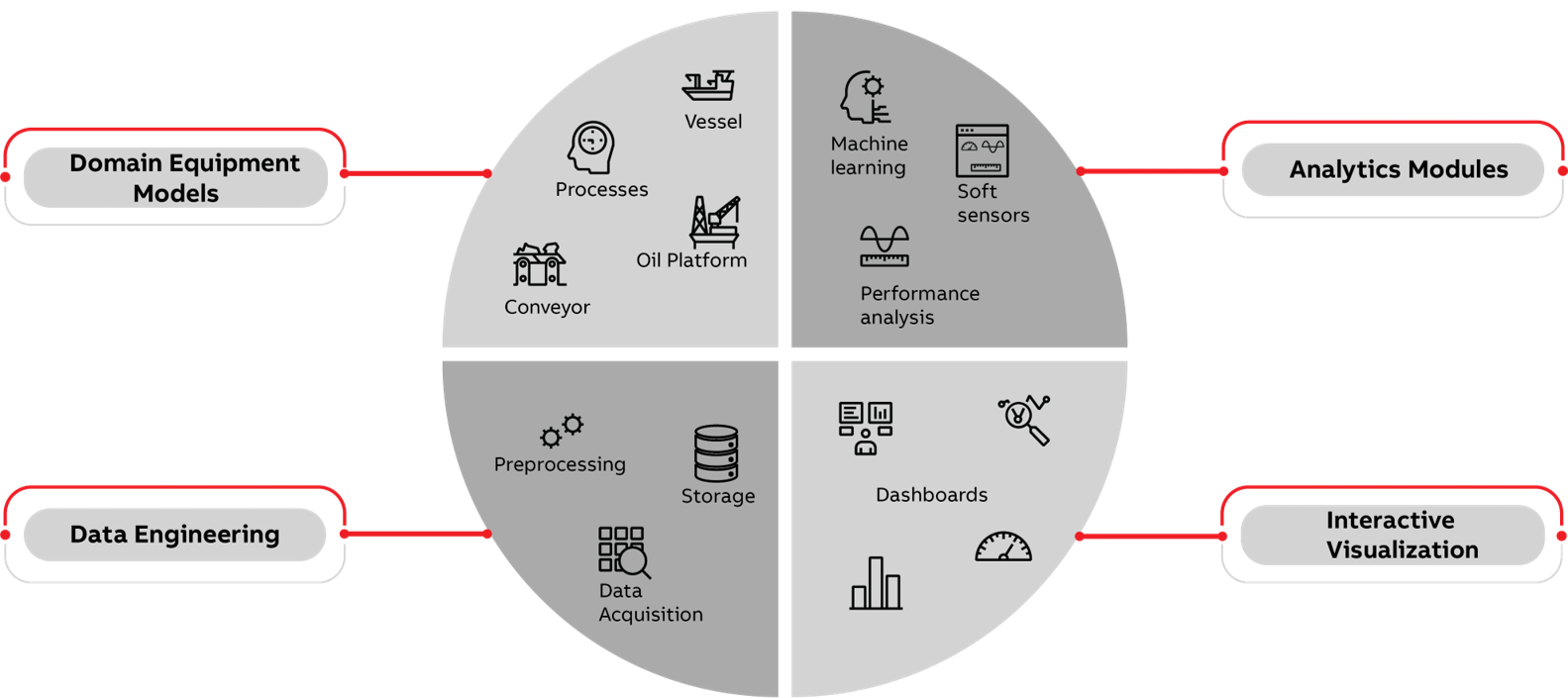
The whole application development process is supported by web browser tooling
The focus in the application development with ABB Ability™ History tooling is on the business impact and doing things that create value and the business domain experts understand; the domain model, data acquisition, analytics, and visualization. This is maintained with a high level of abstraction and automation. Traditionally, all the secondary things are done by software developers.
With ABB Ability™ History the application development is an easy and interactive experience that takes place in a web browser without the need for deep programming skills. Subject matter experts can focus on configuring the functionalities and tailoring the application to address the business subjects while the technical aspects are handled by automation.
iLCAP ManifestoModern industrial systems and architectures are increasingly complex for developers, and user experience is decreasing compared to consumer products.
We believe that with low-code development platform industrial business value can be delivered timely, with low cost, high productivity, and high quality. And the user as well as developer experience can be increased.
Visual tooling to support agile workstreams
Web browser-based visual development encourages collaboration between stakeholders, and invites the users to participate by easy sharing of the application’s progress and prototype. It increases productivity, ensures the business value, fosters better user experience and agile workstream with iterative delivery is its natural character.
iLCAP application development is model-driven and starts from designing the domain equipment models that are the basis for defining the business functionalities. Data engineering covers the creation of the digital twins of real-world things and defining the data acquisitions from the devices and control systems, data processing and aggregation rules. The automation is handling the actual data collection, processing, quality management, aggregation, and storage based on the configuration.
Dashboarding and reporting are implemented with interactive and easy-to-use design tools in a web browser that guides to responsive and “desktop-like application” user experience. The development process encourages the reuse of the already implemented assets, e.g. the analytics and visualization are done against the Equipment Models and reusable as such, and e.g. users can configure their own widgets and dashboards, and store them cumulatively to widget library for sharing and reusing.
The application logic (analytics) is used to refine the data to useful information for the user such as the predictions in predictive maintenance or setpoints to control system in process optimization. It is all managed and configured in a web browser-based tool that is also used to connect external libraries, and AI and ML models when needed.
Ensure high quality and long life-cycle
iLCAP core value proposition is to ease application development, increase productivity, and provide a rich user experience without compromising quality. Cyber security is ensured during the development process as well as in the actual application. The application can be highly customized according to customer business requirements, but still, its’ life cycle is managed and supported with new versions of ABB Ability™ History. Deployment options cover various hierarchical and networked system configurations including Windows and Linux operating systems, Docker containers, in Edge, plant level, and in the Cloud.
The development process is inviting to collaboration due to its visual nature and ease of sharing the results online. Agile workstreams with iterative delivery are the natural development process and provide good visibility for governance.
One traditional challenge that has been seen with low-code tooling in the past is the limited functionality. This is not the case with ABB Ability™ History, because the functionality is rich and the expression power of the tools is good. Additionally, everything can be extended with coding and using 3rd party tools, because of the open standard APIs. All the data as well as configurations are in the database and accessible with OPC UA, OData, ODBC/SQL and other industry-standard APIs.
iLCAP supports the development of customer-specific one-off type solutions as well as productized applications for large distribution. iLCAP makes a revolution to industrial applications by enabling flexibility to meet customer business requirements and better user experience. At the same time, the developer experience and productivity are increased.
How to start?
The application development tools are collected in the Engineering UI of ABB Ability™ History. You can find guidance on the tooling in the tutorial sections, e.g. starting with the Equipment model and data engineering. Analytics are implemented with the Calculation tool, and perhaps the best place to start is Calculation Tool tutorial.
Introduction to visualization tooling can be started from Designing a Dashboard or by watching step-by-step webinars from the table below. The series of videos gives a comprehensive knowledge of Ability™ History UI SDK:- Architecture, concept and use cases; Designing Dashboard Part I & Part II; Create your own widget; Building your own application and Use external data and create Vtrin Driver.
| Type | Title | Short Description |  |
industrial LowCode Application Platform | This is an introduction and overview presentation on ABB Ability™ History iLCAP concept and how it is improving industrial application development and delivery. |
|---|---|---|
| |
Architecture,Concept and Usecase | This is ABB Ability™ History introduction video uncovering its UI SDK tools. This informative session featured with live demo presenting the architecture, concept and use cases of ABB Ability™ History UI SDK tools. |
| |
iLCAP hands-on example | This video teaches you step by step how to implement an industrial application from idea to plan and then through the simple steps with iLCAP tooling to a live application. The end result, a pump energy efficiency monitoring application, is ready for deployment to industrial customers and free to use. |
| |
Designing Dashboard Part I | This video discusses designing well-behaving and functionally intuitive dashboards. Also, how to use our web-based dashboard editor that enables you to design and implement dashboards for industrial applications without coding and to follow ABB common UX guidelines. |
| |
Designing Dashboard Part II | Continuing from the last session this video will examine the subject of designing well behaving and functionally intuitive dashboards. As well as how to use our web-based dashboard editor that enables you to design and implement dashboards for industrial applications without coding and to follow ABB common UX guidelines. |
| |
Create your own widget | This video explains ABB Ability™ History UI SDKs functionality in creating your own widgets. What is the widget architecture and how to create your first "Hello World" widget. Then further widget modules are explained and how the layout handling in dashboards is implemented with some more challenging examples. Continued with description of components and handling of widget properties, and how to access data on the server. Finally, integration of 3rd party widget is explained with an example.. |
| |
Build your application | This video explains how to implement context-sensitive dashboard that works in multiple systems using ABB Ability™ History - UI SDK tool and the exporting and importing of dashboards with examples of deploying from system to system. It also include the creation of an application from start page and navigation options to various other configuration features that summarizes with a demo on how to package a complete application with custom widgets and install script. |
| |
Use external data and create Vtrin Driver | This video explore means on how to connect and use data from 3rd party data sources in UI dashboarding, using ABB Ability(TM) History UI SDK tooling as well as how to create application data models and business logic. With the following points highlighted and featured with demo:- How to connect 3rd party data source to UI dashboarding with Vtrin Driver? How to use ready-made Vtrin Drivers to connect 3rd party data source? How to create your own Vtrin Driver? How to create Vtrin Plugin to create application business logic or connect 3rd party data source? How to create your application-specific tables in ABB Ability™ History and visualize and maintain the data in your dashboards? |
| |
Systems integration | ABB Ability™ History provides flexibility in system topologies that is needed to implement modern multi-layered industrial cyber secure solutions. Netsync service supports secure bidirectional data transfer with automatic backfill from device to Cloud. Data transfers are defined with simple information model-based rules. Data feed can have multiple targets and 3rd party systems are supported with extendable interface. This webinar explains how this all is configured in web browser. |
| |
Calculation tool introduction | ABB Ability™ History is intuitive web browser based tool to create and manage continuously running calculations for your application logic. This webinar explains the basics of calculations with simple examples. The first part of the webinar goes through External Interfaces and then starting from 5:40 the webinar will go through calculation basics (variable and equipment model). |
Updated 6 months ago