
Part 1 - Getting started
This article is a part of the equipment model tutorial.
In this tutorial, we will set up a monitored system using the equipment model. This equipment model is used for teaching purposes in many places in this documentation and is presented in more detail in Example equipment model.
Let us consider a simple example to illustrate the concept of the equipment model. As shown in the figure below, the pump transfers water from the left-side tank to the right-side tank. Pump turns on when there are more than 900 liters of water inside the source tank, and off when there are less than 100 liters of water.
The goal of the tutorial is to build a monitored system. Sensors measure the water flow inside the pipes, the current power of the pump, and the water level inside the tanks, and history information will be stored for those values. Some information such as pump or pipe manufacturers and the nominal power of the pump is not historized.
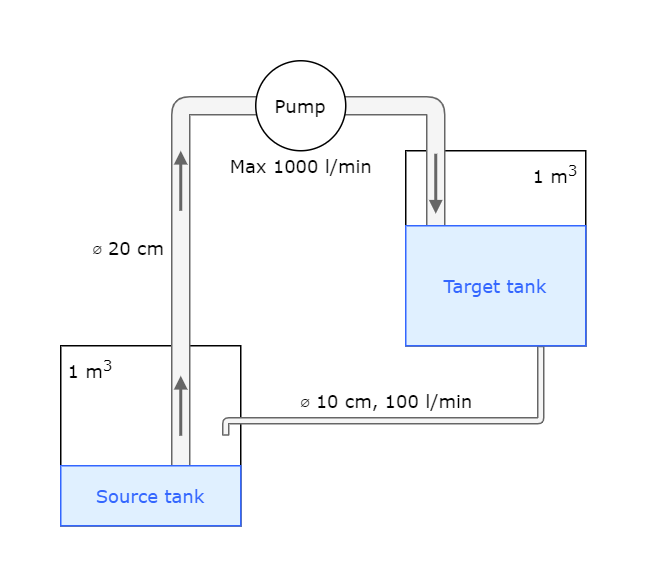
The system consists of two tanks, one pump, and piping.
Installing ABB Ability™ History
To complete this tutorial, you must have ABB Ability™ History installed. Please read through our installation guides for Windows, Linux, and Docker. You will need your database address, username and password later in this tutorial.
Creating a new project
Let's start the tutorial by creating a new blank C# project. First, in Visual Studio select "File" > "New" > "Project" and create a new "Console App (.NET Framework)". Name the project as you want e.g., "EquipmentModelTutorial". The project should contain one class called "Program" with the following contents:
namespace EquipmentModelTutorial
{
    class Program {
        static void Main(string[] args) {
            // TODO: Implement me
        }
    }
}
Referencing VtrinLib
To be able to continue this tutorial, we must add a reference to the data abstraction interface VtrinLib. In Visual Studio, open the "Solution Explorer" and right click your project. Select "Add" > "Reference..." and add a reference to the "VtrinLib.dll" file. At this point, your project file "EquipmentModelTutorial.csproj" should contain the following reference:
<Reference Include="VtrinLib">
  <HintPath>..\path\to\VtrinLib.dll</HintPath>
</Reference>
What do we have now?
At this point, you have set up an empty project with all the references you will need to complete this tutorial.
Compare your codeThis tutorial is following the code that can be found from our GitHub repository. Checking out the full example code is highly recommended.
Updated 9 months ago