
WSS (+HTTP REST) Server API
Secure WebSocket connections to data abstraction interface.
Although there are ready-made APIs for accessing Vtrin-NetServer functionality from C# (VtrinLib) or e.g. JavaScript (View), there might sometimes be cases when you want to access the functionality directly either with your own or some 3rd party code. In order to accomplish this, you have a couple of options regarding the connectivity and serialization. Use of a WebSocket connection is highly recommended whenever possible, as it provides by far the most efficient way to communicate with the server and also the ability to use binary serialization for even better performance and type safety. Regardless of this, it might sometimes be convenient to use plain HTTP connectivity, especially if you are debugging or you are using a third party application that lacks WebSocket support, and you are only going to make a couple of calls to the server.
Available connection types
| Connection type | JSON | Binary |
|---|---|---|
| WebSocket | ✓ | ✓ |
| HTTP POST (REST) | ✓ | |
| HTTP GET with URL-parameters | ✓ |
All connection types support both secure (https/wss) and unsecure (http/ws) connections, depending on the Vtrin Server Configuration. In the current version, the HTTP POST and GET are only supported when Vtrin Server is running in standalone mode (not as IIS plugin).
WebSocket
WebSocket connections can be done with any standard WebSocket library compliant with RFC 6455. All text frames are expected to contain JSON serialized commands and all binary frames are expected to contain binary serialized commands. The server will reply to JSON serialized commands with JSON, and to binary serialized commands with binary, so it is also possible to mix the JSON and binary serialization within a single connection. As WebSocket is a true full duplex transport, any subscribed values will arrive immediately as soon as the server has sent them.
HTTP
With plain HTTP connectivity, you can only use JSON serialization. Since HTTP connections are not persistent, your session is lost whenever the connection is terminated, unless your application supports cookies. In this case, your session stays alive for an additional 90 seconds, during which you can even reconnect and continue. This naturally has no effect on cases where all the commands you are executing are stateless by their nature. The JSON serialized connections can be sent to the server as a body of a HTTP POST or as URL parameter (execute=...), and the server will then reply with a JSON serialized message. In case there are active subscriptions that the server has new data to be sent, this data will not automatically get to the client. Only if the client makes some other call, the server will bundle the subscribed data together with the actual reply of the call. The body of the POST can either be plain JSON or URL-encoded, in which case the request must have a Content-Type header with the value of "application/x-www-form-urlencoded".
Call Structure
Regardless of the communication and serialization method, the call structure is always the same. In a single message, there can either be a single command or multiple commands combined together. When sending multiple commands to the server in separate messages, the server runs the commands in parallel. When multiple commands are combined into a single message, they are executed sequentially. There are two types of commands: function executes and pushes. Both of these commands start similarly with the client-specified call id, but differ after that. The function executes provide a way to asynchronously execute parametrized commands on the server, while getting a return value back. Pushes provide an efficient way to produce data to the server without getting a return value back. Both pushes and method executes can be combined into the same message. The client can freely select a 64bit (52 bit on JSON) positive value for the call id that is used in the calls, but the client has to make sure that there are never two identical ids existing at the same time. As JavaScript does not support 64bit integers, the value is serialized as double instead, leading to an effective precision of only 52 bits.
A single command is presented as an array. When combining multiple commands into the same message, the single commands are combined as an array, resulting in an array of arrays. Arrays are used instead of name-value collections to maximize the performance, as JSON specification does not guarantee the order of the name-value pairs in the serialization process. This enforces the server to fully deserialize the message before executing it, while arrays are guaranteed to retain their order, making it possible to start the execution of the command immediately.
Function Calls
| Index | Name | Description |
|---|---|---|
| 0 | Call Id | A 64bit (52bit on JSON) call id the client can freely select |
| 1 | Function Name | Name of the function to execute |
| 2 | Parameters | Array of function parameters |
Pushes
| Index | Name | Description |
|---|---|---|
| 0 | Call Id | A 64bit (52bit on JSON) push subscription id |
| 1 | Push data | An array containing the pushed data |
Function Call Reply
| Index | Name | Description |
|---|---|---|
| 0 | Call Id | Call Id as it was on success, negated on failure |
| 1 | Return Value | Function return value on success, exception message (string) on failure |
Examples
The following examples are in JSON, but the exact same data can be serialized as binary as well.
Getting Time From Server Call:
[1,"GetServerTimeInUTCFromServer",[]]Server reply:
[1,"14815255832914531"]List Currently Connected Users Call:
[1,"FetchClassData",["ServerUser",["UserName"],-1,"ORDER BY UserName"]]Server reply:
[1,{"Data":["COM600-PC\\COM600","COM600-PC\\COM600","COM600-PC\\Demo","COM600-PC\\Ilpo"],"Truncated":false}]Error in Call Parameters Call, which contains "error" in a parameter that should contain an integer value:
[1,"FetchClassData",["ServerUser",["UserName"],"error"]]Server replies with negated call id (-1 instead of 1) and error message:
[-1,"System.Runtime.Serialization.SerializationException,mscorlib: Invalid string '\"error\"]]' to decode as a Int32 starting from position 47."]Combining Get Server Time and Get Connected Users Together Call:
[[1,"GetServerTimeInUTCFromServer",[]],[2,"FetchClassData",["ServerUser",["UserName"],-1,"ORDER BY UserName"]]]Server reply:
[[1,"14815267524747434"],[2,{"Data":["COM600-PC\\COM600","COM600-PC\\COM600","COM600-PC\\Demo","COM600-PC\\Ilpo"],"Truncated":false}]]Getting Server Time via URL Parameter Type to URL of your browser:
https://localhost/view/connectionstring.data?execute=[1,"GetServerTimeInUTCFromServer",[]]Body of the reply from server:
[1,"14815255832914531"]EqM API
The <<glossary:ABB Ability History>> API (EqM API) hereafter, is an API designed for easy-to-use device connectivity that can be utilized with little effort from 3rd party code. The functionality includes the ability to produce values from a device to ABB Ability™ History and vice versa, the logging of events, and defining device-specific function call APIs that can then be invoked from the ABB Ability™ History server. It is also possible to make ABB Ability™ History itself act as a device and connect to another ABB Ability™ History or 3rd party code using this API.
This article assumes that you are familiar with the full API documentation.
Although the examples presented on this page are in JSON, the same API can be called with binary serialization as well. To access the EqM API from 3rd party code, please check the article that describes how to use 3rd party code to communicate with Vtrin Server. There is also a VtrinLib-based API available for accessing the EqM API that is described in the Equipment API .NET Client Documentation.
The EqM API consists of two entries at the moment and these two contain all the functionality needed.
| Method Name | Parameters | Return Value | Description |
|---|---|---|---|
| FetchEquipmentInfo | Equipment Type Name | Equipment Definition or null | Returns the meta information stored in the ABB Ability™ History that describes the given type of equipment. |
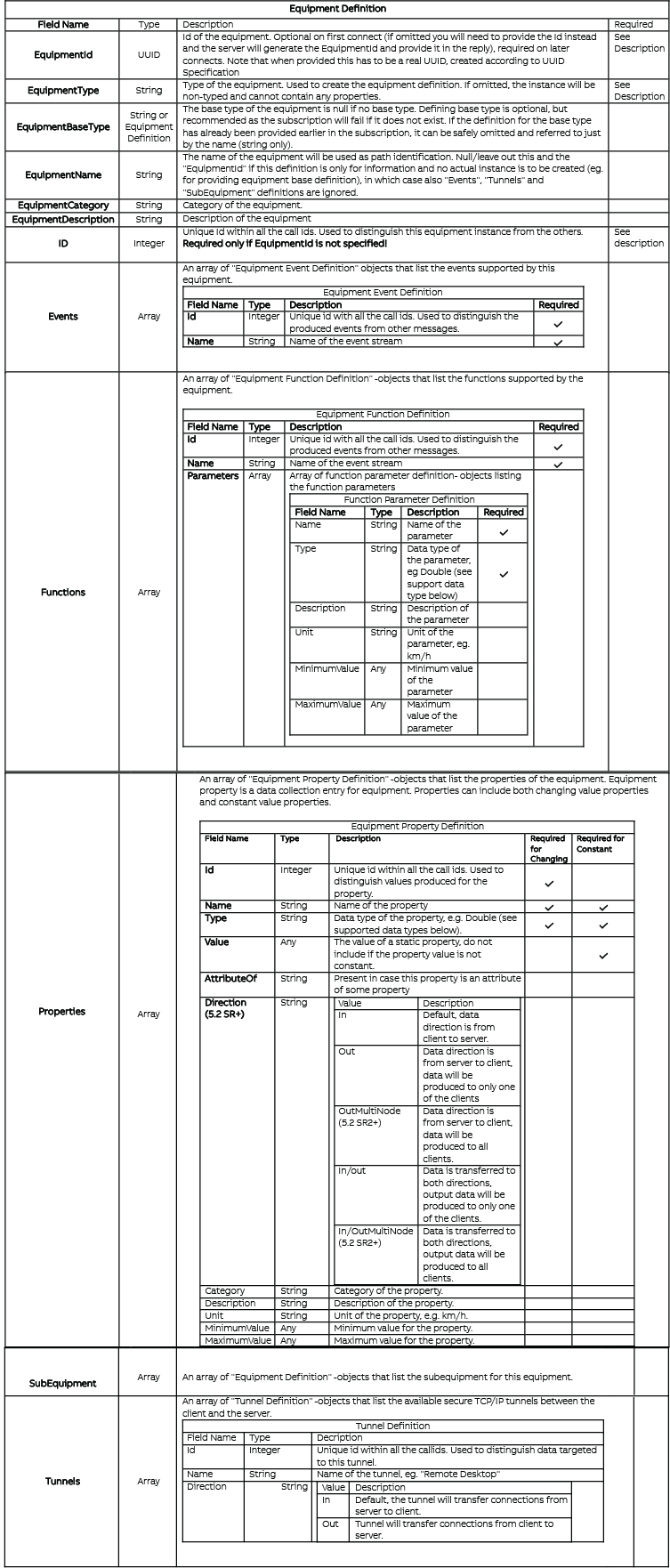
| SubscribeEquipmentSession | Equipment Definition | Equipment Subscription Response | Initialises a session with a server that allows data and event production as well as the server to invoke function calls back to the client according to the definition provided by the client. |
FetchEquipmentInfo
FetchEquipmentInfo returns an equipment definition similar to what a user passes to SubscribeEquipmentSession based on the definitions in the database (the Equipment Definition part) See SubscribeEquipmentSession for more details.
SubscribeEquipmentSession
SubscribeEquipmentSession to produce data will create supporting instances in the database to enable data production.
Note that this call is a subscription, meaning that there might (and probably will) be multiple replies to this call. The implementations of this API will need to be aware of multiple replies to this call. For example, the first reply might be empty, but after an administrator approves some properties, the reply will be sent again with the proper properties in place. The implementing side must treat the latest reply as the current state of subscriptions.
Supported Data Types
Data type names are case-insensitive. For information on how to serialize the different datatypes, please refer to Serialization Support in VtrinLib.
| Type | Minimum Value | Maximum Value | Max Array Length* | Max String Length* |
|---|---|---|---|---|
| boolean | false | true | 16340 | |
| byte | 0 | 255 | 16340 | |
| uint16 | 0 | 65536 | 8170 | |
| uint32 | 0 | 4294967295 | 4085 | |
| uint64 | 0 | 18446744073709551615 | 2042 | |
| sbyte | -128 | 127 | 16340 | |
| int16 | -32768 | 32767 | 8170 | |
| int32 | -2147483648 | 2147483647 | 4085 | |
| int64 | -9223372036854775808 | 9223372036854775807 | 2042 | |
| single | -3,402823E+38 | 3,402823E+38 | 4085 | |
| double | -1,79769313486232E+308 | 1,79769313486232E+308 | 2042 | |
| DateTime | 1601-01-02 00:00:00 UTC | 9766-12-31 23:59:59 UTC | 2042 | |
| TimeSpan | -10675199.02:48:05.4775808 | 10675199.02:48:05.4775807 | 2042 | |
| GUID | 1021 | |||
| byte[max] | 0 | 255 | 264 | |
| string | 0 | 2097151 | not supported | 256 |
| string(size) | 0 | 2097151 | not supported | 5443 |
| string(max) | 0 | 2097151 | not supported | 264 |
| string(max)[max] | 0 | 2097151 | 5440*** | 5440*** |
Max string and array lengths are for the ABB Ability™ History default configuration and can be altered from the database configuration.
The current version of ABB Ability™ History does not support the historizing of string(max)[max] properties.** String(max)[max] combined size is limited to 16340 bytes, BLOB storage is currently not supported.
For arrays, the length can be specified as in [], eg. int32[512] to get an array of 32-bit integers with a maximum length of 512. If the length is not specified, the array's maximum length is set to 256. The maximum array/string length does not affect the disk space consumption for values in history but does affect to disk and memory consumption of the property, so it is recommended to keep it reasonable.
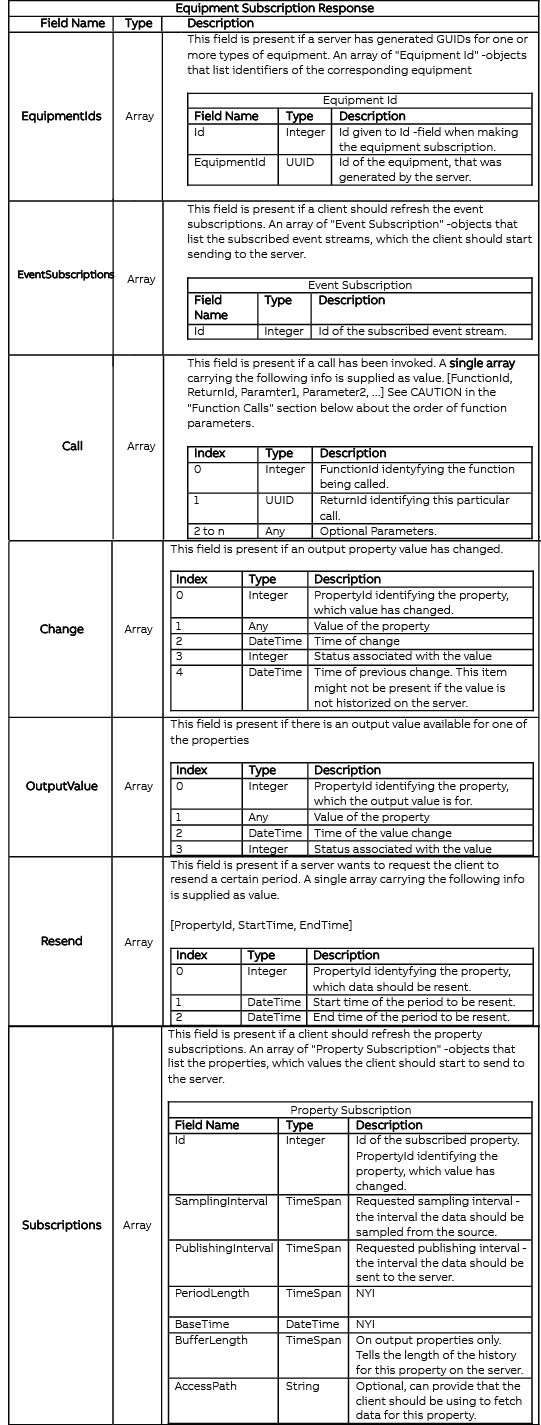
SubscribeEquipmentSession Response
After a successful SubscribeEquipmentSession -call the server will reply with a message containing possible subscriptions to a client. All fields are optional, so if the server at the moment does not make any subscriptions you will receive an empty object.
Equipment Subscription Response
SubscribeEquipmentSession Examples
[
   0,                               // CallId
   "SubscribeEquipmentSession",     // Function Name
   [
      {
         "EquipmentId": "ad841edf-8b2c-47bc-bcfd-11554ae29107",
         "EquipmentName": "My Equipment",
         "EquipmentType": "My Equipment Type",
         "EquipmentCategory": "My Equipment Category",
         "EquipmentDescription": "My Equipment Description",
         "Functions":
         [
            {
               "Id": 1,
               "Name": "A=B+C",
               "Parameters":
               [
                  {"Name": "A", "Type": "double"},
                  {"Name": "B", "Type": "double"},
                  {"Name": "C", "Type": "double"}
               ]
            },
            {
               "Id": 2,
               "Name": "Reboot",
               "Parameters": []
            }
         ],
         "Events":
         [
            {
               "Id": 3,
               "Name": "Errors"
            },
            {
               "Id": 4,
               "Name": "Alarms"
            }
         ],
         "Properties":
         [
            {
               "Id": 5,
               "Name": "Property 1",
               "Type": "Double"
            },
            {
               "Id": 6,
               "Name": "Property 2",
               "Type": "Int32"
            }
         ],
         "SubEquipment":
         [
            {
               "EquipmentId": "GUID",
               "EquipmentName": "My SubEquipment",
               "Properties" :
               [
                  {
                     "Id": 7,
                     "Name": "Property 1",
                     "Type": "String"
                  }
               ]
            }
         ]
      }
   ]
]
SubscribeEquipmentSession example #2
{
    "EquipmentId": "ad841edf-8b2c-47bc-bcfd-11554ae29107",
    "EquipmentName": "My Equipment",
    "EquipmentType": "My Equipment type",
    "Properties": [
        {
            "Id": 1,
            "Name": "Property 1",
            "Type": "Double"
        },
        {
            "Id": 2,
            "Name": "Property 2",
            "Type": "Int32"
        }
    ]
}
The result will be similar, but this time the server will subscribe to the properties with their corresponding Id's if the properties and the equipment instance are approved (see equipment approval for details). See Data production for details on how to produce values for properties.
{
    "EquipmentIds": [{
        "EquipmentPath": "My Equipment",
        "EquipmentId": "ad841edf-8b2c-47bc-bcfd-11554ae29107"
    }],
    "Subscriptions": [
        {"Id":1},
        {
            "Id":2,
            "UpdateRate": TimeSpan,
            "PublishBaseTime": DateTime,
            "PublishBaseTimeUTCInterval": TimeSpan,
            "PublishInterval": TimeSpan
        }
    ]
}
Approving equipment properties for value production
By default, a security feature called property approval is enabled. This is to prevent unwanted data production to the database.
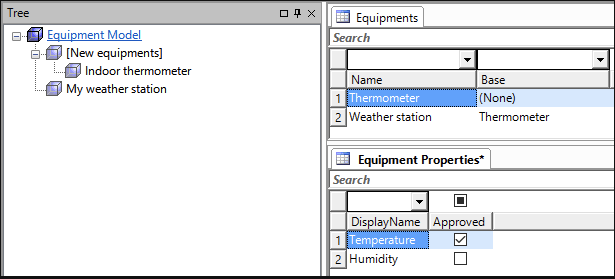
Every equipment property of an equipment has a boolean flag called Approved. To be able to produce values for equipment's properties, the Approved flag needs to be set to true.
When a new connection arrives, the equipment instance that is created will be placed under a special equipment instance called [New Equipment]. The server will not subscribe to properties of instances that reside under this special instance. To approve these new instances, the server administrator needs to change the parent of these instances to some instance that does not reside under [New Equipment].
Equipment property approval example
In the following example, the rules will force the following configuration:
My weather station.Temperature - Approved, because My weather station is not under [New Equipment] and Temperature is approved.
_My weather station.Humidity_ - Disapproved, because Humidity is not approved.
Indoor thermometer.Temperature - Disapproved, because Indoor thermometer is under [New Equipment].
Allowing all properties from every instance (NOT RECOMMENDED!)
For testing purposes, you may disable the approval mechanism by setting the "EquipmentNeedsApproval" boolean to false from the driver's TreeRoot's properties.
For more information about function calls, see Function calls.
Data production
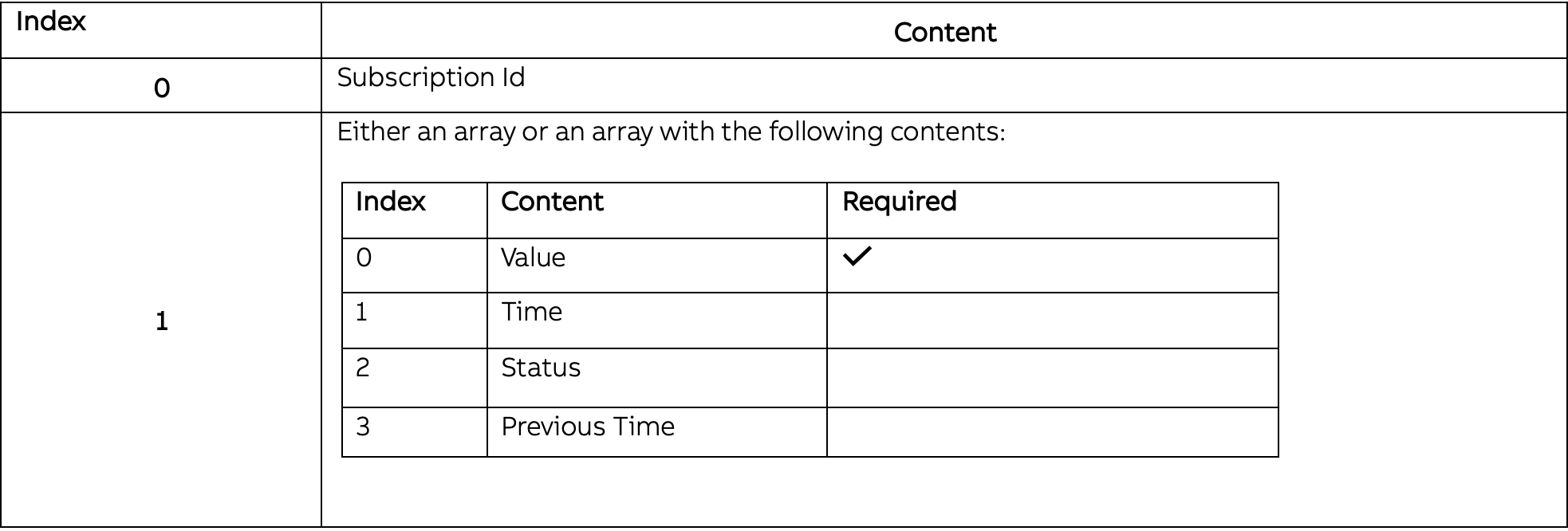
In order to produce values for the properties requested by the server, the values must be serialized into arrays based on the subscription id. In one call, there can be either one of these arrays or an array of these arrays. Also, each of these subscription reply arrays can contain either a single array or an array of arrays containing the actual values in the following format
Status Bits
Status Bits The status is a 64-bit number containing multiple bits and bit fields that can be set individually. In JSON, the status can be given either as a 64-bit number, as a 64-bit number in a string, or as a 64-bit hexadecimal value in a string.
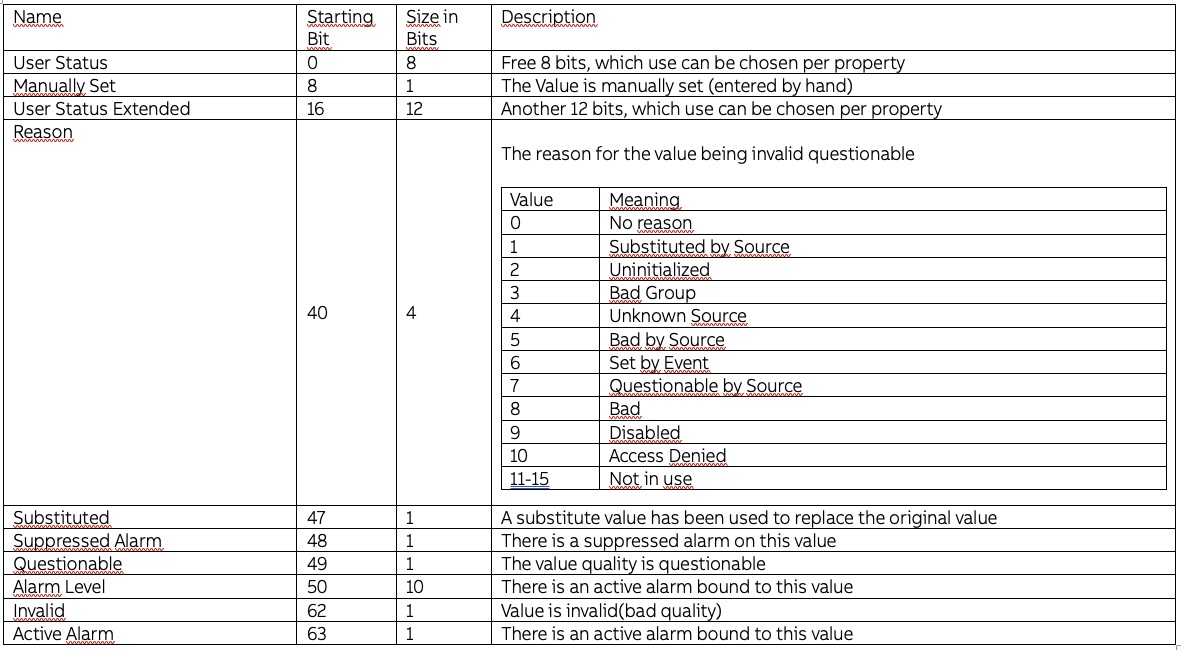
Example
To produce a single value (10) for a property with subscription id #1, without providing time (server will timestamp the value with the time of arrival) and default status:
[1, [10]]To produce multiple values (10,11,12,13) for a property with subscription id #1, without providing time (server will timestamp the values with the time of arrival) and default status:
[1, \[[10],[11],[12],[13]]]To produce a single value (10) for a property with subscription id #1, with time of 2015/01/01 00:00:00 UTC and status of Invalid:
[1, [10, "14200704000000000", "0x4000000000000000"]]To produce a single value (10) for a property with subscription id #1 and a single value (20) for a property with subscription id #2, without providing time (server will timestamp the values with the time of arrival) and default status:
[\[1, [10]],\[2, [20]]]To produce multiple values (10,11,12,13) for a property with subscription id #1 and multiple values (20,21,22) for a property with subscription id #2, without providing time (server will timestamp the values with the time of arrival) and default status:
[\[1, \[[10],[11],[12],[13]],\[2, \[[20],[21],[22]]]Output Values
If the property transfer direction is set to "Out" or "In/Out", the server will notify the client whenever the value changes with a message like:
[subid, {"OutputValue": [id, value, time, status]}]So eg.
[128, {"OutputValue": [1, 123, "14200704000000000", "0x4000000000000000"]}]Resend
If there's a gap between value production, the server can request some values to be resent and then backfill them to the history accordingly.
Usage
Prerequisites Using Resend requires that the BufferLength attribute is specified for the property. The property should be set to a value corresponding to the length of time that the equipment can buffer its values. The value specified in BufferLength is the maximum timespan for which the server will ask the equipment to resend values. When producing values for properties that have BufferLength set, you must provide all the optional values (mentioned in the Data Production section).
Replying As normal communication needs the PreviousTime to be sent with every value, the replies to Resend requests are distinguished by not having the PreviousTime set. So the reply to a Resend request from the server must only contain:
- Value
- Time
- Status
Resend example
An example of the communication of a Resend request and reply.
Client:
[1, [1, time, status, firstprevioustime (1/1/0001 12:00:00 AM)]]
[1, [2, time2, status2, time]]
[1, [3, time3, status3, time2]]
// Three values (4,5,6) sent here that do not get to the server for some reason
[1, [7, time7, status7, time6]]
Server:
// After getting value 7, the server notices that some values are missing and sends a Resend request
[
  subid,
  {
     "Resend": [1, time3, time6]  // [Property id, start time, end time]
  }
]
Client:
// Client receives the Resend request and replies accordingly (note that PreviousTime must not be used here)
[1, [null, "Backfill", time4, time6, 4, time4, status4, 5, time5, status5, 6, time6, status6]]

Server:
// Server receives the Resend reply and backfills the values. The communication continues normally.
History Change
Sometimes there might be a change in history that the server is unaware of and has no means to ask backfill for. In these cases, the client can send a special message to a server to notify that there is a history change for the given period:
[1, [null, "Change", change_start_time, change_end_time]]Events
Event subscription example
Client:
"Events":
[
   {
      "Id": 3,
      "Name": "Errors"
   }
]
Server:
"EventSubscriptions":
[
   { "Id": 3 }
]
**Event value production **
Events in Equipment API have a required Message field and support additional attributes along with the message. The call id that needs to be used is the value of EventId in the returned EventSubscriptions.
Event value production expects an array containing the following data:
| Value | Value type | Value Description | Required |
|---|---|---|---|
| Message | String | Text payload of this event | * |
| Attributes | Dictionary<string, object> | Additional attributes to attach to this event. Key-value pairs with string keys. | |
| Event time | DataTime | Time of this event |
For example, the following will produce an event with the message "Event test", leaving the other fields to be filled with default values:
[3, [["Event test"]]]Additionally, any attributes can be specified at any time:
[3, [["Event test", {"Severity": "Critical", "Some id": 123}]]]
[3, [["Event test", {"Severity": "Critical", "Test type": "Simple", "Test id": 313}]]]
Function Calls
Defining functions Every function has an id the same way the equipment properties do. The id of a function must not collide with the ids of the equipment (or its subequipment) properties. The id is then used to communicate back the return value of the function.
CAUTION: In current version (2021-06-16), the application cannot define the order of the function parameters. The server always passes them in the property order, and the order of the properties cannot be defined when creating the equipment model (instead, the server defines some arbitrary order to the properties and this can even change between server process instances).
Function call example Client:
// (within SubscribeEquipmentSession call):
"Functions":
[
   {
      "Id": 4,
      "Name": "A=B+C",
      "Parameters":
      [
         {"Name": "A", "Type": "double"},
         {"Name": "B", "Type": "double"},
         {"Name": "C", "Type": "double"}
      ]
   }
]
Server:
(See CAUTION above about the order of parameters)
{
  "Call": [4, 1, 0, 4.2, 3.3]   //Id, ReturnId, A, B, C
}
Client
// (return value of the function)
// [functionid, [returnid, A, B, C]]
[4, [1, 7.5, 4.2, 3.3]]
Calling a function from the server The functions are available on the server side as command classes and called by creating and committing a new instance of the class. After the commit, the possibly modified values are updated to the instance.
var f=driver.Classes["Path_EqTest!A=B+C"].Instances.Add();
f["Equipment"]=driver.Classes["Path"].Instances["Test"];
f["B"]=3;
f["C"]=4;
f.CommitChanges();
System.Console.WriteLine(f["A"]);
Receive rules
Receive rules are used to handle the data correctly when received. They can assign the target history to a property and convert the types and target tables. Receive rules are not mandatory and data is received relying on default settings when receive rules are empty.
Typical usage scenarios for receiving rules are:
- Create OPC events from incoming Equipment Events ie. read source class from event attribute
- Store properties to histories that have different retention times or other configurations.
- Write equipment properties to variables
Reaching further
- Switch units from ft to m.
- Only store every 10th value
- Create Equipment events for every new value
Definition Receive rules define three steps; Match, Process and Store. The idea is not to limit the features of the receive rule process but to allow the addition of functionality based on matching function to data.
Match Specify which property or event the rule is for. EqM API has at least 4 types of received objects. These types are
- Event Property Function Tunnel
The receive rule has to be able to match all four of these. The other types are matched the same way as properties. For a rule, the object type is also specified. Also, any field in the equipmentdefinition can be matched. Additionally, the rule can match an Equipment. In that case, the rule applies to everything that is contained in that Equipment including properties and subequipment.
Equipment property is defined as follows:
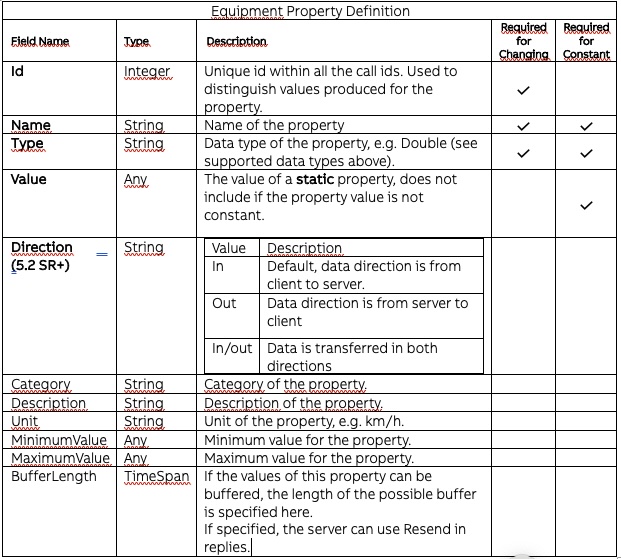
Receive rule can match to any of these properties except "Value" and "Id". Due to this, the rule can match many properties. The matching rule is defined by key-value pairs matching these properties. For example:
      //Match property with name Voltage for any equipment in certain subscription
      "match": [{
       			"RuleTargets": "Properties",
       			"Object": {
       				"Name": "Voltage",
       				"Unit": "V",
       				"Type": "Float"
       			},
       			"Subscription": {
       				"EquipmentName": "source_citest//opt/rtdbdata"
       			}
       		},
      //Match Equipment with name LineMotor5 in all subcsriptions
      {
       			"RuleTargets": "EquipmentName",
       			"Object": {
       				"Name": "LineMotor5"
       			}
       		}
      ]
Process It would be beneficial to for example throttle the incoming data rate with some function. Operations considered:
- Properties
- Sample
- Aggregate
- Average
- Change type
- Equipment
- Approve equipment(change target instance path name)
- Override Path
"process": {
           			"Function": "ProcessEquipmentName",
           			"Arguments": ["source","target",5 ]
           		}
Store Which history, create new history. Possible properties for store step:
       "store": {
       			"TargetHistory": "StreamHistoryLong",
       			"TargetClass": "OpcEvent"
       		}
Usage A complete example of receive rule structure. Contains two rules that match a property and event handle. Json is just for presentation.
       {
       	"ReceiveRules": [{
       		"match": {
       			"RuleTargets": "Properties",
       			"Object": {
       				"Name": "Voltage",
       				"Unit": "V",
       				"Type": "Float"
       			},
       			"Subscription": {
       				"EquipmentName": "source_citest//opt/rtdbdata"
       			}
       		},
       		"process": {

       		},
       		"store": {
       			"TargetHistory": "StreamHistoryLong"
       		}
       	},{
       		"match": {
       			"RuleTargets": "Events",
       			"Object": {
       				"Name": "Voltage spike",
       			},
       			"Subscription": {
       				"EquipmentName": "source_citest//opt/rtdbdata"
       			}
       		},
       		"process": {

       		},
       		"store": {
       			"TargetClass": "OpcEvent"
       		}
       	}]
       }
Updated 9 months ago