
Equipment Classes
Equipment Classes display allows the creation of Equipment models by first creating class(es) and then properties.
On the left side we have a list of all the classes and on the right side the properties. Properties are divided to two datalists; Properties of each class and Inherited properties from base class.
New classes and properties may be created from the Edit button from the bottom of the list. Pressing New will create a new row to the datalist and allows you to configure definitions. The Edit button also allows modifications to already existing classes and properties. Remember to commit changes to save them.
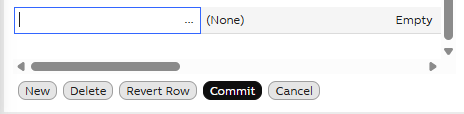
New row may be easily created from the New button
Properties of each class opens on the right side after a class is chosen on the left side. Before this, the properties datalists show full list of already created class properties.
Equipment Class definitions
| Attribute | Type | Description |
|---|---|---|
| Name | String | Name of the equipment type. E.g., Tank, Valve, Compressor |
| Base | Guid | Name of the base class. May be chosen from dropdown menu. Properties of base class will be inherited. |
| Image | Enumeration | Image for equipment type. Appears in front of the name. |
| Abstract | Boolean | Abstract is to indicate that the instances should not be created from this generic model, but only from those inheriting it. See our Example Equipment Model for further information. |
| Interfaces | String | |
| Command | Boolean | Command classes are used to model server-side executable commands and to execute them. Data classes are used to model data and to provide access to the instances and their properties. |
| ClassName | String | Class name of model (E.g., Path_Tank) |
Equipment Property definitions
| Attribute | Type | Description |
|---|---|---|
| DisplayName | String | The name of the equipment property |
| Historized | Boolean | Tells whether the property's history data will be collected or not. |
| Data Type | Enumeration | The type of the equipment property. See supported data types below. |
| ValueMin | Double | The minimum value of the property. |
| ValueMax | Double | The maximum value of the property. |
| Unit | String | The unit of the equipment property. |
| Category | String | Category of property. Shown in property settings menu. E.g., "General information", "Calculated", "Performance parameter". |
| Description | String | The description of the equipment property. |
| Application Type | String | Identifies the application usage type of the property. Please see longer explanation below.* |
| Reference Target | String | When creating reference properties of type GUID, the path of an object that property is related to. E.g., Class:Path_Pump. |
| Compression Method | Enumeration | Defines if data is compressed when stored to history. |
| Target History | History | CurrentHistory: optimized for frequently updated history values. Recommended to use for calculated values. More information on calculation concepts. StreamHistory: optimized for write once and read frequently type of use. It is aimed for measured signal storage that is not subject for later maintenance. More information on history tables. |
| History Collection Templates | String | Defines chain of histories to be collected. Available collection chains are defined in "HistoryCollectionTemplate" class. |
| Max Array Length | Uint | For array variables, the maximum length of the array. Array variables can only be stored in a StreamHistory table. CurrentValues for this variable will be stored in a CurrentValues table of the appropriate size, aligned to a power of 2. |
| Variable Length Array | Boolean | For array properties, indicates that the property will receive arrays of variable length and will optimize space usage accordingly. |
| Max String Length | Uint | For text type and array of text type variables, defines the maximum length of the value in Unicode characters. The maximum possible setting is 2040. |
| Status Storing | Enumeration | Stream history setting. Defines whether to store statuses on a pre-cluster of per-value basis. |
| Timestamp Storing | Enumeration | Stream history setting. Defines whether to store timestamps on a per-value basis. |
| Stream Compression Method | Enumeration | Defines how stream history data is compressed. LZW Compression = lossless data compression. |
| Period Length | Uint | Defines period length for data saved to stream history. Max value is 4,294,967,295. |
| Period Length Unit | Uint | For variables being recorded to a StreamHistory table with per-block timestamp storing, defines the time interval with which values are recorded into history. For best results, it should be as close to the actual frequency of values produced as possible. |
| IsNullable | Boolean | Specifies whether the property can contain NULL values or not. Only applicable for non-historized properties. |
| Equipment | ABB.Vtrin.Interfaces.IEquipment | Tells which equipment property is related to. |
*Application Type: If the value is nonzero, a special action is performed when data is produced to the property as the current value or via the history maintenance. The ApplicationType = 1 indicates a property that holds a production grade identifier, and causes activations of the RTDB-GradeServer service.
Defining properties as discrete values
It is recommended that calculated Variables and Equipment properties are defined to be of type "discrete". Especially, when calculated value presents a time period, such as average value in 30 minutes, Equipment property should be defined as discrete and not linear. Please see further information: Calculations > Concepts.
How to define: This is an advanced setting found in Properties menu on Equipment Classes window (click one property active, open property attribute menu from wheels in top right corner and press + sign. Discrete Value should show under General settings).
Supported Data Types
| Type | Range | Max array length | Max string length |
|---|---|---|---|
| boolean | false .. true | 16340 | |
| byte | 0 .. 255 | 16340 | |
| uint16 | 0 .. 65536 | 8170 | |
| uint32 | 0 .. 4294967295 | 4085 | |
| uint64 | 0 .. 18446744073709551615 | 2042 | |
| sbyte | -128 .. 127 | 16340 | |
| int16 | -32768 .. 32767 | 8170 | |
| int32 | -2147483648 .. 2147483647 | 4085 | |
| int64 | -9223372036854775808 .. 9223372036854775807 | 2042 | |
| single | -3,402823E+38 .. 3,402823E+38 | 4085 | |
| double | -1,79769313486232E+308 .. 1,79769313486232E+308 | 2042 | |
| DateTime | 1601-01-02 00:00:00 UTC .. 9766-12-31 23:59:59 UTC | 2042 | |
| TimeSpan | -10675199.02:48:05.4775808 .. 10675199.02:48:05.4775807 | 2042 | |
| GUID | 1021 | ||
| byte[max] | 0 .. 255 | 264 | |
| string | 0 .. 2097151 | Not supported | 64 |
| string(size) | 0 .. 2097151 | Not supported | 5443 |
| string(max) | 0 .. 2097151 | Not supported | 264 |
| string(max)[max]** | 0 .. 2097151 | 5440*** | 5440*** |
Notes:
- *Max string and array lengths are for the ABB Ability™ History default configuration and can be altered from the database configuration.
- **The current version of ABB Ability™ History does not support history collection for string(max)[max] properties.
- ***The string(max)[max] combined size is limited to 16340 bytes. BLOB storage is currently not supported.
For strings, the maximum value is the maximum supported Unicode character code. Strings use 1-3 bytes per character, depending on the character code + length.
For arrays, the length must be specified as in [], e.g., int32[512] to get an array of 32-bit integers with a maximum length of 512.
The maximum array/string length does not affect the disk space consumption for values in history but does affect the disk and memory consumption of the property, so it is recommended to keep it reasonable.
Further reading
More information on our Equipment Model here.
Updated 3 months ago