
Instructions for re-creating the self signed certificate
All commands should be executed with elevated privileges.
-
Delete the existing VtrinCert with following steps
-
Start an empty management console with: Start -> Run -> mmc
-
In the mmc, select File -> Add/Remove Snap-In -> Certificates -> Computer account
-
Navigate to Certificates (Local Computer) / Personal / Certificates
-
Delete the certificate that has the friendly name "VtrinCert"
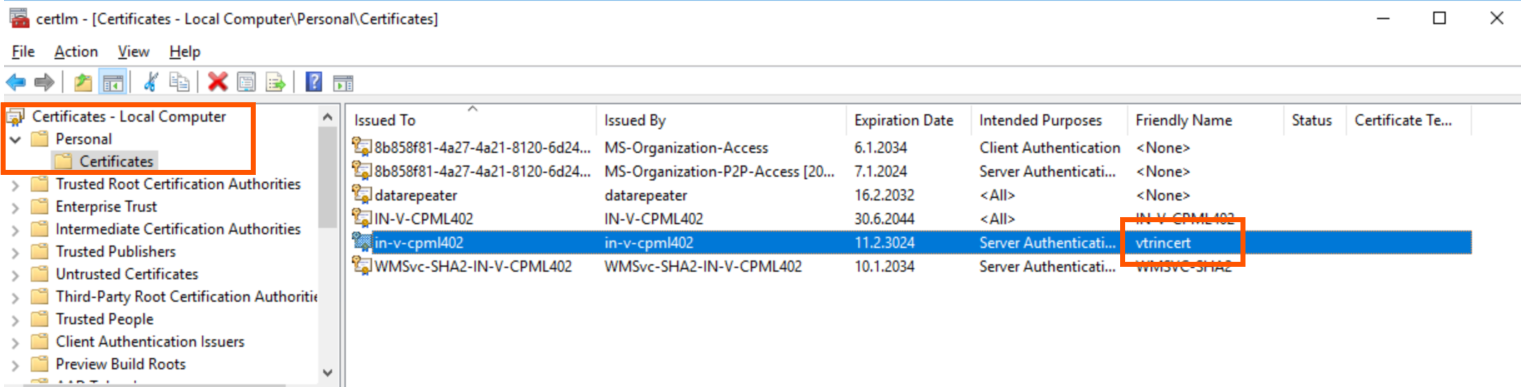
-
-
Re-create the certificate by running below command
%APP_ROOT%\setup\APP_PostInstallOrUpgrade_SelfSignedVtrinCert.bat -
Accept server keys from remote clients
If this is a Main node, run the following in all DCN nodes, or if this is
a DCN, run it in Main nodes (after Vtrin Server is started with the new certificate)%APP_ROOT%\bin\APP_AcceptVtrinServerKeyChangesForServices.bat
Updated 9 months ago