
Notification Service
Ability™ History Notification Service enables you to subscribe interesting events from your system to your mobile device or email.
Concept
Introduction
At its core Ability™ History connects to a huge number of industrial devices and collects measured data. The collected data provide relevant information on manufacturing processes or equipment health. Various calculations and automatic data processing are used to analyze the data to identify relevant events that may affect production efficiency or cause device faults. These events may require immediate user actions to avoid production losses or asset damages. Notification service can be used to notify users about such events also when the user is not actively monitoring the process.
The notification service is part of ABB Ability™ History product functionalities. It is a tool to trigger notifications from database events and send notifications via desired methods to users who have subscribed to them. A triggering event can be any creation or update to an instance in the database that makes it a generic service and also for implementing various kinds of workflow applications.
The picture below gives an example of the Notification Service. A device failure occurs in the factory production line and this causes an alarm that is collected by ABB Ability™ History with OPC UA. With engineering UI, a user with admin rights can define a notification to be triggered from the particular type of alarm, and the format of the content of the notification to contain relevant information such as device ID and description of the failure. Users interested in this notification can subscribe to it to be delivered to them with a chosen method, such as email, signal, or other. Please note that the Notification Service is for instant messaging, and it does not store the notification messages.
Next, we will go through each concept of notification service in more detail.
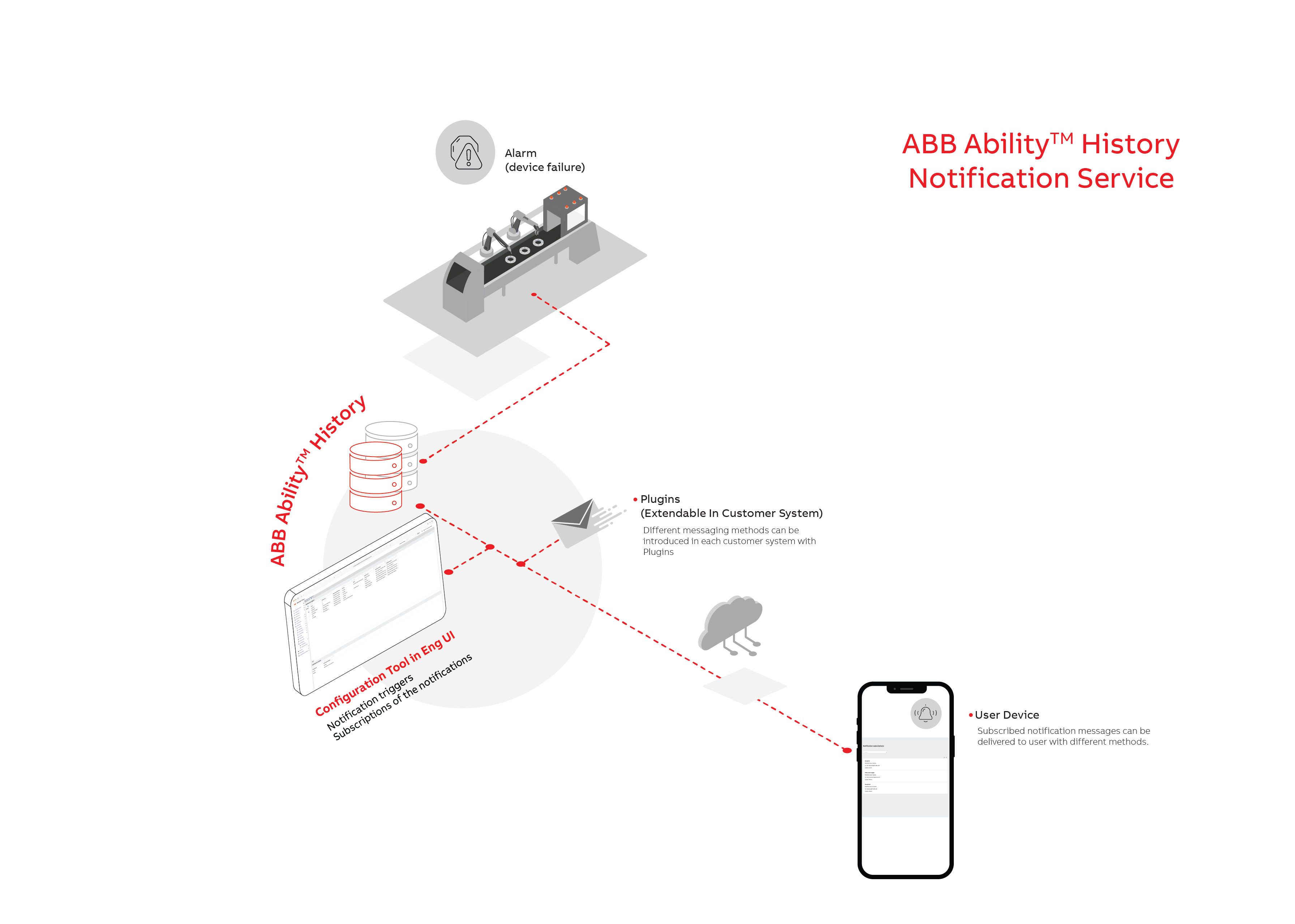
There are four concepts related to Notification service:
- Trigger: Define what is triggering the notification and what is the content of the notification.
- Plugin: The delivery method used to deliver the notification message, e.g. email.
- Subscription: The user can subscribe to a notification to be delivered to oneself via selected plugin.
- Template: Re-usable content for Triggers.
Notifications can be configured and subscribed in Engineering UI which provides two configuration dashboards;
- One for creating the notification triggers and content within, configuring notification methods and showing saved templates.
- The other dashboard is for creating subscriptions and checking active subscriptions.
First, we have to define the trigger and message content, then create the method for receiving notification and, lastly we can create the subscription of the notification.
Trigger
Trigger is used to define what event will set off the notification, and what message to be sent out. It will listen to events related to the class named in the field Source, and if the events pass the Mask's filter, a message will be sent out to all subscribers.
The trigger class name is NotificationTrigger.
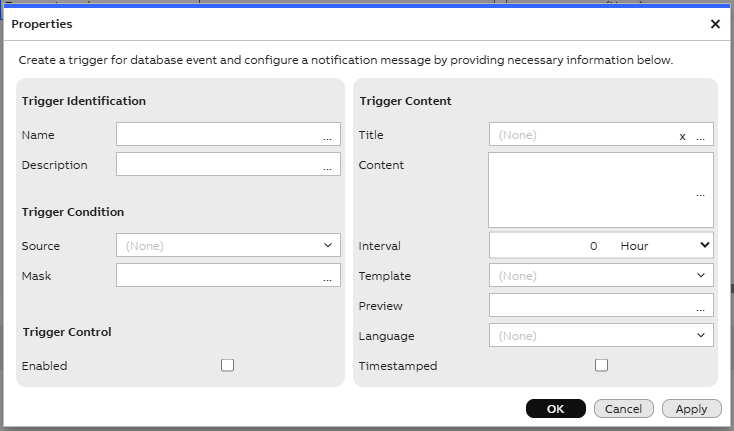
NotificationTrigger settings in Engineering UI are shown in a dialogue window.
NotificationTrigger properties
| Property | Description |
|---|---|
| Name | Name of the trigger |
| Description | What the trigger is about |
| Enabled | Set the trigger to be active or not. If the field is not marked, then the trigger will not check for any changes in the Source |
| RowModificationTime | The last time the trigger was modified |
| DataBaseNode [Added from Version 5.3_25.11] | Trigger will subscribe to Source from this Data Base Node. If this is unselected, Trigger will subscribe to the main data base that Notification Service is running on. |
| Source | Trigger is watching the Cache of this Class for any change. Visible when no Data Base Node is selected. |
| SourceName [Added from Version 5.3_25.10] | When choosing a remote data base, Notification Service cannot produce a selective list of classes to select from. Therefore, the Source's name needs to be input as text. Visible when a data base node is selected from list. |
| Mask | Define a filter for the Source. Any event that passes the Mask will set off the Trigger (See example) |
| Title | Title for the message being sent out |
| NotificationTemplate [Added from Version 5.3_25.10] | Template used for message. Note: This will take priority over Content. |
| Content | Content of the message, in rich text format. [5.3_25.12] Support html format with declaration <!DOCTYPE html> at the beginning. Note: NotificationTemplate is prioritized over this field. |
| Language | Language setting for the message |
| Preview | Preview of the message based on the Content auto-generated when committed. It can give some example value for the properties or give error message if the properties in Content is wrong. Previews are only updated when the service is running, and is updated once at service startup. |
| ConfigurationString [Removed from Version 5.3_25.04] | Set the configuration for the trigger.See details. From Version 5.3_25.04, this is replaced by three properties: Interval,Timestamped below and Timezone in Subscription table. |
| Interval [Added from Version 5.3_25.04 to replace ConfigurationString] | Stored as big integer (as ticks) and displayed as timespan. Represent the delay time before the message to be send out. Other triggers happen during this time period will be combine together with the first into one single message to be sent. |
| Timestamped [Added from Version 5.3_25.04 to replace ConfigurationString] | Choose to whether include the triggered timestamp at the message or not. The message may look like this : "[10.3.2025 14.02.32] Message content". Notes: The timestamp format is also depend on the Locale setting in Subscription. |
Rich text format for Content
The content is in rich text format. Values from trigger source instances can be included in the message using keywords.
To include the value from the trigger source, the property name of the source class could be put in curly brackets form such as {propertyname}. Additional format for the output could be implemented by the ToString method such as {propertyname.ToString("format")}.
For a better understanding of how this works, let's look at the example below.

In this example, we have a Trigger that is subscribing to the class "Variable" with no Mask. This means every change to the cache of this class will trigger the notification message. When the Variable instance as below is added, the Trigger will activate.

The message being sent out will have the title "Example Message". In the Content of the message, the part {Name} will be replaced by the name of the instance ( in our case "AddedVariable",) and the part {ValueMax.ToString("0.000")} will be replaced by the value in the Max column (15.34) with the format "0.000".
With these, the content of the subscription message (see further information below) with locale: "en-US", will be:
"Name is: AddedVariable. Max value is: 15.340."
Escape character: character '' can be used in Content for the parser to read the follow-up character as simple text. Example: to include curly braces "{" "}" in a message, use "{" and "}".
Mask
References: Where String Operator, Where Mask
If we want to add a mask, it could be similar to the following use cases:
-
Use case 1: A user who wants to receive a notification when there is a new alarm with priority Critical could create a NotificationTrigger with Alarm Log Row as Source, and set the Mask as following "EventPriority=3". Any Alarm Log Event that does not have EventPriority level 3 (Critical) will be filtered out and does not set off the Trigger.
Source: "Alarm log row"
Mask: "EventPriority=3"

-
Use case 2: Similiar to the user above, this Trigger subscribe to new alarms but only to the ones related to AmbientTemperature and do not have ReturnTime. The Source and Mask setting is as below: Source: "Alarm log row" Mask: "Property like 'AmbientTemperature' AND ReturnTime=null"
ConfigurationString
Obsoleted.From Version 5.3_25.04, it is replaced by 3 columns : Interval and Timestamped (NotificationTriggers table), Timezone (NotificationSubscriptions table).
Table below contains possible parameters to be configured. Parameters are to be separated by semicolons ( ; ), each parameter can be assigned by format "keyword=assigned_value". Keywords are case insensitive.
[From Version: 5.3_25.04][From Version: 5.3_25.04] When a trigger instance is created or modified, the NotificationTrigger class checks the ConfigurationString property and modifies the string if needed. If the string does not contain all the keywords, the missing keywords are added with default values. If some keyword is not recognized, that keyword is removed. For example, if the user created a trigger with ConfigurationString = "interval=10000; dummy=1", the string will be changed to: "Interval=10000; TimeStamped=false; Utc=false";
| Keyword | Short | Description |
|---|---|---|
| Interval | i | Define interval for the notification to be sent out in milliseconds. A timer is set when the first message arrive, messages triggered within the interval are grouped together and sent out as one notification. When a trigger is disrupted (e.g.: service shut down or trigger is updated), all messages will be sent out before that trigger stop. Default value: 5000 (5 seconds) |
| TimeStamped | t | Turn on/off timestamp. Timestamp is format with Locale setting in NotificationSubscription. Default value: False. |
| UTC | u | Use UTC for timestamps. Default value: False |
Example:
- "Interval=10000; TimeStamped=true; UTC=false" (Interval 10 seconds with TimeStamp at local time). Or it could be written with short keywords as "i=10000;t=true" (UTC default setting is false). Output notification will have the format below: [Timestamp] Message A [Timestamp] Message B ... [Timestamp] Last message within time interval
Note: If the parameters are duplicated, later value takes effect.
Subscription
Subscriptions are for subscribing to triggers and define which plugins are used to send out notifications.
The subscription class name is NotificationSubscription.
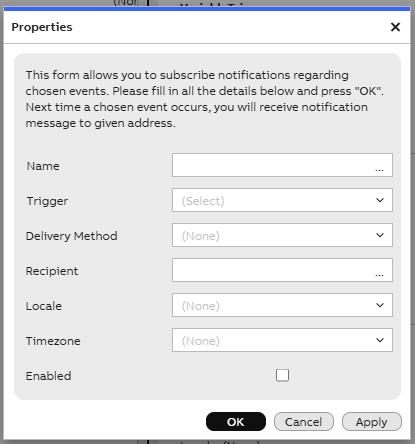
NotificationSubscription dialog in Engineering UI. Dialog allows to add new or edit existing subscriptions.
NotificationSubscription properties
| Property | Description |
|---|---|
| Name | Name of the subscription |
| NotificationTrigger | Name of the linked Trigger |
| NotificationPlugin | Name of the linked Plugin |
| ConfigurationString | Configuration for the subscription (In the EmailPlugin, it stores email addresses that will receive the notification message.) |
| Locale | Locale format to be used in the ToString method in message content. This can affect number formatting such as 3.4 or 3,5 depending on the chosen locale. |
| Timezone[Added from Version 5.3_25.04 to replace ConfigurationString][Added from Version 5.3_25.04 to replace ConfigurationString]] | Choose the timezone information for the timestamp. e.g.: if choosing the timezone to be Europe/Helsinki, the message may look like this: "[10.3.2025 14.02.32 EET] Message content" |
Plugin
Plugins are methods for sending notifications. They can be in the form of either C# or DLL. Currently, notification service may be used with Email Plugin. More plugins will be introduced later and detailed instructions added.
Plugins must be located in a sub-folder named Vtrin-NotificationServicePlugins[Version 5.3_25.04][Version 5.3_25.04] (old name NotificationServicePlugins) in Vtrin. Each plugin has its dedicated sub-folder with the same name. The main file of the plugin must be named with the prefix "NotificationServicePlugin_" (e.g.: NotificationServicePlugin_Email.cs). All dependency DLLs need to be located here.
The plugin class name is NotificationPlugin.
| Property | Description |
|---|---|
| Name | Name of the plugin |
| ConfigurationString | Configurations for the plugin |
The plugin has to implement the interface INotificationServicePlugin
namespace ABB.Vtrin.NotificationService
{
	public interface INotificationServicePlugin
	{
		public void HandleMessage(string title, string message, string configurationstring);
	}
}
The plugin constructor takes in one string parameter, this string is taken from the field ConfigurationString in the Plugin table.
There are 2 plugins included with Notification Service installation:
- Email: Send notifications via email using SMTP server.
- Azure WhatsApp: Send notification via WhatsApp messaging in Azure Communication Service.
Example plugin below:
namespace ABB.Vtrin.NotificationService
{
	public class ExamplePlugin : INotificationServicePlugin
	{
		private string mConfiguration;
		public ExamplePlugin(string configuration)
		{
			mConfiguration = configuration;
		}

		public void HandleMessage(string title, string message, string configurationstring)
		{
			System.Console.WriteLine("Sending message to: " + configurationstring);
			System.Console.WriteLine("Title: " + title);
			System.Console.WriteLine("Message: " + message);
			System.Console.WriteLine("Configuration: " + mConfiguration);
		}
	}
}
Template
From 5.3_25.10, Templates can be created as re-usable Contents for Triggers. The content of the template is in the same rich text format as Notification Trigger's Content. User can create templates and select them in Notification Trigger to be used as message content. Template, if selected, will be prioritized over Trigger's Content property
The template class name is NotificationTemplate.
| Property | Description |
|---|---|
| Name | Name of the template |
| Content | Content for the Trigger's message (in rich text format) when the template is selected. [5.3_25.12] Support html format with declaration <!DOCTYPE html> at the beginning. |
Installation
Before version [5.3_25.06_RTM], Notification service is not part of the default ABB Ability™ History installation but needs to be installed separately. Please find the installation guide under the services section. Any build post 5.3_25.06_RTM The installation will be taken care automatically.
As a summary of this note, you can also watch a short clip which explains the use, configuration and subscription of notification services HERE
Configurations
SimpleConfig
There are few configuration can be changed during run time with SimpleConfig
| Section | Key | Value |
|---|---|---|
| Vtrin-NotificationService (Obsoleted from 5.3_26.01, moved to configuration file) | AppTrace | [numeric value] (Off = 0, Error = 1, Warning = 2, Info = 3, Verbose = 4. **Note:**Default value is 3) |
Configuration file (5.3_26.01)
Configuration file "Vtrin-NotificationService.dll.config" could be found in the same location with the service file (Vtrin-NotificationService.dll, Vtrin-NotificationService.exe).
AppTrace level could be set here by changing the value field below.
<?xml version="1.0" encoding="utf-8" ?>
<configuration>
	<system.diagnostics>
		<switches>
			<!--Possible values: Off, Error, Warning, Info, Verbose, VeryVerbose-->
			<add name="Vtrin-NotificationService" value="Info" />
		</switches>
	</system.diagnostics>
</configuration>
Redundancy support
Notification service support redundancy installation on multiple nodes. Only one node is in active mode at a given time.
The name of the master token is Vtrin-NotificationService. [from version 5.3_25.02]
Updated about 1 month ago