
Caching
VtrinLib has a cache for class instances on the client side. The classes can be either cachable or non-cachable, and this defines how the VtrinLib client utilizes the cache for these classes.
On this page, we give a high-level look at how these classes behave and how the cache works. We start by giving a short overview on the topic. Next, we discuss cachable classes in more detail, followed by a section on non-cachable classes. After this, we take a look at some exceptions to the default caching behavior. Finally, we compare the differences between cachable and non-cachable classes and give some guidance on how to choose which one to use.
Overview
Cachable classes fetch all the instances into the cache and execute queries on the client side. Events sent from the server keep the data on the client's cache up to date. Cachable classes are most suitable for tables that have a small amount of data that is accessed often.
Non-cachable classes do not cache and they send the queries to the server, which executes them. Non-cachable classes are most suitable for tables that have a large amount of data that is accessed rarely.
Queries that explicitly use an ID to fetch instances make an exception to the default caching behavior. In these cases, even non-cachable classes cache the results for some time.
Whether a class is cachable or not is determined by the NonCachable property in its class definition (VtrinLib class Class, or UI Class in Database Classes view in Engineering UI).
Cachable
When querying cachable classes, the client queries all the data from the server and inserts it into the client-side cache. The client then executes the query on this cached data client-side and returns the result to the calling application. The following queries won't be sent to the server, but will instead be executed on the cached data. If any changes occur to this table's data on the server (addition, modification, or deletion of rows), the server sends an event to the client, keeping the cache up to date.
There are some exceptions to the caching behavior, which are discussed later.
Requirements
For a class to be cachable, the following conditions must be fulfilled:
- The class must have a unique
Idproperty. - The underlying database table must support events.
Initial query
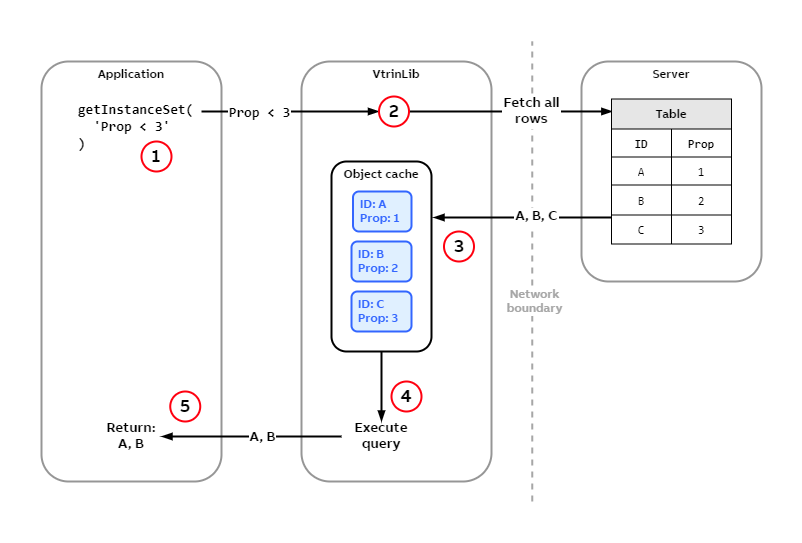
The application executes a query on a class for the first time. This query fetches all data from the server into the client-side cache.
The picture above shows how the initial query to a class populates the client-side cache. The table on the server has two columns, ID (which is the unique key) and Prop. The table contains three rows with values (A, 1), (B, 2), and (C, 3). The process goes as follows:
- The application calls VtrinLib's
getInstanceSetmethod with the query maskProp < 3. - Instead of sending the query to the server, the VtrinLib client library queries for all the rows from the table.
- When the client receives the rows (
A,B, andC) from the server, it inserts these into the client-side cache. - The client executes the query given by the application (
Prop < 3) on the cached data. - As the instances
AandBfulfill the condition of the query, VtrinLib returns these to the calling application.
Following queries
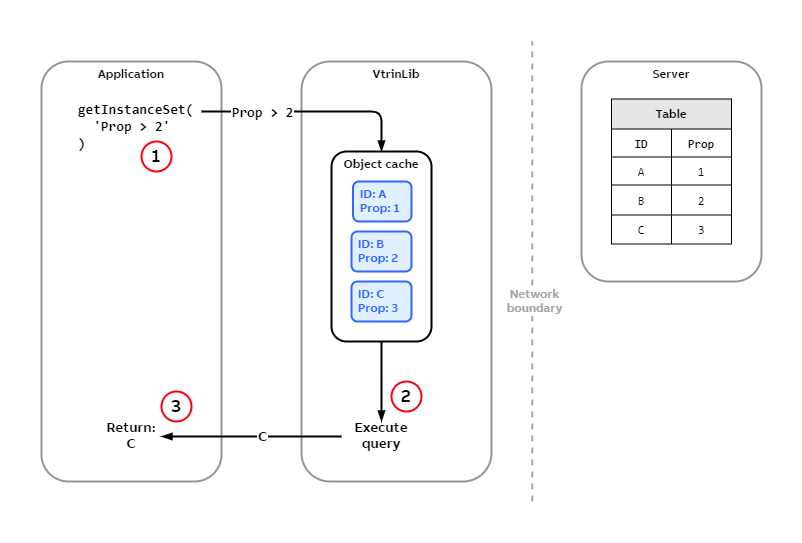
The application executes a query on a class whose cache is already populated. This query doesn't reach the server.
The picture above shows how VtrinLib handles queries to a class whose cache is already populated.
- The application calls VtrinLib's
getInstanceSetmethod with the query maskProp > 2. - Since the cache is populated, VtrinLib executes the query on the cached data.
- As the instance
Cfulfills the condition of the query, VtrinLib returns this to the calling application.
Updating the cache
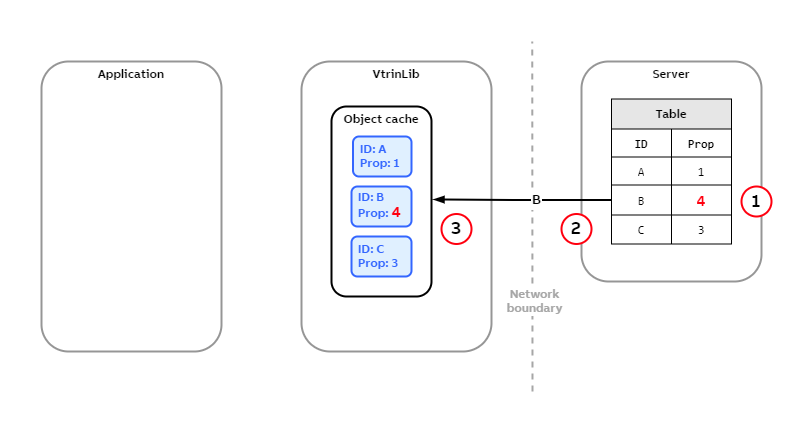
A row on the server is modified. After this, the server sends an event to the client, which updates its cache.
The above picture shows how VtrinLib keeps its client-side cache up to date.
- On the table at the server, the value of
Propcolumn for the rowBchanges from2to4. - Server sends an event to the client with the new data.
- The client updates its cache.
Now any following queries will operate on the latest data without going to the server.
Non-cachable
Unlike cachable classes, non-cachable classes send the queries directly to the server. The server then executes the query and returns the resulting data to the client. The client doesn't insert the data into the cache, and any following queries are sent directly to the server. However, there are some exceptions to this, which are discussed later.
The picture below shows how VtrinLib executes queries for non-cacheable classes.
- The application calls VtrinLib's
getInstanceSetmethod with the query maskProp < 3. - VtrinLib client library forwards this query to the server as-is.
- The server executes the query and returns the resulting data (rows
AandB) to the client. - The client forwards the result to the calling application.
As you may notice, the cache remains untouched during this process.
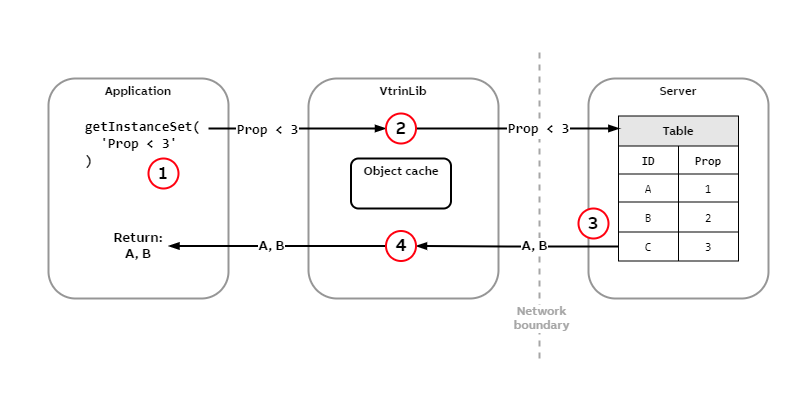
Query execution for non-cacheable classes. All queries are executed server-side.
Identifier queries
For both cachable and non-cachable classes, queries by a known identifier behave a little bit differently. Methods such as GetInstanceById and GetInstanceByName are considered identifier queries. Also, calling GetInstanceSet with a mask using the IN operator, for example, GetInstanceSet("ID IN (1, 2)") , is considered an identifier query.
When making an identifier query, the client queries for the rows specified by the IDs. For non-cacheable classes, this is the default behavior (that is, sending the query to the server as is). However, for cachable classes, this differs from their normal behavior, which is to query all rows and execute the query on the client-side. Therefore, identifier queries do not populate the cache fully for cacheable classes.
The results of the identifier queries are always inserted into the client-side cache, even for non-cacheable classes. However, the cache items for non-cacheable classes are cleared after 30 seconds.
The picture below shows how an identifier query fetches the row from the server and inserts it into the cache.
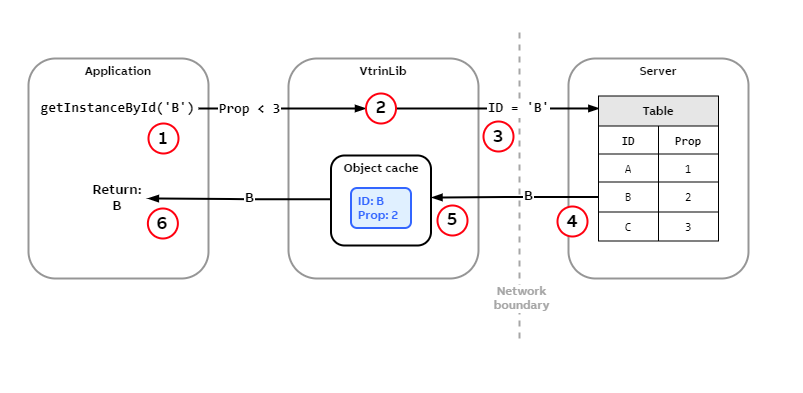
Querying by and identifier. The same logic applies to both cachable and non-cachable classes.
- The application calls
GetInstanceById('B')to get the instance with the IDB. - The VtrinLib client checks the cache for
B, but the cache is empty. - The VtrinLib client sends a query to the server to get the row with ID
B. - The server executes the query and responds back to the client with the row's data.
- The VtrinLib client adds the instance
Binto the cache. - The VtrinLib client returns
Bto the calling application.
Missing cache
When making an identifier query and a row with the given identifier doesn't exist at the server, VtrinLib marks this in the missing cache. This means that if another query is made with the same identifier, VtrinLib doesn't send this query to the server. Instead, VtrinLib immediately returns that the row doesn't exist. Items remain in the missing cache for 30 seconds.
Adding to missing cache
The picture below shows how a query with a non-existing ID results in the ID being added into the missing cache.
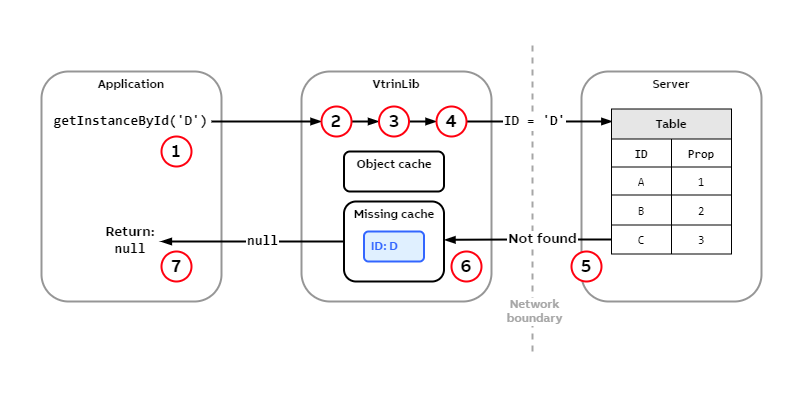
When an identifier query doesn't find a matching row on the server, it inserts the ID on the missing cache.
- The application calls
GetInstanceById('D')to get the instance with the IDD. - The VtrinLib client checks the cache for
D, but the cache is empty. - The VtrinLib client checks the missing cache for
D, but the missing cache is empty. - The VtrinLib client sends a query to the server to get the row with ID
D. - The table doesn't have a row with the given ID, and therefore the server responds that the row doesn't exist.
- The VtrinLib client adds the ID
Dinto the missing cache. - The VtrinLib client returns
nullto the calling application.
Retrieving from the missing cache
The picture below shows how a query returns immediately when an ID is found from the missing cache.
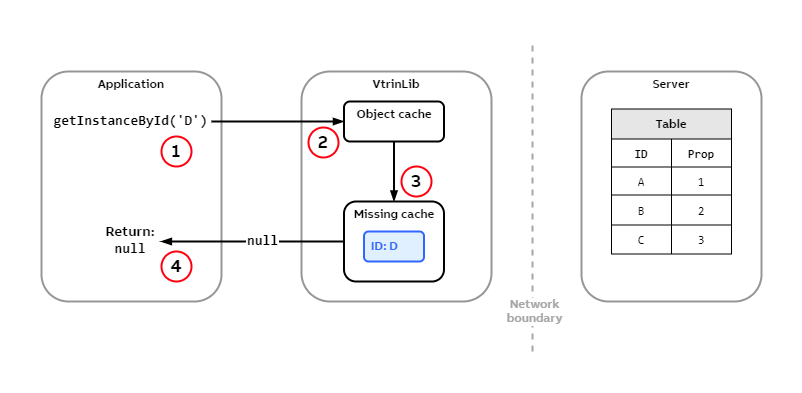
When an identifier query notices that the ID exists on the missing cache, it returns null without sending the query to the server.
- The application calls
GetInstanceById('D')to get the instance with the IDD. - The VtrinLib client checks the cache for
D, but the cache is empty. - The VtrinLib client checks the missing cache for
Dand finds an entry for it. - The VtrinLib client returns
nullto the calling application.
Comparison
This section compares the differences between cacheable and non-cacheable classes. It also discusses things you should consider when deciding whether your class should be cachable or not.
Differences
The following table lists the most important differences between cacheable and non-cacheable classes.
| Cachable | Non-cachable | |
|---|---|---|
| Default cache behavior | Cache | Do not cache |
| Fetching and query execution | Fetch all rows from server to cache (if not yet fetched) and execute the query on the client side | Send query to the server where it is executed and only matching instances are returned |
| Identifier queries | • Get only the rows specified • Cache indefinitely • Cache missing for 30sec | • Get only the rows specified • Cache for 30sec • Cache missing for 30sec |
| Updating | Events keep the cache up to date | Cache is not kept up to date |
| Requirements | • A unique Id property on the class• Underlying table must support events | None |
Choosing between cacheable and non-cacheable
There are no clear rules as to when a class should be cacheable or non-cachable. As with any caching solutions, the idea is to make data access faster and reduce the amount of data transferred over the network. In the following sections, we'll go through the most important points you should consider when deciding between a cacheable and a non-cacheable class.
How much data is in the table
As a rough generalization, it could be said that tables with a large number of rows should have non-cacheable classes, and tables with a small number of rows should have cacheable classes. Where the line between "small" and "large" goes is not exact, but is usually between 1 000 and 100 000 rows.
However, tables that have a huge amount of rows (over a million) should never be cachable. Since the queries to cachable classes fetch all the rows to the client, this would put a significant load on the network and make the initial query slow. It could also consume a considerable amount of the client's memory.
As the size of a single row depends on the number of columns and their types, this also affects the amount of data transferred between the client and the server.
How often data is accessed
If the data is accessed often, it can be beneficial to make the class cacheable, as this will reduce the number of queries the client makes to the server. However, if the data is rarely accessed, it might not be worth making it cacheable.
As the client fetches all the data for a cacheable class on the initial query, this can make the initial query slower compared to the case where this class would be non-cacheable. However, this makes the following queries faster since the client doesn't need to query the data from the server. This could compensate for the slow initial query.
How often data is updated
For a cacheable class, the server sends events to the client about any changes on the table's data. If the data changes a lot, this results in a high amount of traffic between the server and the client. Especially, if the data is rarely accessed, this can generate unnecessary network traffic.
Query performance
Cachable classes execute queries at the client, whereas non-cacheable classes send the queries to the server for execution. Client-side cache only supports indexing by Id and Name columns. For queries using other columns in their conditions, the clients need to iterate through all the instances when executing the queries. In other words, the time complexity expressed in big O notation for Id and Name column queries is O(1), whereas for other queries it is O(N).
For a small amount instances, looping through them on the client-side is usually faster than sending the query to the server. In addition, this moves the performance load from the server into the client. However, when the amount of instances in the cache is large, it might be faster to send the query for the server to execute against an indexed column. Whether client-side or server-side query execution is faster, depends on the number of rows in the tables and the network latency.
Setup effort
The considerations listed above have been about performance. Another area of consideration is how much effort it takes to set up the classes. Non-cachable classes usually have more setup effort, since you need to design indexes for them, whereas for cachable classes this isn't necessary.
Still uncertain?
If you're unsure whether your class should be cachable or not, it's recommended to start with a non-cacheable class. Migrating a non-cacheable class into a cachable class is usually easier than the other way around.
Cachable classes execute queries client-side, so they don't need indexes on the server-side. Therefore, when migrating a cacheable class to a non-cacheable class, you'll need to define indexes on the database table when making it non-cacheable. This might need changes to the existing columns.
Updated 9 months ago