
Networking systems using equipment publications
Using Vtrin-NetSync to publish data to another system.
Introduction
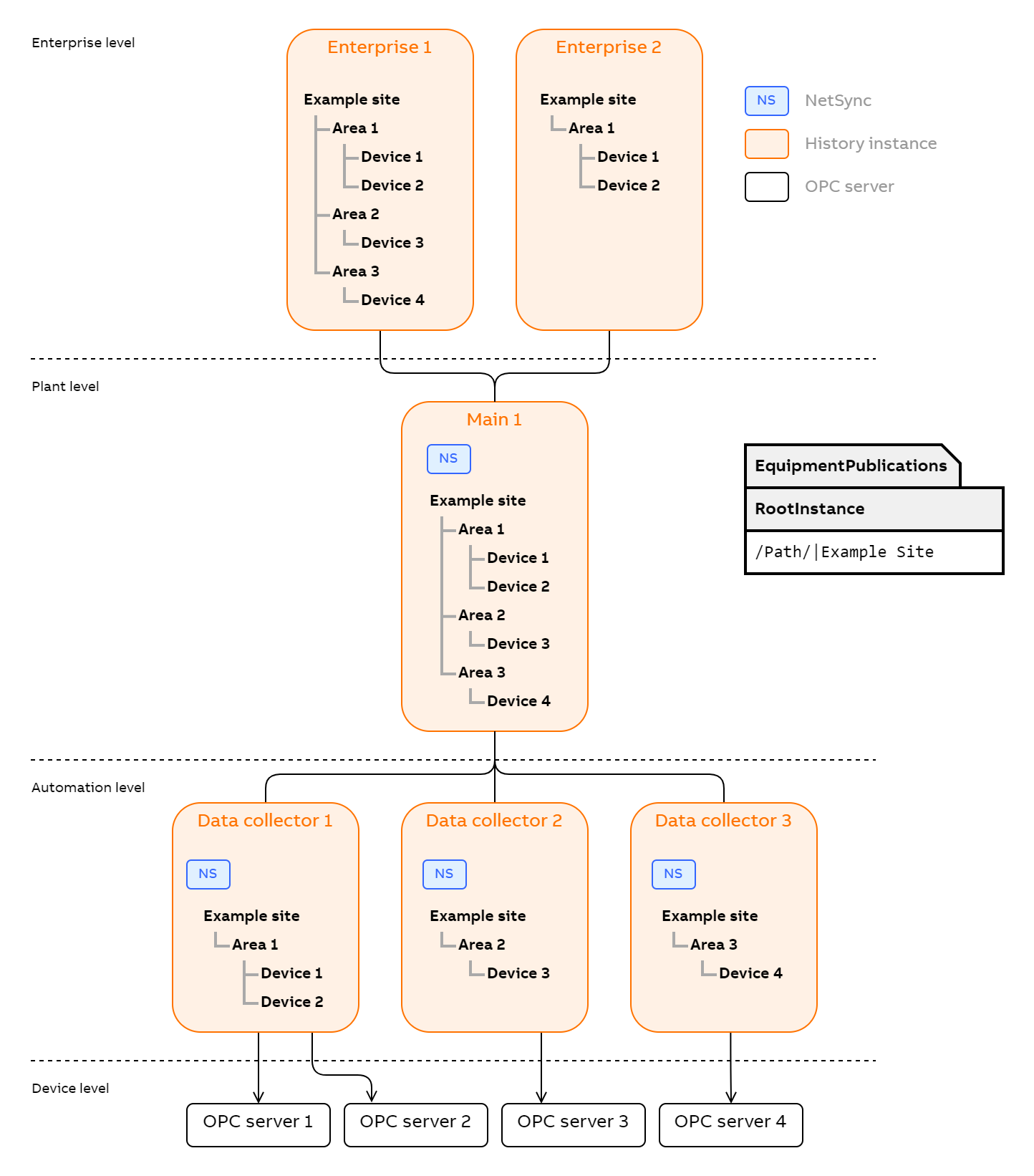
Equipment publications are a way to form an equipment hierarchy from data in an ABB Ability™ History database. They define which classes are used to form a hierarchy and whether data should somehow be restructured. They also define the source and target of these publications.Vtrin-NetSync is an application that can publish data by reading equipment publications. It can be used to transfer equipment between servers.NetSync reads the equipment publication from the database that is specified as the run parameter. Equipment publication essentially describes what to sync from which source to which target. When run, for example, on Process path instances, all the instances and their properties under the specified RootInstance are synced to the target. Equipment publications can be defined in multiple levels to form a larger hierarchy of systems. On different levels, the content of publication might vary and some publications might use results of calculations to publish to a further level.
Usage
Vtrin-NetSync is a command line program that is usually run as a service in Windows installations. As default argument it gets the database path. This is the only required argument. Then from this database it reads the Equipment publications that are enabled. Those then refer to classes which contain the published data and to Database node table which describes the target systems.
Getting Started
Two essential configuration steps for the database need to be in place to run NetSync. These are enabling the equipment publication, as well as checking the address of the database node that is set as a target for the publication. A pre-made equipment publication and database node template should be found in a new installation. If its not predefined you can follow the later steps to create database node and equipment publication.In order for Vtrin-NetSync to be able to connect to the target and source systems, the required credentials must be placed into the Windows vault or Linux keyring of the user account that is running Vtrin-NetSync. Credentials can be added, for example, with Vtrin-NetServer by running a command such as:
Vtrin-NetServer --username myuser --password mypassword --addcredentials myhost.netwhere you replace myuser, mypassword and myhost.net with the desired values. The myhost.net value must match to the corresponding DatabaseNode class entry.The existing credentials can be listed by executing:
Vtrin-NetServer --listcredentials...and modified or removed via the Windows vault (Control Panel/User Accounts/Credential Manager in Win10), or via the keyctl command on Linux. ## RunningIn a common scenario the Vtrin-NetSync service is already running. If not, you can try starting Vtrin-NetSync from console in debug mode:
Vtrin-NetSync -d D:\RTDBDataOther command-line parameters are shown when running without any parameters. The most useful ones are specifying a password (-p) and username (-n).After running in debug mode, you should see from the console output the connections being made and syncing started.
Accepting the publication
At the target, these instances need to be approved for property values to start syncing. The approval can be automatic, or the user can perform it. Unapproved synced instances appear under the "New Equipment" process path in the target. Manual approval is done by changing the parent of those instances under "New equipment" to something else.
Running as a service
NetSync should run as a service normally after installation. It still needs the credentials mentioned in previous chapter to connect to databases. User should be aware which user has the vault entries and which user runs the service.If running with default configuration, credentials for the database access need to be added to SYSTEM user's vault. Creating those entries can be a slightly difficult process. The credentials can be added with APP_TransferVaultEntries.bat which is found under "..Base For RTDB Project\Application\Config\FeatureInstall" in RTDB installation package. It transfers the running users credentials to the SYSTEM users vault. The target user can also be specified but SYSTEM user is used by default. Following is an example of running the command:
APP_TransferVaultEntries.bat /name "VTRIN/Myserver"The .bat may need to be run in admin command prompt depending on which vault entries are to be transferred and to which user.The service can also be configured to run on any other user account. In windows services listing you can open the properties for the service and configure the "Log on" user for the service. This way vault entries can be read from that users vault.
Configuration in detail
Configuring Vtrin-NetSync is done by using the EquipmentPublication class. All the source and target nodes have to be introduced in the DatabaseNode class.
Equipment publication
Each row in equipment publication can define new rules for publication. NetSync will combine the ones that match the same source and target -pair. Following is a typical example of publication where certain portion of Equipment Model is published. When source is not specified in the equipment publication, the local database that was given as a run parameter is used as the source.
Netsync can publish same equipment model to multiple targets. If targets are a replicating pair of nodes, this pair should be considered a single target in equipment publication.
Version Info: BackFillTimeLimit needs 5.3_23.11 or later. In current version (5.3_23.11) BackFillTimeLimit is used only for external sync connections (such as MQTT), not with PushReveiver connectsions (such Vtrin Server of Ability History). Also MQTT currently implements backfill only after Vtrin-NetSync restart reasons (not for network connection reasons to MQTT broker).
| Enabled | Input | Output | Target | Source | Source Class | Root Instance | Source property filter | Publish equipment type | Publish data type | Publish property | Publish path | Instance Filter | History value filter | Update rate | BackFillTimeLimit |
|---|---|---|---|---|---|---|---|---|---|---|---|---|---|---|---|
| True | True | False | MyTargetDatabase | (empty) | Process path | /Path/|My equipment | (empty) | {TypeName:5} | (empty) | {PropertyName} | NetSync | (empty) | (empty) | 00:00:00 | 100000 |
An example in vtrin(not the same one as above):[[File:eqpubexample.png]]
Equipment publication to produce events
New table rows can be synced as events. This can be used for example for syncing OPC events to target. They are sent as equipment events and appear under equipment events in target. The event in target has attribute sourceclass which tells into which class this row was inserted in the source database. All other properties of the class are also in the attributes. Database events for this table have to be enabled so NetSync can detect changes. Creating a publication that creates Equipment events from any class is done by adding that class as the source class and defining a Publish path as :EquipmentEvent.
| Enabled | Input | Output | Target | Source | Source Class | Root Instance | Source property filter | Publish equipment type | Publish data type | Publish property | Publish path | Instance Filter | History value filter | Update rate |
|---|---|---|---|---|---|---|---|---|---|---|---|---|---|---|
| True | True | False | MyTargetDatabase | (empty) | OpcEvent | (empty) | (empty) | (empty) | (empty) | (empty) | :EquipmentEvent | (empty) | (empty) | 00:00:00 |
Database node
Database node defines the details about other databases or sync targets. The essential fields in this table are Name, Type and Data source Name.
If the target system is a replicating pair of nodes, the data source name should define both addresses. The address can use syntax like wss://server[1,2]/history. This makes Netsync as client try both servers.
| Name | Description | Parent | Type | Has Children | Tcc Enabled | Collect Secondary Logs | Computer Name | Ip address | Data Source Name | High availability | High availability node |
|---|---|---|---|---|---|---|---|---|---|---|---|
| MyTargetDatabase | Nexus instance | (empty) | Main | False | False | False | (empty) | 104.211.185.249 | wss://104.211.185.249/history | (empty) | (empty) |
Database node for cloud
If the target database is not ABB Ability™ History, the Database Node type should be "AbilityCloud". This tells NetSync not to connect with regular Vtrin connection, but to just rely on other implementation of the target system. This is only used when Netsync is used as a library as it is in Connector.
| Name | Description | Parent | Type | Has Children | Tcc Enabled | Collect Secondary Logs | Computer Name | Ip address | Data Source Name | High availability | High availability node |
|---|---|---|---|---|---|---|---|---|---|---|---|
| Edge | Using as edge module | (empty) | AbilityCloud | False | False | False | (empty) | (empty) | (empty) | (empty) | (empty) |
Equipment publication definition with examples
Example 1 - Publishing Variables from Source to Target node as Equipment Model.
Note: Currently there is no support for publishing Variables to Variables using Netsync publication.
Example 2 - Publishing Equipment Model from Source to Target node.
Details of each field:
Property | Type | Example 1 (Variable to Equipment Model) | Example 2 (Equipment Model to Equipment Model) | Description |
|---|---|---|---|---|
Id | GUID | Automatically generated instance ID, can be ignored in the normal configuration process. | ||
Enabled | Boolean | true | true | True to enable the rule specified by the current instance. |
Target | GUID(DataBaseNode) | Specifies the target system that the data specified by this rule should be sent to. | ||
Source | GUID(DataBaseNode) | null | null | Specifies the target system that the data specified by this rule is fetched from. Use null for current system. |
Input** | Boolean | true | true | Choose if Netsync should produce these values to target. Are Input values in the source node. |
Output** | Boolean | false | true | Choose if Netsync should allow target to write these values back to source database. |
SourceClass | String | Variable | Path | Name of the class, which instances the data is to be extracted from. |
RootInstance | String | /Path/|MyPlant | Can be used to specify the root instance for the search of the instances. The search will continue recursively from this instance, provided that the instance has a 'Parent' property. | |
SourcePropertyFilter | String | CurrentValue | Wildcard string to match the properties of the instances that should be published by this rule. | |
PublishEquipmentType* | String | CPU |
| Equipment type name for the published equipment type. |
PublishDataType | String | System.Int32 | System.Double | Data type to publish. Can be used to convert values to different data type than what the original property represents. Is passed to System.Type.GetType() |
PublishProperty* | String |
|
| Name of the property to publish. |
PublishPath* | String | SystemCPU | MotorsOfMyPlant | Relative path for publishing the equipment. |
InstanceFilter | String | Name LIKE 'SYS_CPU*' | Equipment='Motor' | Mask for limiting the published instances. SQL like syntax. (Try with Instances.GetInstanceSet("Equipment='Motor'");) |
HistoryValueFilter | String | NYI | ||
UpdateRate | TimeSpan | NYI |
- A special syntax can be used for generating the contents of these properties (see below).
** Either input or output must be selected.
Special Syntax
A special syntax ({KeyWord[:StartIndex[:Length_if_positive_index_if_negative]]}) allows substituting parts of the string with information on the current property, type name, or property values. Multiple instances of the syntax can be used within the same string. Backslash (\) acts as an escape character. The supported keywords are:
| Keyword | Description | Example | Example Result |
|---|---|---|---|
| TypeName | Type name of the class instace that is currently being processed. | {TypeName} | Variable |
| PropertyName | Name of the property that is currently being processed. | {PropertyName} | Description |
| abc | Gets the value of the property 'abc' from the class instance that is currently being processed. | {Unit} | km/h |
Default equipment publication
'''(This is not yet present in installation packages)'''The preinstalled equipment publication entry should define the most important parameters of the publication. It refers to the target database node, which should then reflect the address of the target database, which can be a Nexus instance. Equipment publication is not enabled by default, so this checkbox should be checked if publication needs to used.
Configuring certificates
Vtrin communication uses secure web socket. This is a an encrypted protocol that uses certificates to authenticate the communication pairs. NetSync by default refuses to connect to systems that are not using a certificate that the system trusts.
Client certificate
In addition to user and password combination, NetSync can use client certificates for authentication similarly as other Vtrin clients. The client certificate needs to be available in the Windows certificate store of the user and it needs to have a friendly name parameter. This certificate is used in authentication by defining it in the connection string. In case of NetSync this connection string should be written into DatabaseNode row where the Data Source name is defined. An example of this would be
DataSourceName: wss://targetserver.com/history?cert=certfriendlynameTrusting the server certificate
As with any TLS/SSL communication, the NetSync client host system needs to trust the certificate chain of the target server. In this case the target server is Vtrin-NetServer. Either the target server certificate has to be signed by some public trusted certificate authority or the enterprise public key infrastructure can be used.
Logging
- NetSync writes console output to logfile. Write destination is usually determined by the environment variable "APP_DATAPATH" and then "VTRINROOT". As last resort it determines the Vtrin-Netsync.exe binary launch directory and writes logs there. When running, NetSync shows the log output directory on standard output:
Logs are written to: C:\TFS\cpmPlus\History\Main\Vtrin\bin\Debug\Feature clarifications
There are some misonceptions about how NetSync produces the target model and how the updating of values happens. This chapter tries to address those.
Performance
NetSync is currently targeted to sync equipment properties at the rate of 12 000 per second. This metric is based on syncing high rates of properties with single value numberical types(1 to 64 bit value types) and low rate of array type property updates. This is the typical intended scenario. Syncing array types more than once a second causes sync to rely on resend and backfill which decreases performance significantly. Those should be synced only once a second for best performance. If equipment only contains single value types, the performance can reach 500 000 value updates per second in optimal conditions. Resend and backfill on server can be caused by network or missed currentvalue updates on array types which then lead to major performance drops.
Syncing Between nodes
NetSync does not handle all changes in equipment model in a way that is intuitive to the user. It also does not duplicate all details of equipment model. The following table lists cases of syncing and what is implemented and what will be implemented later. Here equipment model means the path instances and their relation. Equipment definition means the equipment class definitions and their property definitions.
| Feature | Supported | WIll be implemented | Details |
|---|---|---|---|
| Instance name is changed in source equipment model | No | Maybe | Alteration of existing items in the target is a problematic topic. Refering to instance with id and specifying new properties such as name for it can be a security issue. |
| Equipment type of instance is changed | No | Maybe | Type of instance cannot be changed and this results in a conflict. |
| New instance is created | Yes | If instance is created with no type and then its Equipment type is changed afterwards, the type definition will not be synced. In vtrin its not possible to create a new instance with type already specified but it has to be done with vtrin api programmatically. | |
| Syncing deep hierarchy of inherited equipment type definitions | Yes | This was previously not supported but has since been added. NetSync should replicate the exact equipment and property inheritance to target. |
Backfill
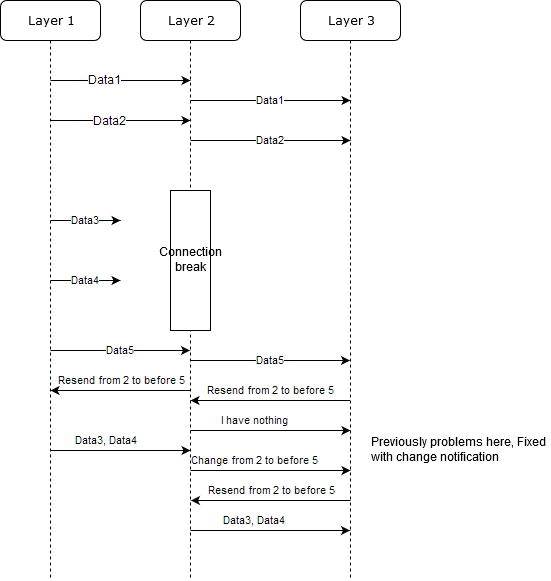
When the target server detects that it has missed a previous value it requests backfill for the missed scenario. This is usually a robust process. Some scenarios add more complexity and can cause faulty backfill. Typically these occur when there are multiple levels in the hierarchy and there is redundant systems on these levels. In such case backfill can be performed on a period that is not yet duplicated to the other system. The backfill unit is days.
Syncing over many layers
When syncing over multiple layers, the backfill is more complicated. If lower level gets data backfilled, this should also get filled in the upper levels. The solution for multi level backfill is the addition of "change" message in EqM API. With this notification, NetSync can notify the next level server that there is a change caused by backfill. It uses historyupdatelog where Vtrin-NetServer writes the change entry when it is backfilling data. NetSync reads this log to notify its upper level server that there has been a change and the server should request a resend for this period. Solution does not on its own solve the problem when NetSync is not there to listen to the changes in historyupdatelogrow.
Known Issues
- On multi level redundant systems, the backfill can happen on a yet not duplicated period which causes the backfill to complete but contain no data points.
- Vtrin-NetSync doesn't set the equipment property's TargetHistory value on the CPM History target if it creates the Equipment model. It uses whatever the default TargetHistory is for the CPM History target, instead of using what the equipment property has in the source.
- Vtrin-NetSync doesn't rename the equipment instance on the CPM History target, when the equipment instance's name is changed on the CPM History source.
- Vtrin-NetSync doesn't handle instances that have periods (
.) in their names. Period characters are used as a path separator. Client should not allow using.in instance name. - The Equipment Type ID on the CPM History target doesn't match the Equipment Type ID on the CPM History Source.
- The fields in equipment publication configuration are of limited length. RootInstance has a maximum length of 128 characters, and this might not be enough for deeply nested structures. Identifying RootInstance with GUID should be added as a feature.
Updated 7 months ago