
Release 5.2
cpmPlus History is a time series database (TSDB) with services from data ingestion, including master protocols for data acquisition, to real-time monitoring, analytics, and control. It contains application development tools that can be used to collect and visualize data, build software products and systems for utilities and manufacturing process industries, and integrate with other systems.
cpmPlus History contains integrated software modules that together provide a highly scalable software platform. The applications vary from standalone embedded data logger for a piece of equipment up to large process historian system, or extended Collaborative Production Management (CPM) solution that integrates the real-time performance measures with the current business context to support fast operational decision-making on the plant or utility level.
About this document
This document describes the major new functionality of the cpmPlus History technology release 5.2.
Detailed technical release notes on individual new functionality as well as bug fixes are presented in the download pages of cpmPlus wiki and they can also be found in the distribution media.
Release Content
The following chapters describe the major new or enhanced functionalities in cpmPlus History in release 5.2. The items are grouped under the category titles to make it easier to find the interesting improvements.
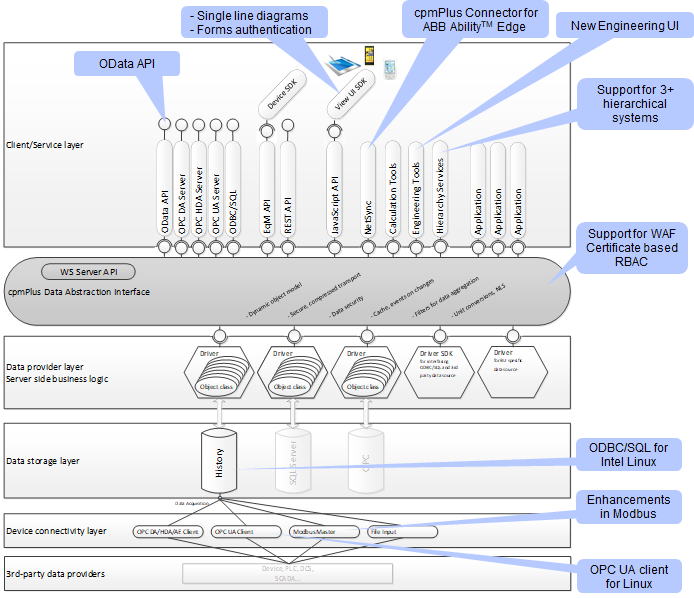
Cyber Security
Certificate-based Role Based Access Control (RBAC)
Device integration and History node-to-node connections established with certificate-based authentication support data authorization. The role is defined in the certificate.
Support for Windows Application Firewall (WAF)
Client certificates are now passed through the WAF to support certificated based authentication .
Compliance with ABB MCSR for products
Assessment of Minimum Cyber Security Requirements for products resulted several improvement requests mainly to documentation and process instructions that have now been implemented.
History functionality
Support for 3 level hierarchical systems
cpmPlus History supports implementation of 3 level hierarchical systems where the Tags are synchronized with TCC, time series transferred with VtrinLink, and events with EventForwarder services. 3 level system should always be implemented as high availability configuration to ensure required consistency between the levels, and Tag engineering should always take place at the lower level systems, because the 3rd level services are in read-only mode towards the 2nd level.
ODBC/SQL interface for Intel Linux
ODBC/SQL interface is now available in x86 Linux environments for the RTDB database maintenance and upgrade functionalities.
Connectivity
Enhancements in Modbus master
Modbus master has been enhanced with the capability to collect string type of data. For more information, please see Modbus client.
OPC UA Client for Linux
New OPC UA Client has been introduced to support Linux environments, but also available in Windows. See documentation: OPC UA Server
Public interfaces
OPC UA server compliance with standard
OPC UA server has been tested against the OPC Foundation’s compliance test tools. For more information, please see OPC UA Server.
OData API for BI and analytics
OData standard REST API increases the data access abstraction better than in traditional ODBC/SQL interface and makes it perfectly suitable for business intelligence and analytics use. See the documentation: OData API
Application development support
Connector for ABB AbilityTM Edge
Connector is an Edge module that can connect to ABB Ability™ History system and feed data to the ABB Ability™ Platform according to the data publish configuration in the History.
Single line diagrams and other improvements in View UI SDK
There are multiple improvements in View UI SDK.
New Engineering UI
HTML based engineering UI is available in History. You can connect to the History with any modern web browser and if authorized you can maintain the configurations, monitor the performance and audit the use of the History. For more information, please see Engineering UI.
Other improvements and bug fixes
See the detailed release notes included in the download pages for the details of new features and bug fixes.
Environment
Operating system
- Windows Server 2019, 2016, or 2012 R2
- (Windows 10 and respective Windows Embedded Systems can be used for development or other controlled use cases)
- MS .NET 4.7.2 or 4.8
- For Linux see Installation on Linux
- For Docker see Installation on Docker
Development and engineering tool environment
- MS Visual Studio 2017 version 15.9 or newer for application development with programming
- MS Office Excel 2013 or 2016, if bulk load tool is used
System sizing
CPU:
- Multicore CPUs are recommended, minimum 2
- Performance cannot me guaranteed in NUMA (Non-Uniform Memory Architecture) systems -> avoid configurations with multiple physical CPUs or CPUs that otherwise utilize NUMA (eg. some Intel XEON models, AMD Epyc models and AMD Threadripper models)
RAM:
- Minimum 4 GB, recommended 32+ GB
Disks:
- high performance redundant disk systems
- recommended to use SSD whenever applicable
- separate disks for OS, database, and online backup
- database disk has to be formatted to 64KB block size
Network: Separate dedicated networks are recommended to use for:
- data acquisition from devices and control systems
- communication between DCN and main history nodes
- users and system/application interfaces above main history
- redundancy between two history nodes (DCN or main) - mandatory
Both physical and virtualized servers can be used.
Compatibility
Applications and systems implemented with previous released versions can be upgraded to release 5.2.
cpmPlus History data collector nodes of version 5.0-1 and 5.1 are tested to be compatible with the cpmPlus History 5.2 main node.
Known Issues
There are currently (September 2nd 2019) 2 known high severity issues that affect certain usage scenarios. They should be considered when building a solution:
- System deployed behind an Azure load balancer causes connection breaks and missing data. This affects at least Equipment API via MiaClient which is used by NetSync. This same behaviour is not seen within local network.
- 35533: [History 5.2][Miaclient] On a highload publication (12K Values / second) to cloud, frequently getting Socket not open error and found missing values. After some days the value update halts
- 37866: [Netsync] Equipment history backfill not happening in the cloud machines after network disturbance in L3 machine
- When using MiaClient Equipment API resend, the server does not recalculate the backfilled data. This affects NetSync which uses the resend backfill regularly
- 38633: [History 5.3 QA1][Vtrin-netSync] - History recollection for backfilled data is not happening
- There can be performance issues in NUMA (Non-Uniform Memory Architechture) environments. Avoiding such configurations is recommended. This issue applies to all cpmPlus History releases, including this version.
Updated 9 months ago