
Architecture
Architecture is what defines the non-functional attributes and is essential when creating an excellent user experience.
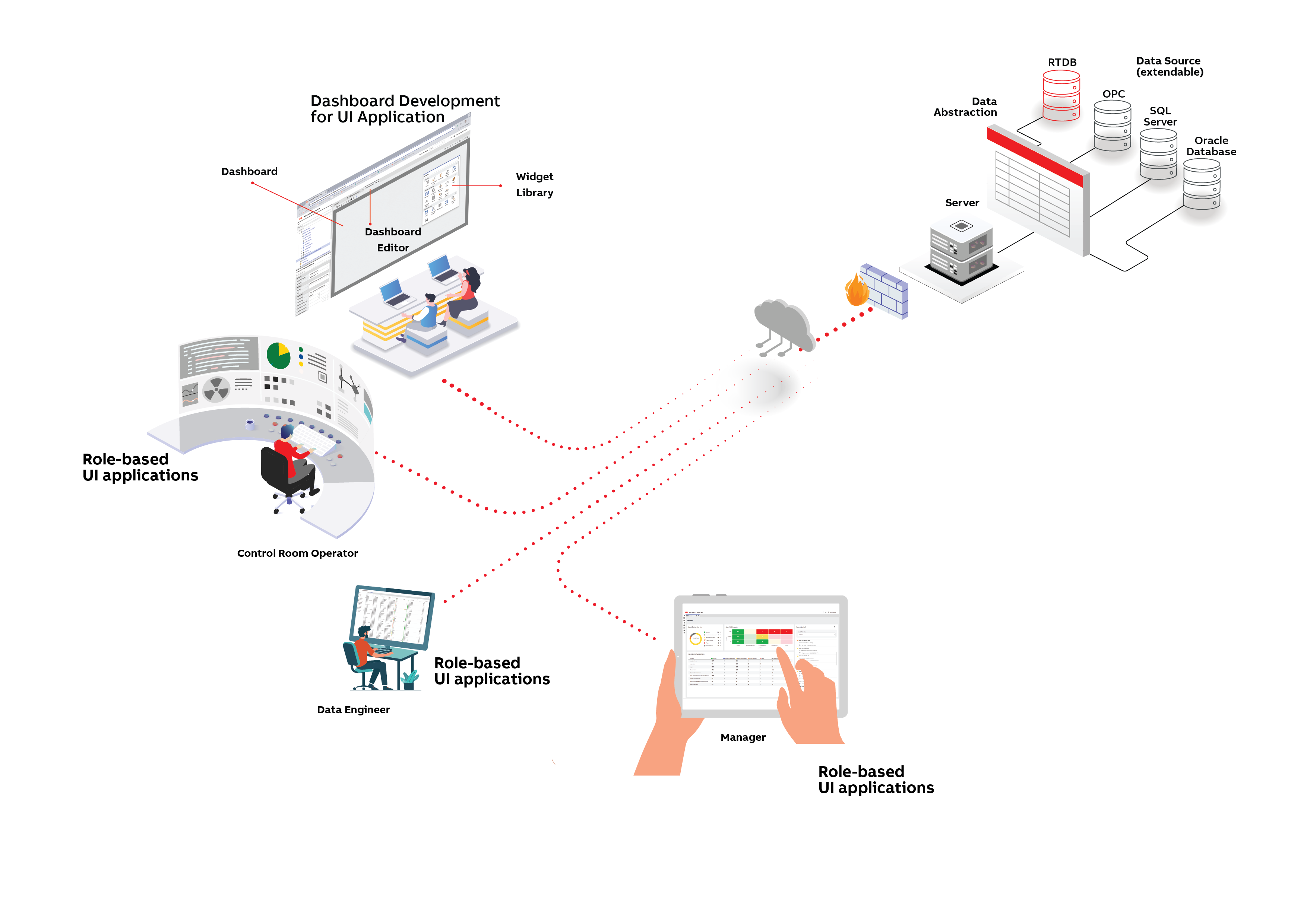
The above picture identifies the main concepts and components in the ABB Ability™ History UI SDK architecture.
Data abstraction
From UI perspective the data abstraction brings all the different data sources to same API and metadata format, hides their differences and enables generic presentation layer development. Multiple data sources can be accessed concurrently. Product contains drivers for RTDB (database of ABB Ability™ History), OPC DA, OPC HDA, OPC UA, and SQL databases (ODBC SQL). A new data source can be added with minimum amount of work by using the data source driver SDK.
Data abstraction provides functionalities that can be used to extend the functionalities of the original data source. These functionalities contain e.g. support for national languages (NLS), time and unit conversions, and numerous filters for online time series aggregation.
For more information see Data abstraction and VtrinLib.
Server
Server provides the web server for the clients to connect and WebSocket data server to access the data in the data abstraction.
Client API
Client API is a JavaScript API to connect to the server and to access data in the data sources behind the data abstraction. Data access is asynchronous.
Client
Client is based on HTML5 and Websockets. Most of the modern web browsers are supported.
Application
Application is typically a single page web application that may contain any number of dashboards, navigators to navigate between the dashboards, search function to search dashboards and data, and tool windows to assist in data navigation, data maintenance or other functions. One system may contain several applications that may share dashboards between each other.
Dashboard
Dashboard is typically a single page that may contain several widgets to present data, access data, control visual behavior of other widgets, or to create some interactions between the widgets.
Dashboard editor
Dashboard editor is a tool to design, create, and maintain dashboards. Dashboard editor provides wysiwyg user experience and enables implementing dashboards by using widgets without programming.
Widget library
Library of widgets that can be used to construct a dashboard. Widget library contains set of basic business widgets that are coming with the product. New widgets can be created by using the widget base SDK. 3rd party widgets can also be wrapped so that they are compatible with the dashboard editor and capable to serialize their properties for storing.
Security
Data is secured in transit by using HTTPS connections and secure Websocket protocol. Role based access control (RBAC) is used to access all the data in the data source. User interactions are controlled by the rights (read, write, create, execute, delete) that have been granted to them directly or to their roles.
Data maintenance is one important function of many UIs and especially the requirements of time series data maintenance are supported with functionalities such as keeping the original time stamp resolution, indicating the maintenance in the quality status attributes, and collecting audit logs with user comments.
User authentication is supported with multiple options such as anonymous, basic HTTP, TLS client certificates, forms, integrated Windows authentication, Azure active directory, and with different identity providers. Multiple authentication methods can be used concurrently by whitelisting them in the server. More about the authentication in Authentication .
Server can also be configured as a gateway to another server that further extends the possibilities for user authentication and accessing data across the security zones that are frequently used in industrial environments.
Performance scalability
Data subscription is supported to enable close to real-time data visualization for hundreds of concurrent users and efficiently to mobile users. Data items are delivered event based independently from each others and updated in the widgets on screen.
UI SDK architecture provides multiple performance accelerators to enable fast response. One example of such is data cache in client memory. Each data class in data abstraction can be defined to be cacheable or not. If data class is cacheable, it means that a copy of it can be kept in client memory and updated if there are changes in the data source. This is especially handy for various metadata and not so frequently changing data, because there is not any need to query them from the server side.
Life-cycle management
UI SDK is designed so that it supports independent life-cycle of the SDK, application and solution. UI SDK is framework agnostic, based on vanilla Javascript. Add the dashboards and configurations are stored in database and designed to be upgradable. APIs are designed to support backward compatibility and avoiding any changing breaks.
Widget library can be extended with application specific widgets that can be developed from the UI SDK base widget or 3rd party widget can be wrapped to be compatible with the dashboard editor. Also frameworks such as React can be used to implement new widgets. Data accessors enable easy access to data for the widgets.
Updated 9 months ago