
Networked System
This article will show you how the process for installing and configuring a basic ABB Ability History based Networked System using Netsync flows.
Concept
Sometimes industrial systems need more flexibility than hierarchical structure can provide. Networked topology approach provides this flexibility. Please find further information of the concept here.
Networked System Installation
To create a networked system the following installations need to be done
- Installation of Source Node
- Installation of Target Node
- Netsync configuration
Source Node
The chart below shows you the process for installing and configuring the Source Node. Links to installation tutorials are listed after the chart.
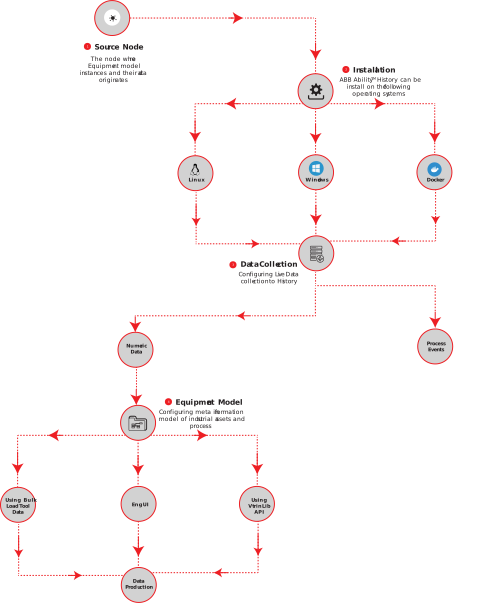
Source Node Installation and Configuration flow chart
References for Installation and Configuration
- Installation
- Installation on Windows: High Availability System: ABB Ability™ History supports high availability configurations where two history nodes replicate data between each others and form one high availability database.
- Installation on Windows: Installing History Server - Single Node System: This article will guide you through how a standalone History Server (no redundancy support) is installed.
- Installation on Linux.
- Running in Docker.
- Data Collection
- Numeric Data for Equipment Model
- Create an Equipment Model in Engineering UI: With Engineering UI, you can easily create a new equipment model for the ABB Ability™ History database. This article will guide you through that with an example.
- Using Bulk Load Tool: Equipment models can be created in any spreadsheet application, yet currently xlsx file format is supported. This article will guide you through that with an example.
- Using VtrinLib API: This Equipment Model tutorial will guide you through the process of referencing VtrinLib, connecting to RTDB, creating equipment types, properties and instances to feeding and reading data.
- Process Events: The class 'DataAccessEvent' is used to configure the events subscription from OPC Classic and OPC UA. This article will give you further information on that.
- Numeric Data for Equipment Model
- Data Production
- Live data production: This page explains the concept of real-time value processing in ABB Ability™ History. It gives an overview of what happens before the value is stored.
- Redundant data production: ABB Ability™ History is frequently used in redundant configurations for achieving high availability. This chapter discusses the various combinations of data production of a single and redundant History node.
- High availability: ABB Ability™ History supports high availability configurations where two history nodes replicate data between each others and form one high availability database.
- Equipment Model and data access classes: Equipment Model is a predefined meta information model in ABB Ability™ History for modelling industrial assets and processes and implement applications against them.
Target Node
The following chart will show you the flow for installing and configuring the Source node. Below the chart you may find relevant links.
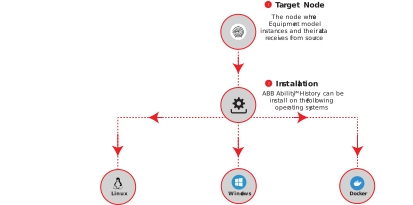
Target Node Installation and Configuration flow chart
References for Installation
Netsync Configuration
RTDB-Netsync is the service responsible for synchronizing Equipment models and their data between Source and Target nodes.
For configuring Netsync refer NetSync - Getting started
Updated 9 months ago