
Release 5.0 and 5.0-1
cpmPlus History is a process historian and database for Collaborative Production Management (CPM) software that can be used to collect and visualize data, build software products and systems for utilities and manufacturing process industries, and integrate with other systems.
cpmPlus History contains integrated software modules that together provide a highly scalable software platform. The applications vary from standalone embedded data logger for a piece of equipment up to large process historian system, or extended CPM solution that integrate the real-time performance measures with the current business context to support fast operational decision-making on the plant or utility level.
About this document
This document describes the major new functionality of the cpmPlus History technology release 5.0.
Detailed technical release notes on individual new functionality as well as bug fixes are presented in a separate document that can be found in the distribution media:
\RTDB\program files\ABB Oy\RTDB\Document\ReleaseNotes_cpmPlus_History.txtVersion 5.0 Release Content
The following chapters describe the major new or enhanced functionalities in cpmPlus History in release 5.0. The items are grouped under the category titles to make it easier to find the interesting improvements.
Cyber Security
.NET Remoting Replaced by Secure WebSockets
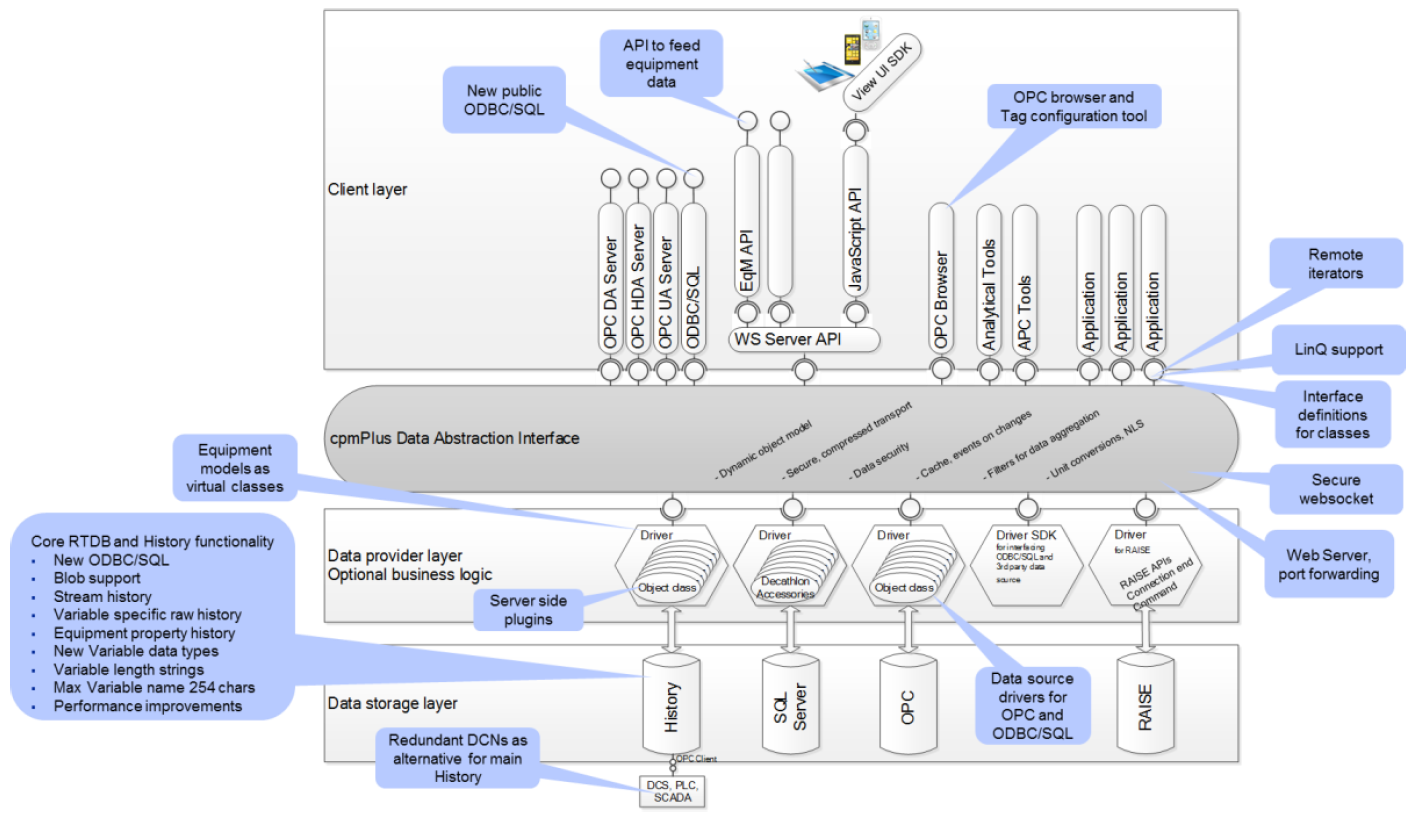
.NET remoting as the data abstraction interface communication protocol has been replaced with secure WebSockets to improve cyber security, to provide better control, and to ensure life-cycle management in the future. .NET remoting is still supported parallel to WebSockets to enable compatibility with previous versions in systems where there are clients or DCNs that need to be connected to History 5.0. See more information in the History Configuration and Administration Manual.
Reduced Attack Surface
There have been implemented several improvements to the installation and default configuration to reduce the potential attack surface based on the suggestions from the cyber security assessments and DSAC testing.
Core RTDB and Performance
New ODBC/SQL for RTDB Core Maintenance
The ODBC/SQL interface for RTDB maintenance has been replaced with new implementation that supports the latest ODBC standards (v3.8). This interface is aimed for the database maintenance purposes for application installations and upgrades. See the ODBC/SQL for Data Abstraction Interface for interfacing your application or 3rd party reporting tool runtime to History.
The old legacy RTDB ODBC/SQL is still available and can be configured to use in the deliverable to support compatibility with the existing applications. See more information in RTDB Developer’s Manual.
Blob Support
RTDB supports blobs as native data type. A blob can be a binary blob or unlimited length of text. See more information in the RTDB Developer’s manual.
History Recording Performance
The performance of the history recording has been improved to handle bigger number of variables by reducing the size of the memory footprint of single variable in the input processing and by removing the need to update the index for the most current value, i.e. so called head table index.
Comparison of the relative performance between versions 4.6 and 5.0 and between CurrentHistory and StreamHistory are presented in the following table:
| Version | History 4.6 | History 4.6 | History 5.0 | History 5.0 | History 5.0 | History 5.0 | History 5.0 |
|---|---|---|---|---|---|---|---|
| History type | CurrentHistory | CurrentHistory | CurrentHistory | CurrentHistory | StreamHistory | StreamHistory | StreamHistory* |
| Redundancy | Yes | Yes | Yes | Yes | No | No | No |
| Variables in test | 10 000 | 10 000 | 10 000 | 10 000 | 10 000 | 10 000 | 10 000 |
| Compression | - | QL | - | QL | - | QL + LZW | QL + LZW |
| Continuous data ingestion throughput | 120 000 /s | 140 000 /s | 210 000 /s | 240 000 /s | 560 000 /s | 710 000 /s | 32 900 000 /s |
| Size on disk /1G float values | 55 GB | 48 GB | 55 GB | 48 GB | 18 GB | 2.4 GB | 2.1 GB |
| Limiting resource | HDD | HDD | HDD | HDD | HDD | CPU | HDD |
| Data read performance** | 1.19 M/s (not cached) 17.5 M/s (cached) | 1.19 M/s (not cached) 17.5 M/s (cached) | 1.19 M/s (not cached) 17.5 M/s (cached) | 1.19 M/s (not cached) 17.5 M/s (cached) | 2.02 M/s 45.5 M/s | 4.81 M/s (not cached) 8.33 M/s (cached) | 4.81 M/s (not cached) 8.33 M/s (cached) |
*) StreamHistory with direct database connect with per block time stamp and status configuration and without current value processing
**) Data read test is performed 10 times. The first result is “not cached” when the data has to be retrieved from the HDD and the last “cached” when most of the data may be available in cache.
R/W performance: Reading and writing are affecting to each other, because the HDD is the typical bottleneck.
The above table is providing performance numbers measured during the release testing. The purpose is to give understanding on the effect of the improvements to the performance and disk space consumption, actual performance values are dependent on the used system configuration, environment and data. This test has been performed with desktop PC (4 CPU cores + hyper threading, 16 GB RAM, 7200 rpm HDD).
Connectivity
Redundant DCN Configuration
Redundant DCNs have been supported already since the History version 4.2 as independent nodes that may perform redundant data collection, but now two DCNs can be defined to take benefit of the data replication between each other and the basic hierarchical configuration of 800xA History with two DCNs and (redundant) main history node can be collapsed to a pair of redundant DCNs that handle all the tasks of the long term history. This leaves the option to introduce additional next level history above the redundant pair of DCNs for customer specific or other application purposes.
Notice that the use of the redundant DCN configuration requires specific HW/network configuration.
Data Source Drivers for OPC and ODBC/SQL
The data source drivers for OPC Classic DA and HDA servers and ODBC compliant data sources are now included in the History deliverable to enable more fluent systems integration.
History functionality
StreamHistory
StreamHistory is a new type of history storage structure that provides possibility for optimized disk IO with option for lossless (LZW) compression when storing time series process data. Storage configuration parameters enable storage space optimization based on the characteristics of the data. StreamHistory supports the normal Variable data types and it can be configured individually for each Variable and whether to use the LZW compression or Quantization Lane (QL) compression or both of them. StreamHistory is aimed for storing sensor values and other signals that are not subject for regular maintenance later on. Calculated Variables shall be configured to use the traditional CurrentHistory. Variable configuration attributes contain several new attributes to specify the functionality for collecting the StreamHistory.
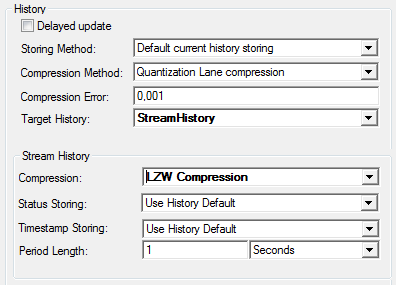
Notice that Quantization Lane compression is strongly recommended for floating point and double type of values, if the LZW compression is used.
Equipment Property History
History can now be recorded for equipment properties without Variable definition. This saves engineering work in the case that there are large number of equipment instances and one configuration of the property in the equipment model is automatically applied to all the property instances. It is indicated in the equipment property definition whether history is collected for the property or not, and to which history table the collection happens. Once the equipment instance is created, data can be started to feed to the property without additional engineering.
Variable Specific Raw History
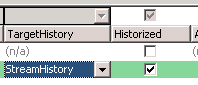
The raw history table can now be selected individually for each Variable that gives the freedom e.g. to define different storing lengths for different types of Variables. The used history table is selected by “Target History” attribute in the Variable configuration. The raw history table can be of type CurrentHistory or StreamHistory.
History aggregations can be defined to be collected from virtual table “(produced values)” that means the source table can be Variable specific and read from the Variable properties.
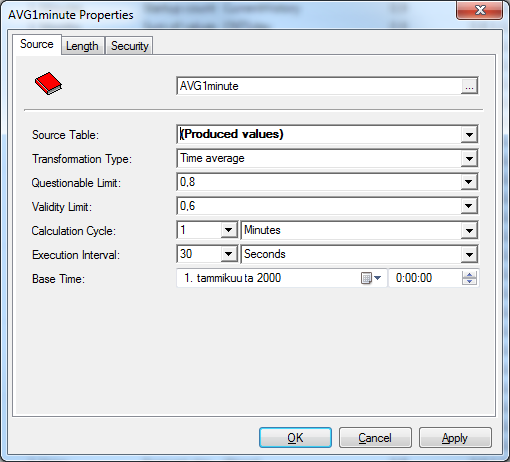
See more information on history collection definitions in the History Configuration and Administration manual.
Which history type should I use?
First there is the question about the engineering model, whether to use Variable or Equipment model:
| Engineering | Variable | Equipment property |
|---|---|---|
| Individual vs. common engineering | Each Variable is separately engineered. You can define descriptions, min/max, data acquisition definitions etc. individually. | All instances are following the setup in the equipment model. Define it once and create as many instances as you want. Modification is applied to all instances. |
| Suitable for OPC data collection | Yes | Only in limited cases |
| Device to feed the data to History | Yes, but requires separate engineering for each Variable | Yes |
| Aggregate collection | Yes | No |
| Virtual class for data retrieval | ProcessHistory | EquipmentHistory |
Then which kind of history to use:
| History | CurrentHistory | StreamHistory |
|---|---|---|
| Measured signal data with very limited need for maintenance | Yes | Yes, optimized |
| Calculated signal with frequent recalculation and maintenance | Yes | No |
| Compression | QL | QL, LZW |
| Space usage optimization by data type | No | Yes |
| Space usage optimization for evenly time stamped data | No | Yes |
| Space usage optimization for quality status | No | Yes |
| Direct API for very high frequency data | No | Yes |
| Aggregate collection | Yes | Yes |
| Data retrieval with the virtual ProcessHistory and EquipmentHistory classes | Yes | Yes |
New Variable Data Types
New data types have been introduced for Variables and equipment properties. In addition to the previously supported data types, Variables can now be Boolean, 32 bit floating points, 8, 16 and 32 bit integers or unsigned integers. Variable can also be defined to be an array of the basic data type, except text, with current value and history recording and arrays are available through the public interfaces similarly as for the basic data types.
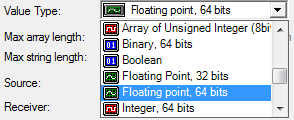
To achieve saving in the disk storage space with value type less than 64 bits and optimization for arrays, Variable raw history shall be collected to StreamHistory.
Applying Varying Length Strings and Variant Data Types in Predefined Tables
The support for the varying length columns and variant data type were introduced in History 4.6 and in that release they were applied to OPCEventLog. Now the varying length columns have been applied to all the predefined tables in the History that reduces the amount of disk space consumption especially in case of engineering data and equipment models. Also the maximum length of many strings have been increased, e.g. the maximum length of Variable name is now 254 chars while it is 32 chars in the previous versions.
Public Interfaces
ODBC/SQL Interface for Data Abstraction Interface
New ODBC/SQL interface has been introduced above the Data Abstraction Interface. It can be used to access data in all the data sources available through the Data Abstraction Interface. The data classes in the Data Abstraction Interface are published as tables in SQL.
ODBC interface supports the latest standard (v3.8) and it can be installed in remote node with secure access with the Data Abstraction Interface to History or other data source. With the remote installation the new ODBC can be used also with the older History versions (tested with v4.5 and up). See more information in ODBC.
Platform Independent Equipment API (EqM API)
EqM API is a simple platform independent API aimed for feeding equipment data to History or other data source that implements the equipment model such as OPC UA or RAISE. EqM API is light weight API through secure websocket communication to the Data Abstraction Interface that handles the actual data production logic according to the defined equipment model. EqM API enables configuring new equipment models and to read the existing metadata for the control of the data acquisition.
If you are implementing an embedded client to your IED to feed data to cpmPlus compatible data source, take a look at the SDK for implementing the client with C/C++: Embedded C++ SDK
Remote Iterators in Data Abstraction Interface
Data Abstraction Interface brings index iterators for remote use to improve the interface usability for the applications. This also introduces the remote iterator with write functionality for the Graph data that has not been available previously and that improves the application performance significantly in operations such as history data update.
LinQ Support in Data Abstraction Interface (technology preview)
LinQ API has been introduced as technology preview to the Data Abstraction Interface.
Application Development Support
OPC Browser and Tag Configuration Tool
cpmPlus data abstraction (VtrinLib) data source drivers have been implemented for OPC DA and HDA and are now included in the History delivery. This enables browsing, searching, and trending the items in the DA and HDA servers with the History engineering tool (Vtrin).
There is also a new Tag Template class in History that provides the possibility to select OPC items from an OPC server with filter conditions and convert them to temporary Tag objects that can further be used to create Tags into History. This functionality makes it easier to configure Tags to record history from an OPC data source. No more need to copy/paste complicated item ids with several possibilities for errors.
Server Side Plugins for Data Abstraction Interface Driver
Some application implementation may need advanced transactional support or other application specific business logic. To enable the customized implementation of a Data Abstraction Interface class, there is option to implement it as a plugin for the data source driver. See more information on VtrinLib.
Equipment Models as Virtual Classes in Data Abstraction Interface
History (RTDB) Driver publishes the equipment models as virtual classes in the Data Abstraction Interface. This makes it easy for the applications to deal with the equipment instances and e.g. ODBC/SQL is publishing a piece of equipment model as a separate virtual table with the instances as rows. See more information in VtrinLib SDK in cpmPlus wiki.
Interface Definitions for Classes (and Equipment Models)
Data Abstraction Interface has a new concept called interface that exposes a separate class specific API.
Web Server and Server Side Port Forwarding
The Data Abstraction Interface provides web server that can be used instead of IIS for the UI and other purposes.
Data Abstraction Interface provides possibility for server side port forwarding to enable Data Abstraction Interface web server to be installed to the standard ports (80 and 443) and let it forward requests not belonging to it to other web servers.
Support for Other Platforms
History Data Abstraction Interface Driver for Linux (technology preview)
History driver has been made compatible with Linux and the Data Abstraction Interface access to History is supported with Mono framework in Linux. See more information on Linux installation in Installation on Linux.
Other Improvements and Bug Fixes
See the detailed release notes included in the deliverable for the details of new features and bug fixes:
\RTDB\program files\ABB Oy\RTDB\Document\ReleaseNotes_cpmPlus_History.txtEnvironment
Operating system
Windows Server 2012 R2 or (2008 R2 SP1)
(Windows 10, 8.1, 8, 7, and respective Windows Embedded Systems can be used for development or other controlled use cases)
MS .NET 4.5.2
Development and engineering tool environment
MS Visual Studio 2013 for application development with programming
MS Office Excel 2010 or 2013 is needed for bulk load tool in engineering client
System sizing
CPU:
- Multicore CPUs are recommended, minimum 2
RAM:
- Minimum 4 GB, recommended 32+ GB
Disks:
- high performance redundant disk systems
- recommended to use SSD whenever applicable
- separate disks for OS, database, and online backup
- database disk has to be formatted to 64KB block size
Network: Separate dedicated networks are recommended to use for:
- data acquisition from devices and control systems
- communication between DCN and main history nodes
- users and system/application interfaces above main history
- redundancy between two history nodes (DCN or main) - mandatory
Both physical and virtualized servers can be used.
Compatibility
Applications and systems implemented with previous released versions can be upgraded to release 5.0.
cpmPlus History data collector nodes of version 4.4, 4.5, and 4.6 are tested to be compatible with the cpmPlus History 5.0 main node.
NoticeDCN version 4.2-5 has not been tested with History 5.0 and it has one known configuration issue while connected to redundant History main server. It is not recommended to run such combination, but in case you have such, contact L4 support to get the instructions for manual configuration change.
NoticeRedundant configuration with one node of version 4.6 and the other 5.0 is not supported due to changes in the communication protocol, and you can’t make online upgrade of a redundant system to version 5.0.
New ODBC/SQL interface above the Data Abstraction Interface has been tested to be compatible with network access to History versions 4.5 and 4.6.
Limitations and remarks to consider
NoticeThe legacy ODBC/SQL interface to RTDB is available in the History 5.0 deliverable, but it has to be separately configured to be available for use.
NoticeStreamHistory is not compatible with the technology preview that has been included in the previous versions. This means that e.g. some version of Modbus interface needs to be modified to use the new API.
Updated 9 months ago