
Example equipment model
This article will give a simple example of our Equipment Model by creating a Water Pump System
Here we define an example equipment model that is used in examples throughout the documentation.
The figure below shows a water pump system where the pump transfers water from the left-side tank (source tank) to the right-side tank (target tank). Furthermore we have defined that the pump turns on when there are more than 900 liters of water inside the source tank and turns off when there are less than 100 liters of water.
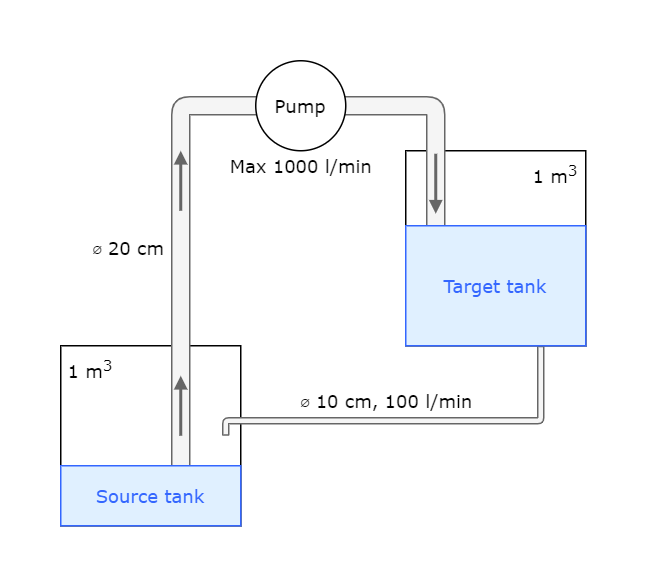
The system consists of two tanks, one pump, and piping.
Equipment models
For the example, we define an abstract equipment model Device. All other models derive from this model either directly or indirectly. We can categorize our equipment as either electrical or mechanical devices. Therefore, we define abstract equipment models Electrical device and Mechanical device. Both of these inherit the Device.
We define three concrete equipment models: Pump, Pipe, and Tank. The pump is considered an electrical device, so Pump inherits the Electrical device abstract equipment model. Pipes and tanks are mechanical devices, so Pipe and Tank inherit the Mechanical device. Since all our concrete equipment models directly inherit either Electrical device or Mechanical device, they all indirectly inherit the Device equipment model.
Model hierarchy
Below we can see the model hierarchy as explained above, where Device is our abstract equipment model and other models derive from this.
Device
├── Electrical device
│   └── Pump
└── Mechanical device
    ├── Pipe
    └── Tank
Model definitions
Next we can define our models attributes and properties.
Model attributes
| Name | Base | Abstract | Class name |
|---|---|---|---|
Device | - | Yes | Path_Device |
Electrical device | Device | Yes | Path_Electrical device |
Mechanical device | Device | Yes | Path_Mechanical device |
Pipe | Mechanical device | No | Path_Pipe |
Tank | Mechanical device | No | Path_Tank |
Pump | Electrical device | No | Path_Pump |
Model properties
Device
| Property | Data type | Unit | Historized | Description |
|---|---|---|---|---|
Manufacturer | string | - | No | The name of the company that produced this device. |
Pipe
| Property | Data type | Unit | Historized | Description |
|---|---|---|---|---|
Flow | double | m3/s | Yes | How much water can flow through the pipe per second. |
Diameter | double | cm | No | |
Manufacturer | string | - | No | Inherited from Device |
Pump
| Property | Data type | Unit | Historized | Description |
|---|---|---|---|---|
Nominal power | double | W | No | Maximum power for the pump. |
Power | double | W | Yes | The power of the pump at the given moment. |
Manufacturer | string | - | No | Inherited from Device |
Source tank | GUID | - | No | References: Tank The tank the pump is draining from. |
Target tank | GUID | - | No | References: Tank The tank the pump is pumping into. |
Operational state | int16 | - | Yes | Enumeration: Binary Text(1),displayed as "Run"/"Stop" Writing to this property can be used to start and stop the pump. |
Power state | int16 | - | Yes | Enumeration: Binary Text(6), displayed as "On"/"Off" Whether the pump is currently turned on or off. Notice that it takes a while for the pump to fully stop. Therefore, after the stop signal has been sent to the pump, the is a short period when Power state is "Off" and Power is above zero. |
Tank
| Property | Data type | Unit | Historized | Description |
|---|---|---|---|---|
Level | double | mm | Yes | How high the water surface is from the bottom of the tank. |
Volume | double | l | No | The total capacity of the tank. |
ContentsVolume | double | l | Yes | The volume of water in the tank. This is calculated from Level and Diameter. |
Diameter | double | mm | No | The diameter of the tank. The tank is a cylinder. |
Manufacturer | string | - | No | Inherited from Device |
Equipment instances
Then we can look at our Equipment Instances created for our example model. The instance hierarchy will show all the devices in our example model and further down, instance paths will show the full paths for each instance.
Instance hierarchy
Example site
├── Tank area
│   ├── Source tank
│   └── Target tank
├── Pipe
├── Flowback pipe
└── Pump section
    └── Pump
Instance paths
| Name | Full path |
|---|---|
Source tank | Example site.Tank area.Source tank |
Target tank | Example site.Tank area.Target tank |
Pipe | Example site.Pipe |
Flowback pipe | Example site.Flowback pipe |
Pump | Example site.Pump section.Pump |
Property values
Here is a listing of the property values for all our equipment instances. Historized properties are marked with "-", since their values are constantly changing.
Source tank
| Property | Value |
|---|---|
Volume | 1000 |
Manufacturer | Tank company |
Diameter | 1128 |
Level | - |
ContentsVolume | - |
Target tank
| Property | Value |
|---|---|
Volume | 1000 |
Manufacturer | Tank company |
Diameter | 1128 |
Level | - |
ContentsVolume | - |
Pump
| Property | Value |
|---|---|
Nominal power | 1000 |
Manufacturer | Pumps & Pipes Inc. |
Source tank | GUID of Source tank |
Target tank | GUID of Target tank |
Power | - |
Operational state | - |
Power state | - |
Pipe
| Property | Value |
|---|---|
Diameter | 20 |
Manufacturer | Pumps & Pipes Inc. |
Flow | - |
Flowback pipe
| Property | Value |
|---|---|
Diameter | 10 |
Manufacturer | Pumps & Pipes Inc. |
Flow | - |
Example installation:
ExampleWaterTransferSystem.exe creates this model and their instances automatically:
#Requirement: a running RTDB_CVMCServer
ExampleWaterTransferSystem.exe --install -c <RTDB Location>
#Remove the service:
#ExampleWaterTransferSystem.exe --remove -c <RTDB Location>
User can start and stop services in RTDB.INI.
Tutorial
We have created a tutorial of our water pump system that will help you get started. Please find the tutorial here.
Other recommended reading
- Our Engineering UI may also be used in creating Equipment Models. More information here.
- Designing a dashboard is easy with our ABB Ability™ History View. More information under designing a dashboard.
- Dashboard step-by-step tutorial will give you detailed instructions on how to create your own dashboard and widgets.
Updated 9 months ago