
Hierarchical systems using tags
Overall architecture in hierarchical systems
In the ABB Ability™ History case, a hierarchical system contains several RTDB nodes organized to form a tree structure. Each node contains an RTDB database adapting a versatile technology that enables the user to simply configure it as a Data Collector Node (DCNs) or The Main Node (Main Node) based on the need.
The Data Collector Node is designated for collecting and transferring data to the upper layer. It is often positioned closer to the Data Producer to ease data collection and automatic configuration.
The Main Node process full-scale real-time data utilizing the DCN service to fetch data. The Main nodes form the basis for the application development and upper-level historical data storage. Multiple layers of Main Nodes can exist in the tree structure.
Tag Class (Tags) is a virtual class used to configure the ABB Ability™ History RTDB database to collect and store process data. Tags are used to define how the data should look in the database. They define a name and a unique ID for data structures and a data type of stored data.
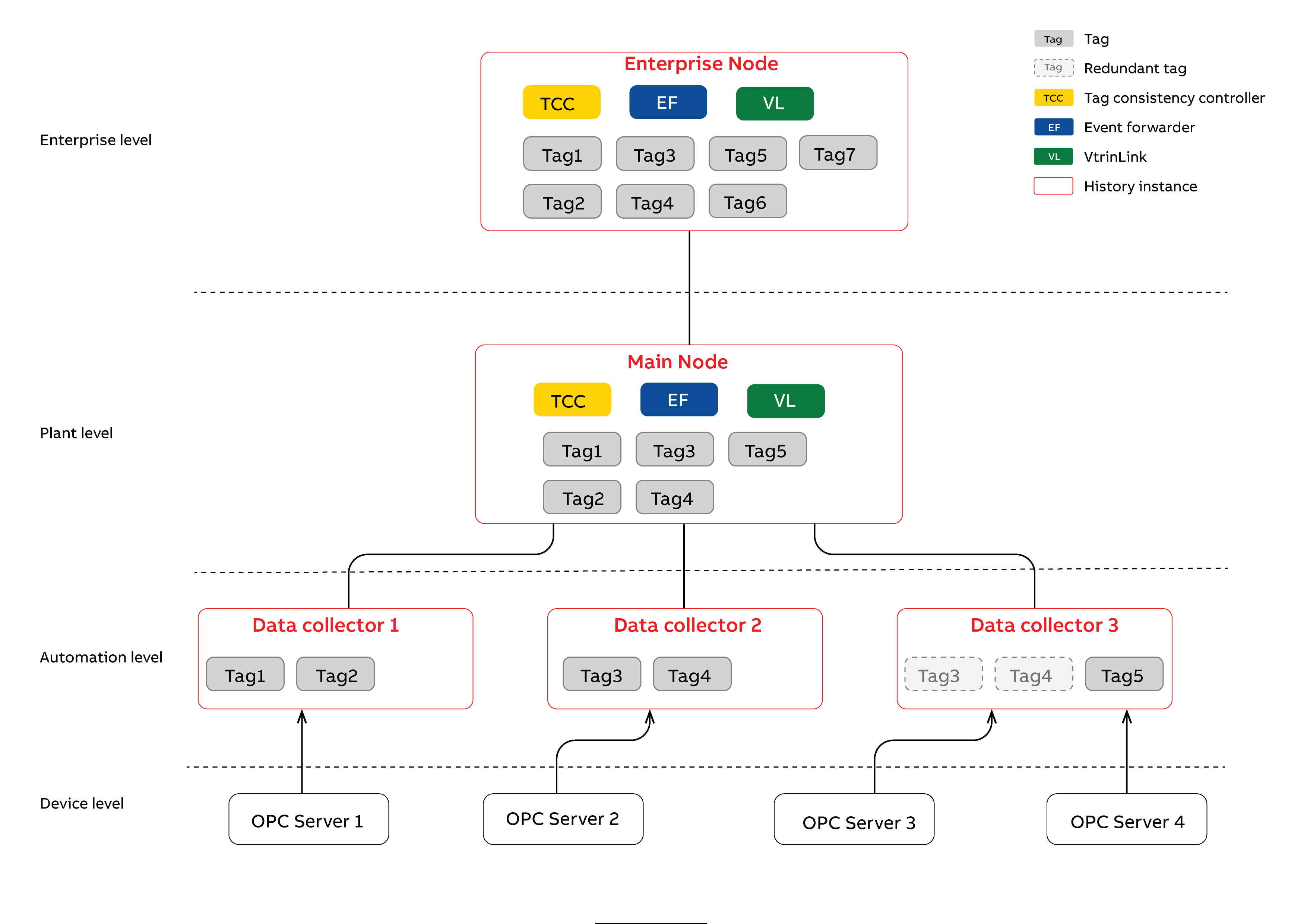
Overall view of the hierarchical system that contains three data collector nodes and a single Main Node between an “Enterprise level” main node.
Tag consistency controller
Tag Consistency Controller (TCC) is a component in ABB Ability™ History that controls the transferring of tags' definitions between nodes in a hierarchical system. It controls the Tag consistency between parent and child nodes (e.g. Main Nodes and DCNs). Communication between the nodes is automatically established based on the Tag. TCC components exist in the parent node. All tags are not necessarily under tag consistency control (e.g. tags 6 and 7 only exist at the enterprise level).
TCC is done based on information available in the Tag itself, as well as the predefined (and configurable) rules for the TCC. Between each level of a hierarchical system exists one tag consistency controller. One TCC can connect to several child nodes. However, at the tag level, the consistency control is always done between two or three nodes. This is derived from the definition of the Tag, where redundant data collection is in two different nodes (no triple redundancy). Redundancy is defined at the tag level. One data collector node may contain tags that are redundant and tags that are not.
Hence, binding to an external data source is done at the tag level and is highly flexible.
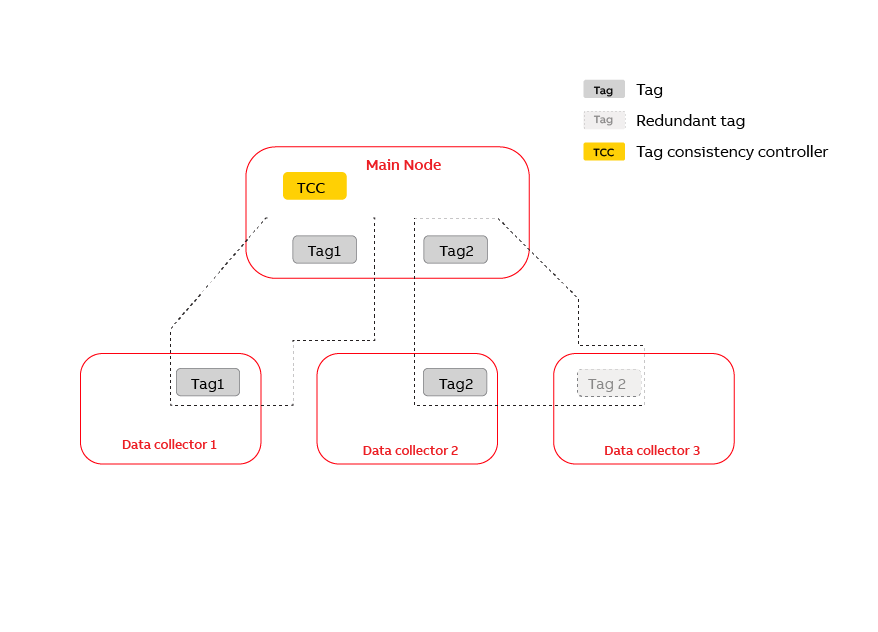
Tag consistency is controlled for each tag based on information available in the Tag and DataBaseNode classes.
Tag consistency controller (TCC) is installed always on the parent node (here "Main node") and takes care of consisting of the direct child. One TCC component can handle consisting between several nodes, but at the tag level consisting is always done between two (non-redundant tag) or three (redundant tag) nodes (dotted lines).
The purpose of the TCC is to distribute the Tag definitions between nodes in hierarchical systems. It doesn’t do anything related to actual real-time data marshalling between nodes. Real-time data and historical data passing between nodes in a hierarchical system are established using VtrinLink.
Tag class support for hierarchical systems
The tag class defines how data is collected to process history. To support hierarchical systems, the tag has two properties: CollectorNode and CollectorNodeRedundant that refer to DataBaseNode class instances. These define the link between the hierarchical node configuration and Tag instances. To establish communication between hierarchical nodes, the information stored in the DataBaseNode class must be identical in each node, and it is properly configured. This is done automatically by the setup (or actually with the PostInstall tasks when new data collectors register themselves to the Main node). The following table describes the contents of the DataBaseNode class. In a hierarchical system that contains two data collector nodes and one main node, there would be three instances in the DataBaseNode class.
The Main server node can be configured as an RTDB Consistency Controlled node in a High-Availability system (in RTDB version 4.3 and later). In this configuration, there can be two (or perhaps more) redundant Main nodes. In this case, there will be an entry in the DataBaseNode that defines the "virtual" node that represents both Main nodes. This entry is marked with HighAvailability = True, and the ComputerName and IPAddress properties of this instance contain the common setting that can be implemented with the NLB technique. This entry is used as the Parent node of the data collector nodes.
In addition, the redundant Main server nodes also have their own DataBaseNode instance. These instances have a nonzero reference in the HighAvailabilityNode property, which refers to the entry that contains the virtual HighAvailability = True node.
In the RTDB 4.3 and later version, there is no RTDB redundancy support for the data collector nodes, however, there is a separate redundancy concept for the data collector nodes that is not related to RTDB consistency control.
| Property | Description |
|---|---|
| Id (GUID) | Uniquely identifies the node. This is referred from the Tag class. It is also used to form parent-child relationship between database nodes. |
| Name (string) | Name of this data collector node. This should be unique within each machine and thus within the whole hierarchical system (because the content of the DataBaseNode class should be identical in each node). The name of the node should not contain spaces or special characters, because that name is also used in the names of RTDB OPC server ProgIds that are used for a connection between nodes in the hierarchical system. |
| Description (string) | Description of the database node. Descriptive only. |
| Parent (GUID) | Reference to parent if such exists. |
| Type (int32) | Either ‘Main’ (0) or ‘DataCollector’ (1). |
| HasChildren (bool) | Whether this node has children or not. |
| TccEnabled (bool) | Defines whether tag consistency is enabled for this node. Not in use currently. |
| CollectSecondaryLogs (bool) | Defines whether history collection is performed in this node. This is usually True for RTDB-only installations and False for installations that also include KM. The Tag class implementation looks at this when the HistoryCollectionTemplates information is entered for a Tag. |
| ComputerName (string) | The name of the computer. Should be the same as defined in the environment variable COMPUTERNAME. |
| IpAddress | The ip address of this machine in numerical format. E.g. 12.12.12.12. |
| DataSourceName | Vtrin data source name. E.g. tcp://12.12.12.12/myrtdb |
| VtrinWebServiceAddress | Address of the web service. Not used currently. |
| HighAvailability (bool) | True if this entry describes the virtual common data for the redundant Main server nodes. |
| HighAvailabilityNode (GUID) | Reference to the HighAvailability instance of this Main server node. |
The tag defines how the data is collected and stored in the process historian. It also defines which data collector node is used to collect that tag. This is done by defining referring DataBaseNode instances using the Tag properties CollectorNode and CollectorNodeRedundant. If a redundant data collector is used, then also the property RedundantDataCollection should be set to true. If automatic Tag propagation between hierarchical nodes is wanted, then the property ConsistencyControlled should be set to true.
For the Tags where redundant data collection is supported, it should be noticed that for the redundant data collection, there are separate data access paths defined for both primary and secondary data collection; these properties are DaPathRedundant and HdaPathRedundant. The latter one is only needed if there is an OPC HDA server for backfill purposes for external communication (not available for 800xA).
| Property | Description |
|---|---|
| Id (GUID) | Uniquely identifies the tag. For the same tag, this is identical in each node where this tag exists. |
| ConsistencyControlled (bool) | The Tag is under tag consistency control only if this has been set to true. The default is false. |
| CollectorNode (GUID) | Defines the collector node for this tag. Refers to the DataBaseNode instance that defines all nodes available in the system. |
| RedundantDataCollection (bool) | Defines whether the redundant data collection is done for this Tag. The default is false. |
| CollectorNodeRedundant (GUID) | If the RedundantDataCollection is defined to be true, this should be set to refer to the node that does this redundant data collection. |
| RowModificationTime (DateTime) | When this Tag instance was last updated. This property is used in RTDB_TagConsistencyController to decide what changes should be made if several changes have occurred simultaneously. (In the VtrinLib data abstraction layer, modifications are only recorded for instances, not for properties. |
The RTDB_TagConsistencyController has to know the set of recently deleted tags to prevent Tags from being added back accidentally. Information about deleted tags is maintained in the TagDeleted class. The contents of this table will be cleaned at predefined intervals (defined in the initialization file of the RTDB_TagConsistencyController). Before any Tag is added to any node, this table is checked for whether the tag already exists.
| Property | Description |
|---|---|
| Id (GUID) | Uniquely identifies the deleted tag. |
| RowModificationTime (DateTime) | Deletion time of the Tag. |
Installation and configuration
NoteIn Hierarchical system the RTDB_TagConsistencyController service will be automatically installed in Main Node (History Server) as part of Post Install procedure once a Data Collector Node establishes connection to its Main Node. The below steps are for informational purpose and can be used in special cases like creating a 3rd level hierarchy which is explained at the later section of this document
RTDB_TagConsistencyController runs as a Windows service. Installation is done by running RTDB_TagConsistencyController from the command line using the argument -install. Installation can be done e.g. by using the following command line:
RTDB_TagConsistencyController.exe -install -inifile D:\MyFold\ RTDB_TagConsistencyController.iniThe following table summarizes the initialization parameters found in the initialization file.
| Init parameter | Description |
|---|---|
| ObjectLogging | NOT IN USE YET. Specifies whether a log file is written from the currently created objects on the server side. This feature can be used to determine how the Tag consistency controller behaves, and what kind of runtime configuration the server currently has. The allowed values are 0, 1, 2, 3, 4, 5, 6 and 7. 0 means that logging is disabled. 1 means that the most important logging objects are printed. 7 means that all log files are printed. Each logging object has severity 1, 2 or 4, and ObjectLogging specifies which log objects are printed to log. It behaves like a bit field, i.e. specifying ObjectLogging 3, objects that have severity 1 or 2 are logged. If ObjectLogging is specified to be 2, only logs that have severity 2 are printed. Logs are saved under the \Diag\TagConsistencyController\ directory of the RTDB database directory. |
| InterfaceLogging | NOT IN USE YET. The allowed values are 0, 1, 2, 3, 4, 5, 6 and 7. See the more detailed description of the behavior above (ObjectLogging). There are three levels of logging messages in HAD server. OPC interface calls use level 1. Internal interfaces are logged using level 2. Level 4 is reserved for more detailed debug logging purposes. Logs are saved under the \Diag\OpcServer\ directory of the RTDB database directory. |
| DataSourceType | The only allowed value currently is ‘Vtrin’. |
| RunMode | The allowed values are ‘Batch’, ‘ContinuousPolled’ and ‘ContinuousEvent’. ‘Batch’ means that RTDB_TagConsistencyController is run from command line, and it takes a snapshot of Tags from all connected data sources, then makes them consistent, and returns. This mode might be particularly convenient when the user is building up the hierarchical system. It might also be useful for debugging purposes. The ‘ContinuousPolled’ mode can be run from command line or as a service. It makes the tags consistent by using a polling cycle defined in the ‘PollingCycle’ ini parameter (full minutes (int)). It doesn’t utilize Vtrinlib events. ‘ContinuousEvent’ is the mode where RTDB_TagConsistencyController utilizes Vtrinlib events to make tags consistent immediately when changes are noticed. |
| TagDeletionLogCleanUpCycle | Specifies how often TagDeleted instances are removed from the TagDeleted class (TagsDeleted table)An integer number that determines the days for what is the oldest allowed instance in the TagDeleted class. |
| PollingCycle | Polling cycle (in minutes) if RunMode is 'ContinuousPolled'. |
| ConsistencyRules | A full file path that contains rules to do consistency control. This is not yet implemented fully and should be left empty. |
| BaseDirectory | This is the full name of the directory that is used to store logging files. |
| DataSourceNames | ‘;’ -separated list of data sources that this RTDB_TagConsistencyController connects to and makes consistent. E.g. tcp://localhost/my_main_rtdb ;tcp://localhost/my_dc_rtdb |
| DataSourceDefinitions | ‘;’ -separated list of initialization files that correspond to the DataSourceNames list. (The order of definitions should be identical to the order of the DataSourceNames list. These initialization files are used to specify the properties of each connectable data source. See the next table for the format of data source specific initialization files. |
| ServiceName | Windows service name. Note that this should include the database path, if the naming convention of other RTDB services is used. E.g. RTDB-TagConsistencyController E:\mydatabasefolder. Note that the service name is formed by removing ‘:\’ characters, and the display name is the given name. |
The following table summarizes the initialization parameters found from the data source specific initialization files.
| Init param | Description |
|---|---|
| DataBaseNodeName | The unique data source name of this node. This should be exactly the same as the value in the DataBaseNode class instances for this node. Otherwise, the RTDB_TagConsistencyController cannot start. |
| Authentication | Allowed values are ‘custom’ or ‘windows’. Currently only ‘custom’ is supported. |
| UserName | Used only if Authentication is ‘custom’. Determines the username that is used to establish a VtrinLib connection to this data source. |
| Password | Used only if Authentication is ‘custom’. Password for the specified user. |
The format of the Consistency Rules initialization files is defined in the following table. This feature is not implemented currently.
| Init parameter | Default value |
|---|---|
| ExternalName | BiDirectional |
| ExternalId | BiDirectional |
| ProposedName | BiDirectional |
| DaType | BiDirectional |
| HdaType | BiDirectional |
| DaPath | BiDirectional |
| DaFrequency | BiDirectional |
| DaRevisedFrequency | Down |
| DaDeadband | BiDirectional |
| Activity | BiDirectional |
| HistoryCollectionTemplates | None |
| HistoryLevels | BiDirectional |
| Type | BiDirectional |
| ArrayData | BiDirectional |
| ArrayCycle | BiDirectional |
| NumericalId | None |
| DaItemPath | BiDirectional |
| PrimaryLogHdaItemPath | BiDirectional |
| SecondaryLogHdaItemPath | BiDirectional |
| StatusString | BiDirectional |
| StatusCode | BiDirectional |
| DaStatusString | BiDirectional |
| DaStatusCode | BiDirectional |
| HistoryStatusString | BiDirectional |
| HistoryStatusCode | BiDirectional |
| Version | BiDirectional |
| EquipmentPath | BiDirectional |
| Description | BiDirectional |
| ValueDisplayMin | BiDirectional |
| ValueDisplayMax | BiDirectional |
| ValueMin | BiDirectional |
| ValueMax | BiDirectional |
| Unit | BiDirectional |
| BinaryTextId | None |
| DisplayFormat | BiDirectional |
| DataFlowDirection | BiDirectional |
| ConsistencyControlled | BiDirectional |
| RedundantDataCollection | BiDirectional |
| CollectorNode | BiDirectional |
| ColletorNodeRedundant | BiDirectional |
| DaTypeRedundant | BiDirectional |
| HdaTypeRedundant | BiDirectional |
| DaPathRedundant | BiDirectional |
| HdaPathRedundant | BiDirectional |
| DaStatusStringLocal | None |
| DaStatusCodeLocal | None |
Running the tag consistency controller
RTDB_TagConsistencyController runs as a Windows service. If installation was done as described in the previous sections, then the service command line is:
RTDB_TagConsistencyController.exe -service -inifile D:\MyFold\ RTDB_TagConsistencyController.iniThe tag consistency controller can also be run from the command line or from a debugger. In that case, the -service parameter is not used. If the service cannot be started after installation, it might help to set the Tag consistency controller Windows service to a disabled state and run the service from the command line. If some unexpected exceptions are thrown, these are reported to the console with the appropriate stack trace.
Before running and installing the service, the initialization files should be properly configured. Remember that there are initialization file references to the data source-specific initialization file in the main initialization file.
Event Forwarder Service
Event buffering design in hierarchical systems
As stated earlier, ABB Ability™ History's hierarchical system contains several RTDB nodes organized to form a tree structure. Each node in the tree structure contains an RTDB database. The two kinds of nodes are:-
The Data Collector Node (DCNs) is designated for collecting and transferring data to the upper layer. It is often positioned closer to the Data Producer to ease data collection and automatic configuration.
The Main Node process full-scale real-time data utilizing the DCN service to fetch data. The Main nodes form the basis for the application development and upper-level historical data storage. Multiple layers of Main Nodes can exist in the tree structure.
DCNs can also collect and store events that typically are fetched from one or more OPC AE servers. To be able to ensure that all event information will be available in the Main node, DCNs are used to buffer events, and the buffered events are then transformed to the main node using the RTDB_EventForwarder component.
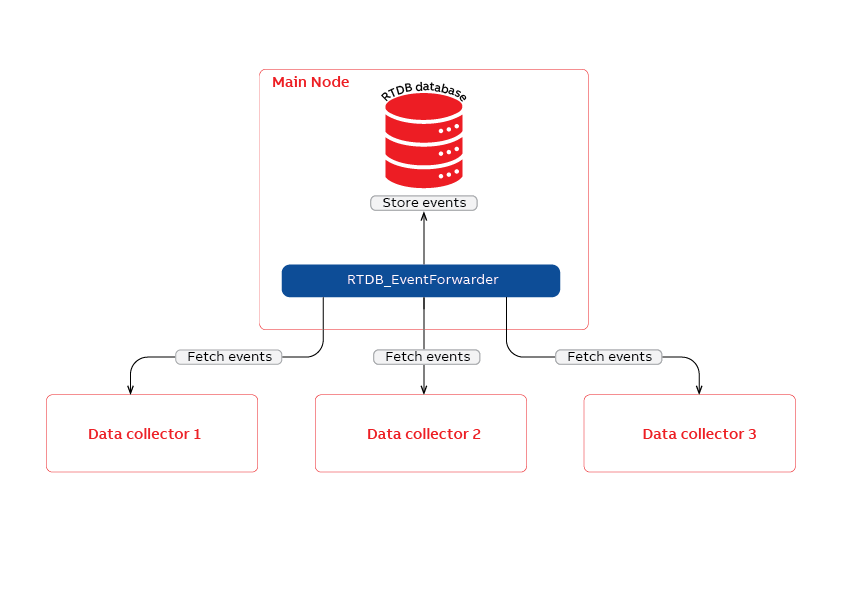
Overall view of the hierarchical system that contains three data collector nodes and one main node. The event forwarder component is located in the main node and is capable of fetching events from one or more data collector nodes.
By default, a single instance of the Event forwarder service is installed into the main node. It creates a separate thread for each configured DCNs to fetch events. The number of event destination data sources is not restricted, and the event destinations can also be located behind the network. In addition, it is allowed to install a separate event forwarder for each event source, or a separate event forwarder for each event destination.
Installation and configuration
NoteIn Hierarchical system the RTDB_EventForwarder service will be automatically installed in Main Node (History Server) as part of Post Install procedure once a Data Collector Node establishes connection to its Main Node. The below steps are for informational purpose and can be used in special cases like creating a 3rd level hierarchy which is explained at the later section of this document
The RTDB_EventForwarder runs as a Windows service. Installation is done by running the RTDB_EventForwarder from the command line using the argument -install. Installation can be done e.g. using the following command line command:
RTDB_EventForwarder.exe -install -Inifile D:\MyFold\ RTDB_EventForwarder.iniThe following table summarizes the initialization parameters found from the initialization file.
| Init parameter | Description |
|---|---|
| ObjectLogging | |
| InterfaceLogging | Allowed values are 0, 1, 2, 3, 4, 5, 6 and 7.0 means that logging is disabled.1 means that most important logging objects are printed.7 means that all log files are printed.Each logging object has severity 1, 2 or 4, and ObjectLogging specifies which log objects are printed to log. It behaves like a bit field, i.e. by specifying ObjectLogging 3, objects that have severity 1 or 2 are logged. If ObjectLogging is specified to be 2, only logs that have severity 2 are printed. Logs are saved under the \Diag\EventForwarder\ directory of the RTDB database directory. |
| DataSourceNames | ‘;’ -separated list of data sources that this RTDB_EventForwarder connects to. E.g. tcp://localhost/my_main_rtdb ;tcp://localhost/my_dc_rtdb |
| DataSourceDefinitions | ‘;’ -separated list of initialization files that correspond to the DataSourceNames list. (The order of definitions should be identical to the order of the DataSourceNames list’.) These initialization files are used to specify the properties of each connectable data source. See the next table for the format of data source specific initialization files. |
| TimeStamps | Determines the full path of the file that is used to store timestamps, which tell when the last fetch was done for each data source. Written in startup and shutdown. If such file doesn’t exist, then the forwarding starts from the current date and time. |
| BaseDirectory | This is the full name of the directory that is used to store logging files. |
| ServiceName | Windows service name. Note that this should include the database path, if the naming convention of other RTDB services is used. E.g. RTDB-EventForwarder E:\mydatabasefolder. Note that the service name is formed by removing ‘:\’ characters, and the display name is the given name. |
The following table summarizes the initialization parameters found from the data source specific initialization files.
| Init param | Description |
|---|---|
| Type | Type can be 'OpcEventSource' or 'OpcEventDestination' or 'OpcEventXmlDestination'. OpcEventSource is used to fetch events from the OpcEvent table, and OpcEventDestination is used to store events to the OpcEvent table. OpcEventXmlDestination can be used to store events using an xml-based event interface. For one EvenForwarder, there should be at least one source and one destination, otherwise the service cannot be started. |
| Authentication | Allowed values are ‘custom’ or ‘windows’. Currently only ‘custom’ is supported. |
| UserName | Used only if Authentication is ‘custom’. Determines the username that is used to establish a VtrinLib connection to this data source. |
| Password | Used only if Authentication is ‘custom’. Password for the specified user. |
| RunMode | Allowed values are ‘ContinuousPolled’ and ‘ContinuousEvent’. ‘ContinuousPolled’ mode can be run from command line or as a service. It fetches events from the data collector using a polling cycle defined in the ‘PollingCycle’ ini parameter (full seconds (int)). It doesn’t utilize Vtrinlib events. ‘ContinuousEvent’ is the mode where RTDB_EventForwarder utilizes Vtrinlib events to get events immediately, when changes are noticed (Event-based mode not yet in use). |
| PollingCycle | Polling cycle in full seconds. This parameter is for data sources of type 'Source' only. For 'Destination' data sources, it doesn't mean anything. |
| FillOpcEventHelperClasses | This is for destinations only. Determines whether the event helper classes are filled (1) or not (0). |
| UpdateComponentStatus | Determines whether the component status info should be stored for this data source. This is only for the data source of type ‘OpcEventDestination’ or ‘OpcEventXmlDestination’. This feature is only available for RTDB. Should be 1 if used or 0 if not in use. |
Running the event forwarder
RTDB_EventForwarder runs as a Windows service. If installation was done as described in the previous sections, then the service command line is:
RTDB_EventForwarder.exe -service -inifile D:\MyFold\ RTDB_EventForwarder.iniThe event forwarder can also be run from command line or from debugger. In that case, the -service parameter is not used. If the service cannot be started after installation, it might help to set the event forwarder windows service to disabled state, and run the service from command line. If some unexpected exceptions are thrown, these are reported to console with the appropriate stack trace.
Before running and installing the service, the initialization files should be properly configured. Remember that there are initialization file references to a data source specific initialization file in the main initialization file. Remember to also refer to the proper timestamp file.
Vtrinlink
VtrinLink is a service that fetches numerical process data (current values and current history) from data collector nodes into the main node. The hierarchical system architecture is described in Hierarchical systems using tags.
VtrinLink reads the Tag configuration available in the Main node and, based on that information, connects to one or more data collector nodes. It uses the services of Vtrin Server RTDB Internal to connect to the data collectors.
VtrinLink uses queued current values (CurrentValue2 class) to get numerical values from data collectors as soon as possible. In case of network breaks between the main node and data collector node, it uses values stored to the current history of the data collector to backfill missing values to the main node, once the network break is over. A similar backfill is done if the main server is shut down for some reason.
In case there are redundant tags from redundant data collectors, VtrinLink is connected to both data collectors simultaneously and data is provided where it can be provided the fastest.
Installation and configuration
NoteIn Hierarchical system the VtrinLink service will be automatically installed in Main Node (History Server) as part of Post Install procedure once a Data Collector Node establishes connection to its Main Node. The below steps are for informational purpose and can be used in special cases like creating a 3rd level hierarchy which is explained at the later section of this document
The following table summarizes the initialization parameters found from the initialization file.
| Parameter name | Description |
|---|---|
DataSourceNames | ;-separated list of data sources that this RTDB_EventForwarder connects to. E.g. tcp://localhost/my_main_rtdb ;tcp://localhost/my_dc_rtdb |
DataSourceDefinitions | ;-separated list of initialization files that correspond to the DataSourceNames list. (The order of definitions should be identical to the order of the DataSourceNames list.) These initialization files are used to specify the properties of each connectable data source. See the next table for the format of data source specific initialization files. |
LogLimitSeconds | |
LogFile | |
LogFileHistoryDays |
The following table summarizes the initialization parameters found from the data source specific initialization files.
| Parameter name | Description |
|---|---|
UserName | Used only if Authentication is custom. Determines the username that is used to establish a VtrinLib connection to this data source. |
Password | Used only if Authentication is custom. Password for the specified user. |
Authentication | Allowed values are custom or windows. Currently only custom is supported. |
Layer 3 configuration
ABB Ability™ History has cability to configure additional 3rd layer providing automatic tag consistency and real-time data exchange from layer 2 to layer 3. This article is specific to Tag and TCC, EventForwarder and VtrinLink services. More flexible configurations can be achieved with NetSync and Equipment Model-based configuration.
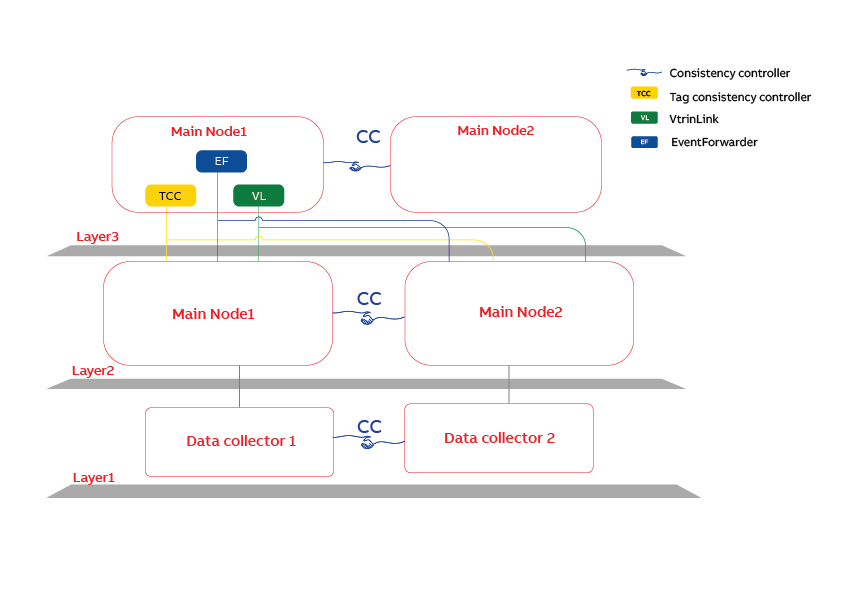
Hierarchical topology support of three layers using Tag Consistency Controller and VtrinLink
RTDB-TagConsistencyController is responsible for moving the tags from layer 2 to layer 3. It should be manually installed to layer 3. Tags to be transferred from layer 2 to layer 3 are selected using the boolean property ‘ConsistencyFindRoot’. When TagConsistencyContoller replicates tags to layer 3 it sets ‘SourceNode’ (reference to DataBaseNode instance) to point layer 2 node. Vtrinlink reads SourceNode information and can connect layer 2 using that information. CollectorNode and CollectorNodeRedunant are kept pointing to the original data collector nodes.
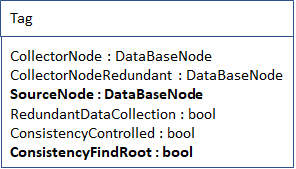
Related Tag class properties
Layer 3 is installed as the MAIN node. It may be redundant or non-redundant.
DataBaseNode entries should be identical in layer 3 and layer 2. As well IDs should match. It is easiest to copy the whole table from layer 2 to layer 3. This can be done if layers 2 and 3 are both redundant or non-redundant.
RTDB-TagConsistencyController and Vtrinlink should be installed manually in layer 3. There is no automatization similar to what is between Main nodes and Data collector nodes.
Install TagConsistencyController
Copy initialization files from layer 2 from %APP_ROOT%\Config\TccIniFiles to layer 3 and change
DataBaseNodeType = MAINSOURCEIn data source specific initialization file for layer 2 machine. Leave it as:
DataBaseNodeType=MainFor layer 3 connection:-
Change credentials used to connect layer 2 machines to have only read-only access to layer 2 machines. By default, all authenticated users are having read-only access. Credentials are available in data source specific initialization files. Use %app_datapath%\Setup\ABB.RTDB.DeployTool.exe to store user names and passwords to avoid clear-text passwords.
To install, using installer user’s admin cmd run:
rtdb_tagconsistencycontroller -i "%app_datapath%\Config\TccInifiles\RTDB-TagConsistencyController.ini"Install Vtrinlink
Copy initialization files from layer 2 from %APP_ROOT%\Config\VtrinLinkIniFiles to layer 3 and add line DisableBackFIll=ON under section [Vtrinlink]:
[Vtrinlink]
DisableBackFill=ON
Data transfer between layer 2 and layer 3 is not supporting backfill.
Change DataSourceNames to point layer 2 nodes. In case layer 2 is redundant, high availability node, use physical computers IP addresses, not a common NLB address. Ensure that given datasource names match what is defined in DataBaseNode class in property ‘DataSourceName’.
To install, using installer user’s admin cmd run:
vtrinlink -i -c "%app_datapath%\Config\VtrinlinkIniFiles\.ini" "%app_datapath%"Check list
- DataBaseNode table indentical in layer 2 and layer 3 nodes.
- DataSoureName in DataBaseNode class matches with what is defined in Vtrinlink's initialization file 'DataSourceNames' line
- In case layer 2 is high availability node, Vtrinlink is configured to connect physical machines, not NLB address of layer2.
- In case layer 2 is high availability node, TagConsistencyController is configured to connect physical machines, not NLB address of layer2.
- In case layer 2 and Layer 3 are redundant high availability servers, parent-relationship between layers are done using High availability DataBaseNode entries, not using physical node entries.
- In TagConsistencyController's data source specific initialization files, set DataBaseNodeType = MAINSOURCE for layer 2 nodes. For layer 3 connection DataBaseNodeType = Main
- User read-only access rights for TagConsistencyController (defined in data collector specific initialization files
- Move tags to layer 3 by setting Tag's 'ConsistencyFindRoot' and 'ConsistencyController' bits true.
Updated 9 months ago