
Reading data
This page explains how time-series data fetching works in ABB Ability™ History. In History, there are multiple interfaces you can use to fetch data. On this page, we won't go into details on how you can use them or compare the differences between the interfaces. Rather, the focus is to give a conceptual understanding of how data fetching works, regardless of the used interface.
We first discuss a few cases where an understanding of the data fetch is important. Next, we will explain what parameters the data fetching operation takes. Finally, we will present multiple examples of the data fetch using illustrations.
Common scenarios
Fetching data for a graph
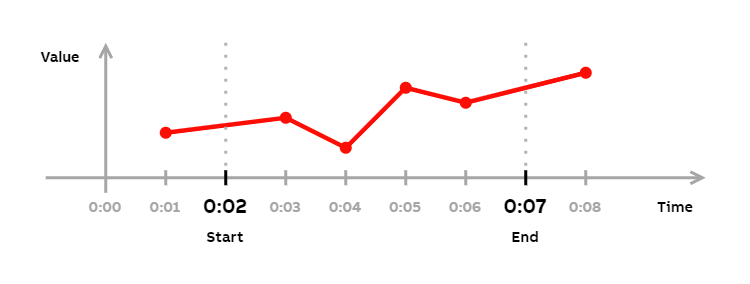
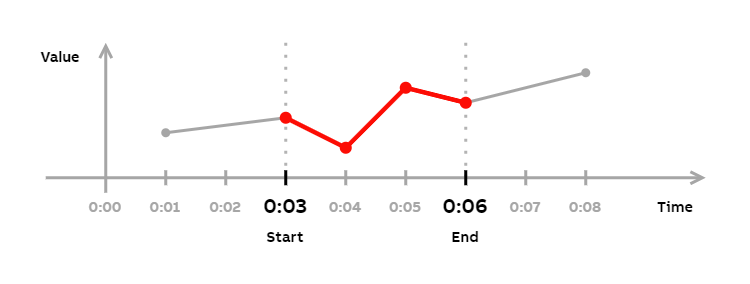
When you're drawing a connected plot of a time series, you draw all the points within a time range and connect these with lines. Ofter, however, you may not have a point exactly on a range boundary, as is the case in Example 1. In this case, you usually want to draw the line that connects the point immediately inside the boundary to the point immediately outside the boundary. To visualize this, think of drawing the section between the dashed lines in Example 1.
To completely draw a graph on a range that doesn't have a point on a boundary, you need to return the first point immediately outside the boundary. To achieve this, you can use the non-equal versions of the inclusive comparison operators (<<, >>). Inclusive versions of the operators always return one point outside the range.
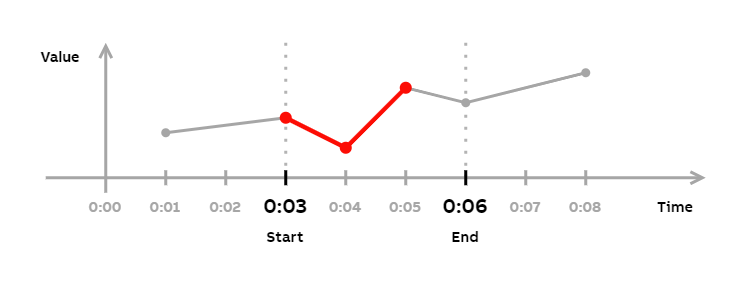
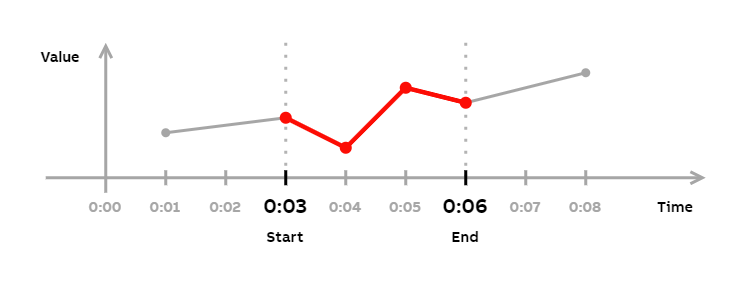
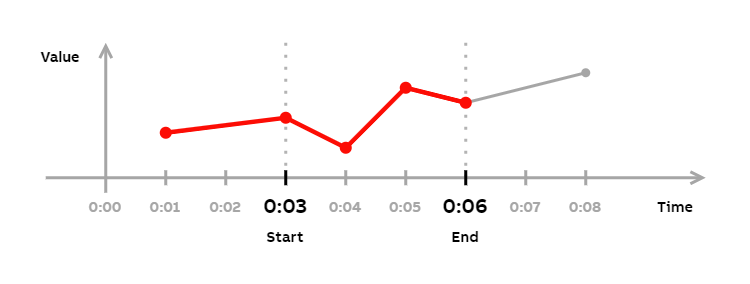
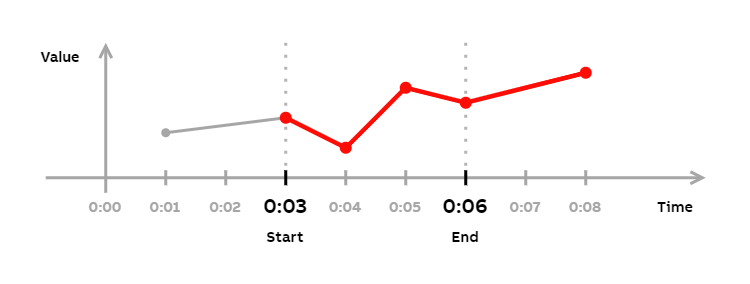
To return only the necessary points, you should use the non-equal versions of the inclusive comparison operators (<<, >>), not the equal versions (<<=, >>=). If there's a point exactly at the boundary, the equal versions would consider this point to belong inside the range. Therefore, they would return one point outside the boundaries (see Example 14 to Example 16), which is unnecessary. The non-equal operators won't return this point ((see Example 6 to Example 8), as they don't consider the point exactly on the boundary to belong inside the range, unlike equal operators do.
Minimize post-processing
When using interfaces, such as ODBC or OData API, it is convenient to return only the set of data that you need. This reduces the need to do post-processing, either programmatic or manual, on the returned data. Understanding the different time-series data fetch parameters helps you to return only the data you need.
Parameters
StartTime- Start boundary for the returned data.EndTime- End boundary for the returned data.StartInclusive- When true, one data point before the start boundary is returned. In the query mask, this is indicated by>>(inclusive greater than) and>>=(inclusive greater than or equal) operators. Default: falseEndInclusive- When true, one data point before the end boundary is returned. In the query mask, this is indicated by<<(inclusive less than) and<<=(inclusive less than or equal) operators. Default: falseFetchMax- Maximum number of data points returned. This parameter can not be given as part of the query mask. Default: unlimited
Examples
This section provides examples, with illustrations, on how each history fetch parameter affects the returned data set.
The example time-series we use on the following examples contains data points at the following times:
- 0:01
- 0:03
- 0:04
- 0:05
- 0:06
- 0:08
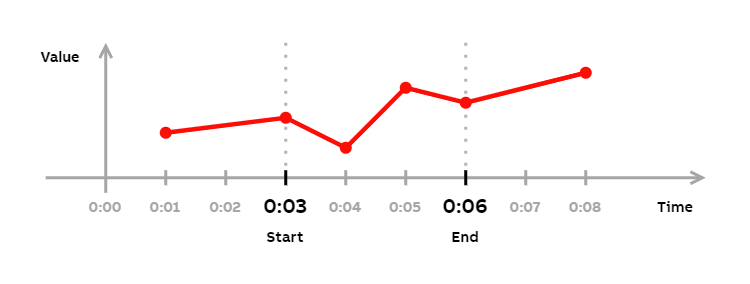
We have not defined exact values for the data points, as the values aren't necessary for understanding the examples. The following figure visualizes the example time-series:
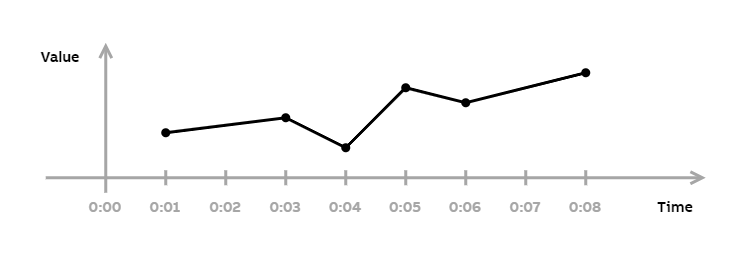
The time series used in the following examples.
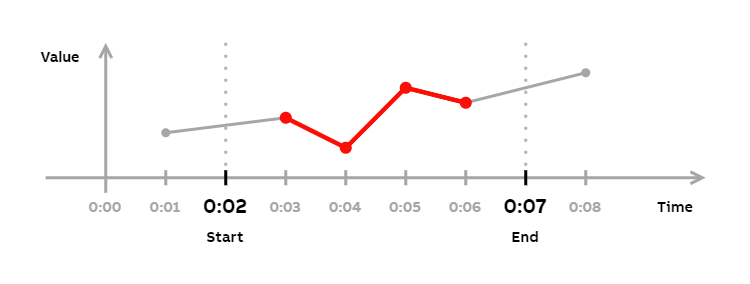
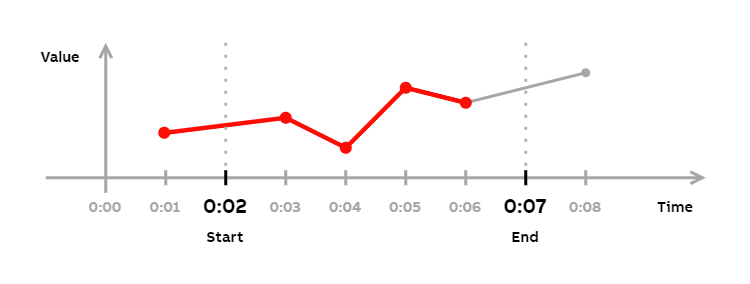
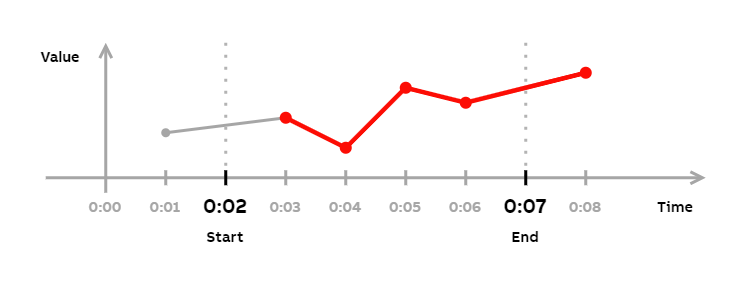
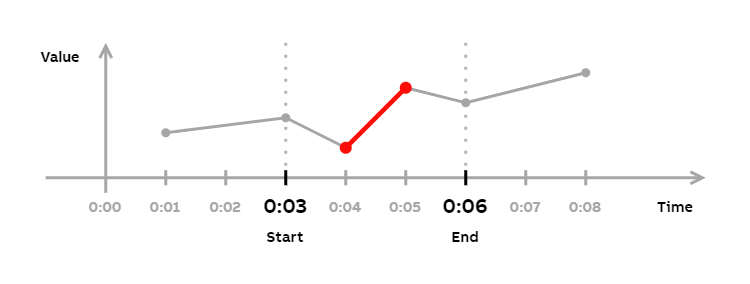
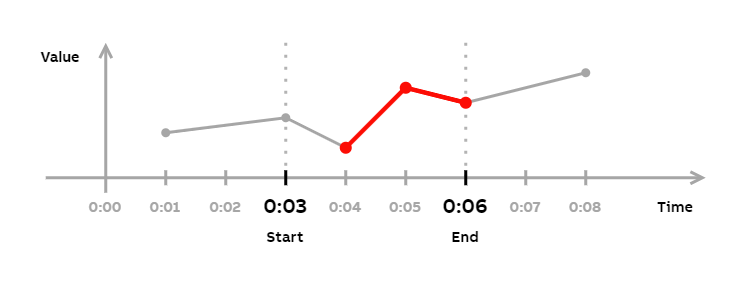
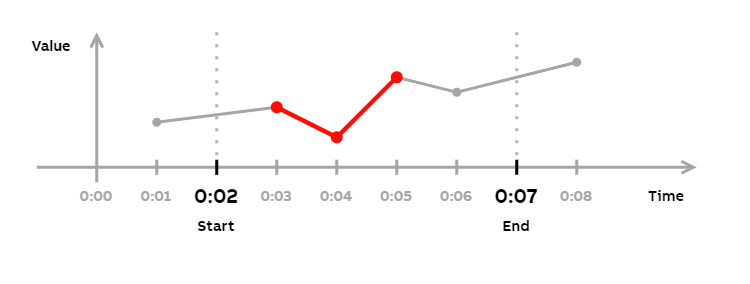
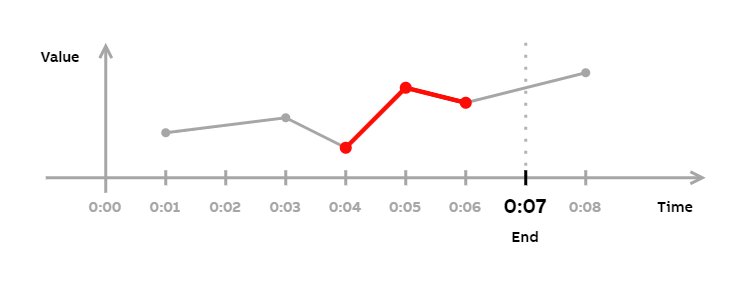
In the examples, the returned data points are marked with red circles. Also, the portion of the line connecting the returned data points has been highlighted with a red line.
The following examples focus on inclusivity when a point does not exist on a boundary:
The following examples focus on inclusivity when a point exists on a boundary:
The following examples focus on inclusivity using equality on boundary conditions (>=, <=, >>=, and <<= operators) when a point does not exist on a boundary:
The following examples focus on inclusivity using equality on boundary conditions (>=, <=, >>=, and <<= operators) when a point exists on a boundary:
The following examples focus on FetchMax:
- Example 17
- Example 18
- This example shows how
FetchMaxworks when onlyEndTimeis given.
- This example shows how
Example 1
Arguments
StartTime- 0:02EndTime- 0:07
Query mask (WHERE string)
Time > '0:02' AND Time < '0:07'
Returned data points
0:03, 0:04, 0:05, 0:06
Example 2
Arguments
StartTime- 0:02EndTime- 0:07StartInclusive- true
Query mask (WHERE string)
Time >> '0:02' AND Time < '0:07'
Returned data points
0:01, 0:03, 0:04, 0:05, 0:06
Example 3
Arguments
StartTime- 0:02EndTime- 0:07EndInclusive- true
Query mask (WHERE string)
Time > '0:02' AND Time << '0:07'
Returned data points
0:03, 0:04, 0:05, 0:06, 0:08
Example 4
Arguments
StartTime- 0:02EndTime- 0:07StartInclusive- trueEndInclusive- true
Query mask (WHERE string)
Time >> '0:02' AND Time << '0:07'
Returned data points
0:01, 0:03, 0:04, 0:05, 0:06, 0:08
Example 5
Arguments
StartTime- 0:03EndTime- 0:06
Query mask (WHERE string)
Time > '0:03' AND Time < '0:06'
Returned data points
0:04, 0:05
Example 6
Arguments
StartTime- 0:03EndTime- 0:06StartInclusive- true
Query mask (WHERE string)
Time >> '0:03' AND Time < '0:06'
Returned data points
0:03, 0:04, 0:05
Example 7
Arguments
StartTime- 0:03EndTime- 0:06EndInclusive- true
Query mask (WHERE string)
Time > '0:03' AND Time << '0:06'
Returned data points
0:04, 0:05, 0:06
Example 8
Arguments
StartTime- 0:03EndTime- 0:06StartInclusive- trueEndInclusive- true
Query mask (WHERE string)
Time >> '0:03' AND Time << '0:06'
Returned data points
0:03, 0:04, 0:05, 0:06
Example 9
Arguments
StartTime- 0:02EndTime- 0:07
Query mask (WHERE string)
Time >= '0:02' AND Time <= '0:07'
Returned data points
0:03, 0:04, 0:05, 0:06
Example 10
Arguments
StartTime- 0:02EndTime- 0:07StartInclusive- true
Query mask (WHERE string)
Time >>= '0:02' AND Time <= '0:07'
Returned data points
0:01, 0:03, 0:04, 0:05, 0:06
Example 11
Arguments
StartTime- 0:02EndTime- 0:07EndInclusive- true
Query mask (WHERE string)
Time >= '0:02' AND Time <<= '0:07'
Returned data points
0:03, 0:04, 0:05, 0:06, 0:08
Example 12
Arguments
StartTime- 0:02EndTime- 0:07StartInclusive- trueEndInclusive- true
Query mask (WHERE string)
Time >>= '0:02' AND Time <<= '0:07'
Returned data points
0:01, 0:03, 0:04, 0:05, 0:06, 0:08
Example 13
Arguments
StartTime- 0:03EndTime- 0:06
Query mask (WHERE string)
Time >= '0:03' AND Time <= '0:06'
Returned data points
0:03, 0:04, 0:05, 0:06
Example 14
Arguments
StartTime- 0:03EndTime- 0:06StartInclusive- true
Query mask (WHERE string)
Time >>= '0:03' AND Time <= '0:06'
Returned data points
0:01, 0:03, 0:04, 0:05, 0:06
Example 15
Arguments
StartTime- 0:03EndTime- 0:06EndInclusive- true
Query mask (WHERE string)
Time >= '0:03' AND Time <<= '0:06'
Returned data points
0:03, 0:04, 0:05, 0:06, 0:08
Example 16
Arguments
StartTime- 0:03EndTime- 0:06StartInclusive- trueEndInclusive- true
Query mask (WHERE string)
Time >>= '0:03' AND Time <<= '0:06'
Returned data points
0:01, 0:03, 0:04, 0:05, 0:06, 0:08
Example 17
Arguments
StartTime- 0:02EndTime- 0:07FetchMax- 3
Query mask (WHERE string)
Time > '0:02' AND Time < '0:07'
Returned data points
0:03, 0:04, 0:05
Comments
This query returns FetchMax amount of data points that are closest to the start boundary.
Example 18
Arguments
StartTime- nullEndTime- 0:07FetchMax- 3
Query mask (WHERE string)
Time < '0:07'
Returned data points
0:04, 0:05, 0:06
Comments
When StartTime is omitted and only EndTime is given, the query will return FetchMax amount of data points that are closest to the end boundary.
Updated 9 months ago