
Concepts
Explanation of basic principles on which calculations work.
Calculations are a way to execute C# code on time-series data. Engineering UI provides a browser-based code editor, which makes it possible to both configure and write the code on the same place.
This page assumes that the reader is familiar with the basic concepts of variables and equipment model.
Most of the calculations are dealing with time series data, i.e. Variables or Equipment properties, and calculating with the history data. The compression of the data may affect significantly to some calculations, and it is recommended that calculated Variables and Equipment properties are defined to be of type "discrete" and no compression allowed.Examples when these settings really matter:
- If batch indicator Variable is compressed, your calculation may skip those batches.
- If calculated hourly energy amount is compressed, then the daily sum might not contain all values.
- If you calculate a value that represents a time period such as 10 minutes average, it should be defined to be discrete and drawn as such on trend charts instead of as linear value.
Further information on how to configure Equipment properties may be found here.
Calculations
Calculations are a way to execute logic and calculations on time-series data. They can be used to transform existing time-series data, thus producing new time-series data.
A simple calculation consists of three things, which must all be defined for the calculation to be usable:
- The calculation code. This contains the actual calculation logic. The code reads the existing time-series and writes the generated time-series using input and output parameters. The code is written in C#.
- Data-parameter mappings. These define how the time-series data is mapped into the parameters of the code. Time-series data can be mapped to parameters from both variables and equipment model properties.
- Triggers. These define when the calculation will be run.
Tutorial: You can create a new calculation in the Catalog view in Engineering UI. We have prepared a detailed guide on how to create a calculation in Engineering UI and you may find it here.
Calculation code
The calculation code is the C# code which contains the calculation logic. It is a class with a single method, called Calculate, which contains the logic. The input data is given to the method in its parameters.
The following code is an example of how to calculate the sum of two time-series and write that to a third time-series:
public class CalcClass_Sum : CalcInstance
{
    public void Calculate(
        CalcVariable<double> InputParam_A,
        CalcVariable<double> InputParam_B,
        CalcVariable<double> OutputParam_C)
    {
        OutputParam_C.Last = InputParam_A.Last + InputParam_B.Last;
    }
}
The code will mostly be auto-generated for you based on the parameter definitions. You only need to write the calculation logic yourself, that is, the line:
OutputParam_C.First = InputParam_A.Avg + InputParam_B.Avg;Next, we'll take a look at each aspect of the example code individually.
Class definition
First, take a look at the class definition:
public class CalcClass_Sum : CalcInstanceThe class name will be auto-generated for you based on the name of the calculation. In our example, the name of the calculation is Sum, which results in the class name CalcClass_Sum.
The calculation classes inherit the CalcInstance class. It provides, for example, a WriteLine method, which you can use to write into the calculation logs. For more information on how to enable logging and how to read the logs, check the Troubleshooting page (Log files and Process logs).
Parameters
Next, we'll consider the signature of the Calculate method:
public void Calculate(
    CalcVariable<double> InputParam_A,
    CalcVariable<double> InputParam_B,
    CalcVariable<double> OutputParam_C)
The Calculate method in the example code takes two input time-series (parameters InputParam_A and InputParam_B) and one output time-series (parameter OutputParam_C). This code expects the used time-series to be contained in variables and be of a floating-point data type. Therefore, they are instances of the CalcVariable<double> class.
The calculation logic
Next, we'll move our focus to the calculation logic, contained in the line:
OutputParam_C.First = InputParam_A.Avg + InputParam_B.Avg;The code above sums together the values of both input time-series (parameters InputParam_A and InputParam_B) and writes the result to the output time-series (parameter OutputParam_C).
First is used here to access the value of the time-series at the start of the current calculation period and Avg the time-weighted average over the calculation period. We'll take a closer look at calculation periods later.
Parameter definitions
Parameter definitions define the parameters of the Calculate method. They are defined in the code definition, from which they are automatically inserted into the code. This means that you only have to write the body for the Calculate method, not the signature.
Consider again the signature of the example Calculate method:
public void Calculate(
    CalcVariable<double> InputParam_A,
    CalcVariable<double> InputParam_B,
    CalcVariable<double> OutputParam_C)
In this example, InputParam_A and InputParam_B are input parameters, which means that they are read-only. OutputParam_C is an output parameter, which means that you can both read from and write to it. Whether a parameter is an input or an output parameter can not be seen from the code (unless you name the parameters to reflect this, as we've done in this case). This can only be seen from the code definition.
Code definitions can be reused between multiple calculations.
NoteWhen creating a new code, it is usually more convenient to first define the data-parameter mappings for the calculation. This way, the parameter definitions are automatically created for the new code.
Data-parameter mappings
To provide data for a calculation, you need to specify which time-series should be mapped to which parameters. It is possible to map both variables (CalcVariable class) and equipment instances (CalcEquipmentNode class) to the calculation parameters. However, they each use their class to access the time-series contents, so the same code will not directly work for both.
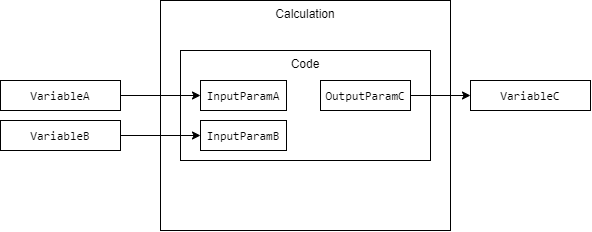
The diagram above illustrates the mapping of time-series into code parameters. In this case, the code can read data of variables VariableA and VariableB from parameters InputParamA and InputParamB, respectively. After calculating the result, the code assigns the it to OutputParamC parameter. This causes the result to be automatically written into VariableC.
Tutorials:
- Example of variable data mapping here.
- Example of single equipment instance data mapping here.
- Example of Equipment model (all instances of one model) data mapping here.
Triggers
Triggers define the conditions when a calculation will be executed.
It is possible for a single calculation to have multiple triggers.
Scheduled
Scheduled triggers run the calculation periodically using a constant interval. The calculation periods for a scheduled trigger will always be predictable and precise. This is the case even if there's a delay in the computation, for example, due to a high system load.
A few common scheduled triggers, such as every second or every minute, have been predefined, but you can create more fine-tuned schedulers yourself.
Event-based
Event-based triggers are executed when changes happen to time series data or other database objects. Supported events are:
- When a new instance is added to a database class
- When a variable's current value changes
- When an equipment property's current value changes
Task-based
A calculation can be set to trigger after another calculation has been completed. The main purpose for this type of trigger is to be able to split large calculations into multiple smaller ones.
If the triggering calculation is not successful, for example, if the process crashes, the following calculation will not get triggered.
Calculation periods
The calculation code is always executed for a time range, called a calculation period. A calculation might be, for example, set to trigger every second. This means that, with no further configuration, the calculation code will be executed every second, and the calculation period for each calculation execution will be exactly one second long. This frequent execution will create the appearance of a real-time continuous calculation.
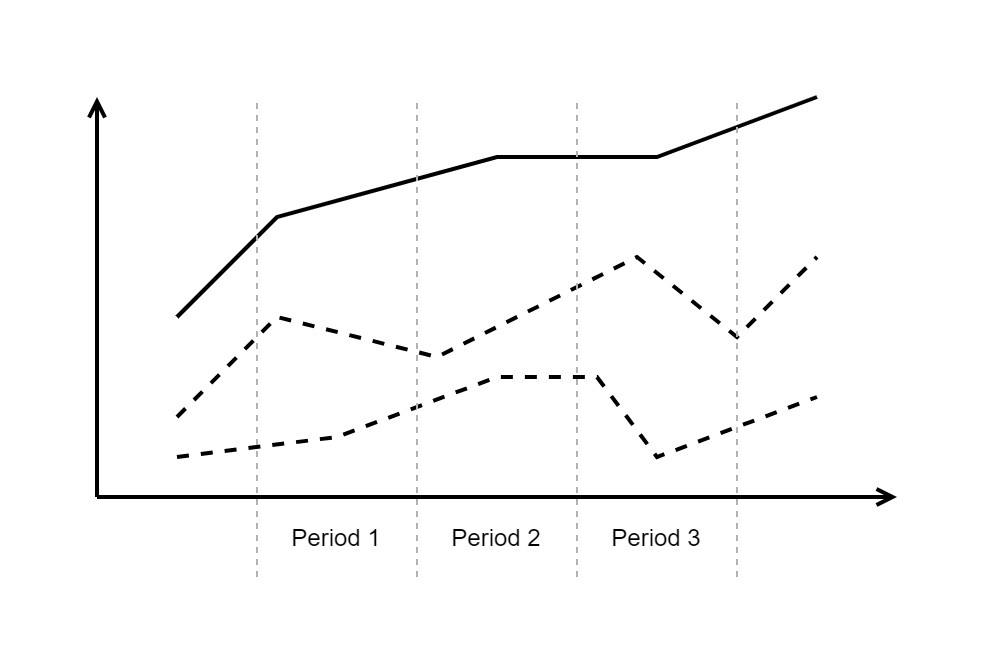
The graph below shows an example visualization of running the code on time-series data. The two input time-series (dashed lines) are summed together to create the resulting time-series (solid line). The calculation period boundaries are also shown.
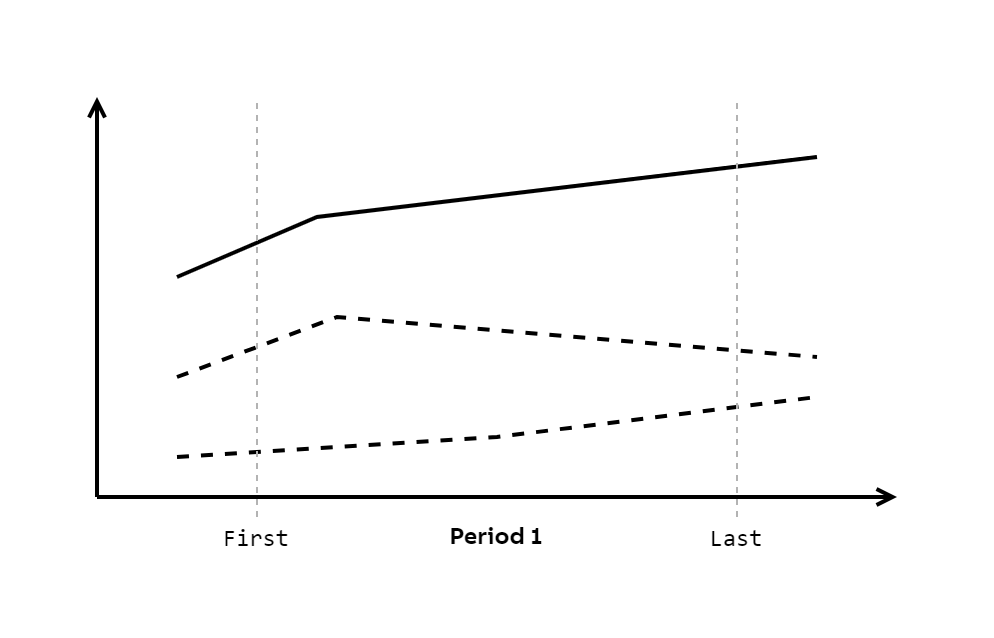
Let's focus on a single calculation period. The graph below shows the same data as the graph above but displays only the first period.
Consider again on the calculation code, especially the body of the Calculate method:
OutputParam_C.First = InputParam_A.Avg + InputParam_B.Avg;First is used here to access the value of the time-series at the start point of the calculation period. In other words, the calculation works by summing the average values of the two input time-series over the calculation period and writing that value to the third time-series at the period start. This is a typical case of how many of the process calculations work.
The calculation period can be configured in calculation task. The calculation period setting is a mandatory field in the calculation task. The default value is 0 but you will be prevented from committing 0 value. This is intentional so that user would really think about how they want their calculation to be executed in terms of its period. Another parameter that affects the calculation period is period offset. The period offset shifts the calculation period alongside the X-axis. If the period offset unit property is not set, the total period offset is calculated as the calculation period multiplied by the offset value. The period offset's main purpose is to delay the execution of present calculation periods, and in this way to accommodate for possible late arrival of data to the history. There is also a property called NumOfPeriodExecution which determines how many periods will be calculated on every execution of the calculation starting from the starting time of the period.
Click HERE to see many scenarios of calculation period configuration and how the calculation is expected to be executed according to that configuration.
The Calculation Tool API provides a means of reading and modifying the data of the time-series. For example, with First and Last, one can read and write to the first and last value of the current calculation period. Many other properties, such as Avg and Sum, apply Vtrin filters to all data points in the current period without the need to provide any additional arguments.
Updated 6 months ago