
Part 11 - Property sharing
This article is describing how equipment instance property can share data from other class instance property.
Frequently in customer installation several applications are created for one device or process. To avoid concurrent data collection for each application, to improve system performance, and especially enable the data access in e.g. in higher levels in system hierarchy, there is need to share properties between different equipment instances.
Property referencing is possible at equipment model level, but it leads to situation that different model is needed, if the property is actually the original one and when it is referencing to another.
Property sharing is an instance level possibility to overwrite the property to reference to another instance that doesn't need any change to the model and that is totally transparent to the users and APIs of the data.
Property sharing is configured with the "References" attribute in the general section of the equipment instance properties.
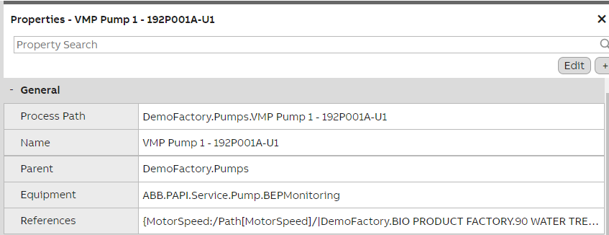
Definining References on instance level
References is a list where the property reference can be defined with the following syntax:
Equipment Property references
ReferringProperty:/TargetClass[TargetProperty]/TargetId|TargetName
e.g. MyProperty:/Path_MyPath[MyTargetProperty]/|MyParent.MyPath
Variable references
If a Variable has to be referred then the syntax is as below
e.g. MyProperty:/Variable/|VariableName
The "MyProperty" must be an existing property that has the same data type and engineering unit as the referenced property or variable. The "Historized" setting of the property must be same as the referred property. (Or in case it refers to Variable, the property must have "Historized" as true).
To enter the reference, set the properties to edit mode and open the dialog for References, and add new reference as in the following picture.
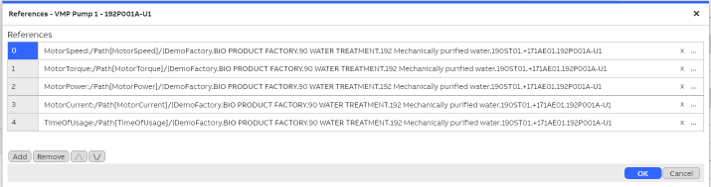
Limitation in the amount of referencesDepending on the software version there is a limit of 4 or 16 kB for the reference definitions. This means that practically you can have about 30-100 reference definitions.
Data types and units must matchProperty referencing takes place at the database (Vtrin) driver level and it checks that the data types of the target and referencing properties are the same (you can't reference float property with integer type of property) and the units are the same. Unit check is strict also in case sensitivity, i.e. rpm and Rpm are considered to be different units. If the other property doesn't have unit at all, then the check is passed.
Referencing another Variable or Property from a Variable
Starting from 5.3 release of late Q2/2025 and later you can similarly refer to another Variable or Equipment Property from a Variable using "Reference" property. The syntax is the same as described above, except there is no property name colon in the start, so
/TargetClass[TargetProperty]/TargetId|TargetName
e.g. /Path_MyPath[MyTargetProperty]/|MyParent.MyPath
Or to another variable:
e.g. /Variable/|VariableName
References work only for VtrinLib applicationsNotice that the native applications, such as some data acquisition interfaces, can't take benefit of the references, because the implementation is part of the data abstraction interface. The referencing Variable doesn't have real current value and that is why it can be used e.g. as output with native interface such as Modbus master.
Creating References ProgrammaticallyIn C# code, the data type of the "References" property of path instance is an array of string. The "References" property is actually a standard global property of equipment model, so its value is technically stored in EquipmentPropertyValues database table, as the value of other equipment properties (but this is an implementation detail, and the application actually refer to the properties by using the equipment classes (Path_*).
To maintain it for an existing instance, you get its current value with GetRawPropertyValue and use SetRawPropertyValue and CommitChanges to update it. For example, to add a new references, the code looks like this:
var pump = RTDBDriver
	.Classes["Path"]
	.Instances
	.GetInstanceByName("Example site.Pump section.Pump");

// Update instance properties
pump = pump.BeginUpdate();

string[] oldrefs = (string[])pump.GetRawPropertyValue("References") ?? [];
var newrefs = new System.Collections.Generic.List<string>(oldrefs);
// Note: a historized property called "MyProperty" must already exist, and having the same
// data type and unit as the referred variable.
newrefs.Add("MyProperty:/Variable/|MyVariable");
pump.SetRawPropertyValue("References", newrefs.ToArray());
pump.CommitChanges();
Here is a full example in VtrinLib ODBC Driver SQL for creating an equipment model and creating an instances that has two properties that refer to a Variable. For demonstration purposes, the example defines the first reference during the instance creation time, and another by updating an existing instance.
insert into Variable(Name, Unit) values('PropertySharingDemoVariable2', 'kg/h');
insert into Variable(Name, Unit) values('PropertySharingDemoVariable3', 'kg/h');
insert into Equipment(Name) values('PropertySharingDemo');
insert into EquipmentPropertyInfo([TGT:Equipment], DisplayName, Type, Historized) values('PropertySharingDemo', 'Prop1', 11, 1);
insert into EquipmentPropertyInfo([TGT:Equipment], DisplayName, Type, Historized, Unit) values('PropertySharingDemo', 'Prop2', 14, 1, 'kg/h');
insert into EquipmentPropertyInfo([TGT:Equipment], DisplayName, Type, Historized, Unit) values('PropertySharingDemo', 'Prop3', 14, 1, 'kg/h');
insert into Path_PropertySharingDemo(name,"References") values('PropertySharingDemoInstance', '(string[]){"Prop2:/Variable/|PropertySharingDemoVariable2"}');
update Path_PropertySharingDemo set "References"='(string[]){"Prop2:/Variable/|PropertySharingDemoVariable2","Prop3:/Variable/|PropertySharingDemoVariable3"}' where name='PropertySharingDemoInstance';
Updated 3 months ago