
Creating an Application
Concept
An application is typically a single page web application that may contain any number of dashboards, navigators to navigate between the dashboards, search function to search dashboards and data, and tool windows to assist in data navigation, data maintenance or other functions. One system may contain several applications that may share dashboards between each other.
Dashboard Storage
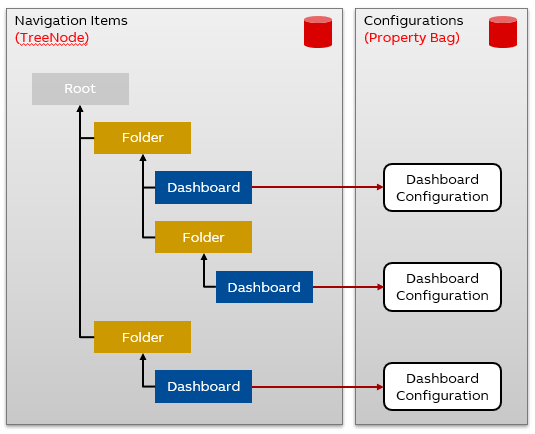
Dashboards and other navigation items are stored in a database. This makes it possible to configure and deploy them through data connection, without requiring file system access to the server. This also enables access control using server-implemented RBAC (role-based access control). Additionally, this allows for dashboard search functionality through the data APIs.
There are a couple of data classes that are reserved for navigation items and the Property Bag API implemented in the data source driver:
TreeNode– Contains general navigation item properties, such asName,Parent,Type,Icon...UIString– Contains language-supported names for the itemReadProperties,WriteProperties– Access to the key/value Property Bag API
Creating an application tutorial
We have prepared a separate tutorial with steps on creating an application.
You may find the guide under Creating an Application tutorial.
Updated 7 months ago