
Security
This section has been moved under architecture section !
This document provides information on security for ABB Ability™ History and its Vtrin and View user interface/application client, and describes measures and practices that shall be considered when building a system based on ABB Ability™ History. In this document, the term security means the protection of a system’s confidentiality, availability, and integrity. This is often also referred to as electronic security or cybersecurity.
Security breaches may lead to system unavailability or failure, or to situations where unauthorized users gain access to or control over a system. Depending on the nature of the system installation, this could lead to corruption of the system’s software, degraded process performance, damage to equipment, as well as environmental and health hazards, including personal injury or death.
The purpose of this document is to discuss possible security measures that a user of ABB Ability™ History system should consider to apply. The described measures are not necessarily complete or effective for a particular application and installation.
Users of ABB Ability™ History systems must assess the risks of their particular applications and installations. The described security measures represent possible steps that a user should consider based on such a risk assessment. The risk assessment, as well as the proper implementation, configuration, installation, operation, administration, and maintenance of all relevant security-related equipment, software, and procedures, are the responsibility of the user of the system.
ABB Ability™ History is not aimed to be used as an internet-facing product, web application, or cloud platform. If someone is building such a product or solution, and using ABB Ability™ History as a component, separate cybersecurity assessment, and required measures shall be taken to ensure required cybersecurity.
Network configuration
This chapter provides an overview of different network security configurations that should be considered, depending on what role ABB Ability™ History has with respect to other systems.
The following nodes can be identified in ABB Ability™ History systems:
- ABB Ability™ History main node
- ABB Ability™ History data collector node
- ABB Ability™ History embedded standalone history node
- ABB Ability™ History client node that can be e.g.
- Vtrin user interface client
- OPC Server
- Other application
- ABB Ability™ History communication gateway
The first three node types include the history database and communication servers to which the clients can connect. They can also contain clients that connect to the other nodes. The communication gateway contains a server-client configuration that can act as a gateway towards other servers.
All communication between the nodes is made with a secure protocol that is encrypting the communication and ensuring packet integrity.
Data collectors and embedded historians
When ABB Ability™ History is used as an embedded historian for some control network or a similar system, it is considered as part of the control system's trusted zone.
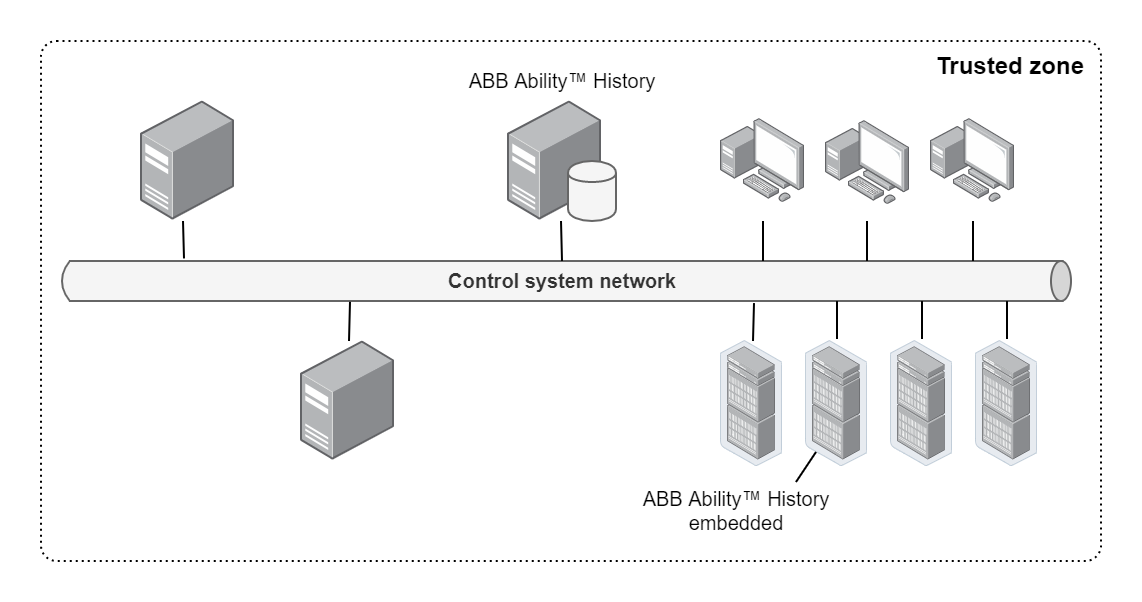
In this case, the security is primarily a matter of physically protecting the control system, and preventing unauthorized users from accessing the system, and from connecting or installing unauthorized hardware and software. The network topology is built according to the control system requirements.
Information management systems
When ABB Ability™ History is used as an information system platform, it is typically installed to an information system network that is isolated from the control system network with a firewall, and also from all the other systems in the information system network. Typically ABB Ability™ History is connected to be part of the information system domain. One ABB Ability™ History server can be connected to several data collectors in different control systems.
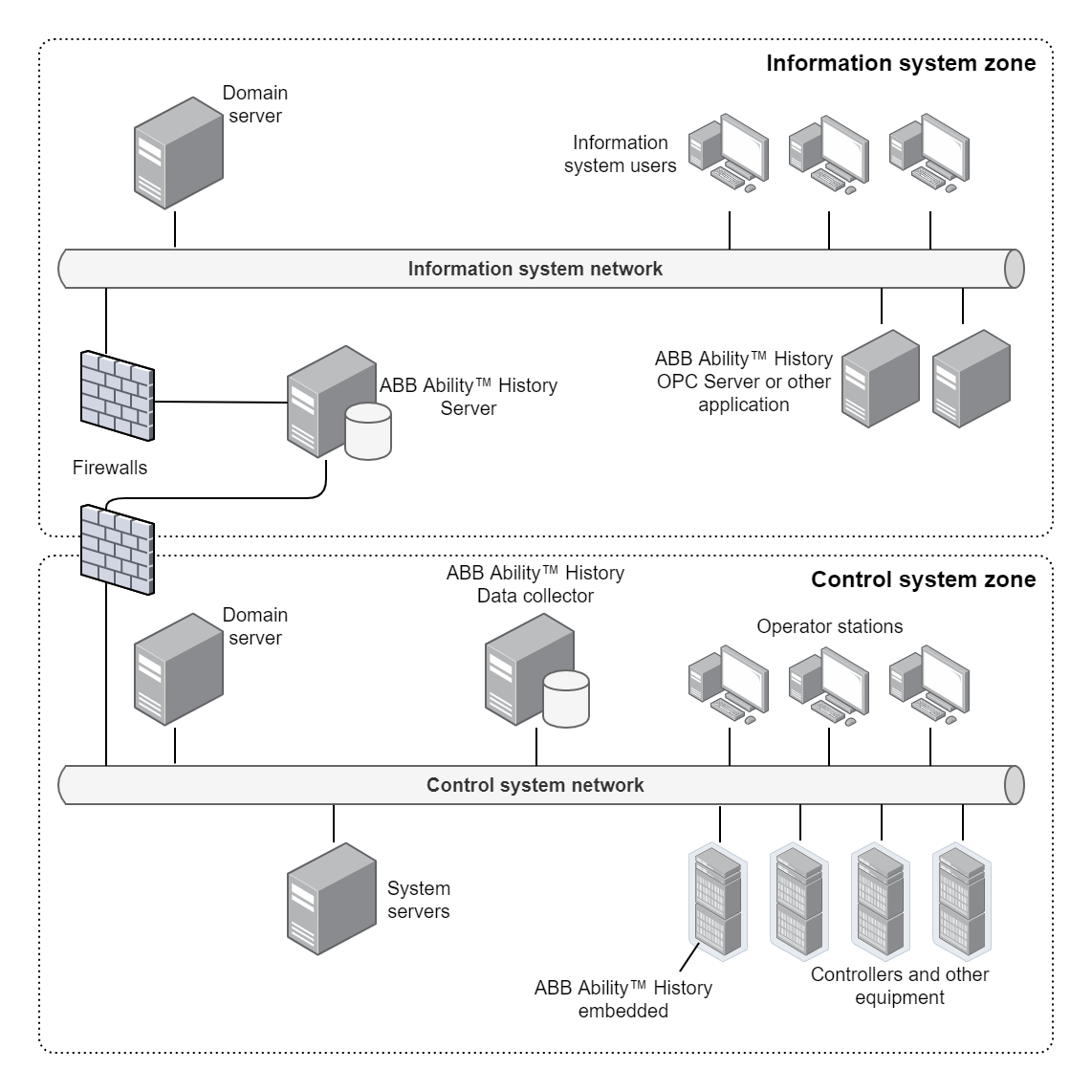
The firewall that connects the ABB Ability™ History server to the information system network, as well as to control system networks, shall be configured to allow access only through selected ports according to the instructions later in this document, and only between the ABB Ability™ History server and selected nodes in the control system network. Workplaces in the control system shall not have direct access to the information system or further, but all access to ABB Ability™ History is going through the ABB Ability™ History data collector that is using secure communication to ABB Ability™ History in the information system network.
Communication gateway between different domains
If there are users e.g., in the enterprise network, that does not have direct access to the information system network, but they need to access the data in ABB Ability™ History, there is the possibility to configure a communication gateway to provide secure access. The user interface gateway is connected to the same domain as the users, and user authentication is performed from that domain. Typically only read-only access is granted to a limited set of displays and data in the ABB Ability™ History system. The data access security is handled so that the gateway is connecting to the history server with a user account that only has limited access rights.
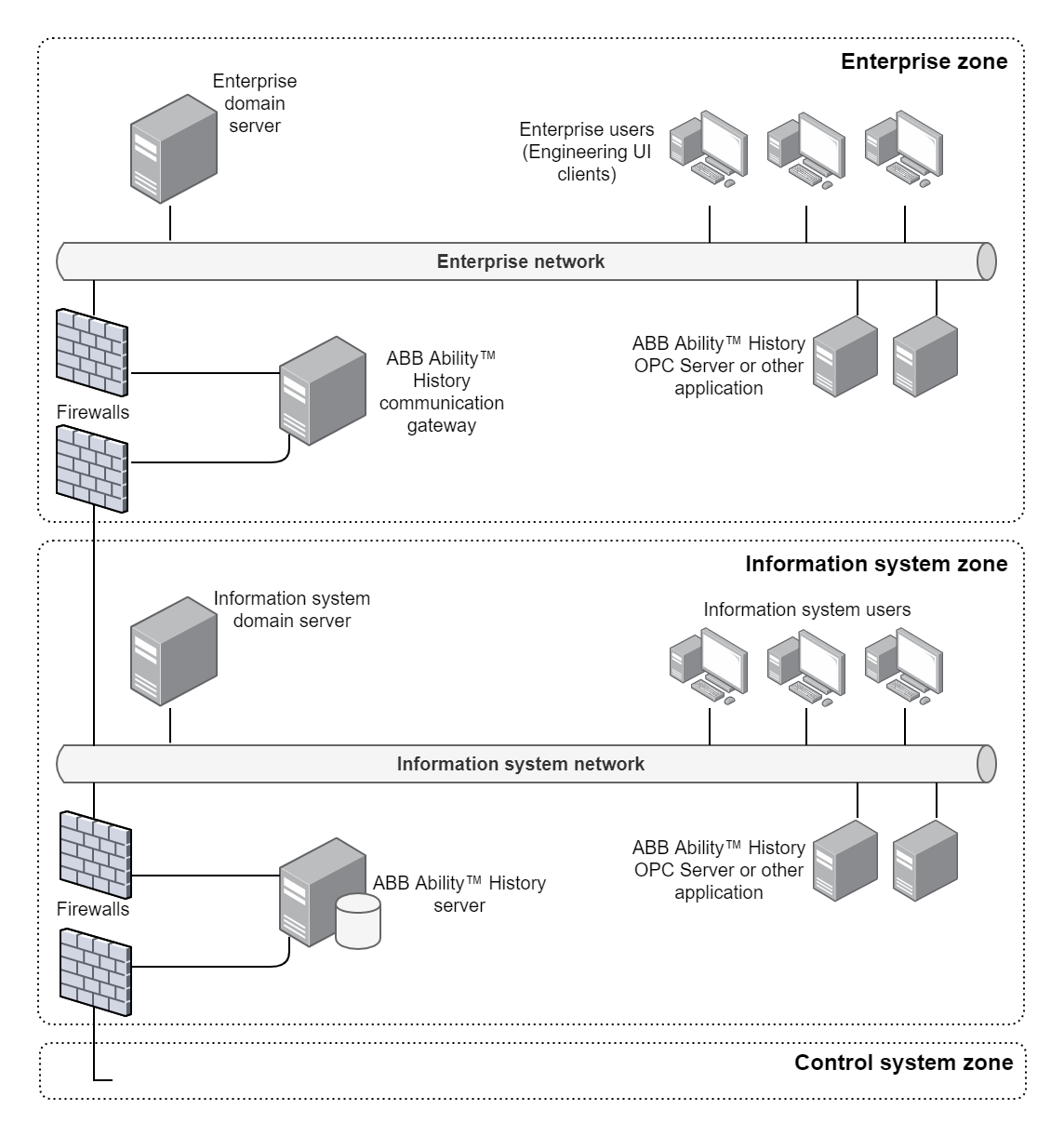
A similar kind of gateway approach can also be implemented to enable operator workplaces in the control system network to access Vtrin displays in ABB Ability™ History. In this case, the communication gateway is typically set up in the data collector node.
Anti-virus software
When configuring anti-virus software in a ABB Ability™ History node, notice to exclude the RTDB database and RTDB backup directories or the entire database disk from the scan list, because anti-virus software would introduce a huge performance penalty when continuously checking the changing database files.
Firewall port configuration
The following firewall port shall be open between the ABB Ability™ History nodes as well as from the clients to History nodes:
443/TCP Data Abstraction Interface secure WebSocket communicationIf your system contains History 4.6 or older nodes or clients, you may need to open additional ports according to the following table. The system nodes and the direction of communication is indicated as follows:
- Main – ABB Ability™ History main node
- DCN – ABB Ability™ History data collector node
- Client – client node (user interface or OPC server or other application)
- Server – ABB Ability™ History main or data collector or communication gateway node.
Notice that the communication gateway acts as a client towards the main history server.
For more advanced system configurations such as ABB Ability™ History high availability system with redundant main nodes, see the additional configuration definitions in the respective configuration manual.
Secure boot
When implementing an application or solution that is using ABB Ability™ History, it is highly recommended to select such operating system that supports secure boot and configure it to be in use.
Use of insecure protocols
ABB Ability™ History deliverable contains support for insecure protocols such as Modbus data collection. By default, these protocols are disabled, and the risk of using them must be considered in case of enabling such a solution.
Use default setup of Windows
To ensure that all the functionality is working as designed, it is recommended to use the default setup of the Windows operating system.
Nodes & direction | Port number | Description |
|---|---|---|
Client → Server | 80/TCP | Http for click-once installation of the user interface client |
DCN → Main | 1583/TCP | ODBC/SQL interface for system configuration |
Client → Server | 7605/TCP | Kerberos authentication. The ports for Kerberos authentication should only be open in case the two computers are in the same domain and the Kerberos authentication is wanted to be used. |
Client → Server | 7606/TCP | Client access to the server. Technically, it is possible to arrange that just the port 80 is needed (and no 7606), however the performance is worse (because the traffic needs to be wrapped within HTTP). Also, currently the setup does not support this configuration automatically. |
Server → Client | 7609/UDP | Multicast events from server to client. If multicast from server to client is not possible, the changes will be updated to the client less frequently. |
DCN → Main | 7609/UDP | Multicast events from server to client for the system internal communication Notice that by default this is only used in version 1.0 and not needed in later versions unless separately configured |
DCN → Main | 7614/TCP | System internal data & configuration transfer |
DCN → Main | 7618/TCP | Events from server to client for the system internal communication Notice that this is used in RTDB version 4.3 (and later) and optionally can be replaced with 7609/UDP |
Updated 5 months ago