this article is part of batch job example presented in the next three pages (part 2, part 3, part 4)
Introduction
In this example we will set up a batch job monitoring system using the equipment model approach in Engineering UI. We will create a simple cookie production line and show the whole process from start to finish within the next few parts.
The goal of this tutorial is to build a traceable monitored system, where sensors measure e.g. Raw material quantity, price per ingredient, machinery temperatures, production time and total amounts produced. For this purpose we have created a Cookie production line with four devices: Mixer, dispenser(s), oven and packager.
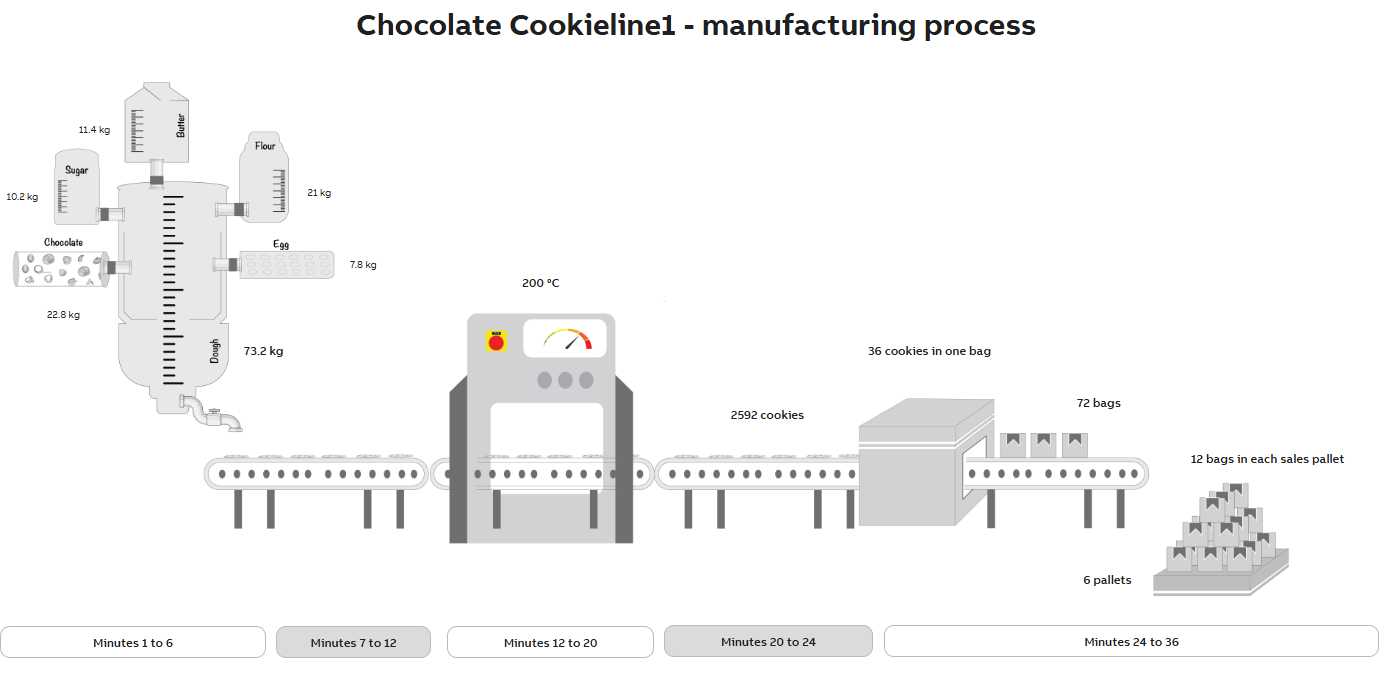
Example of our Chocolate Cookie production line
Manufacturing Process
In our example one cookie production batch takes 36 minutes to finish and produces 72 bags of cookies, each bag containing 36 cookies. The dispensers measure and dose the raw materials to mixer where our cookie dough is mixed. After this, the ready-made dough will be dosed to cooking trays and moved to the oven to bake. From there the baked cookies are transferred to the packaging machine and packed into sales batches. Each sales batch has a unique batch Id and pallet Id.
Separating batches
We can separate each sales batch by enabling "batch job" in our application calculation. This allows us to monitor chosen property value changes. To separate batches, we use a unique cookie batch identifier. History values will be stored for each batch.
Equipment model
Before starting configurations in Engineering UI we plan what kind of Equipment Model we need. First, we will create one Equipment class called Production Line 1 (we use numbering here for multiple production line purposes), which will be our base class for this example. For this we will create one instance called Chocolate Cookie Line 1. Then we create four other classes called Mixer, Oven, Packager and Dispenser. These are not directly derived from our Production Line 1 and will not have any shared properties. Mixer, Oven and Packager will each have one instance with same name as the class is.
To tie our classes together, we will create Mixer, Oven and Packager as reference properties to our Production Line 1 class. For Reference Target of each property we will mark the path of each class name (this will be shown in the tables below). By doing this, we are able to access the instances and properties of each model through our base model instance Chocolate Cookie Line 1.
Dispenser is an abstract class responsible for measuring raw material amounts to Mixer. Our Dispenser will have six instances matching our raw material and dough dispensers and these will be accessed through Mixer class. This is to tie together our Mixer and Dispensers within.
All Equipment model definitions and properties are shown in the tables below.
Model Hierarchy
Production Line 1
├── Chocolate Cookie Line 1
│   ├── Mixer
│   ├── Oven
│   └── Packager
└── Dispenser
Model definitions
Name
Abstract
Class name
Production Line 1
Yes
Path_Cookie.ProductionLine1
Mixer
No
Path_Cookie.Mixer
Oven
No
Path_Cookie.Oven
Packager
No
Path_Cookie.Packager
Dispenser
Yes
Path_Cookie.Dispenser
Model properties
After defining the model hierarchy, we will create properties and define their attributes.
Production Line 1
Property
Data type
Unit
Historized
Description
Reference Target
Cookie batch id
string
Yes
Unique identifier for each batch
Mixer
GUID
No
Dough mixer
Class:Path_Cookie.Mixer
Oven
GUID
No
Baking oven
Class:Path_Cookie.Oven
Packager
GUID
No
Cookie sales batch packager
Class:Path_Cookie.Packager
Production state
boolean
Yes
0 = off, 1 = on
Production time
integer (32bit)
MIN
Yes
Time per one batch production in minutes
Mixer
Property
Data type
Unit
Historized
Description
Reference Target
Average temperature
Floating point value (64bit)
celsius
Yes
Calculated average temperature during batch production time
Butter
GUID for Dispenser instance
No
Cookie raw material
Class:Path_Cookie.Dispenser
Chocolate
GUID for Dispenser instance
No
Cookie raw material
Class:Path_Cookie.Dispenser
Dough
GUID for Dispenser instance
No
Ready-made cookie dough
Class:Path_Cookie.Dispenser
Egg
GUID for Dispenser instance
No
Cookie raw material
Class:Path_Cookie.Dispenser
Flour
GUID for Dispenser instance
No
Cookie raw material
Class:Path_Cookie.Dispenser
Mixing State
Floating point value (64bit)
Yes
Enum, 1 = on, 2 = off
Sugar
GUID for Dispenser instance
No
Cookie raw material
Class:Path_Cookie.Dispenser
Temperature
Floating point value (64bit)
celsius
Yes
Recorded temperature and possible changes during batch production
As the instance hierarchy shows, raw materials are Dispenser instances that are being derived to Mixer. The properties of these instances may be accessed through Mixer path. See table below.
Instance paths
Name
Full path
Chocolate Cookie Line 1
DemoFactory.Chocolate Cookie Line 1
Mixer
DemoFactory.Chocolate Cookie Line 1.Mixer
Butter
DemoFactory.Chocolate Cookie Line 1.Mixer.Butter
Sugar
DemoFactory.Chocolate Cookie Line 1.Mixer.Sugar
Egg
DemoFactory.Chocolate Cookie Line 1.Mixer.Egg
Flour
DemoFactory.Chocolate Cookie Line 1.Mixer.Flour
Chocolate
DemoFactory.Chocolate Cookie Line 1.Mixer.Chocolate
Dough
DemoFactory.Chocolate Cookie Line 1.Mixer.Dough
Oven
DemoFactory.Chocolate Cookie Line 1.Oven
Packager
DemoFactory.Chocolate Cookie Line 1.Packager
Property values
Below is a list of the property values for all the equipment instances. Historized properties with changing values are marked as "-".