
Mappings
This display allows you to create new and monitor existing calculation mappings. However, we do recommend configuring mappings in Calc Catalog display.
Each property is a row on the table meaning that each mapping is separated as its own row.
Data mapping settings for calculation
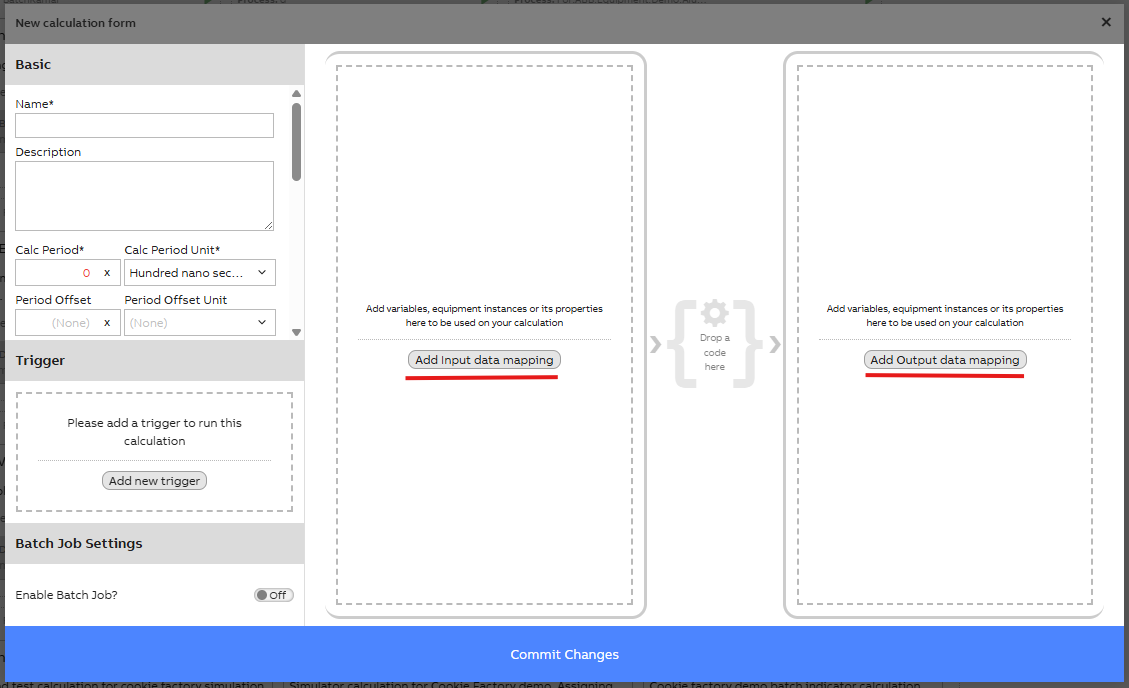
Data mapping settings for new calculation. Possibility to add input and/or output data.
Mapping properties on table
| Property | Data type | Description |
|---|---|---|
| Description | String | Optional description for the mapping. If mapping was done in CalcCatalog, on default, this column includes the calculation name and property/variable added as parameter. If new mapping is created on this table, you may write the description as seems fitting. |
| Class Name | String | Name of the variable or equipment class from which the instances should be fetched. For equipment models it is Path_EquipmentModelName. |
| Where String | String | Optional string to limit which instances are fetched. E.g. "Name=MyVariable". Further information and examples here . Example shown in image below. |
| Constant Value | Object | Optional. Can be a set value when class name is not set. |
| Datasource | Ref. CalcDataSource | Select the datasource to which the instances belong, the datasource values can be defined in the datasources table. |
Example of output data mapping settings for calculation
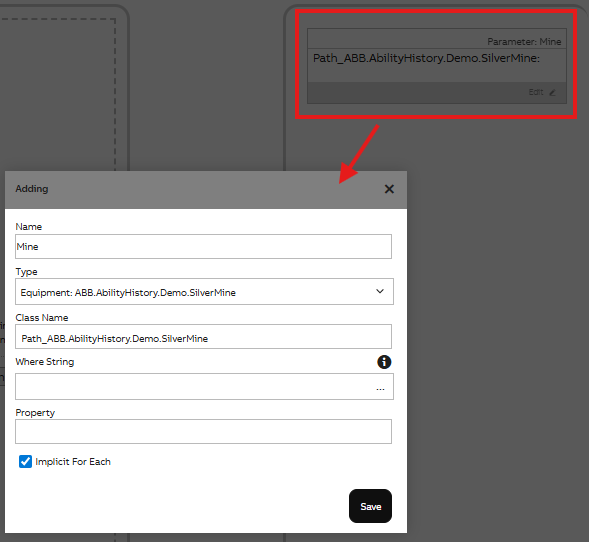
Example of data mapping settings for calculation
Updated about 1 month ago