
Parameter Mappings
This display allows you to monitor parameter mappings of the calculation task.
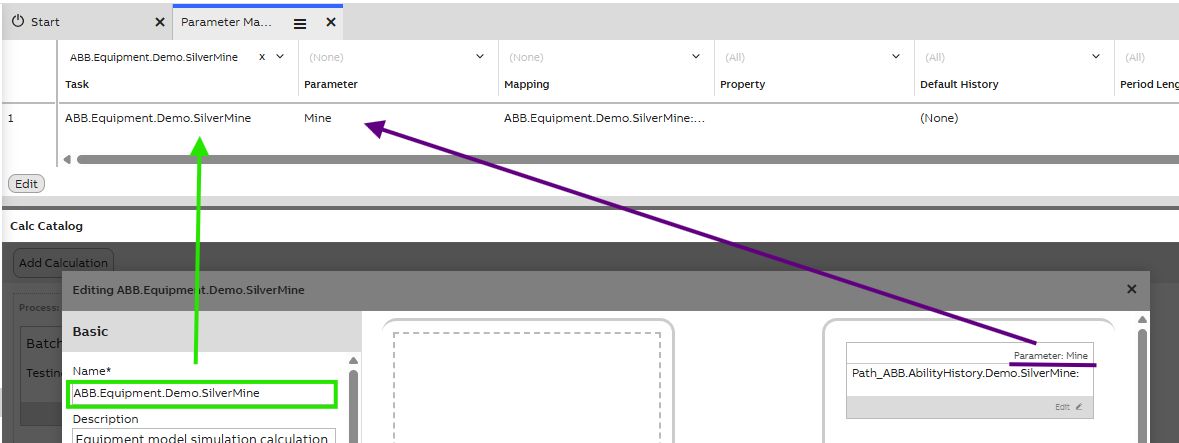
| Property name | Data type | Description |
|---|---|---|
| Task | Ref. CalcTask | Name of the task in which parameter mapping is done. As shown in green in the image above. This is a dropdown menu with all tasks. |
| Parameter | Ref. CalcParameter | Parameter(s) in chosen task. Shows both input and output mappings. Each mapping is on their own row, so if a task has multiple parameter mappings, these will all be separated to own rows in this table. |
| Mapping | Ref. CalcMapping | Information on this column comes from Mappings table description property. |
| Property | String | Represents the name of the property, if only interested in a property of the mapped class instance and not the instance itself. E.g., If mapping an Equipment of type 'Pump' and wanting to get the 'Temperature' property, * SelectProperty would be 'Temperature'. |
| Default History | String | Optional name of the history table to get values from, if not using the default (Defined in the 'TargetHistory' property of the variable or equipment property). |
| Period Length Override | Int32 | If value is defined, this will override the period length of the parameter which is defined in. |
| Period Length Unit Override | Enum | If the value is defined, this will override the period length unit of the parameter which is defined in. |
| Implicit For Each | Boolean | When having a CalcDefinition that operates on a non-array parameters and wanting to perform that calculation for multiple parameter sets, set this to true. If you have multiple 'ImplicitForEach' mappings for a single task, make sure the WhereString provides arrays in the same order by appending an 'ORDER BY' clause. |
Updated 12 days ago