Calculation Tool configuration
At the core of the Calculation Tool is the service RTDB-CalcService, whose configuration file is explained here.
This is a reference for the Calculation Tool configuration file. It is located at %RTDBRoot%\Config\CalcEngine\service_config.xml.
An example configuration file:
<?xml version="1.0" encoding="utf-8"?>
<configuration>
<connection>
<dsn>wss://mycloudservice.cloudapp.azure.com/history</dsn>
<user></user>
<password></password>
</connection>
<diagnosticsNodePath></diagnosticsNodePath>
<tempFileDirectory></tempFileDirectory>
<statusUpdateIntervalSecs>5.0</statusUpdateIntervalSecs>
<masterTokenPollingIntervalSecs>1.0</masterTokenPollingIntervalSecs>
</configuration>RTDB-CalcService is the service that reads the configuration file when it starts. If you edit the file, restart it to make the changes have an effect. Below you find the details of the parameters present in the service_config.xml config file.
Properties
connection/dsn
Required. Short for data source name. This defines the database to which CalcService connects to. It can either be a direct path to the database folder, like f:\rtdbdata, or a secure web socket path like wss://mycloudservice.cloudapp.azure.com/history.
connection/user
connection/password
The credentials for making the connection to DSN.
NoteThese are not recommended to be used! Instead, store credentials in Windows Credential Manager (previously called Vault). Credentials are searched there using the DSN as the key. As Credential Manager is user profile specific, use the Credential Manager that is for the user profile that is used for running the RTDB-CalcService.
diagnosticsNodePath
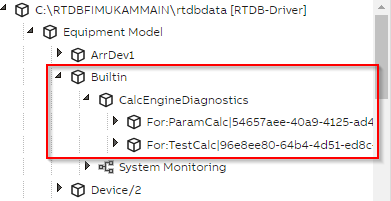
Path of an equipment instance node under which the calculation processes' diagnostics are written. In the example pictured below, the value of diagnosticsNodePath is "Builtin".
tempFileDirectory
A folder where the Calculation Tool writes the DLLs that it compiles from the code that the user writes. If this parameter is not set, a subfolder is created in the operating systems temporary folder (System.IO.Path.GetTempPath()) using a name starting with calcmodules_.
Default value: [System.IO.Path.GetTempPath()]\calcmodules_[DSN]
statusUpdateIntervalSecs
The interval (in seconds) for the RTDB-CalcService to write its status to the database.
Default value: 5.0
masterTokenPollingIntervalSecs
The interval (in seconds) for the RTDB-CalcService to check the master token. This is needed for the High Availability feature to work properly.
Default value: 1.0
Updated 3 days ago