
Debug user code
Release time: February 2024
In case the calculation code needs debugging, the CalcDebugger can be used. There are some requirements before using:
CalcDebugger utilizes the Visual Studio Code. After installing Visual Studio Code, please also install C# plugin:
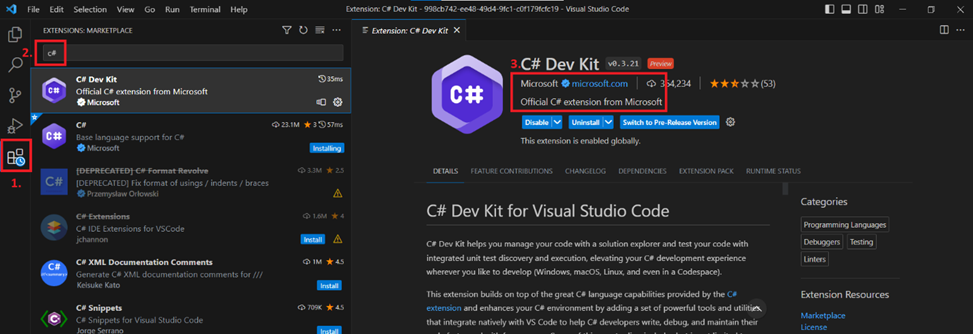
Instructions:
-
Before launching the debugger, check that the code and the process is compiled without errors. If there are errors, please fix them beforehand.
-
Check that the process has only one calculation instance.
-
To launch debug choose Debug in task menu:
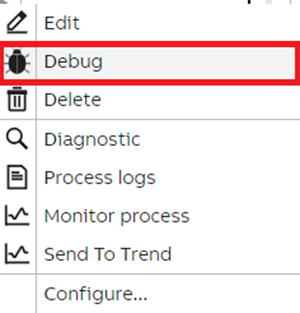
- Please note that the flow is different if you already have CalcDebugger installed.
In case the CalcDebugger is not installed you need to downloaded it first:
- Download CalcDebugger and install it.
- CalcDebugger runs automatically and opens in VSCode with required files.
-
Set a break point in the code file.
-
Switch to debug tab and press Start Debugging(F5).
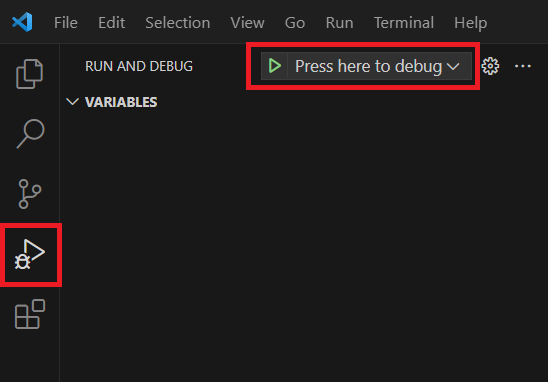
Note: calculation runs only once, not in the loop.
Updated 9 months ago