
Integrating SQL Database Seeding Into the Automated Workflow
Introduction
This section explains how could the SQL database seeding files be included in the workflow so they are executed automatically during software installation or upgrade.
Equipment Model SQL Update Snippets
Add New Equipment Model
INSERT INTO Equipments(Attribute)VALUES();| Attribute | Type | Required | Description |
|---|---|---|---|
| Id | GUID | Yes | Unique identifier |
| Name | VARCHAR | Yes | Display name of the equipment |
| Base(Id) | GUID | No | The parent class from which equipment properties will be inherited. |
| Abstract | BIT | No | Indicates whether the class is abstract |
| Command | BIT | No | Indicates whether the class supports commands |
| Interfaces | VARCHAR | No | Interfaces implemented by the equipment |
| Image(Id) | INTEGER | No | Icon/image ID |

Important: The Id value must be specified when inserting new, as it is not generated automatically.
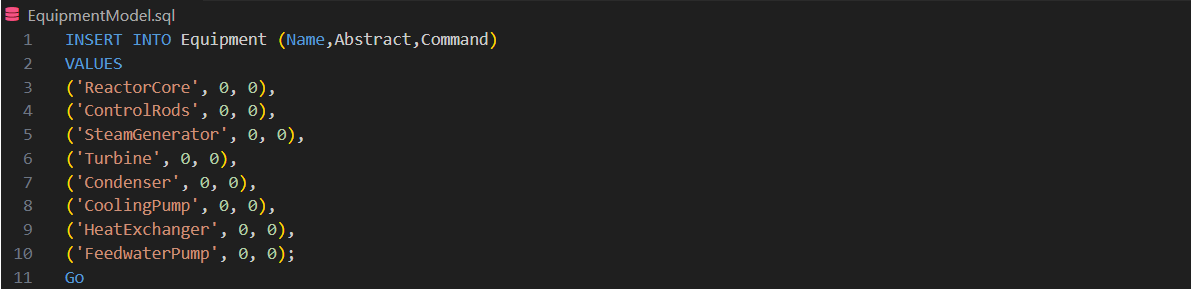
The screenshot is for illustration purposes only. Please replace with your own values.
Add New Equipment Property Info
INSERT INTO EquipmentPropertyInfos(Attribute, Equipment)VALUES();| Attribute | Type | Required | Description |
|---|---|---|---|
| Id | GUID | Yes | Unique identifier |
| DisplayName(Name) | VARCHAR | Yes | Property name |
| Equipment(EquipmentId) | GUID | Yes | The related equipment |
| Type | INTEGER | No | Property type |
| Description | VARCHAR | No | Property description |
| ApplicationType | INTEGER | No | Application type |
| ReferenceTarget | VARCHAR | No | Reference target |
| ValueMin (MinVal) | INTEGER | No | Minimum value |
| ValueMax(MaxVal) | INTEGER | No | Maximum value |
| DefaultValue(DefVal) | INTEGER | No | Default value |
| Unit | VARCHAR | No | Measurement unit |
| DisplayFormat | VARCHAR | No | Display formatting |
| Attributes | VARCHAR | No | Attributes flags |
| CompressionMethod | INTEGER | No | Compression method |
| CompressionError | DOUBLE | No | Allowed compression error |
| SubstituteMethod | INTEGER | No | Substitute method on error |
| SubstituteValue | INTEGER | No | Substitute value |
| NoiseFilterEnable | BIT | No | Enable noise filter |
| NoiseFilterFactor | DOUBLE | No | Noise filter factor |
| TargetHistory | INTEGER | No | Target history configuration |
| RecordingMethod | INTEGER | No | Recording method |
| ProcessingMethod | INTEGER | No | Processing method |
| Historized | BIT | No | Specifies if history data is collected |
| HistoryCollectionTemplates | VARCHAR | No | History collection templates |
| Approved | BIT | No | Approval flag |
| ValueDisplayMin | INTEGER | No | Minimum display value |
| ValueDisplayMax | INTEGER | No | Maximum display value |
| MaxArrayLength | BIT | No | Max array length |
| VariableLengthArray | BIT | No | Variable length array |
| MaxStringLength | INTEGER | No | Max string length |
| StreamStatusStoring | BIT | No | Stream status storing |
| StreamTimestampStoring | BIT | No | Stream timestamp storing |
| StreamCompression | BIT | No | Stream compression method |
| StreamPeriodLength | INTEGER | No | Stream period length |
| StreamPeriodLengthUnit | TINYINT | No | Unit of stream period length |
| Connected | Boolean | No | Is connected |
| DiscreteValue | BIT | No | Is discrete value |
| Events | BIT | No | Event configuration |
| PreventDisableOnInit | BIT | No | Prevent disabling of the property during initialization. |
| BinaryTextId | INTEGER | No | Binary text ID |
| SymbolGroup | INTEGER | No | Symbol group |
| Source | INTEGER | No | Source reference |
| UserStatusId | INTEGER | No | User status ID |
| Inverted | INTEGER | No | Is inverted |
| IsNullable | BIT | No | Nullable flag |
| IsVisibleToUserByDefault | BIT | No | Visible to user by default |
| RangeCheck | BIT | No | Enable range check |
| RangeCheckManuallyEntered | BIT | No | Manually entered range check |
| EditMasking | VARCHAR | No | Edit masking options |
| VisibilityRequirement | VARCHAR | No | Visibility requirement |
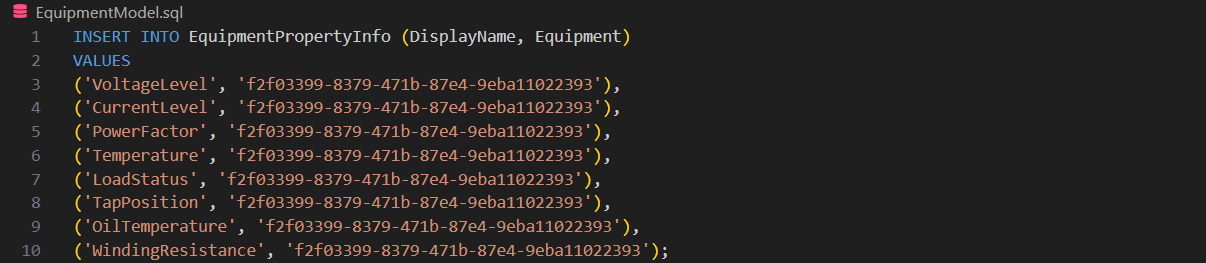
The screenshot is for illustration purposes only. Please replace with your own values.
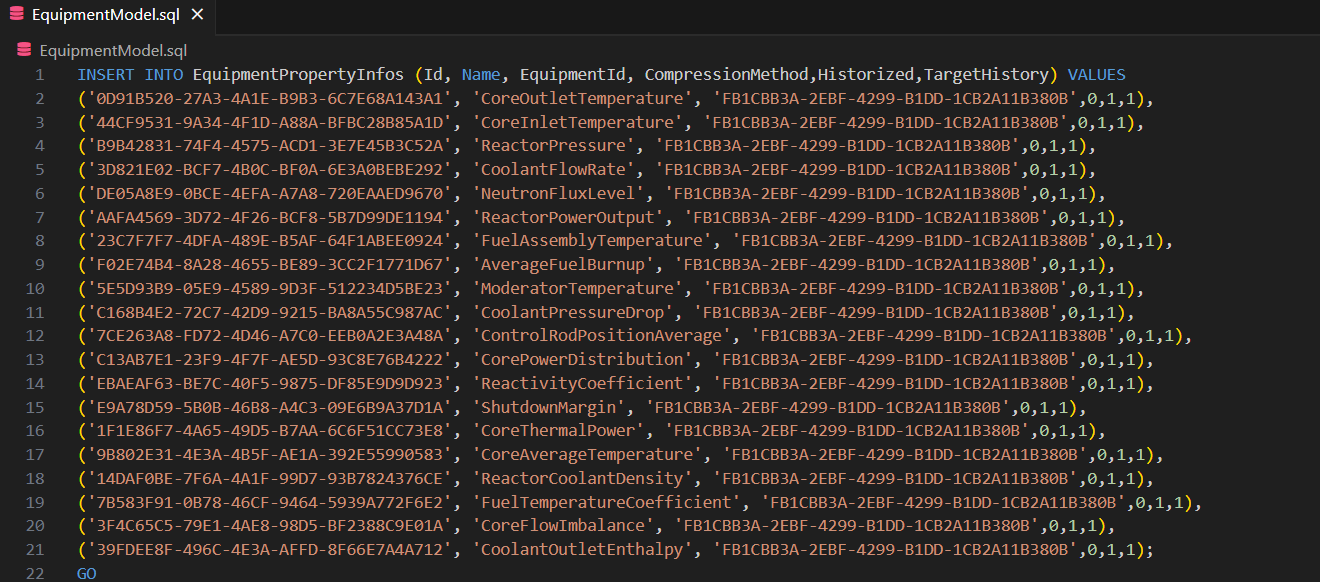
Important: The Id value must be provided when inserting a new record. It is not generated automatically.
Add New Equipment Instance
INSERT INTO Paths(Parent[ParentId],Attribute)VALUES();| Column Name | Data Type | Required | Description |
|---|---|---|---|
| Id(PathId) | GUID | Yes | Unique identifier for each path record. |
| Name | VARCHAR | Yes | Full internal path name (often hierarchical, e.g. Motor.Motor_U2009). |
| DisplayName | VARCHAR | No | Human-readable display name (e.g. Motor_U2009). |
| Parent(ParentId) | GUID | Yes | Reference to parent path object. |
| Equipment(EquipmentId) | GUID | No | Reference to the associated class in equipment(s) table. |
| References | VARCHAR | No | Optional external or logical reference; often NULL. |
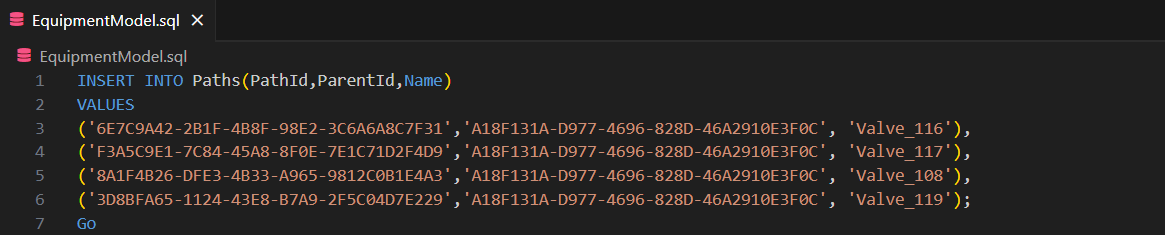
Important: The PathId value must be provided when inserting a new record. It is not generated automatically.
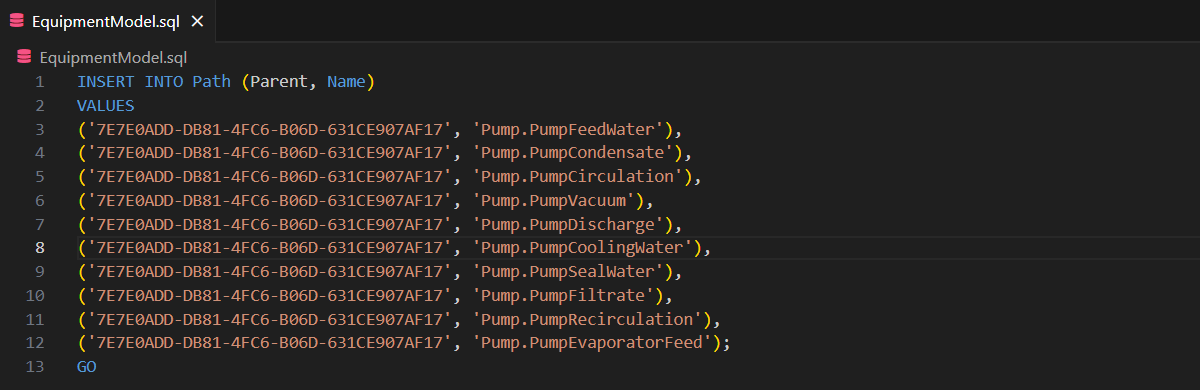
The screenshot is for illustration purposes only. Please replace with your own values.
Update Equipment Model
UPDATE EquipmentsSET Attribute ='New Value' WHERE Mask(Name/Id) = '';
The screenshot is for illustration purposes only. Please replace with your own values.
Update Equipment Property Info
UPDATE EquipmentPropertyInfos SET Attribute='New Value' WHERE Mask(DisplayName[Name]/Id) = '' AND Equipment(EquipmentId)='';
The screenshot is for illustration purposes only. Please replace with your own values.
Update Equipment Instance
UPDATE Paths SET Attribute='New Value' WHERE Mask(Name/Id[PathId]);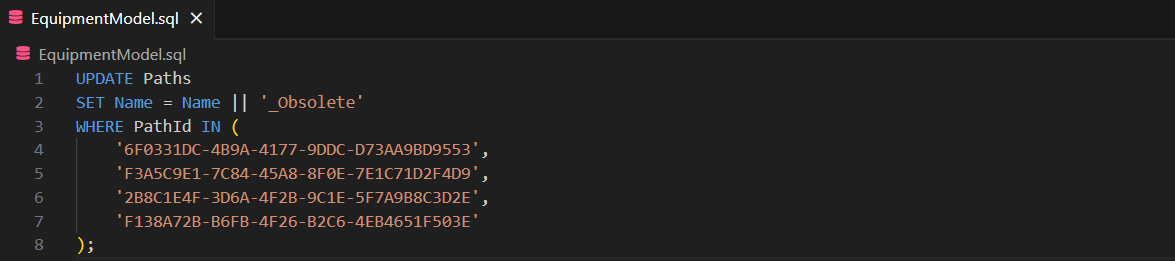
The screenshot is for illustration purposes only. Please replace with your own values.
Disconnect Equipment Property Info
The “Connected” attribute is designed for temporary use to isolate bad or suspicious values originating from unknown sources. A replacement value can then be provided manually until the underlying issue is resolved.
Disconnect specific equipment property
UPDATE EquipmentPropertyInfos SET Connected=0 WHERE Mask(DisplayName[Name]/Id)='' AND Equipment(EquipmentId)='';
The screenshot is for illustration purposes only. Please replace with your own values.
Disconnect all equipment properties associated with the specified equipment class
UPDATE EquipmentPropertyInfos SET Connected=0 WHERE Equipment(EquipmentId)='';
The screenshot is for illustration purposes only. Please replace with your own values.
Disable Equipment Instance
When an equipment instance is disabled, only future real-time interactions are stopped, the asset is marked as legacy, and system overhead is reduced. Disabling an instance allows equipment to be reactivated in the future.
This approach is safer for handling equipment that is no longer in operation but whose history remains valuable for data analysis. The instance continues to function as a data source within the application.
| Attribute | Data Type | Description |
|---|---|---|
| Id | VARCHAR | Unique identifier. |
| Input | BIT | Flags like 0/1 to enable/disable input. |
| Output | BIT | Flags like 0/1 for output enabled/disabled. |
| TargetReference | VARCHAR | Path or ID string to the data source. |
| Target | VARCHAR | Logical name or label of the data source. |
| OwnerComponent | INTEGER | Name of the owning component (e.g., “OPC”). |
| AccessType | TINYINT | Access mode like “Realtime” or “Historical”. |
| AccessPath | VARCHAR | Additional path information. |
| RowModificationTime_UTC | TIMESTAMP | Timestamp of last modification in UTC. |
| TGT:OwnerComponent | VARCHAR | Likely same as OwnerComponent but for linked target. |
| TGT:AccessType | VARCHAR | Same as AccessType but for linked target. |
| TGT:RowModificationTime | TIMESTAMP | Timestamp of linked target’s last modification. |
Disable data production for an entire class or path hierarchy
UPDATE DataAccessSources SET input=0 WHERE Id LIKE '%/Path_Name/%';
The screenshot is for illustration purposes only. Please replace with your own values.
Disable data production for specific equipment instances
UPDATE DataAccessSources SET input=0 WHERE Id LIKE '%/Path_Name/Instance%';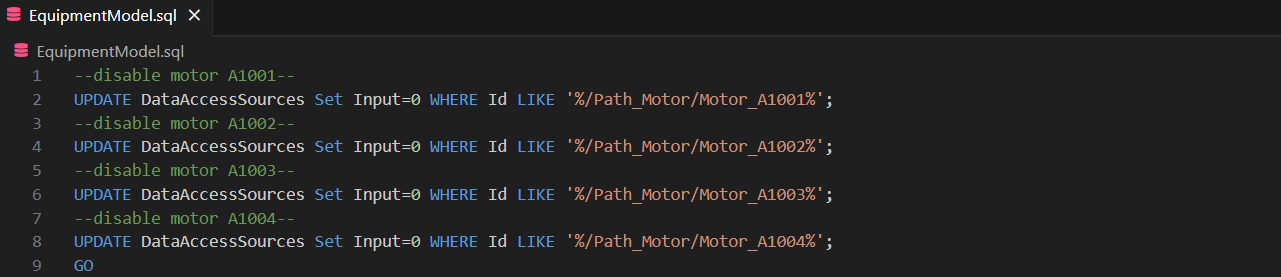
The screenshot is for illustration purposes only. Please replace with your own values.

Warning on Naming Conflicts
A disabled instance remains in the system but is inactive. It retains its unique identifier and name, ensuring traceability and potential future reactivation. The name of a disabled instance cannot be reused for a new instance.
Deletion Overview
RTDB won’t immediately shrink files on disk when you delete rows. When old instances are deleted and replaced with new ones, physical disk reclamation is generally not required. In this scenario:
- Row deletion removes data logically.
- The released storage becomes internally reusable.
- New data can reuse this storage without increasing the database file size.
If deletion is expected to reclaim disk space, explicit maintenance must be performed. The following documentation may help: Hard Deletion to Free up Disk Space.
Delete Equipment Model
The deletion cascades to the related EquipmentPropertyInfo and Path (equipment instances). However, the equipment model may still appear in the node tree, even though its instances are no longer available as data source. This action carries significant risk and is not recommended. The preferred solution is to disable it instead.
DELETE FROM Equipment(s) WHERE Mask(Name/Id)IN();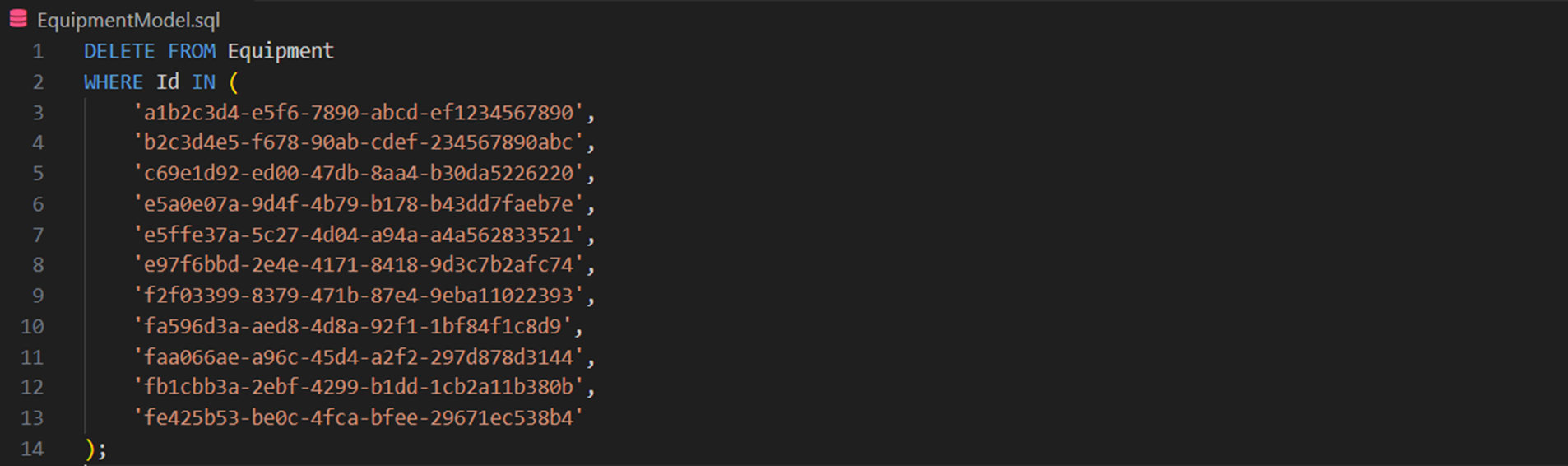
The screenshot is for illustration purposes only. Please replace with your own values.
Delete Equipment Property Info
When a property is deleted, the change cascades to the related Path rows (equipment instances). As a result, the affected equipment instances can no longer display the deleted property and its values. This action carries significant risk and is not recommended. The preferred solution is to disable it instead.
DELETE FROM EquipmentPropertyInfo(s) WHERE Mask(DisplayName[Name]/Id)='' AND Equipment(EquipmentId)='';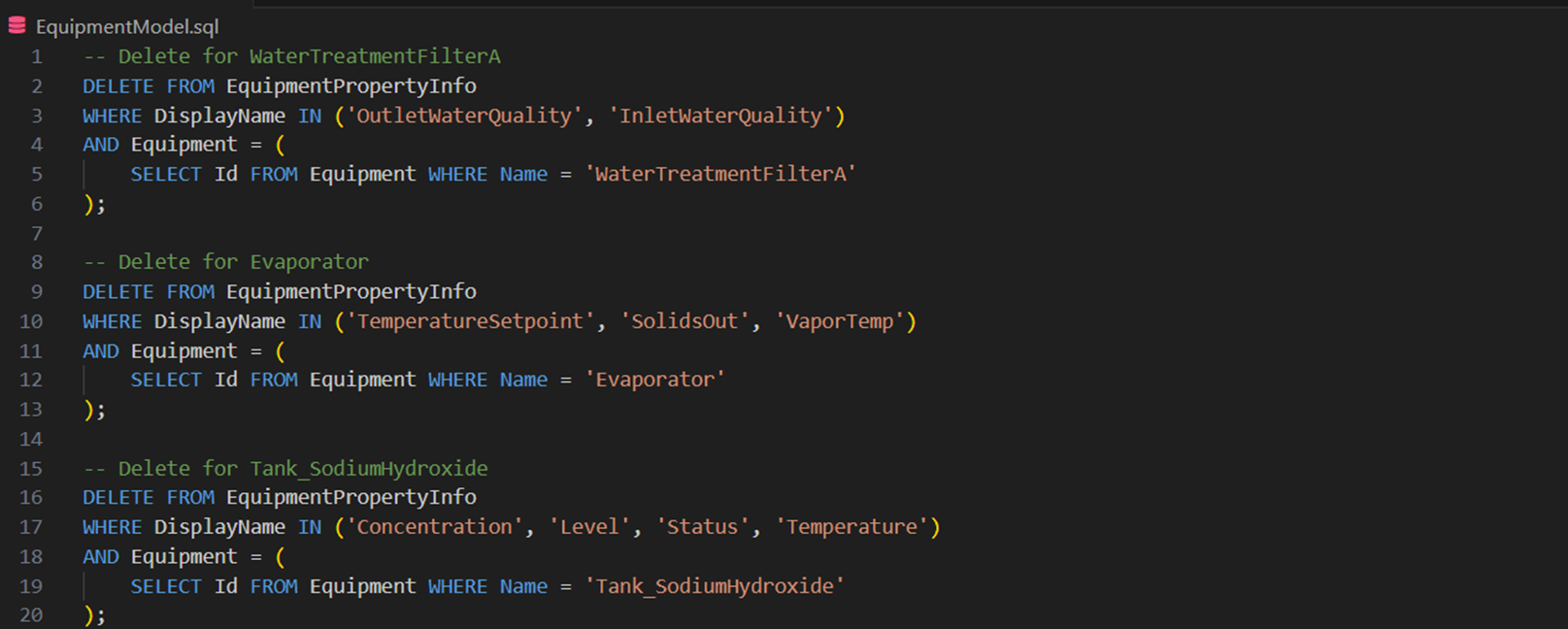
The screenshot is for illustration purposes only. Please replace with your own values.
Delete Equipment Instance
The metadata reference (equipment instance row) is removed. The time-series data remains intact, but it can no longer function as data source in the application. This action carries significant risk and is not recommended. The preferred solution is to disable it instead.
DELETE FROM Path(s) WHERE Mask(Name/Id[PathId])IN();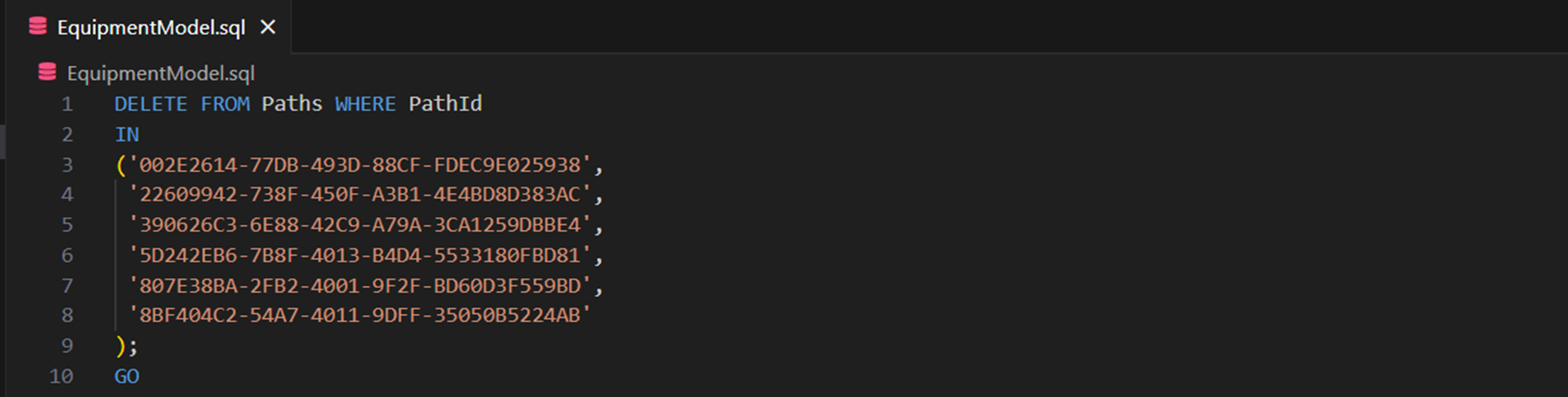
The screenshot is for illustration purposes only. Please replace with your own values.
Integrating SQL Execution Into the Automated Workflow
Where to Place Your SQL Files?
Place them in the appropriate component directory:
packagesetup\ComponentName\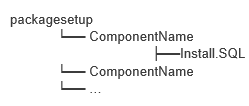
RTDB Service Manager automatically detects and executes the SQL Equipment Model updates.
Steps
- Manually create a component folder under packagesetup.
- Put SQL files inside that folder.
- Stop the RTDB and applications.
- Start the RTDB.
Done!
Note: Possible causes of SQL execution failure include incorrect table names, invalid ID formats, mismatched columns and values, or the process cannot access the file because it is being used by another process.
Updated 3 months ago